
1. Product Overview
The GiiHoo Portable Combustible Gas Detector is designed for accurate and reliable detection of various flammable gases. Equipped with a high-precision sensor and an LCD display, it provides real-time gas concentration readings and alerts users to potential leaks with both sound and visual indicators. Its flexible probe allows for detection in hard-to-reach areas, making it suitable for a wide range of applications including kitchens, mobile caravans, and gas stoves.
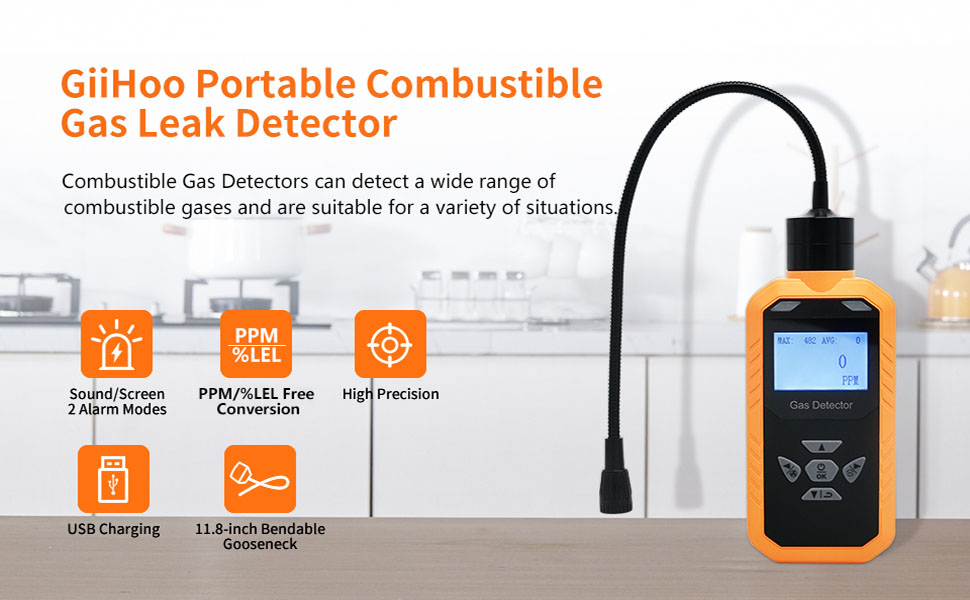
Image: The GiiHoo gas detector displaying gas concentrations, with bubbles indicating various detectable gases like Methane, Natural Gas, Propane, Ethanol, Benzene, N-butane, Ethane, Gasoline, and Hexane.
2. Package Contents
Upon opening the package, please verify that all the following items are included:
- GiiHoo Combustible Gas Detector (main unit with flexible probe)
- USB Charging Cable
- Power Adapter
- Belt Clip (or similar attachment)
- Instruction Manual
Video: Unboxing the GiiHoo Combustible Gas Detector, showing the main unit, USB cable, power adapter, and belt clip.
3. Key Features
- Super Sensitive & Quick Response: High-precision gas sensor for accurate and reliable detection with fast response time.
- Flexible & Portable Design: Equipped with an 11.8-inch flexible probe for detecting leaks in hard-to-reach areas.
- Rechargeable Battery: Features a large capacity 1800mAh rechargeable battery, providing over 10 hours of continuous use. Includes low battery reminder and USB charging.
- Wide Application: Detects various flammable gases including Hydrogen, Methane, Propane, and Natural Gas.
- Sound and Screen Alarm: Alarms continuously with sound and digital display when the gas concentration reaches the preset low threshold (1000PPM).

Image: The gas detector highlighting its alarm features, including an alarm indicator light, digital display, and audible buzzer.
4. Setup and Charging
4.1 Initial Charging
Before first use, fully charge the device. Connect the provided USB cable to the detector's Micro USB port and the power adapter. Plug the adapter into a wall outlet. The device will indicate charging status on the display.

Image: Close-up of the GiiHoo gas detector showing the Micro USB 5V 1A DC input port for charging.
4.2 Powering On/Off
Press and hold the Power/OK button to turn the device on or off. The device will perform a self-check upon startup.
5. Operation
5.1 Gas Detection
Once powered on and the self-check is complete, the detector will enter detection mode. Position the flexible probe near areas where a gas leak is suspected. The LCD display will show the gas concentration in PPM (Parts Per Million). If the concentration exceeds the preset alarm threshold, the device will emit an audible alarm and the display will show an alarm message.

Image: The GiiHoo gas detector with its flexible probe extended, illustrating its use in detecting gas leaks.
5.2 Understanding the Display
The LCD display shows:
- MAX: Maximum gas concentration detected.
- AVG: Average gas concentration.
- Current Reading: Real-time gas concentration in PPM.
- Alarm Status: Indicated by an alarm message and flashing lights.
5.3 PPM/%LEL Unit Switch
The device supports switching between PPM and %LEL display modes. To toggle between these modes, press and hold the Right Shift button.

Image: Two views of the gas detector's screen, illustrating the difference between PPM mode display and %LEL mode display.
6. Language Settings
The device may default to Chinese. To change the language to English:
- Power on the device.
- After the self-check, press the OK button to enter the menu.
- You will be prompted for a password. Use the Up/Down arrows to set the password to 1111, then press OK.
- Navigate through the menu options using the Up/Down arrows until you find the language setting (it may appear as Chinese characters).
- Select 'English' using the Up/Down arrows and press OK to confirm.
- The device should now display menus and voice prompts in English.
Video: Demonstration of changing the language settings on the GiiHoo gas detector from Chinese to English.
7. Maintenance
- Keep the device clean and free from dust and debris. Use a soft, dry cloth for cleaning.
- Store the detector in a cool, dry place away from direct sunlight and extreme temperatures.
- Ensure the flexible probe is not bent or damaged during storage or use.
- Regularly charge the battery to maintain optimal performance.
8. Troubleshooting
8.1 Device Not Powering On
- Ensure the battery is charged. Connect the device to the charger and allow it to charge for at least 30 minutes before attempting to power on again.
- Verify the power button is pressed and held for a few seconds.
8.2 Inaccurate Readings or No Detection
- Ensure the sensor probe is clean and unobstructed.
- Allow the device to complete its self-check and warm-up period before use.
- Avoid using the detector in areas with high humidity or extreme temperatures, as this can affect sensor performance.
8.3 Language Displayed Incorrectly
- Refer to Section 6: Language Settings for detailed instructions on how to change the display language.
9. Specifications
| Specification | Detail |
|---|---|
| Brand | GiiHoo |
| Model Number | ABH502 |
| Power Source | Battery Powered (1 Lithium Ion battery included) |
| Item Weight | 0.39 Pounds (6.2 ounces) |
| Product Dimensions | 7.08 x 1.02 x 2.67 inches |
| Alarm Type | Audible |
| Operating Humidity | 95 percent |
| Upper Temperature Rating | 50 Degrees Celsius |
| Sensor Type | Electrochemical |
| Material | ABS |

Image: The GiiHoo gas detector with its physical dimensions (length, width, thickness) and flexible gooseneck length labeled.
10. Warranty and Support
This product comes with a 1-year limited warranty and lifetime after-sales service. For technical support, warranty claims, or any inquiries, please contact GiiHoo customer service through the retailer's platform or the official GiiHoo website.