
AULCMEET GZ01-BEJO-000
Instruction Manual for AULCMEET Replacement Remote Control
Model: GZ01-BEJO-000 (Compatible with GZ01-BEJ0-000, GZ-1002B-E1, GZ-1002B-E3)
Introduction
This manual provides essential information for the proper setup, operation, and maintenance of your new AULCMEET replacement remote control. This remote is designed to be a direct replacement for Galanz and PHILCO LCD AC Air Conditioner remotes, specifically compatible with models GZ01-BEJ0-000, GZ-1002B-E1, and GZ-1002B-E3.
No programming is required; simply insert batteries, and the remote will be ready for use.
Setup
Battery Installation
The remote control requires two (2) AAA alkaline batteries (not included) for operation. Follow these steps to install the batteries:
- Locate the battery compartment on the back of the remote control.
- Slide the battery compartment cover downwards to open it.
- Insert two AAA batteries, ensuring the positive (+) and negative (-) terminals align correctly with the markings inside the compartment.
- Slide the battery compartment cover back into place until it clicks securely.

Figure 1: Rear view of the remote control with the battery cover open, illustrating the battery insertion points.
Initial Use
Once batteries are installed, the remote control is ready for immediate use. No additional programming or pairing is required for compatible Galanz and PHILCO AC units.
Operating Instructions
Point the remote control directly at the infrared receiver on your air conditioner unit. Ensure there are no obstructions between the remote and the AC unit.

Figure 2: Front view of the remote control, displaying the layout of buttons and the LCD screen.
Key Functions
- I/O (Power) Button: Turns the air conditioner unit On or Off.
- Operation Mode: Cycles through different operating modes such as Cool, Heat, Fan, Dry, Auto.
- Swing: Controls the horizontal or vertical swing of the air deflector.
- Manual: May provide manual control over certain functions or settings.
- Fan Speed: Adjusts the fan speed (e.g., Low, Medium, High, Auto).
- Timer: Sets a timer for the unit to turn On or Off automatically.
- Cancel: Cancels the currently set timer or other active functions.
- Display: Toggles the display on the air conditioner unit or remote.
- Turbo: Activates a rapid cooling or heating function for quick temperature changes.
- Sleep: Engages a quiet, energy-saving mode suitable for nighttime operation.
- Temperature Adjustment Buttons (Up/Down Arrows): Increases or decreases the desired temperature setting.
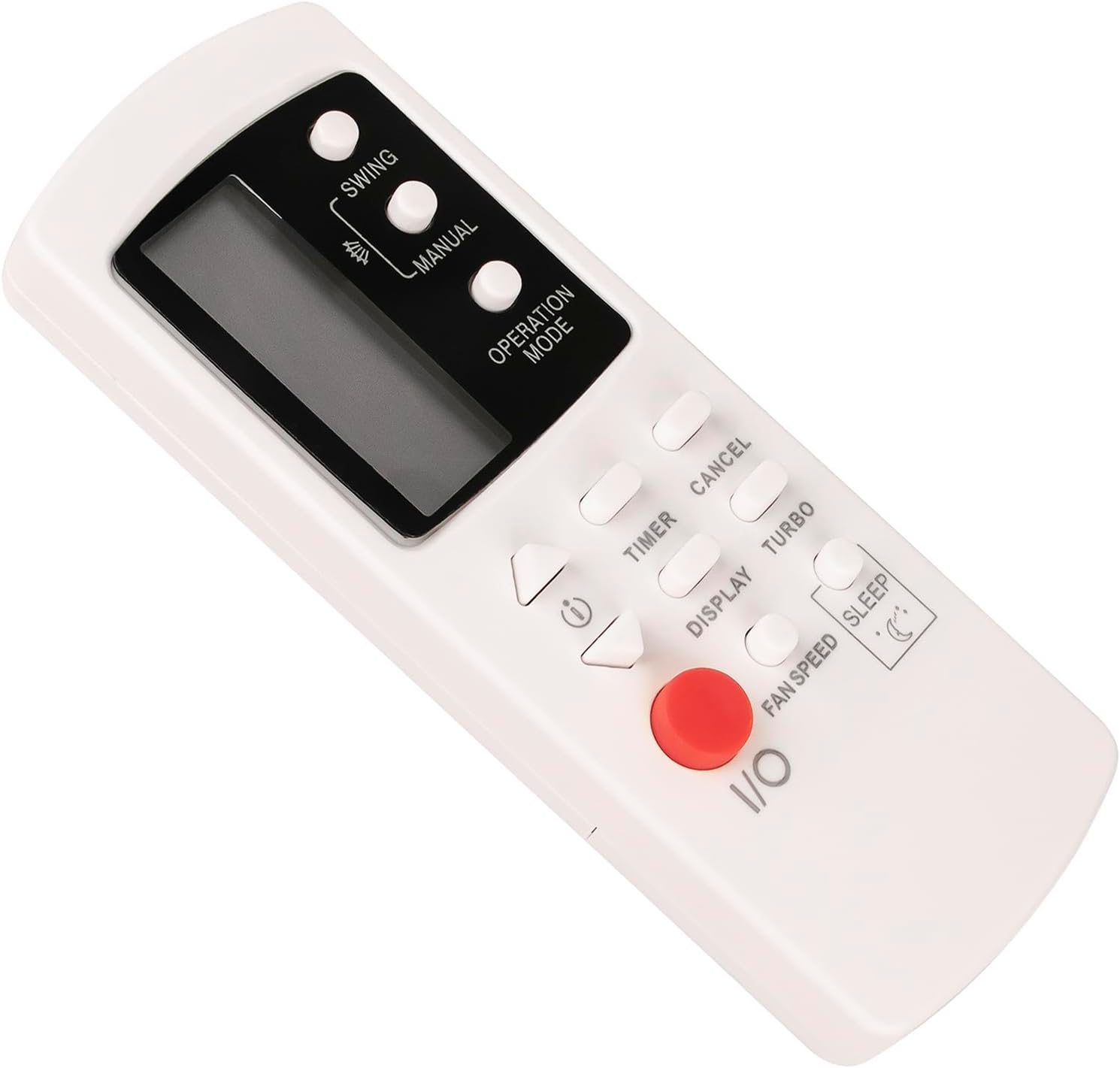
Figure 3: Angled view of the remote control, showcasing its ergonomic shape and button placement.
Maintenance
Cleaning the Remote
To clean the remote control, gently wipe its surface with a soft, dry cloth. Do not use liquid cleaners, abrasive materials, or chemical solvents, as these can damage the remote's finish or internal components.
Battery Replacement
Replace batteries when the remote's range decreases or if the LCD display becomes dim or unresponsive. Always replace both batteries simultaneously with new AAA alkaline batteries. Do not mix old and new batteries, or different types of batteries.
Storage
If the remote control will not be used for an extended period, remove the batteries to prevent leakage and potential damage to the remote.

Figure 4: Additional angled view of the remote control, providing another perspective of its design.
Troubleshooting
| Problem | Possible Cause | Solution |
|---|---|---|
| Remote control is not responding. |
|
|
| AC unit does not respond to specific buttons. |
|
|
| Remote requires programming. | Misconception. | This remote control does not require programming. It is a direct replacement. Ensure it is compatible with your specific AC model (GZ01-BEJ0-000, GZ-1002B-E1, GZ-1002B-E3). |
Specifications
- Model: GZ01-BEJO-000 (KAZENG-MB1698-GZ01-BEJ0-000)
- Compatible Models: GZ01-BEJ0-000, GZ-1002B-E1, GZ-1002B-E3
- Brand: AULCMEET
- Power Supply: 2 x AAA Alkaline Batteries (Not Included)
- Connectivity Technology: Infrared
- Max Number of Supported Devices: 1 (Air Conditioner)
- Special Feature: Ergonomic design
- Package Dimensions: 5.91 x 2.17 x 0.6 inches
- Item Weight: 2.43 ounces
Support and Customer Satisfaction
For any questions or concerns regarding your AULCMEET replacement remote control, please do not hesitate to contact us. We are committed to providing 100% customer satisfaction and will respond to your inquiries within 24 hours.
While specific warranty details are not provided, your satisfaction is guaranteed. If you encounter any issues, please reach out for assistance.
Ask a question about this manual
Ask about setup, troubleshooting, compatibility, parts, safety, or missing instructions. Manuals+ will review the question and use this page’s manual context to help answer it.