
1. Introduction
Thank you for choosing the HARIO MSGS-2-B Smart G PRO Coffee Grinder. This manual provides essential information for the safe and effective use of your new coffee grinder. Please read it thoroughly before first use and retain it for future reference.
The HARIO Smart G PRO is a compact manual coffee grinder designed for portability and consistent grinding. It features a durable stainless steel burr and a stable grinding mechanism, making it suitable for various coffee brewing methods.
2. Product Components
Familiarize yourself with the parts of your HARIO Smart G PRO Coffee Grinder:
- Handle: Detachable for compact storage.
- Lid: Covers the bean hopper.
- Bean Hopper: Holds whole coffee beans.
- Grind Adjustment Knob: Located beneath the burr, used to set grind size.
- Stainless Steel Burr: Grinding mechanism for consistent particle size.
- Body: Main housing of the grinder.
- Powder Tray (Catch Cup): Collects ground coffee, features a scale for measurement.
- Silicone Band: Secures the handle for storage and provides grip.

Image: Fully assembled HARIO Smart G PRO Coffee Grinder, showing the handle, bean hopper, and catch cup.
3. Setup and First Use
3.1 Unpacking
Carefully remove all components from the packaging. Inspect the grinder for any damage. Retain packaging for potential future transport or returns.
3.2 Initial Cleaning
Before first use, disassemble the grinder and wash all removable parts (except the burr assembly, which should be wiped clean) with mild soap and water. Rinse thoroughly and dry completely. Ensure no water remains in the burr mechanism.

Image: Close-up of the disassembled stainless steel burr mechanism, showing its components.
3.3 Assembling the Grinder
- Ensure the burr assembly is securely in place within the main body.
- Attach the powder tray to the bottom of the main body by twisting until secure.
- Place the lid on top of the bean hopper.
- Insert the handle onto the shaft at the top of the grinder.
4. Operating Instructions
4.1 Adjusting Grind Size
The HARIO Smart G PRO allows for adjustable grind settings. To adjust:
- Remove the handle and lid.
- Turn the grind adjustment knob located at the bottom of the burr assembly. Turning clockwise results in a finer grind, while turning counter-clockwise results in a coarser grind.
- Refer to the image below for visual guidance on grind settings.

Image: Top view of the grinder's burr assembly, illustrating the grind adjustment mechanism with arrows indicating finer and coarser settings. Below are examples of fine, medium-fine, medium-coarse, and coarse coffee grounds.
4.2 Grinding Coffee Beans
- Ensure the grind size is set to your preference.
- Remove the lid and add whole coffee beans to the hopper. The powder tray has a scale to help measure the amount of ground coffee. Markings indicate approximately 12g and 24g of ground coffee.
- Replace the lid and attach the handle.
- Hold the grinder firmly with one hand and turn the handle clockwise with the other. Grind until all beans have passed through the burrs and into the powder tray.
- Remove the powder tray to access your freshly ground coffee.

Image: The powder tray of the grinder, showing internal markings for approximate coffee quantities (12g and 24g).

Image: A person demonstrating the manual grinding process with the HARIO Smart G PRO, holding the body and turning the handle.
5. Care and Maintenance
5.1 Cleaning
Regular cleaning ensures optimal performance and longevity of your grinder.
- Daily Cleaning: After each use, tap the powder tray to remove any residual grounds. Use a brush to clean the burrs and hopper.
- Deep Cleaning: Periodically, disassemble the grinder completely. Wash the lid, hopper, body, and powder tray with warm soapy water. Rinse thoroughly and dry completely before reassembly. The stainless steel burr assembly should be cleaned with a dry brush or cloth; avoid water to prevent rust or damage to internal mechanisms.
5.2 Storage
For compact storage, the handle can be secured to the grinder body using the silicone band.
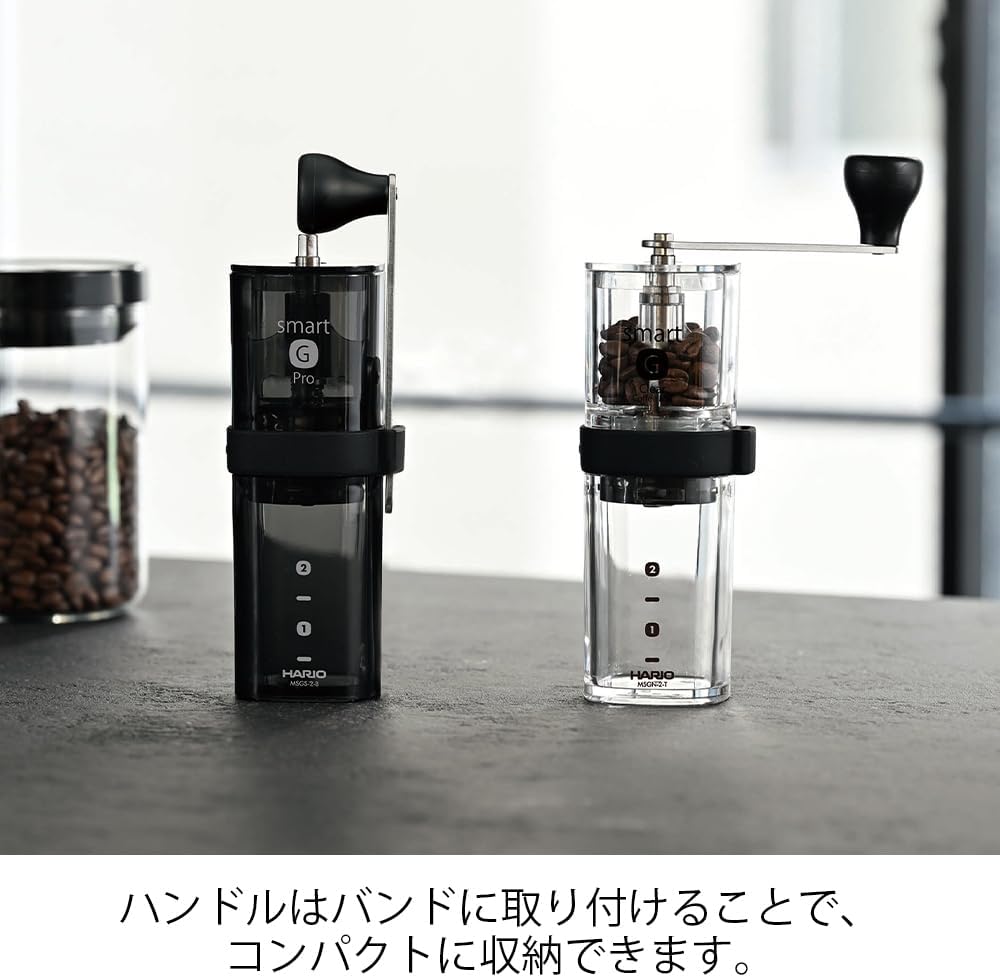
Image: The HARIO Smart G PRO grinder with its handle detached and neatly stored within the silicone band wrapped around the body, demonstrating its compact storage feature.
Store the grinder in a dry place away from direct sunlight and extreme temperatures.
6. Troubleshooting
| Problem | Possible Cause | Solution |
|---|---|---|
| Grinder is difficult to turn. | Grind setting is too fine; beans are jammed; burrs are dirty. | Adjust to a coarser setting. Check for foreign objects. Clean the burrs. |
| Inconsistent grind size. | Burr assembly not properly secured; burrs are worn; grind setting too coarse for desired consistency. | Ensure all parts are assembled correctly. Clean burrs. Adjust grind setting. |
| Ground coffee sticks to the powder tray. | Static electricity. | Lightly tap the tray before opening. A small amount of moisture (e.g., a single drop of water on the beans before grinding) can reduce static. |
| Handle detaches during grinding. | Handle not fully seated on the shaft. | Ensure the handle is pushed down firmly onto the hexagonal shaft until it clicks or is fully seated. |
7. Product Specifications
- Model: MSGS-2-B
- Brand: HARIO
- Color: Black
- Product Dimensions: 2.09"L x 5.91"W x 7.48"H (5.3 cm L x 15.0 cm W x 19.0 cm H)
- Item Weight: 14.1 ounces (approximately 400g)
- Burr Material: Stainless Steel
- Capacity: Approximately 0.8 oz (24g) of coffee beans
- Recommended Use: Grinding whole coffee beans
- Manufacturer: HARIO

Image: Diagram showing the height (19.0 cm) and width (5.3 cm) of the HARIO Smart G PRO Coffee Grinder, along with its capacity (approx. 24g coffee beans).
8. Warranty and Support
Specific warranty information for the HARIO MSGS-2-B Smart G PRO Coffee Grinder is not provided in this manual. Please refer to the product packaging or the official HARIO website for detailed warranty terms and conditions.
For customer support, inquiries, or replacement parts, please contact HARIO customer service through their official website or the retailer from whom you purchased the product.
HARIO Official Website: www.hario.jp/en/


