
Lloyd GLS18I3FWAGC
Lloyd 1.5 Ton 3 Star Inverter Split AC (GLS18I3FWAGC) User Manual
Model: GLS18I3FWAGC
1. Introduction
This manual provides essential information for the safe and efficient operation, installation, and maintenance of your Lloyd 1.5 Ton 3 Star Inverter Split AC, model GLS18I3FWAGC. Please read this manual thoroughly before using the appliance and retain it for future reference.

Image: Lloyd 1.5 Ton 3 Star Inverter Split AC Indoor Unit. This image shows the front view of the indoor unit, typically mounted on a wall.
2. Safety Information
Always follow basic safety precautions to reduce the risk of fire, electric shock, or injury. This appliance is not intended for use by persons (including children) with reduced physical, sensory or mental capabilities, or lack of experience and knowledge, unless they have been given supervision or instruction concerning use of the appliance by a person responsible for their safety.
- Ensure the power supply matches the rating label.
- Do not insert fingers or objects into the air inlet/outlet.
- Do not attempt to repair the unit yourself. Contact qualified service personnel.
- Keep the area around the outdoor unit clear of obstructions.
- Ensure proper grounding to prevent electric shock.
3. Product Overview
The Lloyd 1.5 Ton 3 Star Inverter Split AC system consists of an indoor unit, an outdoor unit, and a remote control.
3.1 Indoor Unit
The indoor unit is responsible for circulating cooled air within the room. It features a hidden LED display and air filters.

Image: Front view of the Lloyd AC indoor unit. This shows the main body of the indoor unit with its air outlet.
3.2 Outdoor Unit
The outdoor unit houses the compressor and condenser coils, dissipating heat to the outside environment. It is designed for durability with corrosion-resistant components.

Image: Diagram showing the dimensions of both the indoor and outdoor units of the Lloyd AC. The indoor unit measures 87 cm (L) x 21.7 cm (B) x 30 cm (H) and the outdoor unit measures 87 cm (L) x 36.5 cm (B) x 56 cm (H).
3.3 Remote Control
The remote control allows you to adjust settings such as temperature, mode, fan speed, and special features from a distance.
Note: Batteries for the remote control are included in the box.
4. Setup & Installation
Professional installation is recommended for this split AC unit to ensure proper functioning and safety. The installation kit and connecting copper wire are included.
- Site Selection: Choose a location for the indoor unit that allows for even air distribution and a suitable location for the outdoor unit with good ventilation.
- Mounting: Securely mount the indoor and outdoor units according to the provided installation guidelines.
- Piping & Wiring: Connect the refrigerant pipes and electrical wiring between the indoor and outdoor units.
- Drainage: Ensure the drain pipe is correctly installed to allow for proper water drainage.
- Installation Check: The unit features an "Installation Check" function to verify proper setup.

Image: Graphic illustrating the "Installation Check" feature, which performs 8 Indoor Unit (IDU) checks and 7 Outdoor Unit (ODU) checks to ensure correct installation.
5. Operating Instructions
Your Lloyd AC offers various features for optimal comfort and efficiency.
5.1 Basic Operation
- Power On/Off: Press the power button on the remote control to turn the unit on or off.
- Temperature Adjustment: Use the temperature up/down buttons to set your desired room temperature.
- Mode Selection: Cycle through cooling, fan, and other available modes using the mode button.
- Fan Speed: Adjust the fan speed to your preference (low, medium, high, auto).
- Air Swing: Activate the 2-way air swing feature for better air distribution.
5.2 5-in-1 Convertible Modes
This AC features 5 cooling modes that allow you to adjust the cooling capacity from 30% to 110% based on your needs, saving energy when fewer people are present or providing extra cooling when required.

Image: Visual representation of the 5-in-1 Convertible AC modes, showing different cooling capacities (40% to 110%) suitable for varying numbers of people in a room.
5.3 Turbo Cool
Activate Turbo Cool mode for 60 minutes to achieve rapid cooling and quickly reach your desired temperature.

Image: Graphic showing the "Turbo Cool" feature, which operates for 60 minutes to achieve the desired temperature quickly.
5.4 Cooling Performance
This AC is designed to cool effectively even at ambient temperatures up to 52°C.

Image: Illustration depicting the AC's ability to cool effectively even when the outside temperature reaches 52°C.
5.5 Hidden LED Display
The indoor unit features a hidden digital display that can be turned off or dimmed as per your preference for undisturbed comfort.

Image: Close-up of the indoor unit highlighting the hidden LED display, which can be turned off or dimmed.
5.6 Stabilizer Free Operation
The AC is designed for stabilizer-free operation within a voltage range of 140 - 280V, providing consistent performance even during voltage fluctuations.

Image: Graphic showing the AC with a remote control and Wi-Fi symbols, indicating it is Wi-Fi ready (optional feature, may require additional accessories). This model supports stabilizer-free operation.
5.7 Air Filtration
The unit includes a Clean Air Filter and a PM 2.5 Air Filter to help improve indoor air quality.
5.8 Long Air Throw
The AC provides a 7-meter long air throw, ensuring cool air reaches all corners of larger rooms.

Image: Illustration demonstrating the 7-meter long air throw capability of the AC, showing air reaching distant parts of a room.
5.9 Auto Restart
In case of a power outage, the AC will automatically restart with the previous settings once power is restored.
5.10 Quiet Operation
The AC operates at a low noise level of 32 dB, ensuring a quiet and comfortable environment.

Image: Illustration showing a person relaxing in a quiet room with the AC operating, emphasizing its low noise level of 32dB.
5.11 Strong Dehumidification
The unit provides strong dehumidification, effectively reducing humidity levels in the room for enhanced comfort.

Image: Graphic illustrating the strong dehumidification capability of the AC, showing moisture being removed from the air.
6. Maintenance
Regular maintenance ensures optimal performance and longevity of your AC unit.
- Clean Filter Indication: The indoor display panel will show "CL" (Clean Filter Indication) when the air filter requires cleaning or washing.
- Filter Cleaning: Regularly clean the air filters to maintain air quality and cooling efficiency. Refer to the detailed cleaning instructions in the full manual.
- Coil Maintenance: The AC features Blue Fins Evaporator Copper Coils and 100% Copper Condenser Tubes, which are corrosion-resistant and require low maintenance. However, periodic professional cleaning of coils is recommended.
- Outdoor Unit: Keep the outdoor unit free from dust, leaves, and other debris.

Image: Graphic showing the "CL" (Clean Filter Indication) symbol on the indoor display panel, indicating that the air filter needs cleaning or washing.

Image: Diagram illustrating the corrosion-resistant coating on the AC's internal components, designed for increased durability.

Image: Cross-section view highlighting the 100% copper condenser tubes, which ensure efficient heat transfer and resistance to corrosion.
7. Troubleshooting
Before contacting customer service, refer to the following common issues and solutions.
| Problem | Possible Cause | Solution |
|---|---|---|
| AC not turning on | No power, remote batteries low, circuit breaker tripped. | Check power supply, replace remote batteries, reset circuit breaker. |
| Insufficient cooling | Dirty air filters, blocked outdoor unit, wrong mode selected, low refrigerant. | Clean air filters, clear obstructions, select cooling mode, check for "E5" error. |
| "E5" Error Code | Low gas detection (loss of refrigerant). | Contact customer service for inspection and refrigerant recharge. |

Image: Display showing the "E5" symbol, which indicates low gas detection or loss of refrigerant in the AC system. |
||
| "CL" Indication | Clean Filter Indication. | Clean or wash the air filters. |
| Unusual noise | Loose parts, foreign objects, compressor issue. | Turn off the unit and contact customer service. |
For issues not listed here or if solutions do not resolve the problem, please contact Lloyd customer support.
8. Specifications
| Brand | Lloyd |
| Model Number | GLS18I3FWAGC |
| Capacity | 1.5 Tons |
| Cooling Power | 4.75 Kilowatts |
| Energy Rating | 3 Star (as per 2025 BEE guidelines) |
| Annual Energy Consumption | 956.79 Kilowatt Hours |
| ISEER Value | 3.84 |
| Refrigerant | R-32 (Environment friendly) |
| Compressor Type | Variable Speed (Inverter) |
| Noise Level (IDU) | 32 Decibels |
| Indoor Unit Dimensions (L x B x H) | 87.0 x 21.7 x 30.0 cm |
| Outdoor Unit Dimensions (L x B x H) | 87.0 x 36.5 x 56.0 cm |
| Item Weight | 36800 Grams (Total) |
| Filter Type | Anti-Viral Dust Filter, PM 2.5 Filter |
| Core Material | 100% Copper |
| Voltage | 230 Volts |
| Wattage | 1565 Watts |
| Control Method | Remote Control |
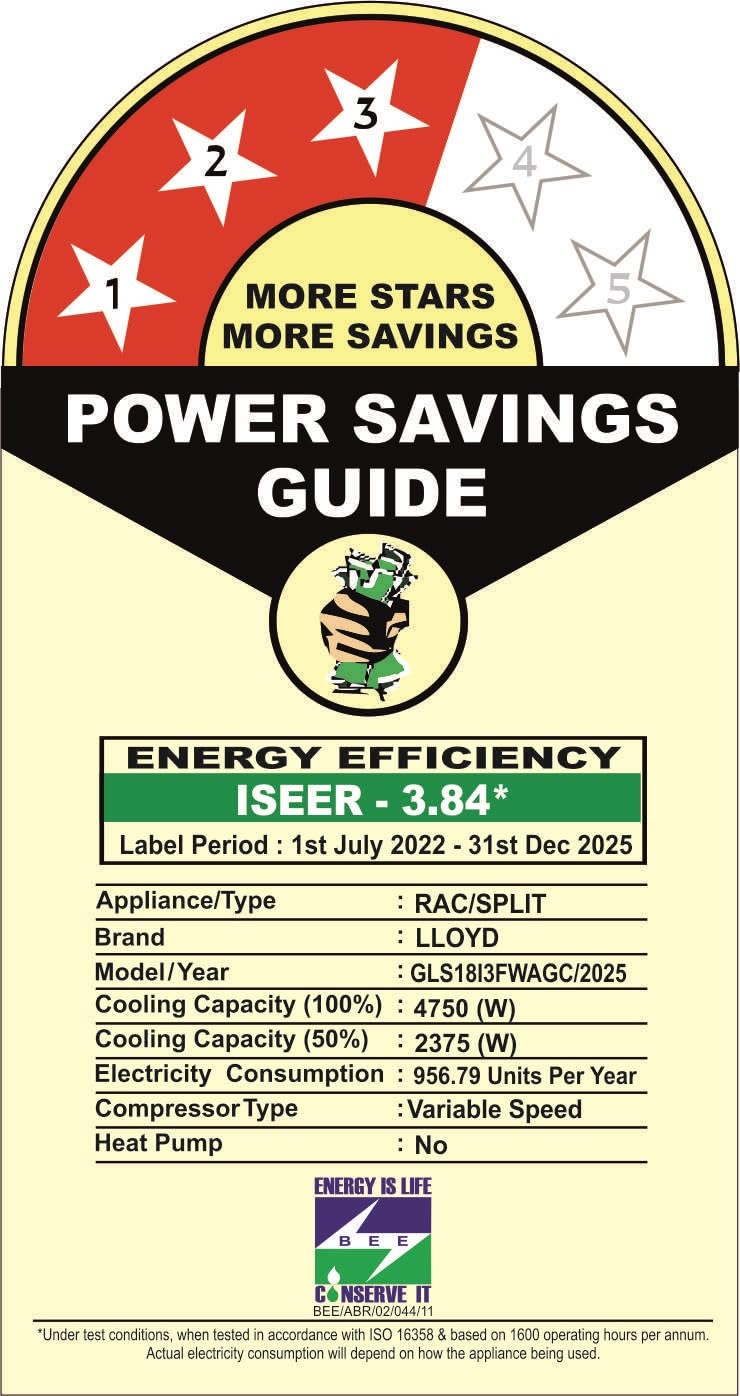
Image: Energy efficiency label for the Lloyd AC, showing a 3-star rating, ISEER value of 3.84, and annual energy consumption of 956.79 kWh.
Note: The current star rating is based on the 2025 BEE guidelines. Under the new 2026 BEE guidelines (effective from 1st Jan 2026), this product will be rated one star lower.
9. Warranty & Support
Your Lloyd AC comes with a comprehensive warranty and dedicated customer support.
- Manufacturer Warranty:
- 1 Year on the product
- 5 Years on Component (including PCB)
- 10 Years on the Compressor
Terms and Conditions apply. Please refer to the company website or warranty card for further details.
- Customer Support:
- Telephone: +91 8045775666
- WhatsApp: +91 9711773333
- Email: CUSTOMERCARE@HAVELLS.COM
Brand's service center will allot you a convenient slot for service. For units installed by entities outside of Brand's service network, warranty repairs for defects attributed to installation may be charged by the Brand.
Ask a question about this manual
Ask about setup, troubleshooting, compatibility, parts, safety, or missing instructions. Manuals+ will review the question and use this page’s manual context to help answer it.