
1. Introduction
The ASOFTY Wireless Battery Operated Motion Sensor Outdoor Light is designed to provide efficient and reliable illumination for various outdoor areas such as garages, yards, porches, and patios. Featuring 6 high-brightness LEDs, this spotlight delivers 1000 lumens of 6000K natural white light. It incorporates both light and human sensing capabilities, ensuring the light activates automatically in dark conditions when motion is detected and turns off after 20 seconds of no motion. Its IP65 waterproof rating ensures durability in diverse weather conditions. The unit is battery-powered for wireless installation and includes a remote control for convenient operation.

Image: The ASOFTY Wireless Battery Operated Motion Sensor Outdoor Light, shown with its accompanying remote control. The light features a black casing and a bright LED array.
2. Package Contents
Please verify that all items listed below are included in your package:
- 1 x Motion Sensor Light
- 1 x Remote Control
- 1 x Instruction Manual
- Mounting Screws

Image: The side of the ASOFTY product box, detailing the package contents including the motion sensor light, screw accessory, user manual, and remote control.
3. Specifications
| Feature | Specification |
|---|---|
| Model Name | Wireless Battery Operated Motion Sensor Light |
| Part Number | ASGR29-3 |
| Light Source | 6 x 3W LED Lamp Beads |
| Brightness | 1000 Lumens |
| Color Temperature | 6000K (Natural White) |
| Power Source | 3 x D Alkaline Batteries (Not Included) |
| Voltage | 4.5 Volts (DC) |
| Wattage | 3 Watts |
| Motion Sensing Distance | Max 5M / 16ft |
| Motion Sensing Angle | Horizontal 120°, Vertical 90° |
| Auto-off Time | 20 seconds (after no motion detected) |
| Water Resistance Level | IP65 Waterproof |
| Material | Acrylonitrile Butadiene Styrene (ABS) |
| Product Dimensions | 4"L x 3"W x 6.5"H |
| Item Weight | 12.6 ounces |
| Installation Type | Wall Mount |
| Adjustability | 360° Rotatable Mounting Base, 180° Rotatable Lamp Head |
| Certifications | CE, RoHS |

Image: The ASOFTY motion sensor light shown in a rainy environment, highlighting its IP65 waterproof capability.
4. Setup
4.1 Battery Installation
The ASOFTY Motion Sensor Light requires 3 D-cell alkaline batteries (not included) for operation. Ensure correct polarity during installation.
- Twist the front cover of the light counter-clockwise to open the battery compartment.
- Insert 3 D-cell batteries according to the anode (+) and cathode (-) markings inside the compartment.
- Align the fastener and close the battery holder cover. Twist the front cover clockwise to secure it.
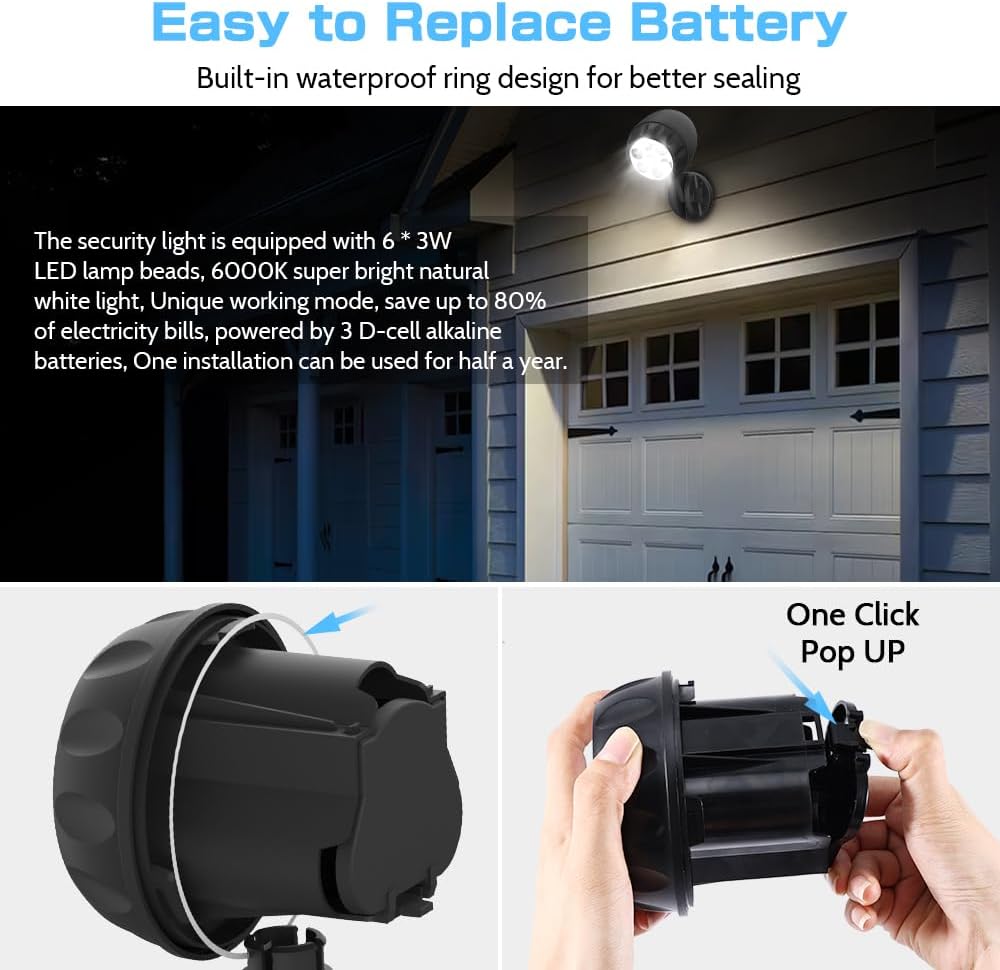
Image: A visual guide demonstrating the process of opening the light and inserting D-cell batteries into the compartment.

Image: An exploded view of the ASOFTY motion sensor light, showing the LED light, motion sensor, remote control sensor, knuckle screw, and mounting base, along with the battery compartment.
4.2 Mounting the Light
The light is designed for wireless wall-mount installation. The optimal installation height is within 3 meters (approximately 9.8 feet).
- Choose a suitable location for installation, ensuring it is within the desired sensing range and provides adequate coverage.
- Use the provided mounting screws to securely attach the mounting base to the wall.
- Attach the light fixture to the mounting base. The mounting base can be rotated 360°, and the lamp head can be rotated 180° to adjust the light direction.

Image: A two-panel image illustrating the battery insertion and the wall mounting process for the ASOFTY light, emphasizing easy wireless installation.
5. Operating Instructions
5.1 Motion Sensor Operation
The ASOFTY light features a dual light and human sensing design. It will remain off in well-lit conditions and automatically activate in dark environments when motion is detected.
- Sensing Distance: Maximum 5 meters (16 feet).
- Sensing Angle: Horizontal 120°, Vertical 90°.
- When motion is detected in dark conditions, the light will turn on.
- If no further motion is detected, the light will automatically turn off after 20 seconds.

Image: A diagram showing the motion sensor's 120° horizontal and 90° vertical sensing angles, with a maximum sensing distance of 5 meters (16 feet).

Image: A split image demonstrating the light's functionality: off during daylight and automatically turning on at night when motion is detected, also highlighting remote control capability.
5.2 Remote Control Operation
The included remote control allows for manual override of the sensor mode.
- Press the ON button on the remote control to manually turn on the light and activate sensor mode.
- Press the OFF button on the remote control to manually turn off the light.
- Note: After manually turning off the light with the remote control, the sensor mode will automatically reactivate after 5 minutes.

Image: A collage of four images showing the ASOFTY motion sensor light installed in different outdoor settings, including a house exterior, patio, and garage, demonstrating its versatile application.
6. Maintenance
6.1 Battery Replacement
In normal sensor mode, the batteries can last for approximately half a year. Replace batteries when the light dims or stops functioning.
- Refer to Section 4.1 Battery Installation for detailed steps on replacing the D-cell batteries.
- Always use new, high-quality D-cell alkaline batteries for optimal performance.
- Dispose of old batteries responsibly according to local regulations.
6.2 Cleaning
- Wipe the light's exterior with a soft, damp cloth to remove dust and dirt.
- Do not use abrasive cleaners or solvents, as they may damage the finish or electronic components.
- Ensure the light is off and batteries are removed before cleaning if possible.
7. Troubleshooting
| Problem | Possible Cause | Solution |
|---|---|---|
| Light does not turn on. | Batteries are dead or incorrectly installed. | Replace batteries, ensuring correct polarity. |
| Insufficient darkness for sensor activation. | Test the light in a completely dark environment. | |
| Motion sensor is obstructed or dirty. | Clean the sensor lens and ensure no obstructions. | |
| Light stays on constantly. | Continuous motion detected within range. | Relocate the light or adjust its angle to avoid constant motion sources. |
| Light sensor malfunction. | Ensure the light sensor is not covered or exposed to constant light. If problem persists, contact support. | |
| Remote control not working. | Remote battery is dead. | Replace the battery in the remote control. |
| Obstruction between remote and light. | Ensure a clear line of sight between the remote and the light. |
8. Support & Warranty
For technical assistance or warranty inquiries, please contact the manufacturer directly:
- Manufacturer: SHEN ZHEN SHI XIN HONG JU KE JI YOU XIAN GONG SI
- Customer Service Email: amy@asofty.cn
- Website: www.asofty.cn
Please retain your purchase receipt for warranty purposes.