
ZHQ3-63-2P
Generic ZHQ3-63-2P Dual Power Automatic Transfer Switch User Manual
Model: ZHQ3-63-2P | Brand: Generic
1. Introduction
This manual provides comprehensive instructions for the safe and efficient operation, installation, and maintenance of the Generic ZHQ3-63-2P Dual Power Automatic Transfer Switch. Please read this manual thoroughly before installation and use to ensure proper function and safety.
2. Safety Information
WARNING: Electrical shock hazard. Installation and servicing must be performed by qualified personnel only. Disconnect all power sources before working on the switch. Failure to follow these instructions may result in serious injury or death.
- Always ensure the main power supply is disconnected before installation or maintenance.
- Verify all connections are secure and correctly wired according to local electrical codes.
- Do not operate the switch if it appears damaged.
- Keep children away from electrical equipment.
3. Product Overview
The ZHQ3-63-2P is a 2-pole, 63 Amp dual power automatic transfer switch designed to automatically switch between two power sources, typically a main utility power and a backup generator or alternative power supply. This ensures continuous power to critical loads.
3.1 Key Components

Figure 1: Front view of the ZHQ3-63-2P Automatic Transfer Switch, showing the main selector switch, Auto/Manual indicator, and N (Normal) and R (Reserve) power input sections.
- Main Selector Switch: Allows selection between Automatic, Off (O), and Manual modes.
- Power Source Indicators: Lights (Un, Ur) indicate the presence of power from Normal (N) and Reserve (R) sources.
- Terminal Blocks: Clearly labeled N (Normal) and R (Reserve) for connecting power sources.
- Mounting Plate: For secure installation.

Figure 2: Side view of the ZHQ3-63-2P Automatic Transfer Switch, highlighting the product label with technical specifications such as rated current and voltage.

Figure 3: Rear view of the ZHQ3-63-2P Automatic Transfer Switch, illustrating the mounting points and the enclosure for the internal switching mechanism.
4. Installation
IMPORTANT: Ensure all power sources are disconnected before proceeding with installation. This device must be installed by a qualified electrician in accordance with all applicable electrical codes.
- Mounting: Select a suitable location for the transfer switch, ensuring it is protected from environmental elements and easily accessible for maintenance. Securely mount the switch using appropriate fasteners through the designated mounting holes.
- Wiring Normal Power Source (N): Connect the main utility power supply to the "N" terminals on the switch. Ensure correct phase and neutral connections.
- Wiring Reserve Power Source (R): Connect the backup power supply (e.g., generator) to the "R" terminals on the switch. Ensure correct phase and neutral connections.
- Wiring Load: Connect the electrical load (circuits to be powered) to the output terminals of the transfer switch.
- Control Wiring: If applicable, connect any external control signals (e.g., generator start/stop) as per the specific wiring diagram provided with your generator.
- Verification: Double-check all wiring connections for tightness and correctness. Ensure no bare wires are exposed.

Figure 4: Bottom view of the ZHQ3-63-2P Automatic Transfer Switch, illustrating the control wiring terminal block for auxiliary connections.
5. Operation
The ZHQ3-63-2P transfer switch offers both automatic and manual operation modes.
5.1 Automatic Mode
In Automatic mode, the switch will automatically transfer the load between the Normal (N) and Reserve (R) power sources based on power availability.
- Set the main selector switch to "Auto".
- When Normal power (N) is present, the switch will connect the load to N. The "Un" indicator light will illuminate.
- If Normal power (N) fails, the switch will detect the outage and, after a preset delay, transfer the load to the Reserve power (R) source (if R is available). The "Ur" indicator light will illuminate.
- When Normal power (N) is restored, the switch will automatically transfer the load back to N after a stabilization delay.
5.2 Manual Mode
Manual mode allows for direct control over which power source is connected to the load.
- Set the main selector switch to "Manual".
- Use the rotary handle to manually switch between the Normal (N) and Reserve (R) positions.
- The "O" position on the selector switch indicates that neither power source is connected to the load.
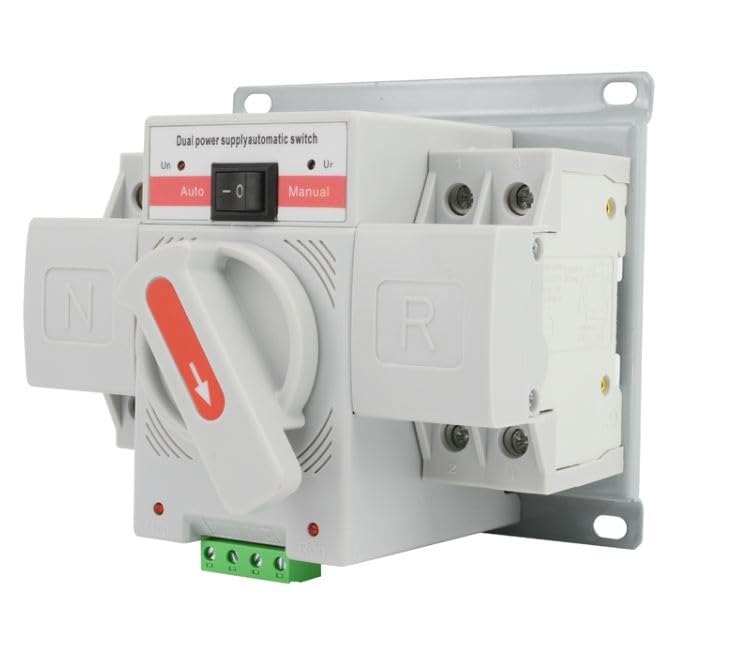
Figure 5: Angled view of the ZHQ3-63-2P Automatic Transfer Switch, demonstrating the selector switch set to the 'Auto' position for automatic power transfer.
6. Maintenance
Regular maintenance ensures the longevity and reliable operation of your transfer switch.
- Periodic Inspection: Annually inspect the switch for any signs of physical damage, loose connections, or corrosion.
- Cleaning: Keep the switch free from dust and debris. Use a dry, soft cloth for cleaning. Do not use liquid cleaners.
- Testing: Periodically test the automatic transfer function by simulating a power outage (e.g., by temporarily disconnecting the normal power source, if safe to do so and with proper precautions).
- Professional Service: For any complex issues or internal inspections, contact a qualified electrician.
7. Troubleshooting
| Problem | Possible Cause | Solution |
|---|---|---|
| Switch does not transfer automatically. |
|
|
| No power to load in either mode. |
|
|
| Indicator lights not working. |
|
|
8. Specifications
| Feature | Detail |
|---|---|
| Model Number | ZHQ3-63-2P |
| Operation Mode | Automatic / Manual |
| Current Rating | 63 Amps |
| Circuit Type | 2-way |
| Terminal Type | Screw |
| Connectivity Protocol | X-10 (Note: This may refer to control signal compatibility, not necessarily network connectivity) |
| Package Dimensions | 6 x 5 x 5 inches |
| Weight | 1.2 Pounds |
9. Warranty and Support
For warranty information and technical support, please refer to the documentation provided at the point of purchase or contact the retailer. Keep your purchase receipt as proof of purchase.
Ask a question about this manual
Ask about setup, troubleshooting, compatibility, parts, safety, or missing instructions. Manuals+ will review the question and use this page’s manual context to help answer it.