
Introduction
This user manual provides comprehensive instructions for the operation, maintenance, and troubleshooting of your Hilitand Portable Thermal Printer. Please read this manual thoroughly before using the device to ensure proper function and longevity. This printer is designed for convenient, inkless printing of A4 documents, ideal for office and mobile use.
Safety Information
- Do not expose the printer to water or excessive humidity.
- Avoid dropping or subjecting the printer to strong impacts.
- Use only the specified charging cable and power source.
- Keep the printer away from direct sunlight and heat sources.
- Do not attempt to disassemble or repair the printer yourself. Contact qualified service personnel.
- Ensure proper ventilation during operation and charging.
Package Contents
Please verify that all items are present in the package:
- 1 x Hilitand A4 Thermal Printer
- 1 x USB Cable (Type C)
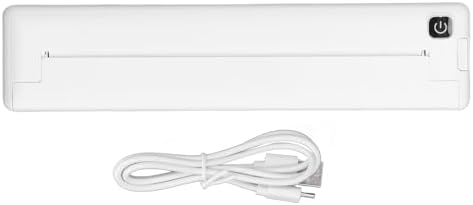
Image: The Hilitand Portable Thermal Printer shown with its included USB charging cable.
Setup
1. Charging the Printer
Before first use, fully charge the printer. Connect the provided USB Type-C cable to the printer's charging port and the other end to a compatible USB power adapter (not included) or a computer USB port. The built-in 1000mAh rechargeable lithium battery takes approximately 1.5 hours to fully charge.
2. Loading Thermal Paper
This printer uses thermal paper with a width of 210mm or 218mm (A4 size). Ensure you use thermal paper specifically designed for thermal printers. Open the paper compartment cover, insert the thermal paper with the printable side facing the print head (usually the smoother, brighter side), and close the cover securely. Incorrect paper orientation will result in blank prints.

Image: Demonstrates thermal paper being fed into the printer, with an example of a printed document.
3. Installing the App
Download the "iprint" application from your device's app store (compatible with both iOS and Android systems). This app is required to connect and operate the printer via Bluetooth.
4. Connecting via Bluetooth
- Turn on the printer by pressing and holding the power button.
- Enable Bluetooth on your smartphone or tablet.
- Open the "iprint" app.
- Within the app, search for available devices and select your Hilitand printer to establish a connection.
Operating the Printer
Printing Documents
Once connected via the "iprint" app, you can select documents, images, or text from your device to print. The printer utilizes inkless thermal technology, producing prints at a speed of 10mm/s with a resolution of 200dpi. Ensure your document is formatted for A4 size for optimal results.

Image: The Hilitand printer in operation, demonstrating its ability to print documents at 10mm/s.

Image: Illustrates the 200dpi print resolution, providing clear and readable output.
The printer is designed for portability, allowing you to carry it in a backpack for printing on the go. A fully charged battery supports continuous printing of approximately 90 sheets of A4 thermal paper.
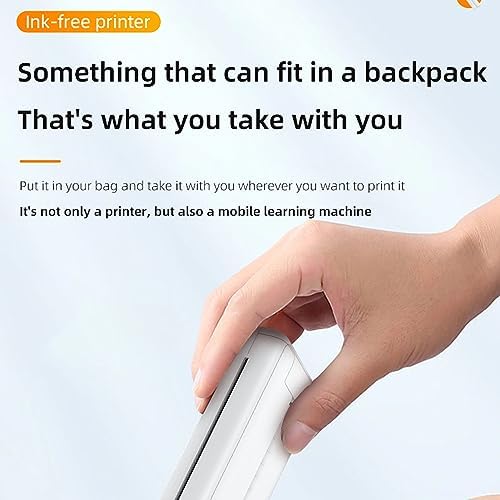
Image: A hand holding the compact printer, emphasizing its portability and ease of transport.
Maintenance
Cleaning the Printer
To maintain optimal print quality, regularly clean the print head and paper path. Use a soft, lint-free cloth slightly dampened with isopropyl alcohol to gently wipe the print head. Ensure the printer is turned off and disconnected from power before cleaning. Allow all components to dry completely before re-using.
Storage
Store the printer in a cool, dry place away from direct sunlight and extreme temperatures. If storing for an extended period, ensure the battery is partially charged (around 50%) to preserve battery health. Remove any paper from the compartment before storage.
Troubleshooting
If you encounter issues with your Hilitand Portable Thermal Printer, refer to the following common problems and solutions:
| Problem | Possible Cause / Solution |
|---|---|
| Printer does not turn on or respond. |
|
| Prints are blank or very faint. |
|
| Print quality is poor, blurry, or incomplete. |
|
| Cannot connect via Bluetooth. |
|
| Paper jams. |
|
Specifications
| Feature | Detail |
|---|---|
| Brand | Hilitand |
| Model Number | Hilitandhyeu5xo13k |
| Connection Method | Bluetooth 4.0, USB |
| App Support System | iprint APP (Android, iOS) |
| Printing Specification | 200dpi |
| Battery Capacity | 1000mAh rechargeable lithium battery (built-in) |
| Charging Time | Approx. 1.5 hours |
| Continuous Printing Battery Life | Approx. 90 sheets A4 thermal paper |
| Printing Speed | 10mm/s |
| Applicable Paper Width | 210mm - 218mm (A4 thermal paper) |
| Charging Interface | Type C |
| Dimensions (Approx.) | 265mm x 58mm x 32mm (10.4in x 2.3in x 1.3in) |
| Item Weight | 1.34 pounds |
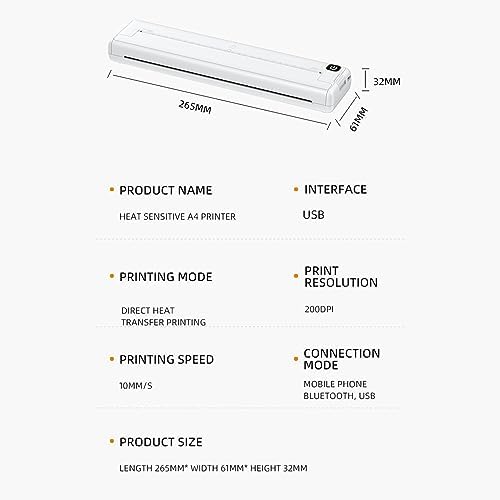
Image: A visual representation of the printer's dimensions and core specifications.
Warranty and Support
For warranty information or technical support, please contact Hilitand customer service through the retailer where you purchased the product or visit the official Hilitand brand store online. Keep your purchase receipt as proof of purchase.
Hilitand is committed to providing quality products and customer satisfaction. For further assistance, refer to the contact information provided with your product packaging or on the official brand website.
You can visit the Hilitand Store for more information: Hilitand Store on Amazon.