
1. Introduction
Thank you for choosing the EBUYFIRE Smart Bike Tail Light. This device is designed to enhance your cycling safety with its multi-functional capabilities, including a tail light, turn signals, brake light, anti-theft alarm, and bicycle horn. Please read this manual carefully to ensure proper installation, operation, and maintenance of your new device.

Image: The EBUYFIRE Smart Bike Tail Light and its accompanying remote control.
2. Product Features
The EBUYFIRE Smart Bike Tail Light integrates five essential functions into one compact device, ensuring comprehensive safety for cyclists:
- 5-in-1 Functionality: Combines an electric bike horn, anti-theft vibration alarm, rear bike light, bike turn signals, and an auto bicycle brake light (built-in G-sensor).
- Loud Bicycle Horn: Produces a 110-decibel sound with three selectable tones (electric car horn, standard horn, birdcall) to alert pedestrians and vehicles.
- Intuitive Turn Signals: Easily activated via the remote control, providing clear left and right turn indications with an audible clicking sound.
- Smart Auto On/Off Modes: Features "Slowing Flashing" and "Breathing" intelligent modes. The taillight automatically adjusts based on ambient light and vibration, turning off in bright conditions or after 30 seconds of inactivity to conserve power, and reactivating upon vibration.
- USB Rechargeable Battery: Equipped with a built-in rechargeable battery that fully charges in approximately 7 hours via USB Type-C, offering up to 70 hours of operation in low mode.
- Anti-Theft Alarm: A vibration-triggered 110dB alarm helps deter theft when the bike is parked.
- Wireless Remote Control: The remote control offers a strong wireless range of up to 60 meters for convenient operation.
- Durable and Waterproof: Designed with an IP65 international protection rating, ensuring resistance to water and dust.

Image: Visual representation of the five integrated safety functions.
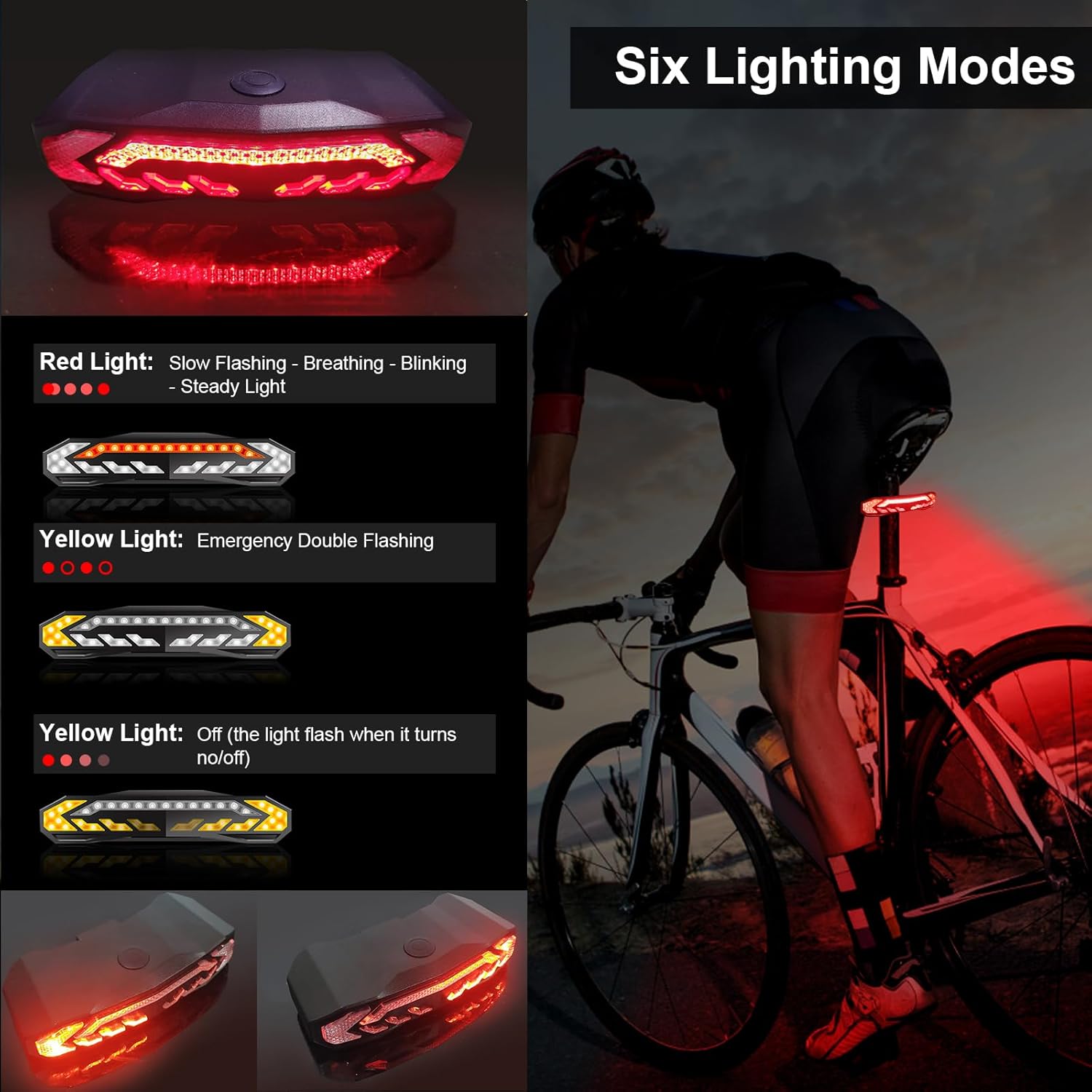
Image: Illustration of the six distinct lighting modes available for the tail light.
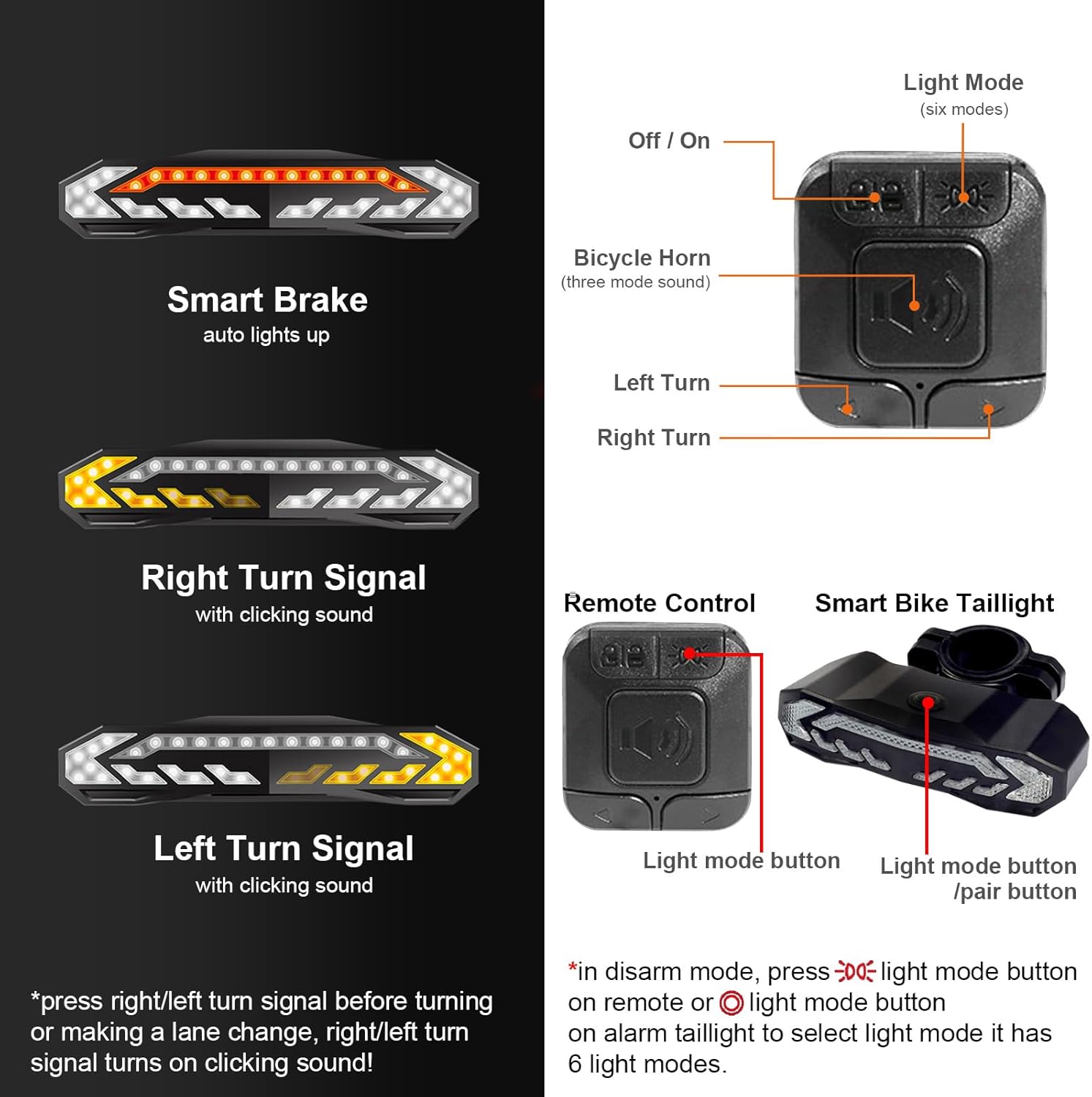
Image: Details on the smart brake function, turn signals, and the remote control interface.
3. Package Contents
Please verify that all items are present in your package:
- 1 x Smart Bike Tail Light
- 1 x Remote Control
- 1 x USB Data Cable (Type-C)
- 1 x Seat Post Bracket
- 1 x Seat Bracket
- Screws for mounting
- 1 x User Manual (this document)
- 1 x Gift Box
4. Setup and Installation
Follow these steps to properly install your EBUYFIRE Smart Bike Tail Light and Remote Control:
- Tail Light Installation: Choose either the seat post bracket or the seat bracket. The tail light fits seat posts with a diameter of 25-35mm. Securely attach the chosen bracket to your bike's rear, then slide the tail light onto the bracket until it clicks into place.
- Remote Control Installation: The remote control clamps easily to handlebars with a diameter of 0.78-0.94 inches (20-24mm). Position the remote control within easy reach of your thumb for safe operation while riding.

Image: Detailed dimensions for both the tail light and the remote control to assist with installation.

Image: Visual guide for recommended installation positions on a bicycle.
5. Charging Instructions
To charge your Smart Bike Tail Light:
- Locate the USB Type-C charging port on the tail light.
- Connect the provided USB data cable to the tail light and a standard USB power source (e.g., computer USB port, wall adapter).
- The built-in rechargeable battery takes approximately 7 hours to fully charge.
- It is recommended to use the original USB cable for optimal charging performance.

Image: Visual guide for charging the tail light and battery status indicators.
6. Operating Instructions
Familiarize yourself with the various functions of your Smart Bike Tail Light:
6.1. Power On/Off and Light Modes
- To turn the tail light on or off, press the power button located on the top of the tail light or the 'Light Mode' button on the remote control.
- Cycle through the six available light modes by pressing the 'Light Mode' button: Slow Flashing, Breathing, Blinking, Steady Light, Emergency Double Flashing, and Off.
Image: Overview of the different light modes and their appearance.
6.2. Turn Signals
- To activate the right turn signal, press the 'R' button on the remote control. The right side of the tail light will flash, accompanied by a clicking sound.
- To activate the left turn signal, press the 'L' button on the remote control. The left side of the tail light will flash, accompanied by a clicking sound.
- Press the respective button again to deactivate the turn signal.
Image: Visual guide for activating turn signals and the smart brake feature.
6.3. Smart Brake Light
- The tail light features a built-in G-sensor that automatically detects when you are braking.
- Upon detection of deceleration, the tail light will illuminate brightly to signal your braking action to others.
6.4. Bicycle Horn
- Press the 'Horn' button on the remote control to activate the bicycle horn.
- The horn produces a loud 110-decibel sound. You can choose from three distinct horn sounds: electric car horn, standard horn, or birdcall sound.
6.5. Anti-Theft Alarm
- To arm the anti-theft alarm, press the 'Arm/Disarm' button on the remote control. The tail light will emit a
Ask a question about this manual
Ask about setup, troubleshooting, compatibility, parts, safety, or missing instructions. Manuals+ will review the question and use this page’s manual context to help answer it.