
1. Introduction
This manual provides essential information for the safe and efficient operation, assembly, and maintenance of your Homall Electric Standing Desk. Please read this manual thoroughly before assembly and first use to ensure proper functionality and to prevent damage or injury. Retain this manual for future reference.
2. Features
- Monitor Stand: Integrated 5.1-inch monitor stand enhances viewing height and promotes ergonomic posture.
- Space Saving Design: Features triple drawers and heightened shelves for organized storage, helping to keep your desktop clean and tidy.
- Custom Height Adjustment: Electric lift system with a height range of 28.5 to 48 inches. Includes 3 memory presets for quick and convenient adjustments.
- Sturdy Construction: Reinforced stainless steel frame, thickened desktop, and solid T-shaped legs ensure stability and durability.
- Quiet Operation: Powerful motor provides smooth and quiet lifting, capable of supporting up to 176 pounds.
- Anti-collision Technology: Automatically prevents collisions during height adjustments, enhancing safety.
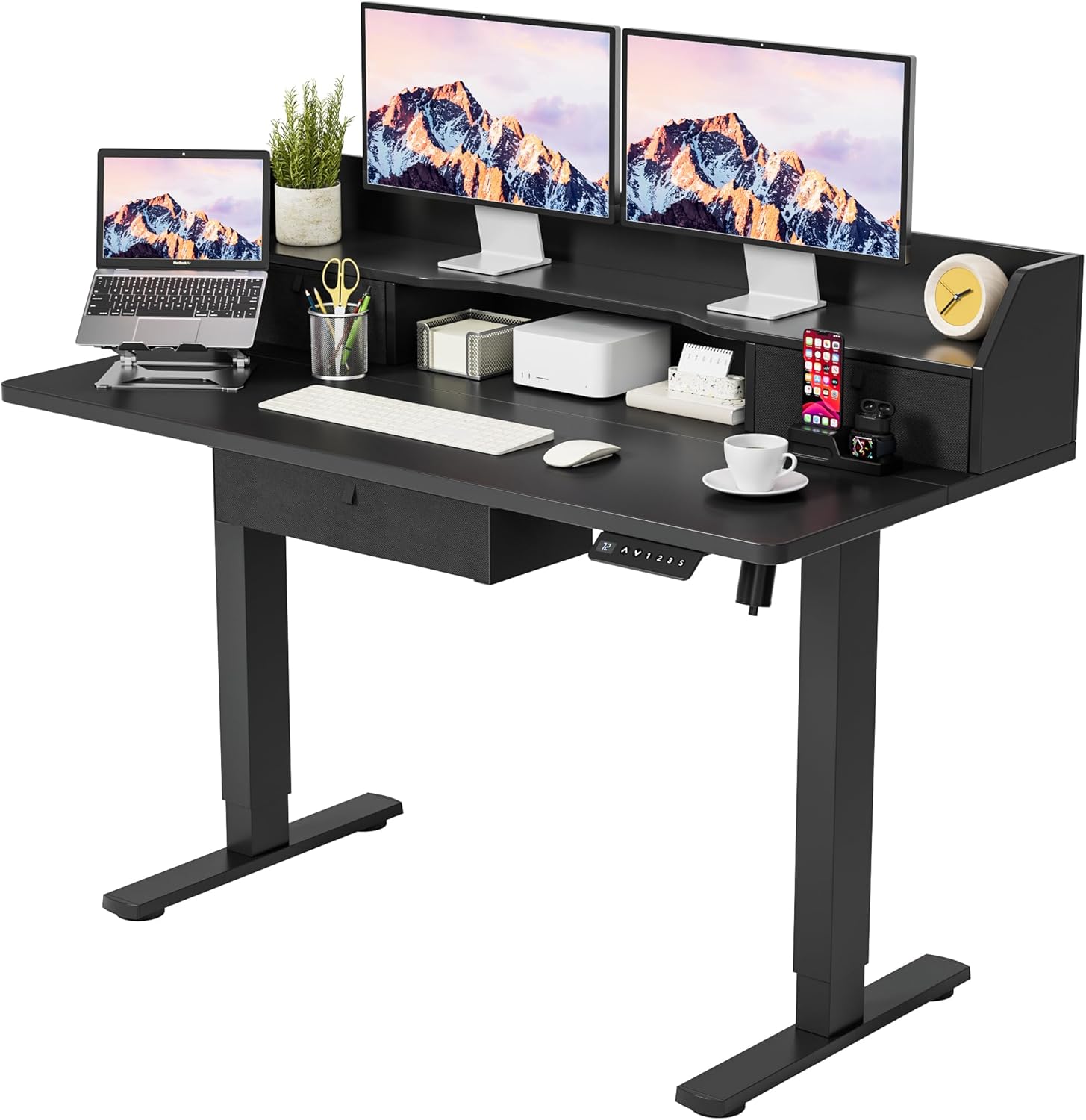
Homall Electric Standing Desk with Triple Drawers and Monitor Stand, shown with two monitors, a laptop, and various office accessories.

Homall Electric Standing Desk illustrating its adjustable height range from 28.5 inches to 48 inches, with an arrow indicating vertical movement.

Illustrations of the storage options for the Homall Electric Standing Desk, including two fabric drawers, a wooden stand, and a storage cubicle.
3. Setup
The Homall Electric Standing Desk is designed for straightforward assembly. Detailed instructions and all necessary accessories are included in the product package. Typical assembly time is approximately 45 minutes.
Before beginning assembly, ensure all components are present and undamaged. Refer to the parts list provided in your physical instruction manual for a complete inventory. Follow the step-by-step instructions carefully to ensure correct and secure assembly.
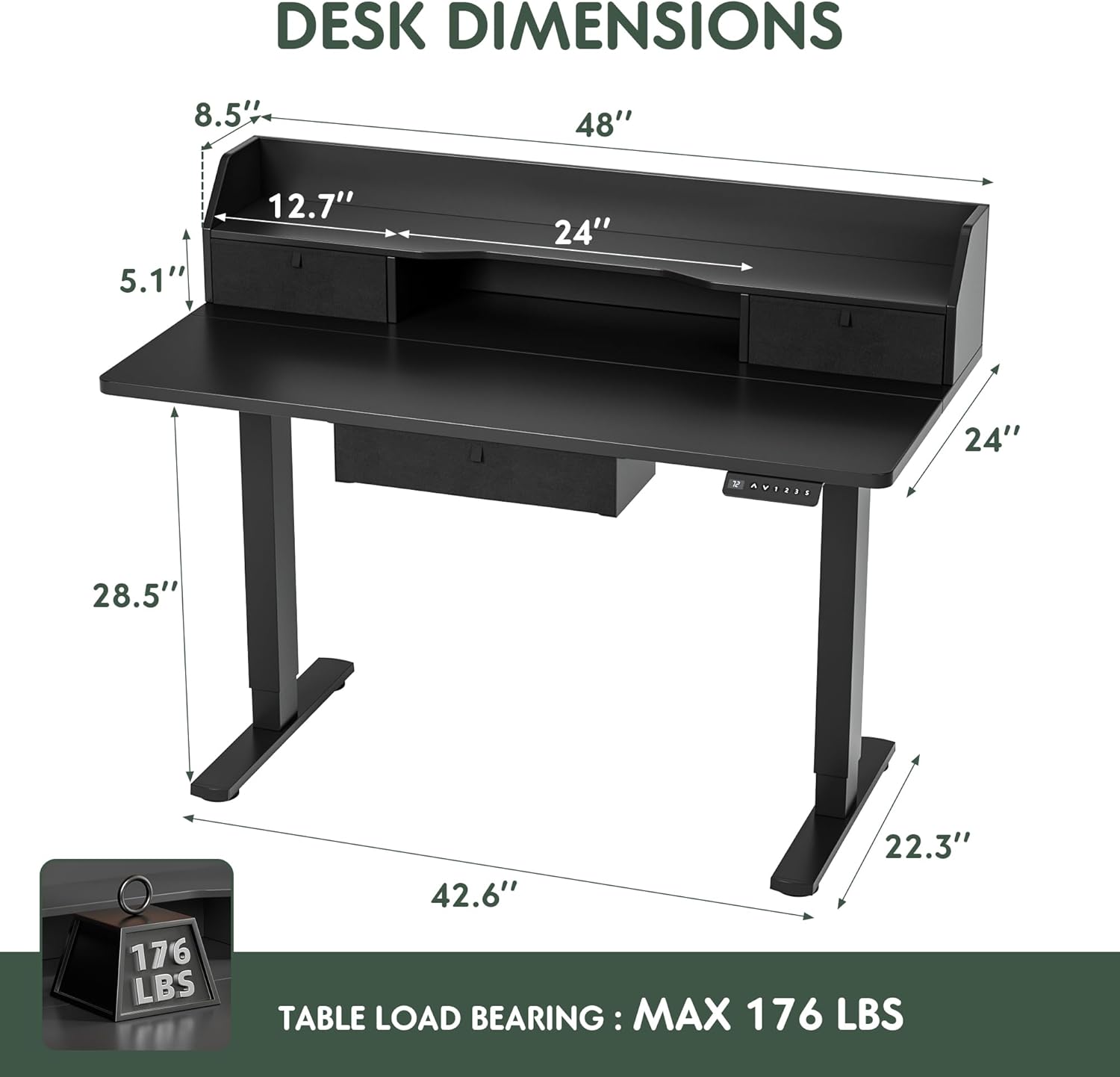
Detailed dimensions of the Homall Electric Standing Desk, including overall width, depth, height, monitor stand dimensions, and table load bearing capacity of 176 lbs.
4. Operating Instructions
Your Homall Electric Standing Desk features an intuitive digital control panel for height adjustment and memory functions. Familiarize yourself with the controls for optimal use.
- LED Display: Shows the current desk height in inches.
- UP Key (^): Press and hold this button to raise the desk to your desired height.
- DOWN Key (v): Press and hold this button to lower the desk to your desired height.
- Memory Presets (1, 2, 3): To save a height, adjust the desk to the desired position, then press and hold one of the number buttons (1, 2, or 3) until the display flashes or beeps. To recall a saved height, briefly press the corresponding number button.
- Screen Lock Button (S): Press this button to lock the control panel, preventing accidental height adjustments. Press again to unlock.
- Automatic Anti-collision Technology: The desk is equipped with a sensor that detects obstructions during movement. If an obstruction is detected, the desk will automatically stop and slightly reverse to prevent damage.

Close-up of the digital control panel for the Homall Electric Standing Desk, showing the LED display, up/down keys, memory presets (1, 2, 3), and screen lock button (S).
5. Maintenance
Regular maintenance ensures the longevity and optimal performance of your Homall Electric Standing Desk.
- Cleaning: Wipe desk surfaces with a soft, damp cloth. Avoid using abrasive cleaners, harsh chemicals, or solvents, as these can damage the finish. Ensure the desk is unplugged from the power outlet before cleaning any electrical components.
- Component Check: Periodically inspect all screws, bolts, and connections to ensure they are tight and secure. Tighten any loose fasteners as needed.
- Motor Care: Avoid overloading the desk beyond its maximum weight capacity (176 lbs for the 48-inch model). Do not obstruct the lifting mechanism or force the desk to move if it encounters resistance.
- Cable Management: Ensure power cords and other cables are neatly managed and do not interfere with the desk's movement.
6. Troubleshooting
This section addresses common issues you might encounter with your Homall Electric Standing Desk. If the problem persists after attempting these solutions, please contact customer service.
Desk Not Moving or Responding:
- Power Connection: Verify that the power cord is securely plugged into both the desk's control box and a working electrical outlet.
- Screen Lock: Check if the screen lock (S button) on the control panel is activated. Press the 'S' button to unlock the panel.
- Overload: Ensure the weight on the desk does not exceed the maximum weight capacity of 176 lbs. Remove excess weight if necessary.
- Anti-collision Trigger: If the desk stopped mid-movement, it might have encountered an obstruction. Remove any objects that could be blocking the desk's path and try again.
Uneven Movement or Noise:
- Surface Level: Ensure the desk is placed on a flat, stable, and level surface. Uneven flooring can affect movement.
- Weight Distribution: Verify that the weight on the desk is evenly distributed. Uneven loads can cause slight tilting or increased motor strain.
- Loose Fasteners: Check all assembly screws and bolts to ensure they are tight. Loose connections can lead to instability or noise.
For issues not covered in this section, or if problems persist, please contact Homall customer service for further assistance.
7. Specifications
| Specification | Detail |
|---|---|
| Brand | Homall |
| Model Number | HAD23 |
| Product Dimensions (D x W x H) | 24"D x 48"W x 61.6"H (Overall) |
| Adjustable Height Range | 28.5" - 48" |
| Color | Black |
| Base Material | Alloy Steel |
| Top Material Type | Stainless Steel |
| Maximum Weight Recommendation | 176 Pounds |
| Number of Drawers | 3 (Triple Drawers) |
| Lifting Mechanism | Electric |
| Required Assembly | Yes |
| Included Components | Monitor Stand |
8. Warranty Information
Warranty information for your Homall Electric Standing Desk is typically included with the product packaging or can be obtained by contacting Homall customer support directly. Please retain your proof of purchase, such as your receipt or order confirmation, for any warranty claims or service requests.
9. Customer Support
For further assistance, technical support, or inquiries regarding your Homall Electric Standing Desk, please contact Homall customer service. Refer to the contact information provided in your product packaging or visit the official Homall website for the most up-to-date support details.