
ElecSmart JR01
ElecSmart JR01 Open Ear Headphones
Instruction Manual
Introduction
Thank you for choosing the ElecSmart JR01 Mini Open Ear Headphones. These wireless Bluetooth earbuds are designed for comfort and safety, allowing you to enjoy audio while remaining aware of your surroundings. Featuring an open-ear clip-on design, IPX4 waterproofing, and a long-lasting battery, the JR01 is ideal for sports, cycling, running, and daily use. This manual provides detailed instructions to help you get the most out of your new headphones.
Safety Information
- Do not expose the headphones or charging case to extreme temperatures, direct sunlight, or fire.
- Avoid dropping, disassembling, or modifying the device.
- Keep the device away from water and moisture. While IPX4 rated for splash resistance, it is not designed for submersion.
- Clean the headphones with a soft, dry cloth. Do not use harsh chemicals or abrasive materials.
- Use only the provided charging cable or a certified Type-C cable for charging.
- Prolonged exposure to loud sounds may cause hearing damage. Adjust volume to a safe level.
Package Contents
Please check the box for the following items:
- ElecSmart JR01 Open Ear Headphones (Left and Right earbuds)
- Charging Case
- Type-C Charging Cable
- Instruction Manual
Product Overview

Figure 1: ElecSmart JR01 Open Ear Headphones and Charging Case.
The ElecSmart JR01 headphones feature an innovative open-ear design that clips comfortably onto your ear, allowing ambient sounds to be heard alongside your audio. The compact charging case includes an LED display to show battery levels for both the case and individual earbuds.
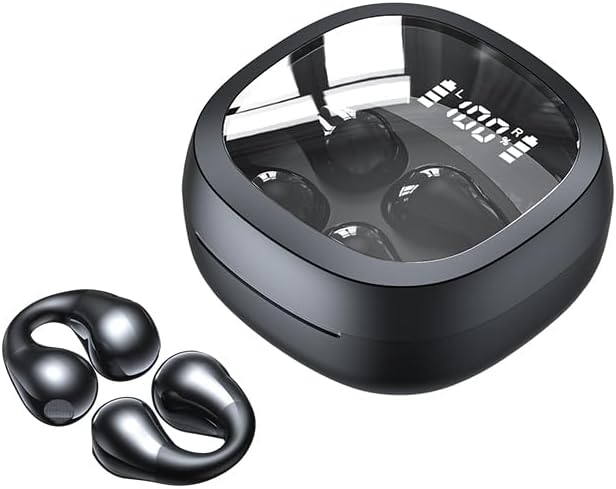
Figure 2: Individual ElecSmart JR01 Earbuds and Charging Case.
Each earbud is designed for a secure and comfortable fit, making them suitable for active lifestyles. The touch control area on each earbud allows for easy management of music playback and calls.
Setup
1. Initial Charging
Before first use, fully charge the headphones and the charging case.
- Place both earbuds into the charging case.
- Connect the Type-C charging cable to the charging port on the case and plug the other end into a USB power adapter (not included).
- The LED display on the charging case will show the battery percentage. Allow approximately 1.5 hours for a full charge of the case. Earbuds charge within the case.

Figure 3: Charging Case with LED Display.
2. Bluetooth Pairing
- Open the charging case. The earbuds will automatically power on and enter pairing mode.
- On your device (smartphone, tablet, etc.), enable Bluetooth.
- Search for "JR01" in the list of available Bluetooth devices.
- Select "JR01" to connect. Once connected, you will hear a confirmation tone, and the earbuds' indicator lights will turn off.
- The headphones will automatically reconnect to the last paired device when taken out of the case, if Bluetooth is enabled on the device.
Operating Instructions
Wearing the Headphones
Gently clip the earbuds onto your ears, ensuring the audio drivers are positioned correctly for optimal sound while maintaining awareness of your surroundings. The flexible design allows for a comfortable and secure fit during various activities.
Touch Controls
The JR01 headphones feature touch-sensitive controls on each earbud:
| Action | Function |
|---|---|
| Single Tap (L/R) | Play/Pause Music, Answer/End Call |
| Double Tap (Right) | Next Track |
| Double Tap (Left) | Previous Track |
| Triple Tap (L/R) | Activate Voice Assistant |
| Long Press (2s) (L/R) | Reject Call |
| Long Press (3s) (L/R) | Power On/Off (when not in case) |
Power On/Off
- Power On: Open the charging case, or long press the touch area for 3 seconds if earbuds are out of case.
- Power Off: Place earbuds back into the charging case and close the lid, or long press the touch area for 3 seconds if earbuds are out of case and not connected.
Maintenance
- Cleaning: Use a soft, dry, lint-free cloth to clean the earbuds and charging case. Do not use liquids or spray cleaners.
- Storage: When not in use, store the headphones in their charging case to protect them and keep them charged. Store in a cool, dry place.
- Battery Care: To prolong battery life, avoid fully discharging the battery frequently. Charge the device regularly, even if not in use for extended periods.
- Water Resistance: The JR01 headphones are IPX4 waterproof, meaning they are resistant to splashing water from any direction. They are not designed for swimming or submersion. Dry them thoroughly if they get wet.
Troubleshooting
| Problem | Solution |
|---|---|
| Headphones won't power on. | Ensure the charging case and earbuds are fully charged. Place earbuds in the case and close the lid, then open again. |
| Cannot pair with device. | Make sure Bluetooth is enabled on your device and the earbuds are in pairing mode (out of the case). Forget "JR01" from your device's Bluetooth list and try pairing again. Ensure earbuds are charged. |
| Only one earbud is working. | Place both earbuds back into the charging case, close the lid, wait a few seconds, then open the lid. This should re-sync them. Ensure both earbuds are charged. |
| Poor sound quality or intermittent connection. | Ensure the earbuds are within the 10-meter Bluetooth range of your device. Check for interference from other wireless devices. Recharge the earbuds. |
| Microphone not working during calls. | Ensure the earbuds are properly connected and selected as the audio input device on your phone. Check for any obstructions on the microphone area. |
Specifications
| Feature | Detail |
|---|---|
| Model Name | JR01 |
| Connectivity Technology | Wireless (Bluetooth) |
| Bluetooth Version | 5.3 |
| Bluetooth Range | Up to 10 meters (33 feet) |
| Audio Driver Type | Bone Conduction Driver |
| Battery Life (Earbuds) | Up to 5 hours per charge |
| Total Playback Time (with case) | Up to 30 hours |
| Charging Time (Case) | Approx. 1.5 hours (Type-C) |
| Water Resistance Level | IPX4 (Splashproof) |
| Control Type | Touch Control |
| Frequency Response | 20 Hz - 1 KHz |
| Sensitivity | 105 dB |
| Impedance | 20 Ohm |
| Item Weight | 3.2 ounces |
Warranty and Support
ElecSmart products are designed and manufactured to the highest quality standards. For warranty information or technical support, please refer to the contact details provided on the product packaging or visit the official ElecSmart website. Please retain your proof of purchase for any warranty claims.
For further assistance, please contact our customer support team.
Ask a question about this manual
Ask about setup, troubleshooting, compatibility, parts, safety, or missing instructions. Manuals+ will review the question and use this page’s manual context to help answer it.