
1. Important Safety Information
Please read all instructions carefully before assembly and use. Keep this manual for future reference.
- Weight Capacity: Do not exceed the maximum weight capacity of 200 pounds (90.7 kg) for the TV stand. Overloading can cause instability and potential injury.
- Assembly: Assemble the unit on a soft, clean surface to prevent scratches. Ensure all parts are securely fastened before use.
- Stability: For added safety, consider anchoring the TV stand to a wall, especially if children or pets are present. Wall anchoring hardware may not be included.
- Electrical Safety (LED Lights): Ensure the LED light strip is installed and connected according to instructions. Do not expose electrical components to water or excessive moisture.
- Children: Keep small parts and packaging materials away from children during assembly.
2. Package Contents
Verify that all components are present before beginning assembly. If any parts are missing or damaged, please contact customer support.
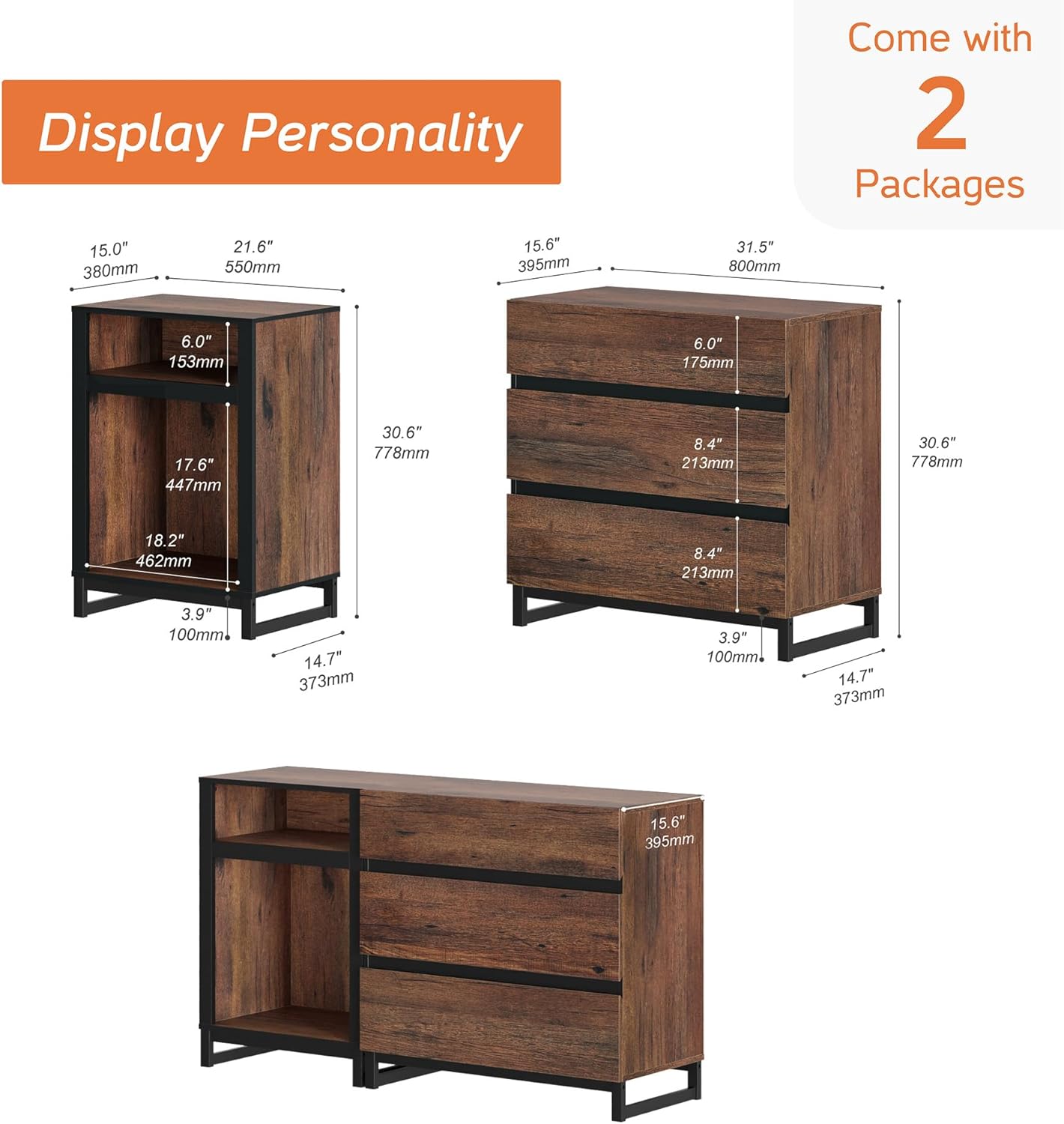
Image: Detailed diagram illustrating the dimensions of the individual components of the TV stand, including the open shelving unit and the three-drawer cabinet. This helps in identifying parts and understanding the overall structure.
2.1 Parts List (Example - refer to actual manual for full list)
- Main Top Panel
- Side Panels (Left, Right)
- Bottom Panels
- Back Panels
- Drawer Fronts, Sides, and Backs
- Drawer Bottoms
- Metal Legs/Base
- LED Light Strip
- Hardware Pack (Screws, Dowels, Cam Locks, Drawer Slides, etc.)
2.2 Hardware List (Example - refer to actual manual for full list)
- Cam Bolts
- Cam Locks
- Wood Dowels
- Screws (various types)
- Drawer Slides (Left & Right)
- Allen Wrench
- LED Light Controller and Power Adapter
3. Assembly Instructions
Follow these steps carefully. It is recommended to have two people for assembly.
- Prepare the Area: Clear a spacious, clean, and soft area for assembly to prevent damage to the furniture.
- Identify Parts: Lay out all panels and hardware. Match them with the diagrams in your included instruction booklet. Each part is typically labeled with a code.
- Assemble the Base: Attach the metal legs to the bottom panels of both the open shelf unit and the drawer unit using the provided screws. Ensure they are securely tightened.

Image: Close-up details of the TV stand, highlighting the sturdy metal feet, the sleek handleless design of the drawers, and the smooth operation of the metal drawer slides. This image provides visual guidance for assembly steps involving these components.
- Construct the Open Shelf Unit:
- Insert wood dowels and cam bolts into the designated holes on the side panels.
- Attach the top and bottom panels to the side panels using cam locks.
- Slide the back panel into the grooves.
- Construct the Drawer Unit:
- Assemble the drawer boxes by attaching the sides, front, and back panels, then slide in the drawer bottoms.
- Install the drawer slides onto the inner side panels of the main unit and onto the assembled drawer boxes.
- Attach the main top and bottom panels to the side panels using cam locks and dowels.
- Slide the back panel into the grooves.
- Join the Units: Carefully align and connect the open shelf unit and the drawer unit using the provided connectors or screws, ensuring a flush fit.
- Install LED Lights:
- Clean the surface where the LED strip will be applied.
- Peel off the adhesive backing from the LED strip and carefully press it onto the desired location within the open shelf compartment.
- Connect the LED strip to the controller and then to the power adapter.
- Plug the power adapter into a wall outlet.
- Final Check: Ensure all screws and fasteners are tight. Gently move the unit to its desired location.
4. Operating Instructions (LED Lights)
The WAMPAT TV Stand features integrated LED lighting to enhance your living space.
4.1 Powering On/Off
- Once the LED light strip is connected to the power adapter and plugged into an outlet, it should be ready for operation.
- Use the provided remote control or inline switch (if applicable) to turn the lights on or off.
4.2 Changing Colors and Modes
- The LED lights offer 16 changeable colors. Use the color selection buttons on the remote control to choose your desired hue.
- Various modes (e.g., flash, strobe, fade, smooth) may be available. Refer to the specific LED light remote control instructions for detailed mode selection.
- Adjust brightness using the designated buttons on the remote.

Image: The WAMPAT TV Stand displayed in a modern living room, showcasing the blue LED lighting within the open shelf, providing ambient illumination.

Image: The WAMPAT TV Stand positioned in a dining room, featuring the purple LED lighting in the open shelf area, demonstrating its versatility in different home environments.
5. Maintenance and Care
Proper care will help maintain the appearance and longevity of your TV stand.
- Cleaning: Wipe the surfaces with a dry, soft cloth. For stubborn marks, a slightly damp cloth followed by a dry cloth can be used. Avoid abrasive cleaners or harsh chemicals.
- Spills: Immediately wipe up any spills to prevent damage to the engineered wood finish.
- Sunlight: Avoid prolonged exposure to direct sunlight to prevent fading or discoloration.
- Heat and Moisture: Keep the unit away from direct heat sources and areas of high humidity.
- Hardware: Periodically check all screws and fasteners to ensure they remain tight. Retighten if necessary.
6. Troubleshooting
Refer to this section for common issues and their solutions.
| Problem | Possible Cause | Solution |
|---|---|---|
| LED Lights Not Working |
|
|
| Drawers Do Not Slide Smoothly |
|
|
| Unit Feels Unstable |
|
|
7. Product Specifications
Detailed specifications for the WAMPAT TV Stand.
| Feature | Detail |
|---|---|
| Brand | WAMPAT |
| Model Number | W11S4082Q+W04S-3060Q |
| Color | Brown |
| Material | Engineered Wood, Metal |
| Product Dimensions (D x W x H) | 15.6"D x 53.1"W x 30.6"H (39.6 cm D x 134.9 cm W x 77.7 cm H) |
| Recommended TV Size | Up to 60 inches |
| Weight Capacity | 200 Pounds (90.7 kg) |
| Number of Drawers | 3 |
| Number of Open Compartments | 1 (with 2 shelves) |
| LED Lights | 16 Colors Changeable |
| Assembly Required | Yes |
| Mounting Type | Floor Mount |

Image: A visual representation of the TV stand with superimposed outlines of 40-inch, 50-inch, and 60-inch televisions, demonstrating the recommended TV size compatibility.
8. Warranty and Customer Support
WAMPAT stands behind the quality of its products. For specific warranty details, please refer to the warranty card included with your purchase or visit the official WAMPAT website.
If you encounter any issues, require replacement parts, or have questions regarding assembly or operation, please contact WAMPAT customer support:
- Online Support: Visit the WAMPAT Store on Amazon for FAQs and contact information.
- Email: Refer to your purchase documentation for direct email support.
Please have your model number (W11S4082Q+W04S-3060Q) and purchase date ready when contacting support.