
1. Product Overview
The podofo A3439-US is a single DIN car stereo receiver designed for in-dash installation. It features Bluetooth 5.1 for hands-free calling and wireless audio streaming, an FM radio tuner, and multiple media playback options including USB, SD card, and AUX-in. Additional functionalities include USB charging, a car locator app feature, and a wireless remote control for convenient operation.

Image: The podofo A3439-US car stereo unit, its wireless remote control, and a smartphone connected for USB charging.
2. Package Contents
Verify that all items are present in the package:
- 1 x Car MP3 Player (Main Unit)
- 1 x Remote Control
- 1 x Power Cable
- 1 x Speaker Cable
- 1 x User Manual
- 2 x Keys (for unit removal)
- Mounting Bracket (as per product description)
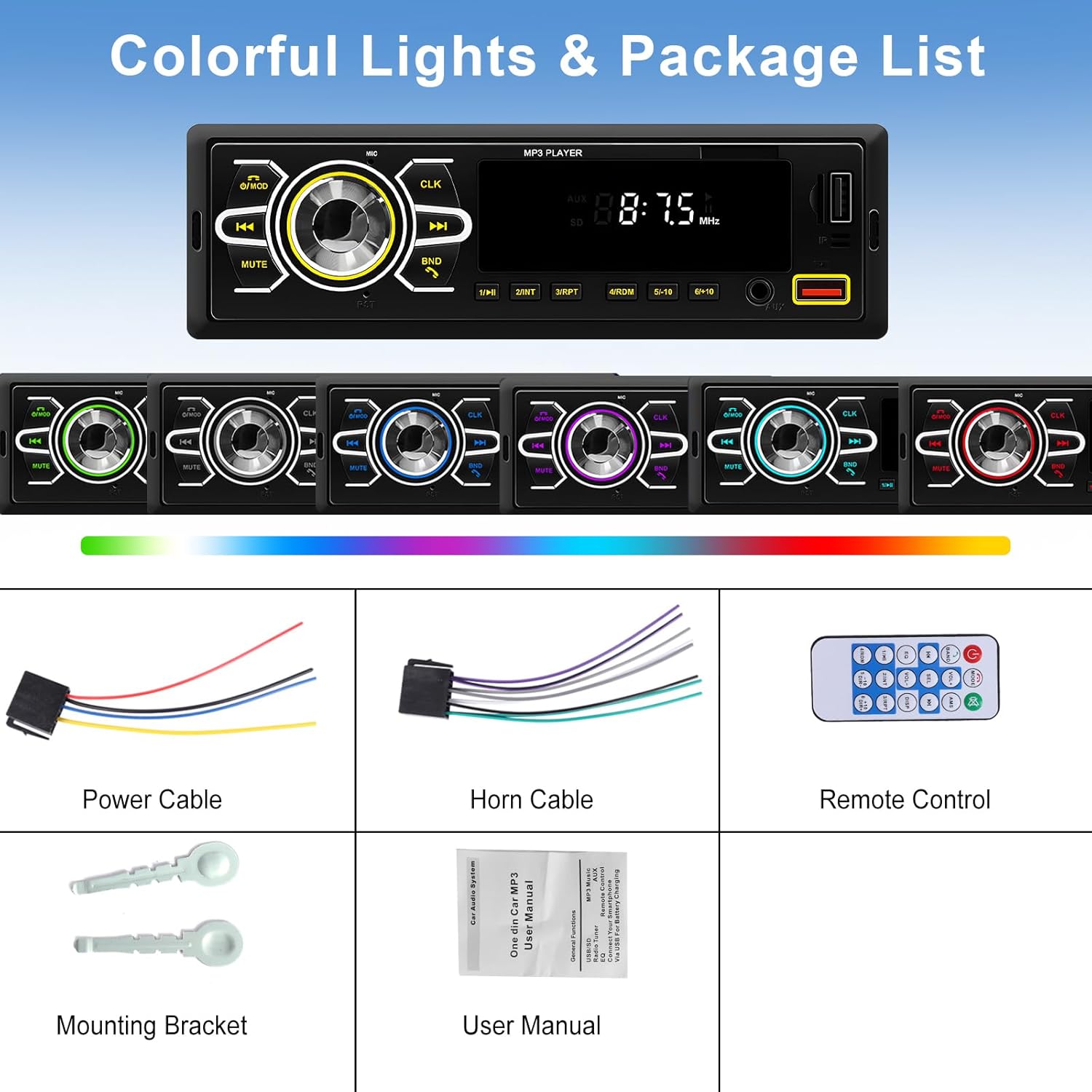
Image: An illustration showing the car stereo unit and its included accessories: power cable, horn cable, remote control, mounting bracket, and user manual.
3. Setup and Installation
3.1 Wiring Connections
Proper wiring is crucial for the safe and correct operation of the car stereo. Refer to the wiring diagram provided in the included user manual for detailed instructions. Ensure all connections are secure to prevent damage to the unit or vehicle electrical system.
- Power Cable: Connect the yellow wire to the constant 12V power supply, the red wire to the accessory 12V power supply (switched by ignition), and the black wire to ground.
- Speaker Cables: Connect the speaker wires to the corresponding vehicle speakers. Ensure correct polarity.
- Radio Antenna: Connect the vehicle's radio antenna to the designated input.
- RCA Audio Output: Two channel audio output ports are available for connecting external amplifiers.

Image: A visual guide illustrating correct wiring connections for the car stereo, emphasizing reverse connection protection. The image shows that incorrect wiring will prevent the machine from turning on, while correct wiring ensures normal boot-up.
3.2 Mounting the Unit
Install the single DIN unit into your vehicle's dashboard using the provided mounting bracket and keys. Ensure the unit is securely fastened to prevent movement during driving.
4. Operating Instructions
4.1 Front Panel Controls
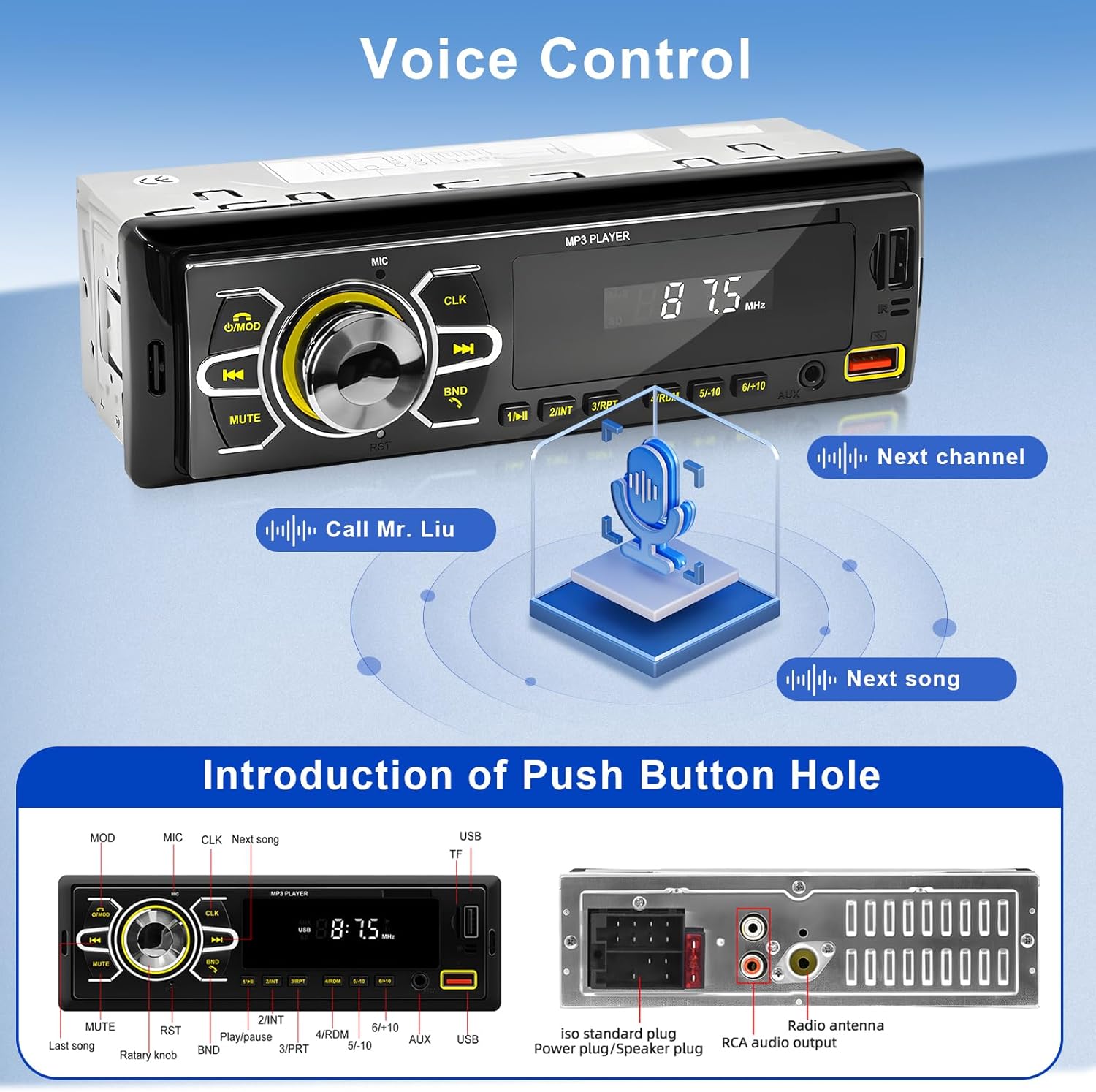
Image: A detailed diagram of the car stereo's front panel, labeling buttons such as MOD, MIC, CLK, MUTE, BND, RST, Play/Pause, Next/Previous Track, and ports like USB and AUX. It also shows the ISO standard plug and RCA audio output at the back.
- Power/MOD: Press to turn on/off or switch between modes (FM, USB, SD, AUX, Bluetooth).
- CLK: Press to display clock, long press to set time.
- MUTE: Mute/unmute audio.
- BND: In FM mode, press to switch radio bands (FM1, FM2, FM3). Long press for automatic station search and store.
- Rotary Knob: Adjust volume. Press to select EQ presets.
- 1/Play/Pause: Play/pause media. In FM mode, press to select preset station 1.
- 2/INT: Intro scan. In FM mode, select preset station 2.
- 3/RPT: Repeat track. In FM mode, select preset station 3.
- 4/RDM: Random play. In FM mode, select preset station 4.
- 5/-10: Jump back 10 tracks. In FM mode, select preset station 5.
- 6/+10: Jump forward 10 tracks. In FM mode, select preset station 6.
- USB Port: Connect USB drives for media playback or charge mobile devices.
- SD Card Slot: Insert SD cards for media playback.
- AUX-IN: Connect external audio devices via a 3.5mm jack.
4.2 Wireless Remote Control
The included wireless remote control provides convenient access to various functions from a distance.
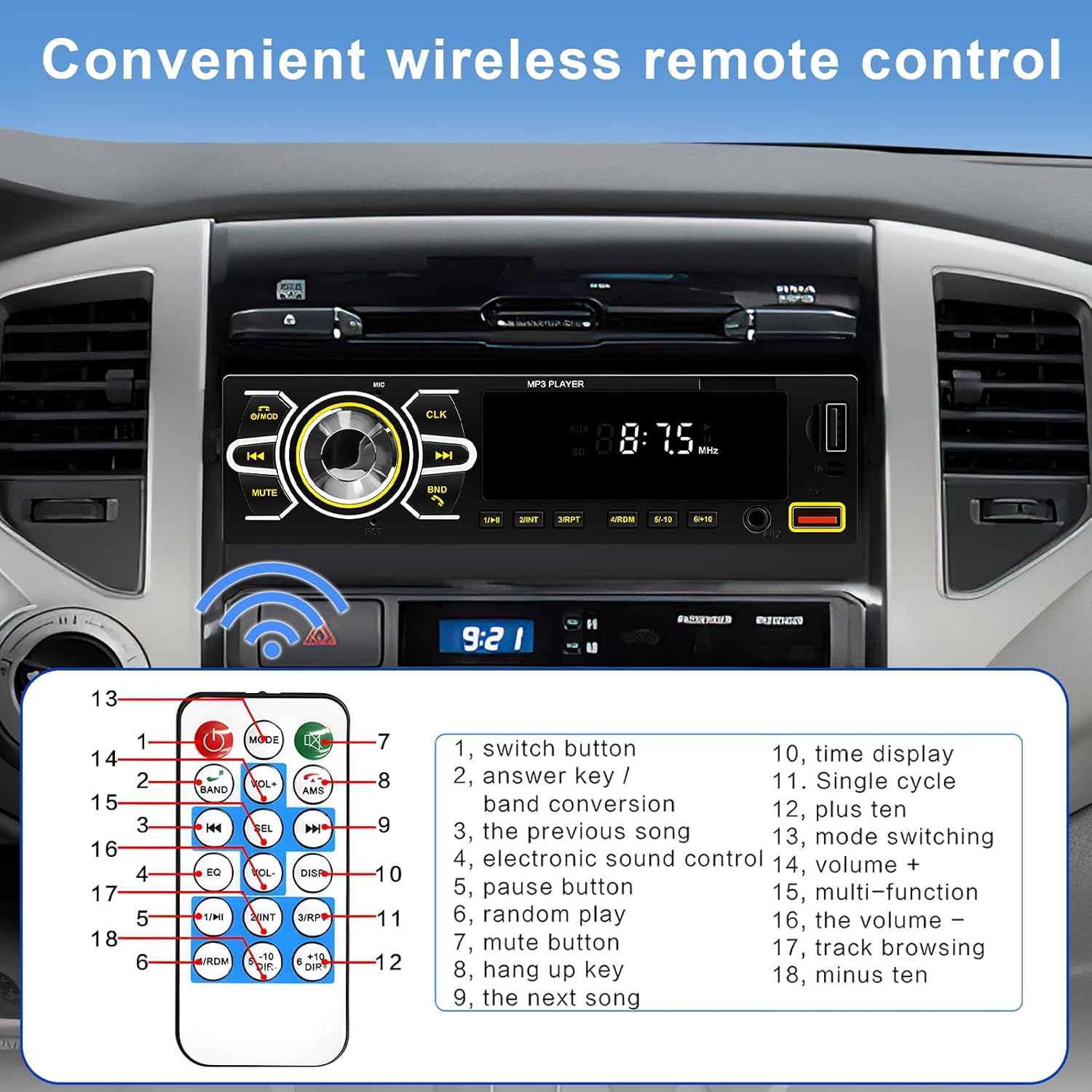
Image: The wireless remote control for the car stereo, with numbered buttons corresponding to functions like power, answer/hang up calls, volume, mode, EQ, track navigation, and numeric input.
- Power Button: Turns the unit on or off.
- Answer Key: Answer incoming calls.
- Volume +/-: Adjust volume level.
- Mode: Switch between input sources (FM, USB, SD, AUX, Bluetooth).
- EQ: Cycle through equalizer presets.
- Next/Previous Track: Navigate through tracks or radio stations.
- Numeric Buttons: Direct selection of radio presets or track numbers.
4.3 Bluetooth Operation
The unit features Bluetooth 5.1 for seamless wireless connectivity.
- Pairing: Turn on the car stereo and enable Bluetooth on your mobile device. Search for "CAR BT" in your device's Bluetooth settings and connect.
- Hands-free Calling: Once paired, you can make and receive calls directly through the car stereo. Use the answer/hang up buttons on the front panel or remote.
- Audio Streaming: Play music wirelessly from your paired device. Control playback (play/pause, next/previous) from the car stereo or remote.

Image: An in-car view showing the stereo unit with a phone displaying an incoming call and another phone streaming music, illustrating the Bluetooth call and music features. Also shows FM radio tuning.
4.4 FM Radio
Tune into your favorite FM radio stations.
- Frequency Range: 87.5~108MHz.
- Station Search: Use the tuning buttons or the BND button (long press) for automatic search and storage of up to 30 preset stations.
- Preset Recall: Use the numeric buttons (1-6) on the front panel or remote to recall stored stations.
4.5 Media Playback (USB/SD/AUX)
The stereo supports various media formats and input sources.

Image: The car stereo unit highlighting its multimedia capabilities, showing connections for AUX cable, USB cable, and a TF (Micro SD) card, indicating support for various audio sources.
- USB/SD: Insert a USB drive or SD card into the respective slot. The unit will automatically switch to USB/SD mode and begin playback of supported audio formats (MP3/WMA/CDDA/HDCD/ACC).
- AUX-IN: Connect an external audio player (e.g., smartphone, MP3 player) to the AUX-in port using a 3.5mm audio cable. Select AUX mode on the stereo.
4.6 USB Charging
The USB port provides high-current output for charging mobile phones and other USB-powered devices.
Image: The car stereo unit with a smartphone connected via USB, illustrating the USB charging capability. The phone screen shows a charging indicator.
4.7 APP Locate and Find Car
Utilize the dedicated smartphone application to locate your parked vehicle. This feature is particularly useful in large parking areas.
Image: The car stereo unit positioned above a smartphone displaying a map with a location pin, demonstrating the "APP Positioning to Find Car" feature.
4.8 Voice Control
The unit supports basic voice commands for certain functions, enhancing convenience and safety while driving.
Image: The car stereo unit with a microphone icon and speech bubbles indicating voice commands like "Call Mr. Liu" and "Next song," demonstrating the voice control functionality.
4.9 Colorful Backlight Settings
The key backlights can automatically change colors, allowing for personalization of the unit's appearance.
Image: The car stereo unit shown with its buttons illuminated in a spectrum of colors, illustrating the colorful backlight feature.
4.10 Power Off Memory Function
The car stereo automatically remembers the last played music or radio station and its state when restarted, ensuring a seamless listening experience.
5. Maintenance
To ensure the longevity and optimal performance of your car stereo, follow these maintenance guidelines:
- Cleaning: Use a soft, dry cloth to wipe the front panel. For stubborn dirt, slightly dampen the cloth with water. Avoid using harsh chemicals or abrasive cleaners.
- Avoid Liquids: Do not expose the unit to liquids. If liquid enters the unit, disconnect power immediately and consult a qualified technician.
- Temperature: Avoid extreme temperatures. Do not leave the unit in direct sunlight for extended periods or in very cold conditions.
- Ventilation: Ensure the unit's ventilation openings are not blocked to prevent overheating.
6. Troubleshooting
If you encounter issues with your car stereo, refer to the following common problems and solutions:
| Problem | Possible Cause | Solution |
|---|---|---|
| No power | Incorrect wiring; Blown fuse; Vehicle battery issue. | Check power cable connections (yellow, red, black wires). Verify fuse integrity. Ensure vehicle battery is charged. |
| No sound | Speaker wires disconnected; Volume too low; Mute function active; Incorrect source selected. | Check speaker connections. Increase volume. Deactivate mute. Select correct input source (FM, USB, BT, AUX). |
| Bluetooth not connecting | Bluetooth not enabled on device; Incorrect pairing procedure; Interference. | Ensure Bluetooth is on and discoverable on your phone. Re-attempt pairing with "CAR BT". Move closer to the unit. |
| Radio reception poor | Antenna not connected; Weak signal area; Antenna damage. | Check antenna connection. Try tuning in a different location. Inspect antenna for damage. |
| USB/SD not playing | Unsupported file format; Corrupted media; Incorrect mode selected. | Ensure files are MP3/WMA/CDDA/HDCD/ACC. Try a different USB/SD card. Select USB/SD mode. |
7. Specifications
- Voltage: DC 12V-14.4V
- Radio Band: FM (87.5~108MHz)
- Power Output: 45W x 4
- Bluetooth Version: 5.1
- Bluetooth Name: CAR BT
- RCA Port: 2 channel audio output
- AUX-IN: Support
- Colorful Lights: Support
- Supported Audio Formats: MP3/WMA/CDDA/HDCD/ACC
- USB Charging: High current output
- Memory Function: Power off memory
- Product Dimensions: 7.36 x 2.28 x 2.09 inches
- Item Weight: 15.9 ounces
- Model Number: A3439-US
8. Warranty and Support
podofo is committed to providing quality products and customer satisfaction.
- Warranty: This product comes with a 2-year warranty.
- Refund Policy: A 30-day refund policy is available.
- After-sales Service: For any questions or assistance, please contact podofo customer service. Our professional team is dedicated to resolving any issues you may encounter.

Image: An illustration emphasizing podofo's after-sales service guarantee, stating that their team is available to help with any questions before or after purchase.