
KETOTEK KT3400-EU
KETOTEK Humidity/Temperature Controller Socket
Model: KT3400-EU
Introduction
The KETOTEK Humidity/Temperature Controller Socket is a versatile device designed for precise environmental control. It features a 3-meter long sensor and offers four operational modes: humidification, dehumidification, heating, and cooling. This controller is equipped with alarm functions for both temperature and humidity, calibration capabilities, a reset function, and data storage to retain settings after power loss. It supports both Celsius and Fahrenheit units and includes adjustable button tone settings.
This device is ideal for a wide range of applications, including incubators, reptile habitats, poultry houses, mushroom cultivation, glass containers, greenhouses, and general household use where specific temperature and humidity levels are critical.

Image: The KETOTEK Humidity/Temperature Controller Socket, showing its main unit with a display and power outlet, connected to its external 3-meter sensor.
Product Features Overview
The controller integrates multiple functions to ensure optimal environmental conditions. Key features include:
- Multifunctional Control: Supports humidification, dehumidification, heating, and cooling modes.
- Alarm Functions: Alerts for out-of-range humidity and temperature.
- Calibration: Allows real-time calibration for humidity and temperature readings.
- Data Storage: Retains all settings even after a power outage.
- Unit Switching: Easily switch between Celsius (℃) and Fahrenheit (℉).
- Error Indication: Displays error messages for sensor issues or out-of-range data.

Image: A visual representation of the controller's key features, including humidity control, temperature control, humidity alarm, temperature alarm, calibration, reset function, ℃/℉ switch, memory function, button tone setting, and error reporting.
Setup
1. Unboxing and Components
Before setup, ensure all components are present:
- 1 x KETOTEK Humidity/Temperature Controller Socket
- 1 x User Manual (this document)
2. Physical Installation
- Plug In: Insert the KETOTEK controller into a standard 230V power outlet.
- Sensor Placement: The controller comes with a 3-meter sensor. Place the sensor in the environment where you wish to monitor and control humidity and temperature. Ensure the sensor is not obstructed and is positioned to accurately reflect the conditions of the area.
- Connect Device: Plug the appliance you wish to control (e.g., humidifier, dehumidifier, heater, cooler) into the power outlet on the KETOTEK controller.

Image: The KETOTEK controller plugged into a wall socket, with its sensor extended into a terrarium to monitor and regulate its internal environment.
Operating Instructions
Display and Buttons Overview
Familiarize yourself with the controller's display and buttons:
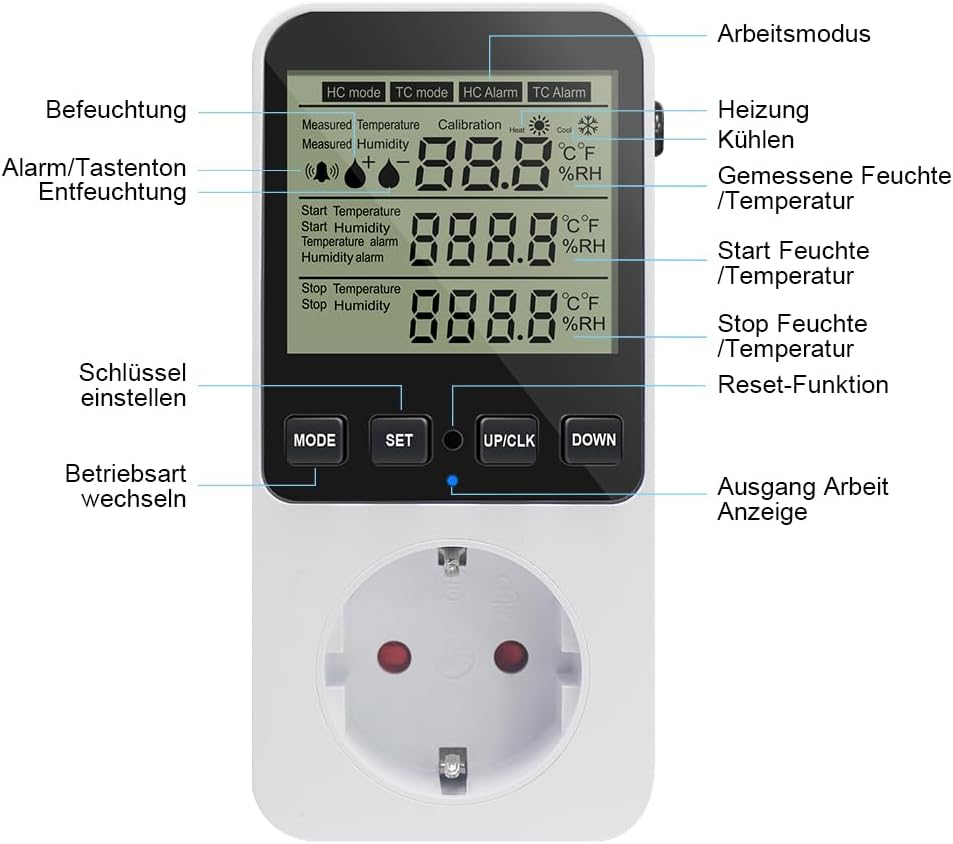
Image: A detailed diagram labeling the various parts of the controller's display, including measured humidity/temperature, start/stop values, alarm indicators, and the MODE, SET, UP/CLK, and DOWN buttons.
- MODE Button: Used to switch between operating modes (Humidification, Dehumidification, Heating, Cooling) and to enter/exit settings.
- SET Button: Used to confirm settings and enter calibration mode.
- UP/CLK Button: Used to increase values, switch temperature units (℃/℉), and for real-time calibration.
- DOWN Button: Used to decrease values.
Operating Modes
The controller supports four main operating modes:
- Humidification Mode (HC mode): Activates the connected device (e.g., humidifier) when humidity drops below the set start humidity and deactivates it when it reaches the stop humidity.
- Dehumidification Mode (HC mode): Activates the connected device (e.g., dehumidifier) when humidity rises above the set start humidity and deactivates it when it reaches the stop humidity.
- Heating Mode (TC mode): Activates the connected device (e.g., heater) when temperature drops below the set start temperature and deactivates it when it reaches the stop temperature.
- Cooling Mode (TC mode): Activates the connected device (e.g., cooler) when temperature rises above the set start temperature and deactivates it when it reaches the stop temperature.

Image: The controller's display illustrating the four different operating modes: Humidity Control (HC mode), Temperature Control (TC mode), Temperature Alarm (TC Alarm), and Humidity Alarm (HC Alarm).
Setting Humidity/Temperature Parameters
To program the controller:
- Press the MODE button to cycle through the operating modes until you reach the desired mode (HC for humidity, TC for temperature).
- Press the SET button. The "Start" value will begin to flash.
- Use the UP/CLK or DOWN buttons to adjust the "Start" humidity/temperature.
- Press SET again. The "Stop" value will flash.
- Use the UP/CLK or DOWN buttons to adjust the "Stop" humidity/temperature.
- Press SET to confirm and save the settings. The display will return to the main interface.
Humidity/Temperature Calibration
To calibrate the sensor for accurate readings:
- Simultaneously press and hold the UP/CLK and MODE buttons to enter calibration mode.
- The display will show the current calibration offset. Use the UP/CLK or DOWN buttons to adjust the calibration value.
- Humidity correction range: -10% RH to 10% RH.
- Temperature correction range: -9.9°C to 9.9°C.
- Press and hold the MODE button to save the calibration and exit the mode.
Alarm Function
The controller can sound an alarm if humidity or temperature exceeds set limits:
- In HC Alarm or TC Alarm mode (accessed via MODE button), press SET.
- Adjust the alarm threshold using UP/CLK or DOWN buttons.
- Press SET to confirm.
- If the measured humidity/temperature exceeds the set alarm value, the controller will emit an audible alarm.
Other Functions
- Data Storage: All settings are automatically saved and retained even after a power failure.
- Reset Function: To reset the device to factory settings, locate the small reset button (often a pinhole) and press it with a thin object.

Image: A close-up showing the location of the reset button on the side of the KETOTEK controller.
- Temperature Unit Switch (℃/℉): Press and hold the UP/CLK button to toggle between Celsius and Fahrenheit.
- Button Tone Settings: To adjust or disable the button tone, refer to the specific instructions in the manual.

Image: A visual guide indicating how to adjust the button tone settings on the KETOTEK controller, typically involving the MODE and DOWN buttons.
Maintenance
Sensor Care
The 3-meter sensor is crucial for accurate readings. Keep it clean and free from dust, debris, or excessive moisture buildup. Avoid bending or kinking the sensor cable sharply, as this can damage internal wires.
Cleaning Instructions
To clean the main unit and sensor:
- Unplug the device from the power outlet before cleaning.
- Use a soft, dry cloth to wipe down the display and casing.
- For stubborn dirt, a slightly damp cloth can be used, but ensure no liquid enters the device or sensor.
- Do not use abrasive cleaners, solvents, or strong chemicals, as these can damage the plastic and electronic components.
Troubleshooting
| Problem | Possible Cause | Solution |
|---|---|---|
| Display shows "Error" or "E" | Sensor not connected, damaged, or measured data is out of range. | Ensure the sensor is securely plugged in. Check the sensor cable for visible damage. If the environment's conditions are extreme, move the sensor to a suitable range. If the problem persists, the sensor may need replacement. |
| Connected appliance does not turn on/off as expected | Incorrect start/stop settings, relay issue, or appliance malfunction. | Verify your start and stop humidity/temperature settings. Ensure the appliance itself is working correctly when plugged directly into a wall outlet. If the relay seems stuck (appliance remains on/off), try unplugging and re-plugging the controller. |
| Inaccurate humidity/temperature readings | Sensor dirty, improperly placed, or requires calibration. | Clean the sensor. Ensure it's placed away from direct heat sources, drafts, or extreme moisture. Perform a calibration as described in the "Operating Instructions" section. |
| Alarm sounds frequently | Alarm thresholds set too close to operating range or environmental fluctuations. | Adjust the alarm thresholds to allow for normal fluctuations in humidity/temperature. Ensure the environment is stable. |
Specifications
| Feature | Detail |
|---|---|
| Brand | KETOTEK |
| Model Number | KT3400-EU |
| Voltage | 230 Volts |
| Output | Max 16A/230V |
| Humidity Control Range | 20% RH ~ 95% RH |
| Temperature Control Range | -10°C ~ 50°C (14°F ~ 122°F) |
| Humidity Correction Range | -10% RH ~ 10% RH |
| Temperature Correction Range | -9.9°C ~ 9.9°C |
| Sensor Cable Length | 3 meters |
| Material | Acrylonitrile Butadiene Styrene (ABS) |
| Display Type | LCD or LED |
| Color | Black |
| Product Dimensions | 15.9 x 8.2 x 8.1 cm (Packaging) |
| Weight | 260 Grams |
| Batteries Required | No |
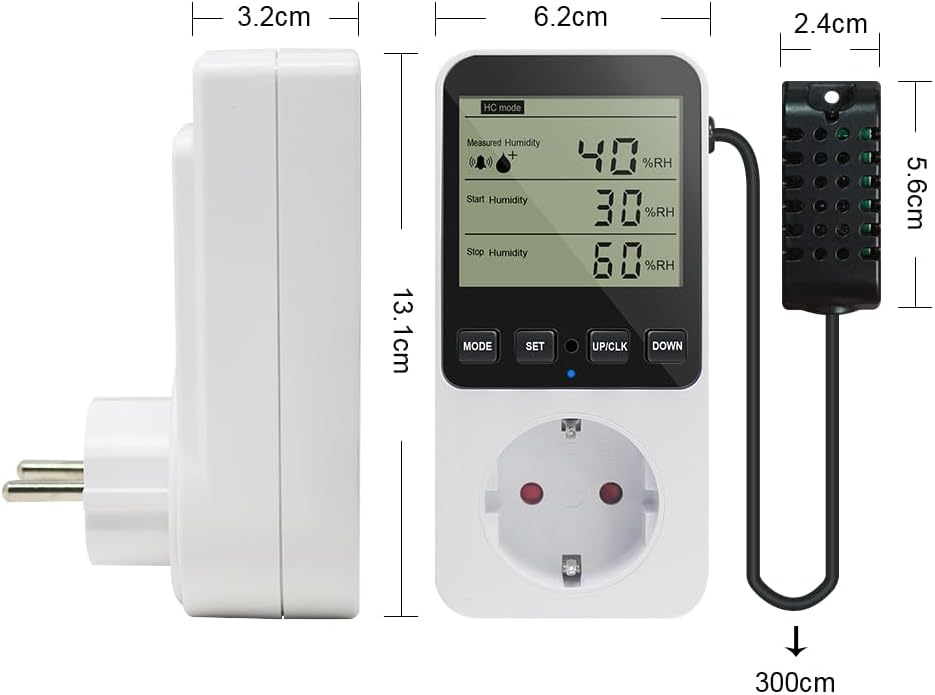
Image: A diagram illustrating the physical dimensions of the KETOTEK controller and its sensor, including length, width, and sensor cable length.
Warranty and Support
Warranty Information
Specific warranty terms and conditions for the KETOTEK Humidity/Temperature Controller Socket may vary. Please refer to the warranty card included with your product or contact the seller/manufacturer directly for detailed warranty information and claim procedures.
Customer Support
For technical assistance, troubleshooting, or general inquiries, please visit the official KETOTEK store or contact their customer support. You can find more information at the KETOTEK Store on Amazon.
Ask a question about this manual
Ask about setup, troubleshooting, compatibility, parts, safety, or missing instructions. Manuals+ will review the question and use this page’s manual context to help answer it.