
Riloer G50
Riloer G50 4G Magnetic GPS Tracker User Manual (6000mAh Model)
Model: G50 | Capacity: 6000mAh
1. Introduction
This manual provides essential instructions for the safe and effective operation of your Riloer G50 4G Magnetic GPS Tracker. Please read this manual thoroughly before using the device and retain it for future reference. The Riloer G50 is a robust 4G magnetic GPS tracker designed for real-time tracking of vehicles such as automobiles, motorcycles, and electric scooters. It features a powerful magnet for easy, non-installation placement and an IP67 waterproof rating for durability.
2. Product Overview
The Riloer G50 4G Magnetic GPS Tracker is a compact and durable device. It features a strong magnetic base for secure attachment to metallic surfaces and is designed with an IP67 waterproof PVC casing, ensuring reliable performance in various environmental conditions. The device includes charging contacts and indicator lights for status updates.

Figure 2.1: Front view of the Riloer G50 4G Magnetic GPS Tracker, showcasing its compact design and textured surface.

Figure 2.2: Top view of the Riloer G50, highlighting the four magnetic charging pins and status indicators.
3. Technical Specifications
| Feature | Description |
|---|---|
| Brand | Riloer |
| Model | G50 |
| Material | PVC |
| Battery Capacity | 6000 mAh (also available in 3000 mAh) |
| Color | Black |
| Network | 4G (LTE-FDD: B1/B3/B5/B8), LTE-TDD(B34/B38/B39/B40/B41) |
| Waterproof Rating | IP67 |
| GPS Precision | 5 meters |
| Storage Temperature | -40 °C to 85 °C |
| Operating Temperature | -20 °C to 55 °C |
| Humidity | 5% to 95% (non-condensing) |
| Tracking Software | iOS/Android App, PC Software |
| Connectivity Technology | Wi-Fi |
| Special Features | Magnetic attachment, SOS function, Real-time tracking |
| Compatible Devices | Mobile devices, Tablets, Personal Computers |
| Dimensions (6000mAh) | 84.5 x 45 x 31.5 mm |
| Weight (6000mAh) | 167 g |
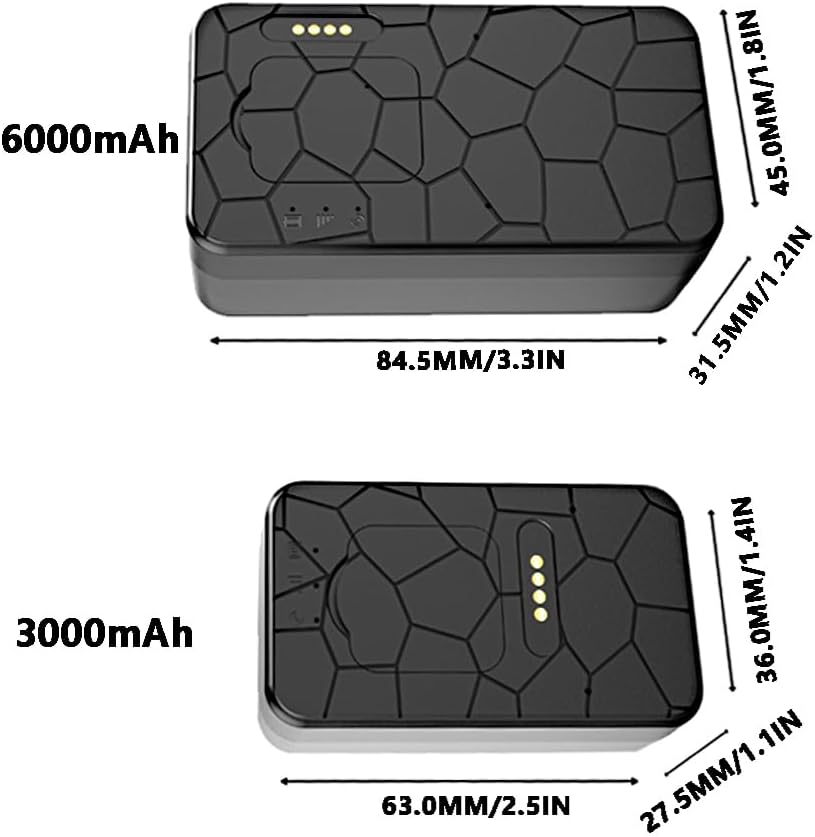
Figure 3.1: Comparative dimensions of the 3000mAh and 6000mAh Riloer G50 models.
4. Setup Guide
4.1. Charging the Device
Before initial use, fully charge your Riloer G50 tracker. Connect the provided charging cable to the magnetic charging pins on the device and to a standard USB power adapter. The indicator lights will show the charging status. A full charge ensures maximum battery life for extended tracking.
4.2. App Installation and Account Setup
The Riloer G50 tracker operates with a dedicated mobile application (iOS/Android) and PC software. Follow these steps:
- Download the official tracking application from your device's app store (for iOS/Android) or the provided link/QR code for PC software.
- Install the application and create a new user account.
- Follow the in-app instructions to add your G50 tracker to your account. This typically involves scanning a QR code on the device or entering its unique ID number.
- Once added, the device should appear online in the application, indicating successful setup.
5. Placement and Installation
The Riloer G50 features a powerful magnetic base, eliminating the need for complex installation. It can be directly attached to any metallic surface on your vehicle.

Figure 5.1: The Riloer G50 tracker demonstrating its magnetic attachment capability.
5.1. Recommended Placement Locations
For optimal performance and security, consider the following placement areas on a vehicle:
- Under the seat
- Passenger seat glove box
- Trunk
- Rear bumper (ensure secure attachment and minimal exposure to direct impact)
- Chassis (ensure it's not too low to scrape)
- Front bumper
Ensure the chosen location is clean and dry for the best magnetic adhesion. Avoid areas with extreme heat or strong electromagnetic interference.

Figure 5.2: The Riloer G50 tracker securely attached to the rear bumper of a car.
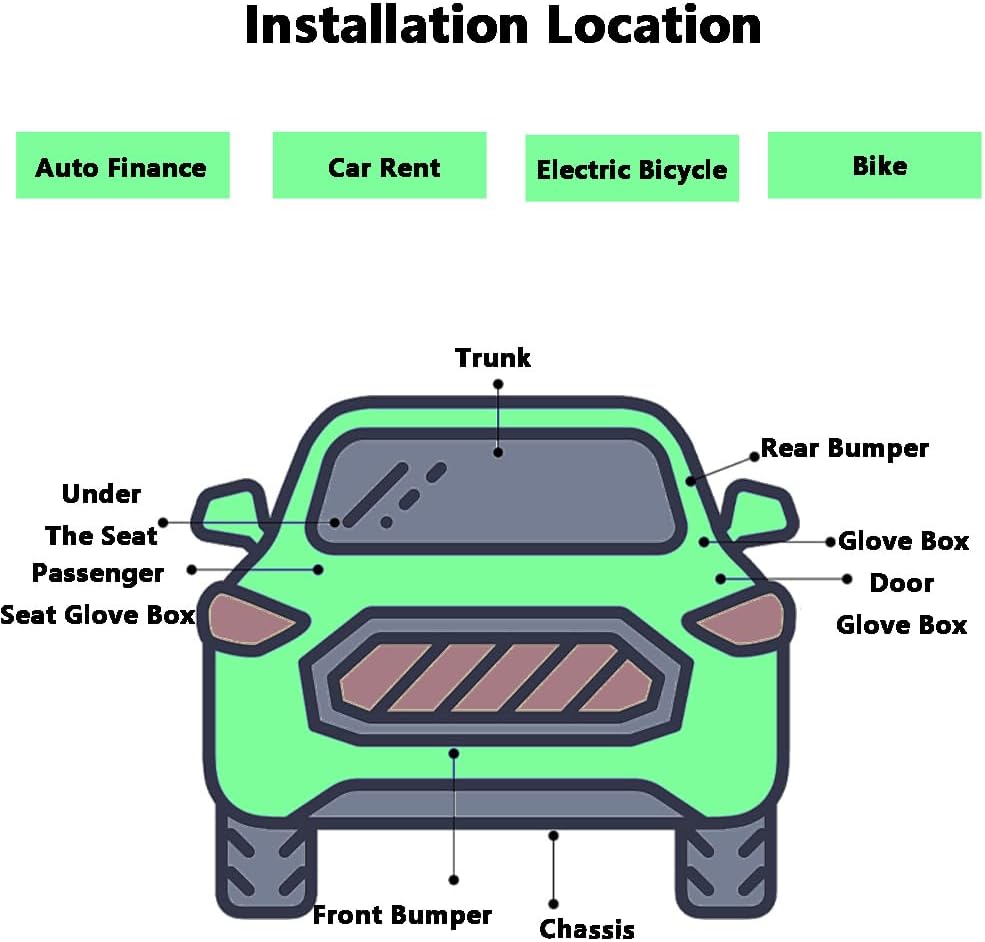
Figure 5.3: A diagram illustrating various potential placement locations for the GPS tracker on a vehicle.
6. Operating Instructions
The Riloer G50 utilizes five positioning modes (GPS + Beidou + AGPS + WiFi + LBS) for enhanced accuracy and global coverage.
6.1. Real-time Tracking
Access the mobile application or PC software to view the current location of your tracker in real-time. The map interface will display the device's position, speed, and direction of travel.

Figure 6.1: Mobile application interface displaying precise positioning, 90-day movement record, and fast playback features.
6.2. Track Playback
The application automatically records the device's route, time, location, speed, and direction. You can review the historical data for the past 90 days at any time through the track playback function.

Figure 6.2: The track playback feature within the mobile application, showing a historical route.
6.3. Geo-fencing
Set up virtual boundaries (geo-fences) on the map. You will receive alerts if the tracker enters or exits these predefined areas.
6.4. SOS Function
The device supports an SOS function. Refer to the application's specific instructions for configuring and using this feature, which typically involves setting emergency contact numbers.
6.5. Low Battery Alarm
The system will notify you when the device's battery level is low, allowing you to recharge it promptly.
7. Maintenance and Care
- Cleaning: Wipe the device with a soft, dry cloth. Avoid using harsh chemicals or abrasive cleaners.
- Battery Care: To prolong battery life, avoid fully discharging the device frequently. Charge it regularly, especially if it will be stored for an extended period.
- Storage: Store the tracker in a cool, dry place away from direct sunlight and extreme temperatures.
- Waterproof Integrity: While IP67 rated, ensure the charging port's waterproof plugs are securely in place to maintain water resistance, especially in rainy conditions.
8. Troubleshooting
If you encounter issues with your Riloer G50 tracker, refer to the following common problems and solutions:
- Device not connecting to network: Ensure the device is in an area with 4G coverage. Check the device's status indicators.
- Inaccurate positioning: GPS accuracy can be affected by dense urban areas, heavy foliage, or indoor environments. The device uses multiple positioning modes (GPS + Beidou + AGPS + WiFi + LBS) to mitigate this. Move the device to an open area for better GPS signal.
- Battery not charging: Verify that the charging cable is correctly connected to both the device and the power source. Ensure the power source is functional.
- App not displaying device: Confirm that the device is powered on and has network connectivity. Log out and log back into the application, or try reinstalling the app.
- No historical data: Ensure the device has been active and connected during the period you are trying to review. Data is typically stored for 90 days.
If problems persist, contact customer support for further assistance.
9. Warranty and Support
For information regarding product warranty, please refer to the warranty card included with your purchase or contact the seller directly. For technical support, troubleshooting assistance, or inquiries about your Riloer G50 4G Magnetic GPS Tracker, please visit the official Riloer store or contact their customer service department.
You can find more information and support resources by visiting the Riloer Store on Amazon.
Ask a question about this manual
Ask about setup, troubleshooting, compatibility, parts, safety, or missing instructions. Manuals+ will review the question and use this page’s manual context to help answer it.