
1. Introduction and Safety Information
Thank you for purchasing the PUKAMI Fireplace TV Stand. This manual provides essential instructions for safe assembly, operation, and maintenance of your new entertainment center. Please read all instructions carefully before use and retain this manual for future reference.
Important Safety Warnings:
- Two-Package Delivery: This product is shipped in two separate packages (Fireplace insert and TV Stand components). These packages may arrive on different days. Please ensure both packages are received before beginning assembly.
- Fireplace Heater Safety: The electric fireplace is designed for supplemental heating and will not replace a primary heat source. To prevent fire, keep combustible materials such as furniture, pillows, bedding, papers, clothes, and curtains at least 3 feet (0.9m) from the front, sides, and rear of the heater.
- Electrical Safety: Ensure the power outlet used meets the specifications for the fireplace (1500W). Do not overload circuits.
- Assembly: Follow all assembly instructions precisely. Improper assembly can lead to instability and potential injury.
- Weight Capacity: Do not exceed the maximum load capacity of 300 lbs for the TV stand.
2. Package Contents
Before assembly, verify that all components listed below are present and undamaged. If any parts are missing or damaged, please contact PUKAMI customer support.
- TV Stand Panels and Hardware
- Electric Fireplace Insert (36-inch)
- Remote Control for Fireplace
- LED Light Bar with Remote Control
- Crystal Media for Fireplace Bed
- Assembly Instruction Manual
3. Setup and Assembly Instructions
Assembly of the PUKAMI Fireplace TV Stand requires careful attention to detail. Please refer to the separate, detailed assembly instruction manual included in your package for step-by-step guidance. The following points highlight key features and considerations during assembly:
- Preparation: Clear a spacious area for assembly. It is recommended to have two people for certain assembly steps due to the size and weight of the components.
- Cable Management: The TV stand features pre-drilled cable holes in the back panel to help organize and conceal wires from your media devices.
- Soft-Close Hinges: The cabinet doors are equipped with soft-close hinges for quiet and smooth operation.
- Fireplace Crystal Media Installation: When installing the crystal media into the fireplace, exercise extreme caution. The glass panel may need to be carefully removed. Be aware of the display and control board connected by a cable to the unit; this must be unplugged before fully removing the glass.

Image 3.1: Key features including heating function, cable management, waterproof wood, and stratified storage.

Image 3.2: Detail of the soft-close hinge mechanism on the cabinet door.
4. Operating Instructions
4.1 Electric Fireplace Operation
The electric fireplace offers various settings for heat, flame appearance, and timing, controllable via the included remote or the touch screen panel on the unit.
- Power: Use the ON/OFF button to activate or deactivate the fireplace.
- Heat Settings: Select between 750W (low) and 1500W (high) heating modes. The heater is designed to warm rooms up to 400 square feet.
- Flame Colors: Choose from 12 customizable flame colors to match your ambiance.
- Flame Brightness: Adjust the flame intensity with five adjustable brightness levels (L1 to L5).
- Flame Speed: Control the speed of the flame effect with five adjustable settings (V1 to V5).
- Timer: Set an automatic shut-off timer for 1 to 8 hours.
- Sleep Mode: Activate sleep mode for reduced light output during rest.
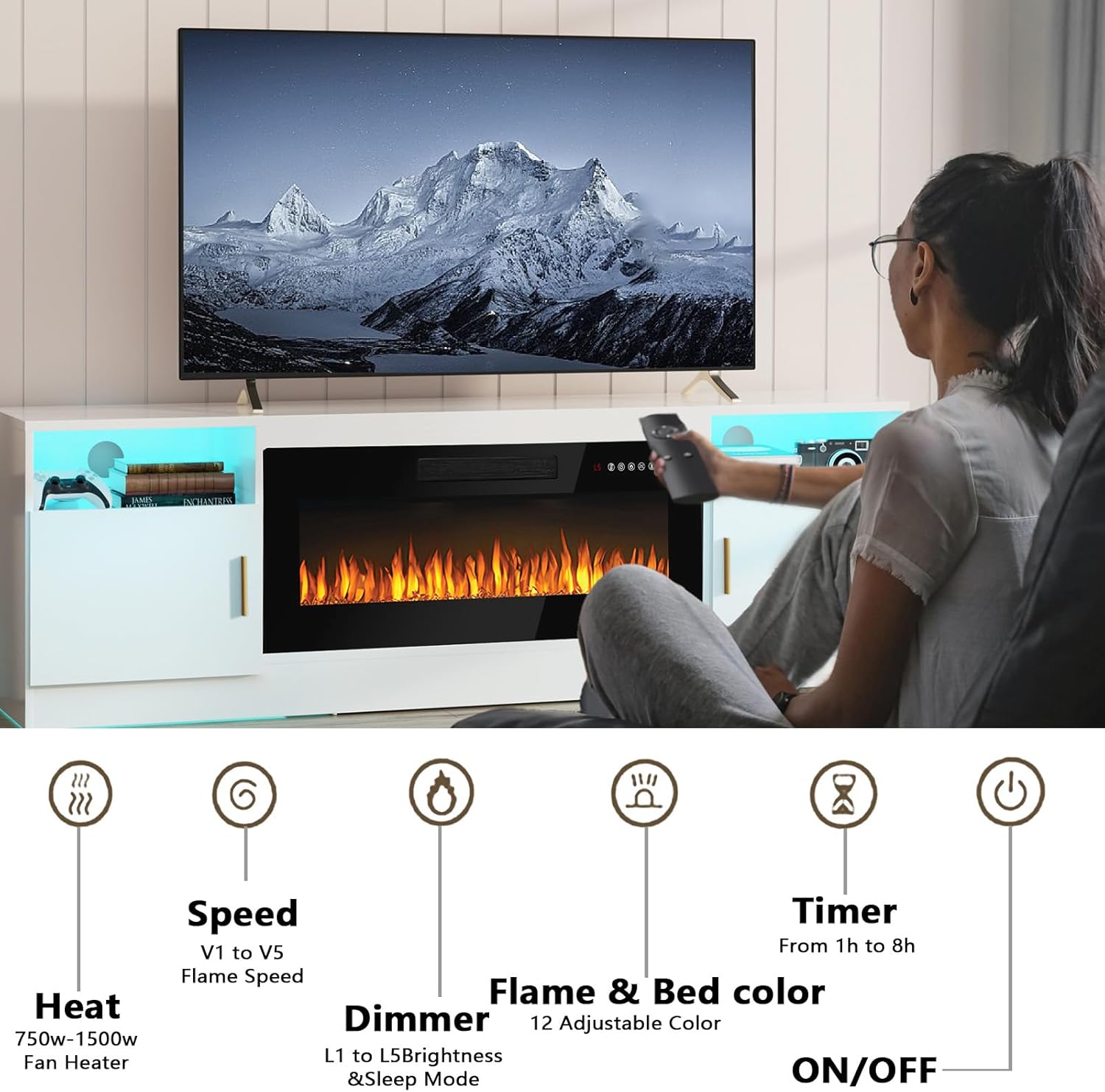
Image 4.1: Remote control functions for the electric fireplace, including heat, flame settings, and timer.

Image 4.2: Examples of the 12 flame colors and LED bed colors, showcasing the crystal media.
4.2 LED Light Bar Operation
The integrated LED light bar enhances the ambiance of your TV stand and can be controlled independently.
- Colors: Select from 16 different colors.
- Light Modes: Choose from 4 dynamic light modes.
- Control: Adjust settings using the dedicated remote control.
- Power Connection: The LED lights can be powered by connecting to your TV's USB port (if available) or a standard wall outlet.

Image 4.3: The 16-color LED light system with various color options and dynamic effects.
5. Maintenance
Regular maintenance ensures the longevity and optimal performance of your TV stand and fireplace.
- Cleaning the Stand: Wipe surfaces with a soft, damp cloth. Avoid abrasive cleaners or harsh chemicals that may damage the finish.
- Cleaning the Fireplace: Ensure the fireplace is turned off and unplugged before cleaning. Gently wipe the exterior and glass with a soft, lint-free cloth. Keep the air intake and exhaust vents clear of dust and debris to ensure proper airflow.
- Electrical Cord: Periodically inspect the power cord for any signs of damage. If damaged, discontinue use and contact customer support.
6. Troubleshooting
If you encounter issues with your PUKAMI Fireplace TV Stand, refer to the following common problems and solutions:
| Problem | Possible Cause | Solution |
|---|---|---|
| Fireplace does not turn on. | No power, remote control battery low, power switch off. | Check if the unit is plugged in securely. Ensure the wall outlet is functional. Replace remote control batteries. Verify the main power switch on the unit is ON. |
| No heat output from fireplace. | Heat function not activated, thermostat setting too low. | Ensure the heat function is turned on via remote or touch panel. Increase the temperature setting. Check for obstructions around air vents. |
| LED light bar not working. | Loose connection, remote control battery low, power source issue. | Check the connection of the LED light bar to its power source. Replace remote control batteries. Ensure the power source (TV USB or wall outlet) is active. |
| Assembly holes do not align. | Panels are not perfectly square or misaligned. | Do not fully tighten all screws until all major components are loosely assembled and aligned. Adjust panels as needed before final tightening. |
If the problem persists after attempting these solutions, please contact PUKAMI customer support for further assistance.
7. Specifications
| Feature | Detail |
|---|---|
| Brand | PUKAMI |
| Model Name | 70-MTTV |
| Product Dimensions (D x W x H) | 13.8" x 70" x 23" |
| Material | Wood (Particle Board) |
| Finish Type | Polished |
| Power Source | Corded Electric |
| Heat Output | 750W / 1500W |
| Heating Coverage | Up to 400 square feet |
| Fireplace Insert Size | 36 inches |
| TV Compatibility | Up to 80 inches |
| Load Capacity | Up to 300 lbs |
| Special Features | Dimmer, LED Flame, Timer, LED Light Bar, Cable Management |
| Item Weight | 105 Pounds |
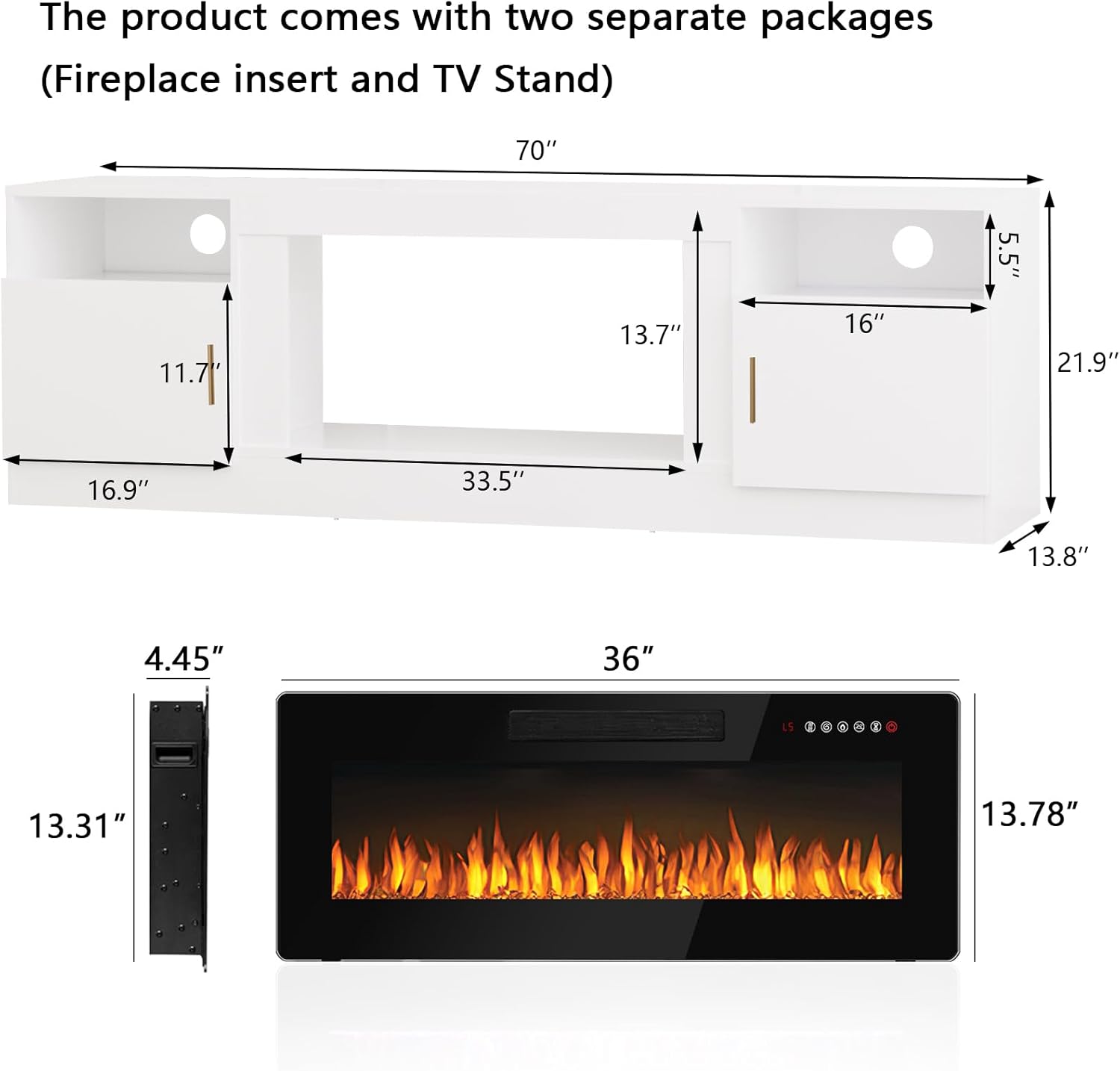
Image 7.1: Detailed dimensions of the TV stand and fireplace insert.

Image 7.2: Visual guide for TV size compatibility, supporting TVs up to 80 inches.
8. Warranty and Support
The PUKAMI Fireplace TV Stand comes with a Limited Warranty. Please refer to the warranty documentation included with your purchase for specific terms and conditions.
For technical support, missing parts, or warranty claims, please contact PUKAMI customer service. Contact information can typically be found on the product packaging or the official PUKAMI website.