
PUKAMI 70-MTTV
PUKAMI 70-MTTV Fireplace TV Stand with 36" Electric Fireplace User Manual
Model: 70-MTTV | Brand: PUKAMI
1. Introduction
Thank you for choosing the PUKAMI 70-MTTV Fireplace TV Stand. This manual provides essential information for the safe assembly, operation, and maintenance of your new entertainment center. Please read all instructions carefully before use and retain this manual for future reference.

Figure 1: PUKAMI 70-MTTV Fireplace TV Stand
2. Important Safety Information
WARNING: To reduce the risk of fire, electric shock, or injury, read all instructions before using this appliance.
- Keep combustible materials, such as furniture, pillows, bedding, papers, clothes, and curtains at least 3 feet (0.9m) from the front of the heater, and keep them away from the sides and rear.
- Do not operate any heater with a damaged cord or plug, or after the heater malfunctions, has been dropped or damaged in any manner.
- Do not run cord under carpeting. Do not cover cord with throw rugs, runners, or similar coverings. Arrange cord away from traffic area and where it will not be tripped over.
- Always unplug the heater when not in use.
- Do not insert or allow foreign objects to enter any ventilation or exhaust opening as this may cause an electric shock or fire, or damage the heater.
- Use this heater only as described in this manual. Any other use not recommended by the manufacturer may cause fire, electric shock, or injury to persons.
3. Setup and Assembly
The PUKAMI 70-MTTV Fireplace TV Stand is delivered in two separate packages: one for the TV stand components and one for the electric fireplace insert. These packages may arrive on different days. Ensure all components are present before beginning assembly.
3.1 Unpacking and Component Check
- Carefully open both packages and remove all contents.
- Verify all parts against the included parts list in your assembly guide. Contact customer support immediately if any parts are missing or damaged.
- Place all components on a soft, clean surface to prevent scratches during assembly.
3.2 Assembly Instructions
Follow the step-by-step instructions provided in the separate assembly guide included with your product. Pay close attention to diagrams and hardware identification.
- Door Installation: Refer to the installation video for specific guidance on installing the cabinet doors. Some models may require drilling pilot holes for hinges.
- Electric Fireplace Insert: Install the 36-inch electric fireplace insert into the designated central opening of the TV stand. Ensure it is securely seated and all electrical connections are made according to the fireplace's specific instructions.
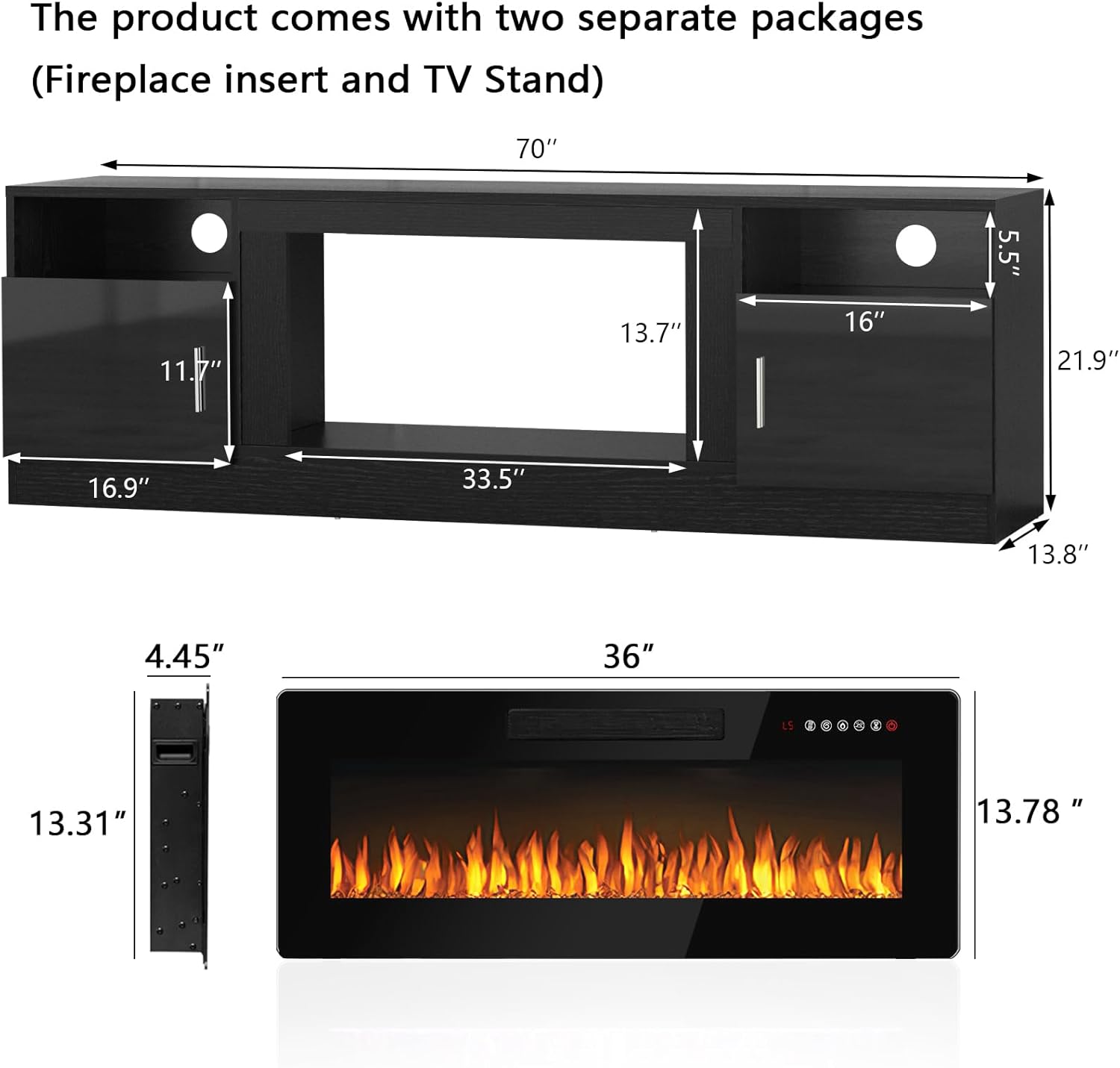
Figure 2: Product Dimensions and Separate Packaging
4. Operating Instructions
The PUKAMI Fireplace TV Stand features an integrated electric fireplace and LED light bar, both controllable via remote control or touch screen.
4.1 Electric Fireplace Operation
The 36-inch electric fireplace offers various settings for ambiance and heating.
- Power: Use the power switch on the remote or touch panel to turn the fireplace ON/OFF.
- Heat Settings: Select between 750W and 1500W heating modes. The powerful heating element is designed to warm rooms up to 400 square feet. The heater will warm a cool room but is not intended to replace a primary heat source.
- Flame Colors: Choose from 12 customizable flame colors to match your mood or decor.
- Flame Brightness: Adjust the flame brightness with five adjustable levels.
- Timer Control: Set an automatic shut-off timer from 1 to 8 hours.
- Sleep Mode: Activate sleep mode for reduced light and quiet operation.
- Independent Control: Heat and flame functions can be operated independently.

Figure 3: Fireplace Remote Control Functions

Figure 4: 12 Flame Colors & LED Bed Colors
4.2 LED Light Bar Operation
The included LED light bar enhances the ambiance of your entertainment center.
- Colors: Offers 16 different colors.
- Light Modes: Features 4 distinct light modes.
- Control: The LED strip's color and mode can be adjusted with the remote control.

Figure 5: 16 Color LED Lights System
5. Maintenance
Regular maintenance ensures the longevity and safe operation of your PUKAMI Fireplace TV Stand.
- Cleaning: Dust the surfaces with a soft, dry cloth. For the electric fireplace glass, use a non-abrasive glass cleaner. Ensure the unit is unplugged before cleaning.
- Ventilation: Keep the fireplace's air intake and exhaust vents clear of any obstructions to ensure proper heat dissipation.
- Cord Inspection: Periodically inspect the power cord for any signs of damage. Do not use the unit if the cord is frayed or damaged.
- Storage: If storing the unit for an extended period, ensure it is unplugged and stored in a dry, cool place.
6. Troubleshooting
This section addresses common issues you might encounter with your PUKAMI Fireplace TV Stand.
| Problem | Possible Cause | Solution |
|---|---|---|
| Fireplace does not turn on. | No power, remote control battery low, or unit malfunction. | Check power connection. Replace remote batteries. If still not working, contact customer support. |
| No heat output. | Heater function is off, or thermostat setting is too low. | Ensure heater function is activated and set to desired heat level (750W/1500W). |
| LED lights not working. | LED light bar is off, or connection issue. | Verify LED light bar is powered on via remote. Check connections. |
| Cabinet doors do not fit or align properly. | Incorrect installation or missing pre-drilled holes. | Review the door installation video and assembly guide. Some models may require drilling pilot holes for hinges. |
7. Specifications
| Feature | Detail |
|---|---|
| Brand | PUKAMI |
| Model Name | 70-MTTV |
| Product Dimensions | 13.8"D x 70"W x 23"H |
| Material | Wood |
| Finish Type | Polished |
| Power Source | Corded Electric |
| Heat Output | 1500 Watts |
| Heating Coverage | 400 sq.ft |
| Special Features | Dimmer, LED Flame, Timer, TV Stand |
| Item Weight | 105 Pounds |
8. Warranty Information
The PUKAMI 70-MTTV Fireplace TV Stand comes with a Limited Warranty. Please refer to the warranty card included with your product for specific terms, conditions, and duration of coverage. Retain your proof of purchase for any warranty claims.
9. Customer Support
For any questions, assistance, or to report missing/damaged parts, please contact PUKAMI customer support. Refer to the contact information provided in your product packaging or visit the official PUKAMI website.
Online Support: Visit the PUKAMI Store on Amazon