
DORHEA B0CCNYH8SD
FM Radio Receiver DIY Kit User Manual
Brand: DORHEA | Model: B0CCNYH8SD
1. Introduction
This manual provides comprehensive instructions for assembling, operating, and maintaining your DORHEA FM Radio Receiver DIY Kit. This kit is designed for educational purposes, project design, and electronic learning, offering a hands-on experience in building a functional FM radio.
The assembled radio features an LCD1602 display, LED flashing lights, and a frequency range of 87.0MHz to 108.0MHz. Please read all instructions carefully before beginning assembly.
2. Components List
The kit includes all necessary electronic components and acrylic casing parts for assembly. Below is an overview of the components you will receive:

Figure 2.1: Overview of all components included in the DIY kit, showing the PCB, LCD screen, speaker, various resistors, capacitors, ICs, LEDs, switches, wires, and acrylic casing parts.
Detailed Component Breakdown
For precise identification and quantity, refer to the detailed component list provided below, which corresponds to the markings on the Printed Circuit Board (PCB).
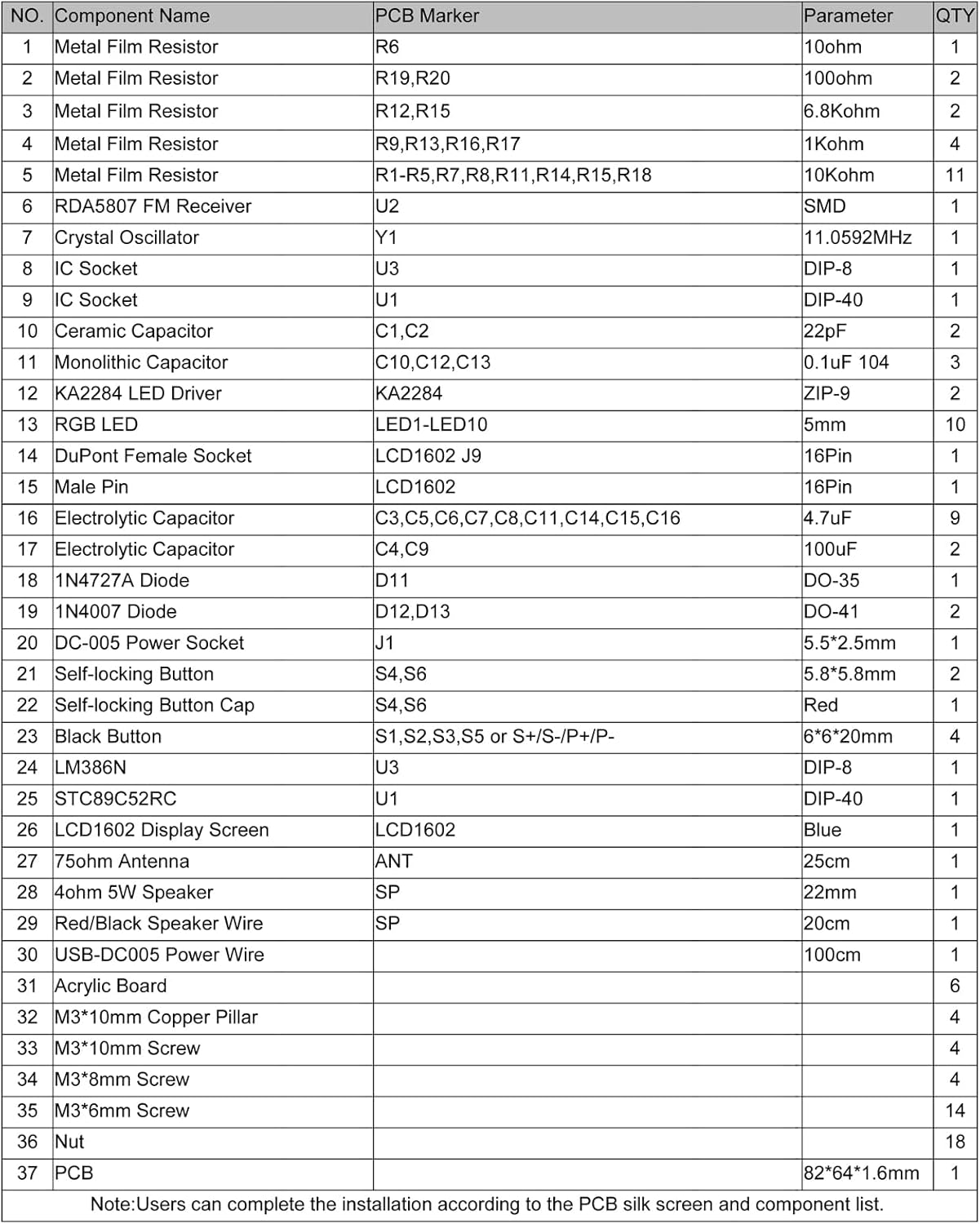
Figure 2.2: Detailed list of components with their corresponding PCB parameters and quantities. This table is crucial for identifying each part during assembly.
| NO. | Component Name | PCB Parameter | QTY | |
|---|---|---|---|---|
| 1 | Metal Film Resistor | R19,R20 | 10ohm | 2 |
| 2 | Metal Film Resistor | R1,R5-R7,R8,R11,R14,R15,R18 | 10Kohm | 11 |
| 3 | Metal Film Resistor | R12,R15 | 6.8Kohm | 2 |
| 4 | Metal Film Resistor | R9,R13,R16,R17 | 1Kohm | 4 |
| 5 | RDA5807 FM Receiver | U2 | SMD | 1 |
| 6 | Crystal Oscillator | Y1 | 11.0592MHz | 1 |
| 7 | IC Socket | U3 | DIP-8 | 1 |
| 8 | IC Socket | U1 | DIP-40 | 1 |
| 9 | Ceramic Capacitor | C1,C2 | 22pF | 2 |
| 10 | Monolithic Capacitor | C10,C12,C13 | 0.1uF 104 | 3 |
| 11 | KA2284 LED Driver | KA2284 | ZIP-9 | 2 |
| 12 | RGB LED | LED1-LED10 | 5mm | 10 |
| 13 | DuPont Female Socket | LCD1602_J9 | 16Pin | 1 |
| 14 | Male Pin | 16Pin | 1 | |
| 15 | Electrolytic Capacitor | C3,C5,C6,C7,C8,C11,C14,C15,C16 | 4.7uF | 9 |
| 16 | Electrolytic Capacitor | C4,C9 | 100uF | 2 |
| 17 | 1N4727A Diode | D11 | DO-35 | 1 |
| 18 | 1N4007 Diode | D12,D13 | DO-41 | 2 |
| 19 | DC-005 Power Socket | J1 | 5.5*2.5mm | 1 |
| 20 | Self-locking Button | S4,S6 | 5.8*5.8mm | 2 |
| 21 | Self-locking Button Cap | S4,S6 | Red | 1 |
| 22 | Black Button | S1,S2,S3,S5 or S+/S-/P+/P- | 6*6*20mm | 4 |
| 23 | LM386N | U3 | DIP-8 | 1 |
| 24 | STC89C52RC | U1 | DIP-40 | 1 |
| 25 | LCD1602 Display Screen | LCD1602 | Blue | 1 |
| 26 | 75ohm Antenna | ANT | 25cm | 1 |
| 27 | 4ohm 5W Speaker | SP | 22mm | 1 |
| 28 | Red/Black Speaker Wire | SP | 20cm | 1 |
| 29 | USB-DC005 Power Wire | 100cm | 1 | |
| 30 | Acrylic Board | 6 | ||
| 31 | M3*10mm Copper Pillar | 4 | ||
| 32 | M3*10mm Screw | 4 | ||
| 33 | M3*8mm Screw | 4 | ||
| 34 | M3*6mm Screw | 14 | ||
| 35 | Nut | 18 | ||
| 36 | PCB | 82*64*1.6mm | 1 |
Note: Users can complete the installation according to the PCB silk screen and component list.
3. Assembly Instructions
Before You Begin
- Tools Required: Soldering iron, solder, wire cutters, small screwdriver set.
- Component Identification: Carefully identify each component using the provided component list and the PCB silk screen.
- Polarity: Pay close attention to the polarity of diodes, electrolytic capacitors, and LEDs. Incorrect polarity can damage components.
- SMD Component: The RDA5807 FM Receiver (U2) is a Surface Mount Device (SMD). It needs to be carefully placed on the PCB and then fixed.
- LED Installation: User must install the LED according to the specified rules (polarity and orientation). Otherwise, some LEDs will not light.
PCB Layout and Schematic
Familiarize yourself with the PCB layout and schematic diagram before soldering. This will help in understanding component placement and circuit flow.
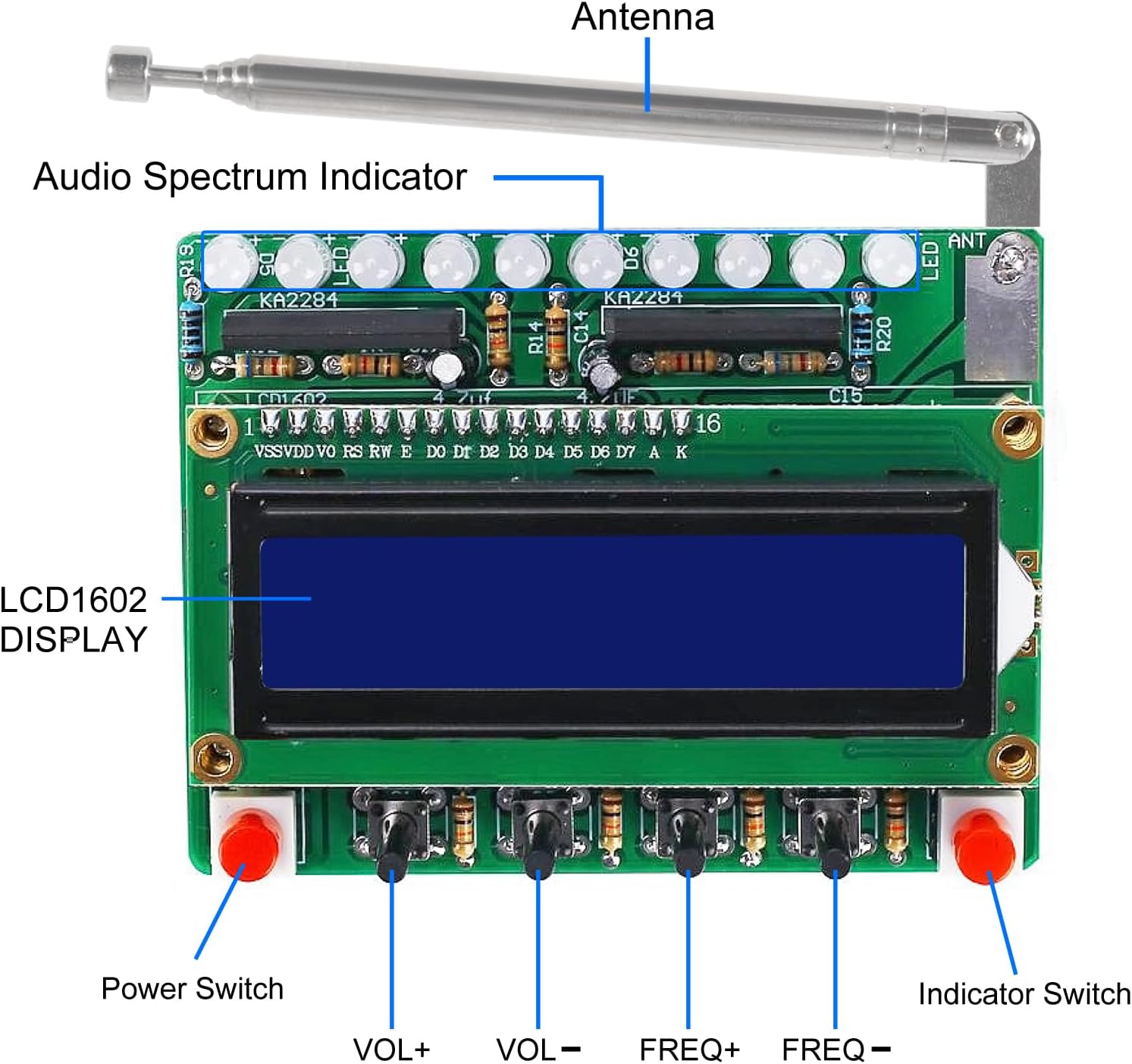
Figure 3.1: Labeled components on the assembled PCB, indicating the location of the antenna, audio spectrum indicator, LCD display, and control buttons.

Figure 3.2: Detailed schematic diagram illustrating the electronic connections and circuit design of the FM radio receiver.
Step-by-Step Assembly
- Prepare the PCB: Ensure the PCB is clean and free of any debris.
- Solder Resistors: Start by soldering all metal film resistors (R1-R20) to their designated spots on the PCB. Resistors are not polarized.
- Solder Diodes: Solder the 1N4727A (D11) and 1N4007 (D12, D13) diodes. Ensure correct polarity; the band on the diode matches the band on the PCB silk screen.
- Solder Ceramic and Monolithic Capacitors: Solder C1, C2, C10, C12, C13. These are non-polarized.
- Solder IC Sockets: Solder the DIP-8 (U3) and DIP-40 (U1) IC sockets. Ensure the notch on the socket aligns with the notch on the PCB silk screen.
- Solder Crystal Oscillator: Solder Y1 (11.0592MHz) to its position.
- Solder Electrolytic Capacitors: Solder C3, C4, C5, C6, C7, C8, C9, C11, C14, C15, C16. These are polarized; ensure the longer lead (positive) goes into the '+' hole or the marked side on the PCB.
- Solder LEDs: Solder the 10 RGB LEDs (LED1-LED10). Pay close attention to their polarity and orientation as specified in the component list and PCB markings.
- Solder KA2284 LED Drivers: Solder the two KA2284 (ZIP-9) LED drivers.
- Solder Buttons and Power Socket: Solder the self-locking buttons (S4, S6), black buttons (S1, S2, S3, S5), and the DC-005 power socket (J1).
- Solder Speaker and Speaker Wire: Solder the 4ohm 5W speaker to the PCB using the red/black speaker wire. Ensure correct polarity if marked.
- Install ICs: Carefully insert the LM386N (U3) and STC89C52RC (U1) ICs into their respective sockets, aligning the notch on the IC with the notch on the socket.
- Connect LCD1602 Display: Solder the 16-pin male header to the LCD1602 display. Then, connect the LCD1602 display to the DuPont Female Socket (LCD1602_J9) on the PCB.
- Assemble Acrylic Casing: Follow the acrylic board shapes to assemble the protective casing around the PCB using the M3 copper pillars, screws, and nuts. Ensure the PCB fits securely within the casing.
- Attach Antenna: Connect the 75ohm antenna to the designated ANT port on the PCB.
- Final Check: Before powering on, visually inspect all solder joints for shorts or cold joints. Double-check component placement and polarity.
4. Operating Instructions
Once assembled, your FM Radio Receiver DIY Kit is ready for operation. Connect the USB-DC005 power wire to the power socket (J1) and a 4.5V~5.5V DC power source.

Figure 4.1: The assembled FM Radio Receiver in operation, demonstrating its LCD display and integrated LED lights.
Basic Controls
- Left Button (Power Switch): Press to turn the power supply ON or OFF.
- Right Button (Indicator Switch): Press to turn the RGB spectrum indicator flashing ON or OFF.
- S+ / S- Buttons (Volume Adjustment): Press S+ to increase volume, and S- to decrease volume.
- P+ / P- Buttons (Frequency Adjustment): Press P+ to increase the receiving frequency, and P- to decrease the receiving frequency. This allows you to tune into different FM stations.
5. Technical Specifications
| Feature | Specification |
|---|---|
| Work Voltage | DC 4.5V ~ 5.5V |
| Output Impedance | 4ohm |
| Output Power | 5W |
| Output Channel | Mono |
| Receiver Frequency | 87.0MHz ~ 108.0MHz |
| Frequency Accuracy | 0.1MHz |
| Equivalent Noise | >= 30dB |
| Work Temperature | -40℃ ~ 85℃ |
| Work Humidity | 5% ~ 95%RH |
| Display Type | LCD1602 |
| Item Weight | 0.48 ounces |
| Package Dimensions | 3.2 x 1.1 x 0.2 inches |
6. Troubleshooting
If you encounter issues with your FM Radio Receiver DIY Kit, please refer to the following common problems and solutions:
- No Power / Display Off:
- Ensure the power supply is connected correctly (DC 4.5V~5.5V).
- Check the power switch (left button) is in the ON position.
- Verify all power connections and solder joints on the PCB.
- Confirm the polarity of electrolytic capacitors and diodes.
- No Sound / Weak Sound:
- Check speaker connections and ensure the speaker is functional.
- Adjust the volume using the S+ / S- buttons.
- Ensure the LM386N (U3) IC is correctly inserted into its socket.
- Verify solder joints for the speaker and audio output components.
- Poor FM Reception / Static:
- Extend the antenna fully.
- Adjust the frequency using the P+ / P- buttons to find a clear station.
- Avoid using the radio in environments with strong signal interference. This is a wireless module and can be affected by external noise.
- Ensure the RDA5807 FM Receiver (U2) is properly placed and fixed.
- LEDs Not Lighting / Incorrectly Flashing:
- Verify the installation direction and polarity of each RGB LED. Incorrect orientation will prevent them from lighting.
- Check the solder joints for all LEDs and the KA2284 LED drivers.
- Ensure the right button (Indicator Switch) is ON.
- LCD Display Issues (Blank / Garbled Text):
- Ensure the LCD1602 display is correctly connected to the DuPont Female Socket.
- Verify all 16 pins are making good contact.
- Check the solder joints for the LCD connector on the PCB.
- General Assembly Issues:
- Review all solder joints for cold joints (dull, grainy appearance) or solder bridges (short circuits).
- Ensure all components are in their correct positions as per the PCB silk screen and schematic.
- Double-check the polarity of all polarized components.
7. Maintenance
To ensure the longevity and proper functioning of your FM Radio Receiver DIY Kit, follow these maintenance guidelines:
- Cleaning: Use a soft, dry cloth to clean the exterior of the radio. Avoid using liquid cleaners or solvents, which can damage the acrylic casing or electronic components.
- Storage: Store the radio in a cool, dry place away from direct sunlight, extreme temperatures, and high humidity.
- Handling: Handle the assembled radio with care to avoid dropping it or subjecting it to strong impacts, which could dislodge components or crack the casing.
- Power Supply: Always use a stable DC 4.5V~5.5V power supply. Using an incorrect voltage can damage the circuit.
8. Warranty and Support
Specific warranty information for this DIY kit is not provided in the product details. As a DIY kit, its functionality largely depends on the user's assembly process.
For any questions regarding installation instructions, component identification, or technical support, please contact the manufacturer, DORHEA, directly via email. They can provide further assistance and guidance for your project.
For general inquiries or to visit the DORHEA store, you may refer to their official Amazon store page: Visit the DORHEA Store
no relevant documents
Ask a question about this manual
Ask about setup, troubleshooting, compatibility, parts, safety, or missing instructions. Manuals+ will review the question and use this page’s manual context to help answer it.