
Takstar PCM-5600
TAKSTAR PCM-5600 Handheld Vocal Microphone User Manual
Model: PCM-5600 | Brand: Takstar
1. Introduction
Thank you for choosing the TAKSTAR PCM-5600 Handheld Vocal Condenser Microphone. This microphone is engineered to deliver high-quality, natural sound reproduction for a variety of applications, including studio recording, live performances, broadcasting, and podcasting. Its robust design and advanced features ensure reliable and superior audio capture. This manual provides essential information for proper setup, operation, maintenance, and troubleshooting to help you get the most out of your PCM-5600 microphone.

Image: The TAKSTAR PCM-5600 Handheld Vocal Condenser Microphone, showcasing its sleek black metal design and gain control switch.
2. Package Contents
Please check the package carefully to ensure all items are present and in good condition:
- PCM-5600 Microphone (1 unit)
- Mic Clip (1 unit)
- XLR Cable (1 unit)
- Leather Storage Bag (1 unit)
- Aluminum Alloy Carry Box (1 unit)

Image: All components included with the TAKSTAR PCM-5600 microphone, neatly arranged with labels for the microphone, XLR cable, mic clip, leather pouch, user manual, and aluminum case.
3. Key Features
3.1 High-Quality Condenser Capsule
The PCM-5600 features a high-quality condenser capsule designed for detailed dynamic timbre and a smooth frequency response from 30Hz to 20KHz, ensuring clean and natural sound reproduction.

Image: An exploded view illustrating the internal components of a professional condenser microphone, highlighting its wide frequency response and Hi-Res audio quality.
3.2 Classic Cardioid Polar Pattern
Equipped with a classic cardioid polar pattern, the microphone effectively reduces sounds from the sides and rear, focusing on the primary sound source. This characteristic is ideal for capturing warm, natural, and rich vocals while minimizing ambient noise.

Image: A visual representation of the classic cardioid response pattern, demonstrating its directional pickup for smooth recording and anti-interference.
3.3 Two-Step Microphone Gain Adjustment
The PCM-5600 includes a convenient two-step gain control switch (+10dB/0dB) allowing for flexible adjustment of microphone gain. This feature helps optimize the input level to improve recording quality and adapt to various sound sources.
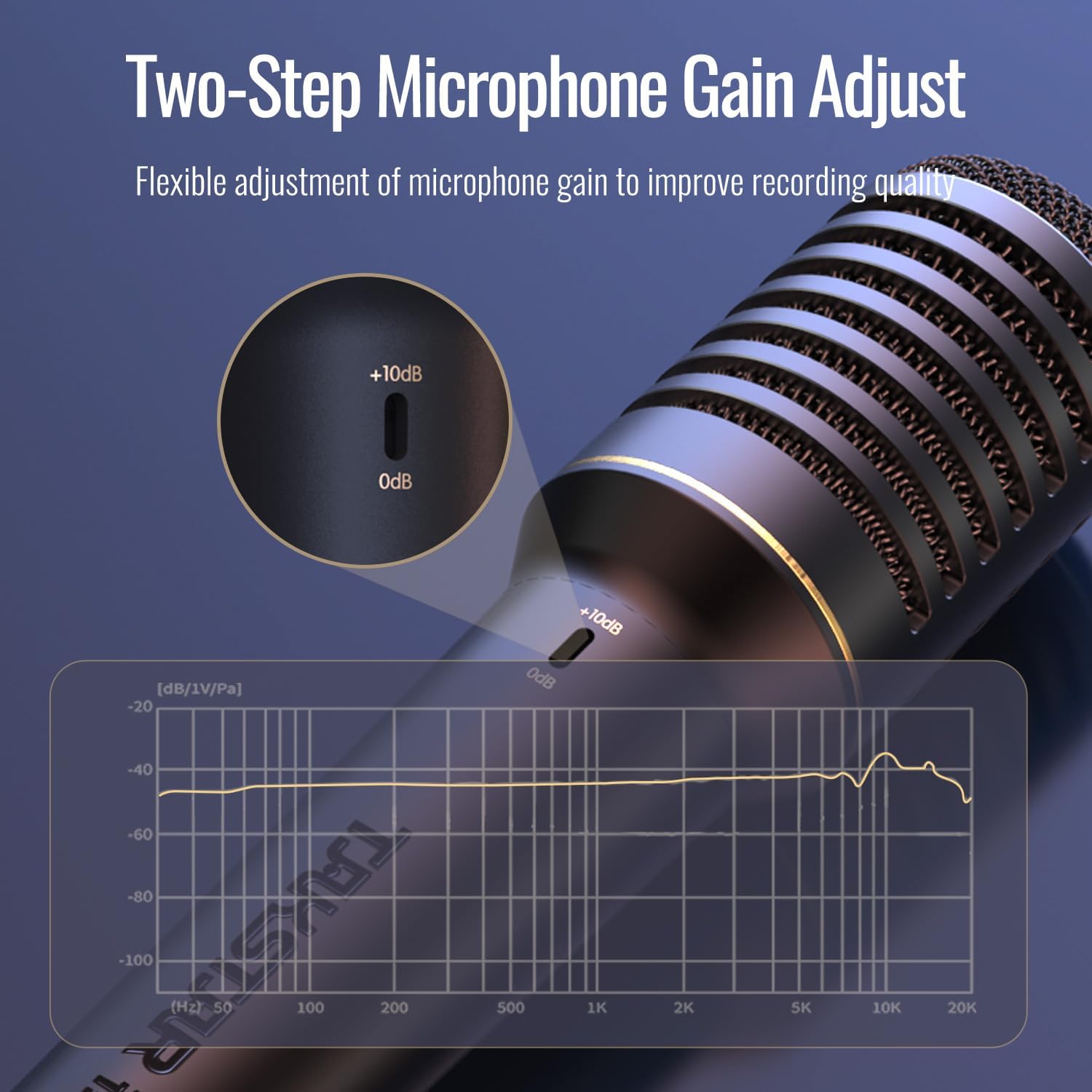
Image: A close-up of the microphone's gain switch, showing the +10dB and 0dB settings, alongside a frequency response graph illustrating the microphone's performance.
3.4 Advanced Calibration Circuit Design
The microphone incorporates an advanced calibration circuit design, contributing to a low noise floor. This design ensures clean recordings with rich sound detail, crucial for professional audio production.

Image: A detailed view of the advanced calibration circuit design, emphasizing its role in achieving a low noise floor and capturing rich sound detail.
3.5 Dual-Layer Metal Grille with Anti-Plosive Design
The PCM-5600 features a built-in dual-layer metal grille that acts as an effective pop filter. This design breaks up strong air currents and filters out undesirable wind and breath sounds, reducing plosives and ensuring clearer audio.

Image: A cross-sectional view of the dual-layer metal grille, illustrating its anti-plosive design that effectively filters out spraying sounds.
3.6 Silicone Damper Design
An internal silicone damper is integrated into the microphone's design to effectively reduce handling noise. This feature ensures a cleaner sound, especially during live performances or when the microphone is being moved.

Image: A cutaway diagram of the microphone showing the built-in silicone shock absorber, designed to reduce handling noise.
4. Setup Guide
- Unpack the Microphone: Carefully remove the PCM-5600 microphone and all accessories from the aluminum alloy carry box.
- Attach the Mic Clip: Securely screw the provided mic clip onto a standard microphone stand.
- Mount the Microphone: Insert the PCM-5600 microphone into the mic clip. Ensure it is firmly seated to prevent accidental dislodging.
- Connect the XLR Cable: Connect one end of the supplied XLR cable to the XLR output port at the bottom of the microphone. Connect the other end of the XLR cable to an audio interface, mixer, or preamplifier that provides 48V phantom power.
- Activate Phantom Power: Ensure that the audio device (mixer, interface) to which the microphone is connected has 48V phantom power activated. The PCM-5600 is a condenser microphone and requires phantom power to operate.
- Initial Gain Setting: Set the gain control switch on the microphone to the 0dB position for initial setup. Adjustments can be made during operation based on your audio source and recording environment.
5. Operating Instructions
- Microphone Placement: Position the microphone approximately 6-12 inches (15-30 cm) from the sound source for optimal vocal capture. Experiment with distance to achieve the desired tone and minimize proximity effect.
- Utilizing the Cardioid Pattern: The PCM-5600 has a cardioid polar pattern, meaning it is most sensitive to sounds coming from the front and least sensitive to sounds from the rear. Point the top of the microphone directly at the sound source you wish to capture. This helps to isolate the desired sound and reduce background noise.
- Adjusting Gain Control:
- 0dB Setting: This is the standard gain setting, suitable for most vocal and instrument applications.
- +10dB Setting: Engage this setting when recording quieter sound sources or if you require a stronger signal output from the microphone. Be mindful of potential clipping if the input signal is too strong.
- Monitoring: Always monitor your audio through headphones or studio monitors to ensure proper levels and sound quality.
- Avoiding Plosives: The built-in dual-layer pop filter helps reduce plosive sounds (harsh 'p' and 'b' sounds). For additional protection, especially in close-mic situations, consider using an external pop filter.
6. Maintenance and Care
- Cleaning: Use a soft, dry cloth to wipe the microphone body. Do not use abrasive cleaners, solvents, or harsh chemicals, as they may damage the finish or internal components.
- Grille Cleaning: If the microphone grille accumulates dust or debris, gently brush it with a soft, dry brush. Avoid poking or pushing anything through the grille.
- Storage: When not in use, store the microphone in its provided leather storage bag and aluminum alloy carry box to protect it from dust, moisture, and physical damage.
- Handling: Handle the microphone with care. Avoid dropping it or subjecting it to strong impacts, as this can damage the sensitive internal capsule.
- Environmental Conditions: Avoid exposing the microphone to extreme temperatures, high humidity, or direct sunlight for prolonged periods.
7. Troubleshooting
- No Sound Output:
- Ensure 48V phantom power is activated on your audio interface or mixer. The PCM-5600 requires phantom power.
- Check all XLR cable connections. Ensure they are securely plugged into both the microphone and the audio device.
- Verify that the input gain on your audio device is turned up.
- Test with a different XLR cable to rule out a faulty cable.
- Confirm that the correct input is selected on your audio interface/mixer and recording software.
- Distorted or Clipped Sound:
- Reduce the input gain on your audio interface or mixer.
- If the microphone's gain switch is set to +10dB, try switching it to 0dB, especially for loud sound sources.
- Increase the distance between the microphone and the sound source.
- Excessive Noise or Hum:
- Ensure all cables are properly shielded and not running parallel to power cables.
- Check for ground loops. Try plugging all audio equipment into the same power strip.
- Verify that the microphone is not picking up ambient room noise. Adjust microphone placement or consider acoustic treatment.
- Ensure the microphone is securely mounted in its clip to minimize handling noise.
8. Technical Specifications
| Specification | Value |
|---|---|
| Capsule | Condenser capsule |
| Polar Pattern | Cardioid (Unidirectional) |
| Frequency Response | 30Hz-20KHz |
| Sensitivity | -43dB±3dB (at 0dB) |
| Gain Control | +10dB / 0dB |
| Equivalent Noise Level | ≤20dBA |
| Peak SPL | 130dB (THD≤1% at 1KHz) |
| Output Impedance | 110Ω±30% (at 1KHz) |
| Power Requirement | 48V ±4V phantom power |
| Net Weight | Approx. 400g |
| Material | Aluminum |
| Connectivity Technology | XLR |
9. Warranty and Support
The TAKSTAR PCM-5600 microphone comes with a one-year free warranty from the date of purchase. This warranty covers manufacturing defects and ensures the product meets its specified performance standards under normal use.
For any questions, technical assistance, or warranty claims, please contact the seller or authorized TAKSTAR service center. Please retain your proof of purchase for warranty validation.
Important: Unauthorized disassembly or modification of the product may void the warranty.
Ask a question about this manual
Ask about setup, troubleshooting, compatibility, parts, safety, or missing instructions. Manuals+ will review the question and use this page’s manual context to help answer it.