
Ninja WC1001
Ninja Thirsti Drink System WC1001 User Manual
Model: WC1001
1. Introduction
The Ninja Thirsti Drink System is designed to provide a personalized beverage experience, allowing users to create a wide variety of still and sparkling drinks. This system offers customization options for flavor, fizz level, and drink size, enabling thousands of unique drink combinations. It features an easy-to-use interface and is compatible with Ninja Thirsti Flavored Water Drops and 60L CO2 Cylinders.

Figure 1: The Ninja Thirsti Drink System with a filled glass and CO2 cylinder.
2. Important Safeguards
READ ALL INSTRUCTIONS BEFORE USE.
To reduce the risk of fire, electric shock, injury, or damage, basic safety precautions should always be followed, including the following:
- Ensure the appliance is placed on a stable, level surface away from the edge of the countertop.
- Do not operate the appliance with a damaged cord or plug. If the appliance malfunctions or has been damaged in any manner, discontinue use and contact customer service.
- Do not immerse the appliance, power cord, or plug in water or other liquids.
- Always unplug the appliance from the outlet when not in use and before cleaning.
- Use only Ninja Thirsti CO2 cylinders and flavored water drops. Using other brands may damage the appliance and void the warranty.
- Do not remove the CO2 cylinder while the appliance is dispensing or under pressure.
- Keep hands and face clear of the dispensing nozzle during operation.
- Ensure the water reservoir is filled with cold water for optimal carbonation.
3. What's Included
Your Ninja Thirsti Drink System WC1001 package includes the following components:
- Ninja Thirsti Station (Main Unit)
- 48oz Removable Temperature Sensitive Water Reservoir
- 60L CO2 Cylinder
- Variety of Flavored Water Drops Starter Pack

Figure 2: All components included in the Ninja Thirsti Drink System package.
4. Setup Guide
Follow these steps to set up your Ninja Thirsti Drink System for first use:
- Unpack and Clean: Remove all packaging materials. Wash the water reservoir and drip tray with warm, soapy water. Rinse thoroughly and dry.
- Attach Water Reservoir: Place the clean water reservoir onto the side of the main unit. Ensure it clicks securely into place. Fill the reservoir with cold water up to the MAX fill line. The temperature-sensitive indicator on the reservoir will show if the water is sufficiently cold. Cold water is crucial for optimal carbonation.
- Install CO2 Cylinder: Open the CO2 access door on the back of the unit. Remove the protective cap from the CO2 cylinder. Insert the cylinder into the compartment and screw it in clockwise until it is firmly seated. Close the access door.
- Insert Flavor Drops: Pull down the flavor drop compartment at the front of the unit. Open the cap of your desired Ninja Thirsti Flavored Water Drop bottle and push the cap all the way back. Insert the bottle(s) into the designated slots (up to two bottles can be inserted). Push the compartment back up until it clicks into place.
- Plug In: Plug the power cord into a standard electrical outlet. The unit is now ready for use.

Figure 3: The removable water reservoir can be stored in the refrigerator to keep water cold.
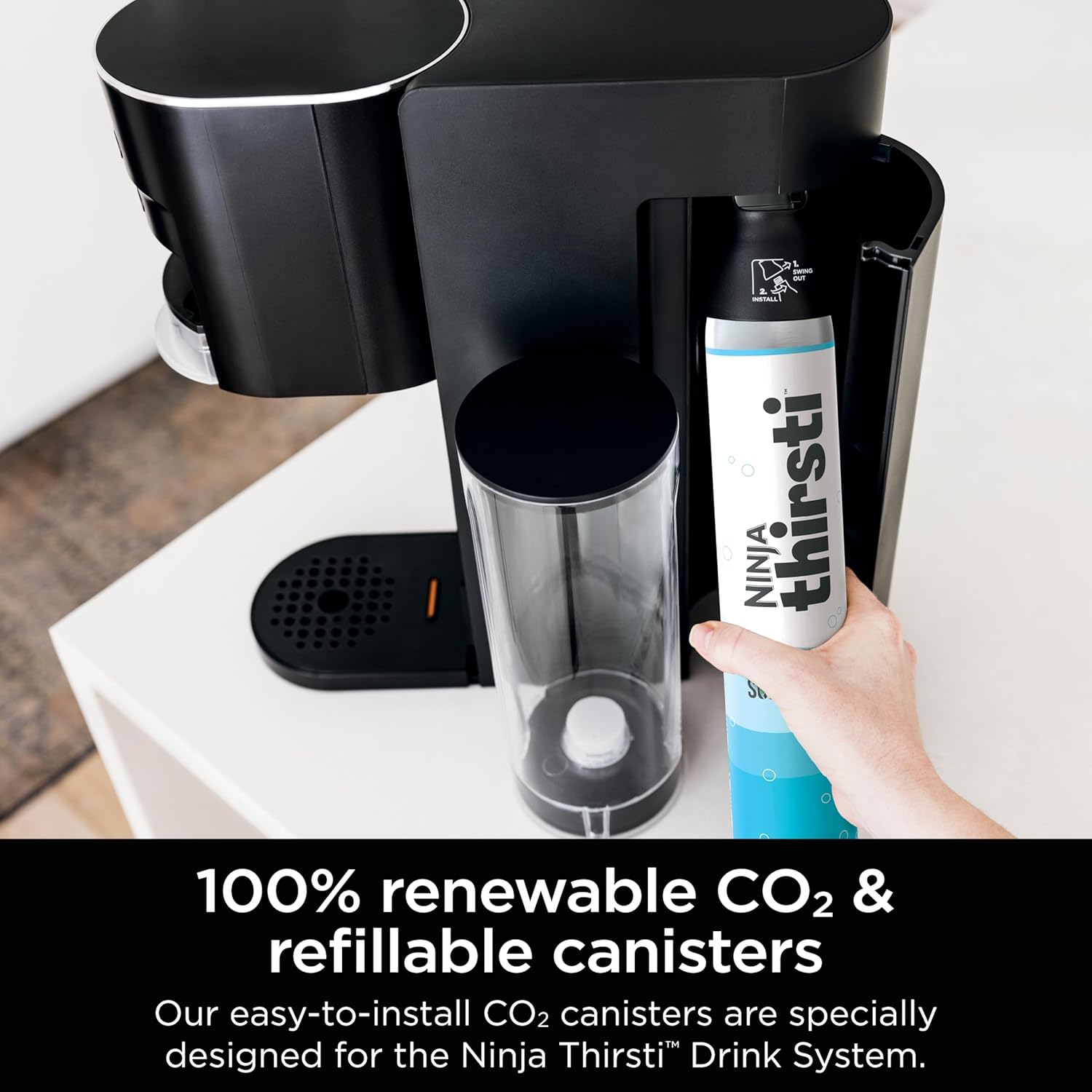
Figure 4: Proper installation of the CO2 cylinder into the rear compartment.

Figure 5: A selection of Ninja Thirsti flavor pods, showing the variety available.
5. Operating Instructions
Creating your custom drink is simple:
- Place Your Cup: Place your desired cup, bottle, or tumbler on the drip tray. The system can accommodate various cup sizes.
- Select Fizz Level: Use the 'Still | Sparkling' buttons to choose your desired carbonation level: Still (no bubbles), Low Fizz, Medium Fizz, or High Fizz.
- Select Drink Size: Press the 'Size' button to cycle through the available drink sizes: 6oz, 12oz, 18oz, or 24oz.
- Select Flavor(s): Choose your flavor(s) using the '1', '2', or 'Combo' buttons. The 'Combo' option allows you to mix two flavors (available for 12oz, 18oz, and 24oz sizes). You can also adjust flavor intensity (Classic or Bold) by pressing the flavor strength button.
- Start Dispense: Press the 'Start' button. The system will begin dispensing your customized drink. Do not grab your drink until you hear the chime indicating completion.
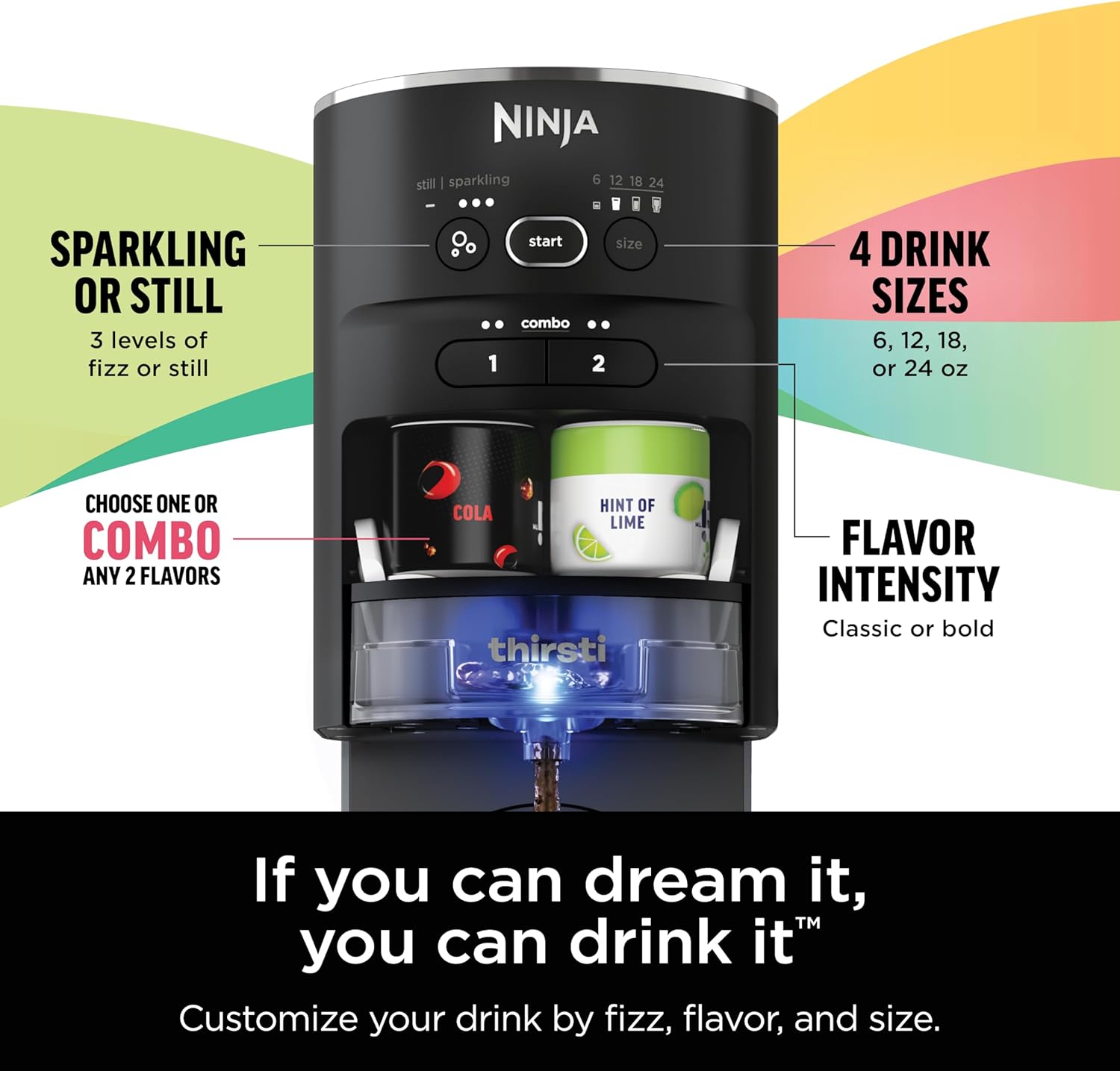
Figure 6: The control panel allows selection of fizz level, drink size, and flavor combinations.

Figure 7: The system dispenses directly into your chosen cup or bottle.
6. Care and Maintenance
Regular cleaning ensures optimal performance and hygiene of your Ninja Thirsti Drink System.
Cleaning the Unit:
- Exterior: Wipe the exterior of the unit with a clean, damp cloth. Do not use abrasive cleaners or scouring pads.
- Drip Tray: The drip tray is removable for easy cleaning. Empty and wash it regularly with warm, soapy water.
- Flavor Mixing Area: The flavor mixing area (where the flavor drops are inserted) can be pulled out for cleaning. Wash it with warm, soapy water and rinse thoroughly. Ensure it is completely dry before reinserting.
Water Reservoir:
- Wash the water reservoir with warm, soapy water. It is recommended to wash it after every few uses or if it has been left unused for an extended period.
- For best results, store the water reservoir filled with cold water in the refrigerator.
CO2 Cylinder:
- The CO2 cylinder does not require cleaning. Replace it when empty.
7. Troubleshooting
If you encounter any issues with your Ninja Thirsti Drink System, refer to the following common problems and solutions:
| Problem | Possible Cause | Solution |
|---|---|---|
| No fizz or low fizz | CO2 cylinder is empty or not properly installed. Water is not cold enough. | Replace CO2 cylinder. Ensure cylinder is screwed in tightly. Use chilled water. |
| Unit not dispensing | Water reservoir is empty or not properly seated. Unit is not plugged in. | Fill water reservoir and ensure it is securely attached. Check power connection. |
| Flavor is too weak/strong | Incorrect flavor strength setting. Flavor drop bottle is empty. | Adjust flavor strength setting on the control panel. Replace flavor drop bottle. |
| Leaking from unit | Water reservoir or drip tray not properly seated. Overfilling cup. | Ensure water reservoir and drip tray are correctly installed. Do not overfill cup. |
If the problem persists after trying these solutions, please contact Ninja Customer Service for further assistance.
8. Specifications
| Feature | Detail |
|---|---|
| Model Name | Ninja WC1001 |
| Brand | Ninja |
| Color | Black |
| Material | Plastic |
| Product Dimensions (D x W x H) | 13.97"D x 8.76"W x 16"H |
| Item Weight | 13.5 pounds |
| Water Reservoir Capacity | 48oz (approx. 1.4 Liters) |
| CO2 Cylinder Capacity | 60L |
| Power Source | AC |
| Operation Mode | Automatic |
| Manufacture Year | 2022 |
| UPC | 622356601870 |

Figure 8: Key dimensions of the Ninja Thirsti Drink System.
9. Warranty and Support
For warranty information, please refer to the warranty card included with your product packaging or visit the official Ninja website. For customer support, troubleshooting beyond this manual, or to order replacement parts and accessories, please contact Ninja Customer Service.
Contact information can typically be found on the product packaging or the manufacturer's official website.
Ask a question about this manual
Ask about setup, troubleshooting, compatibility, parts, safety, or missing instructions. Manuals+ will review the question and use this page’s manual context to help answer it.