
1. Introduction
This manual provides detailed instructions for the installation, operation, and maintenance of your ModishOmbre Modorwy TS7 Universal Android Car Stereo. Please read this manual thoroughly before using the product to ensure proper functionality and safety. This device is designed to enhance your in-car entertainment and navigation experience with its advanced Android operating system and multimedia capabilities.
2. Safety Information
- Professional Installation Recommended: Due to the complexity of car electrical systems, professional installation is highly recommended to prevent damage to the unit or your vehicle.
- Driving Safety: Do not operate the device in a manner that distracts you from driving. Always prioritize road safety.
- Power Supply: Ensure the unit is connected to a 12V DC power supply with proper grounding. Incorrect wiring can cause damage or fire.
- Temperature: Avoid exposing the unit to extreme temperatures or direct sunlight for prolonged periods.
- Moisture: Keep the unit away from water and excessive moisture.
3. Package Contents
Verify that all items listed below are included in your product package:
- Modorwy TS7 Car Multimedia Player (Main Unit)
- GPS Antenna
- Microphone (Mic)
- Modrive Car Rear View Reverse Parking Camera
- Rear Camera Cable
- USB Cable (x2)
- RCA Cable Set
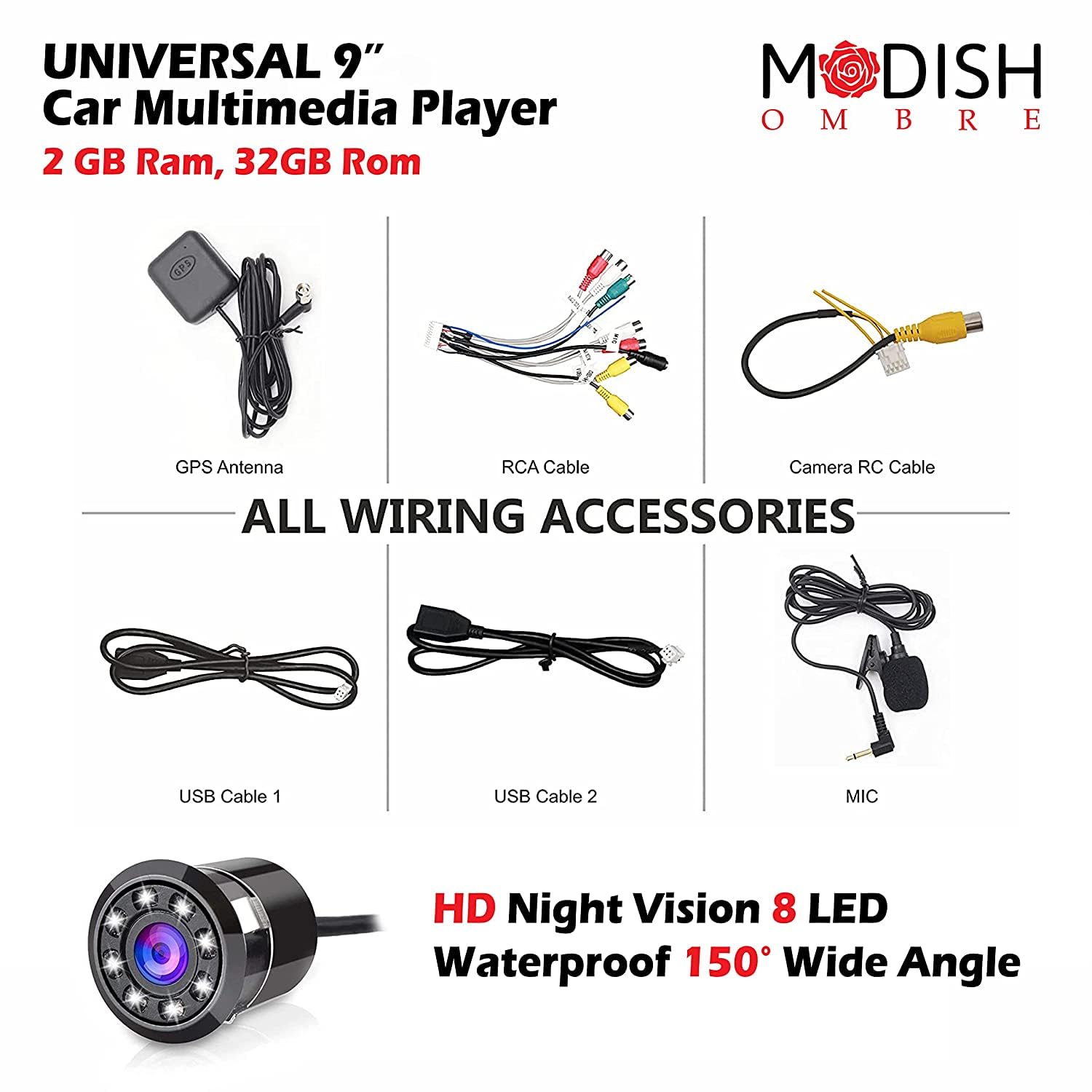
4. Product Overview
The Modorwy TS7 is a universal 9.1-inch Android car stereo designed for a wide range of vehicles. It features a capacitive touchscreen, a Quad-Core processor, 2GB RAM, and 32GB ROM, providing a responsive and feature-rich user experience. Key features include GPS navigation, Bluetooth connectivity, FM/AM radio, and support for a rear camera.
4.1 Front Panel Controls and Interface

- MIC: Built-in microphone for hands-free calling and voice commands.
- RST (Reset): Small pinhole button to reset the unit if it becomes unresponsive.
- Opening Key: Power on/off button, also used to return to the main interface.
- Main Interface: Button to quickly navigate to the home screen.
- Return Key: Back button for navigating through menus.
- Volume Plus (+): Increases audio volume.
- Vol (Volume Minus -): Decreases audio volume.
4.2 Rear Panel Connections

Refer to Figure 4.2 for a detailed diagram of the rear connections. Each connector is labeled for its specific function, including power, speaker outputs, auxiliary inputs, video inputs/outputs, USB ports, and antenna connections.
5. Setup & Installation
Proper installation is crucial for the optimal performance of your car stereo. If you are unsure about any steps, consult a professional installer.
5.1 Wiring Connections
- Power Connection: Connect the main power harness according to the Car Navi Diagram (Figure 4.2). Ensure the 12V B+ (constant power), ACC (switched power), and GND (ground) wires are correctly connected to your vehicle's electrical system.
- Speaker Connections: Connect your vehicle's speakers to the corresponding speaker output wires on the harness. Pay attention to positive (+) and negative (-) terminals for each speaker (Front Left, Front Right, Rear Left, Rear Right).
- GPS Antenna: Connect the GPS antenna to the dedicated GPS ANT port on the rear of the unit. Mount the antenna in a location with a clear view of the sky, typically on the dashboard or under the windshield.
- Radio Antenna: Connect your vehicle's radio antenna to the Radio ANT port.
- Rear Camera: Connect the Modrive Rear View Camera to the CAM IN video input and its power/trigger wires to the appropriate vehicle circuits (e.g., reverse light trigger).
- USB Cables: Connect the provided USB cables to the USB ports on the unit. These can be routed to a convenient location in your vehicle for connecting USB drives or other devices.
- Microphone: Connect the external microphone to the MIC input for improved call quality. Position the microphone near the driver for optimal voice pickup.
- Other Connections: Connect any additional accessories such as AUX-IN, video output, or external amplifiers using the RCA cables as needed.
5.2 Mounting the Unit
Securely mount the car stereo into your vehicle's dashboard opening using the appropriate mounting brackets and screws. Ensure the unit is stable and does not obstruct any vehicle controls or airbags.
6. Operating Instructions
Familiarize yourself with the unit's interface and functions for an optimal user experience.
6.1 Basic Operation

- Power On/Off: Press and hold the 'Opening Key' button on the front panel to power the unit on or off. A short press will return to the main interface.
- Touch Screen: The 9.1-inch capacitive touch screen responds to finger gestures. Tap to select, swipe to scroll, and pinch to zoom (where applicable).

6.2 Android System
The unit runs on Android 10.1 (upgradable to Android 12 in some versions), providing access to a wide range of applications. You can download and install apps from the Android market (Google Play Store) once connected to Wi-Fi.
6.3 Navigation (GPS)
The built-in GPS receiver supports offline maps. To use online navigation, connect the unit to Wi-Fi or a mobile hotspot. Open the pre-installed navigation app or download your preferred navigation app from the Play Store.
6.4 Bluetooth Connectivity
- Go to the Bluetooth settings menu on the car stereo.
- Enable Bluetooth on your mobile device and search for available devices.
- Select the car stereo's Bluetooth name (e.g., 'Modorwy TS7') from your device list.
- Confirm the pairing code on both devices.
- Once paired, you can make/receive calls and stream audio wirelessly.
6.5 FM/AM Radio

Access the 'Radio' application from the main interface. Use the on-screen controls to scan for stations, manually tune to a frequency, and save your favorite radio stations.
6.6 Multimedia Playback
The unit supports media playback from USB flash drives and SD cards. Insert your storage device into the appropriate port, then use the 'Music' or 'Video' applications to browse and play your media files.
6.7 Rear Camera Functionality

When the vehicle is shifted into reverse gear, the unit will automatically display the feed from the connected rear camera, assisting with parking and reversing maneuvers.
6.8 Split Screen Mode

The split-screen mode allows you to run two applications simultaneously. For example, you can have navigation open on one side and a music player on the other. To activate, open an app, then long-press the recent apps button or follow the specific Android gestures for split-screen mode.
7. Maintenance
- Cleaning: Use a soft, dry cloth to clean the screen and unit. For stubborn smudges, a slightly damp cloth with a mild, non-abrasive cleaner can be used. Avoid harsh chemicals.
- Software Updates: Periodically check for software updates through the unit's settings menu (requires internet connection) to ensure optimal performance and access to new features.
- Data Backup: Regularly back up important data stored on the unit to an external device or cloud service.
8. Troubleshooting
If you encounter issues with your Modorwy TS7, refer to the following common problems and solutions:
- No Power:
- Check all power connections (12V B+, ACC, GND) for proper wiring and secure contact.
- Verify the vehicle's fuse for the stereo is not blown.
- No Sound Output:
- Ensure speaker wires are correctly connected and not short-circuited.
- Check the volume level and mute settings on the unit.
- Verify that the correct audio source is selected.
- Touch Screen Unresponsive/Inaccurate:
- Perform a soft reset by pressing the RST button with a thin object.
- Ensure the screen is clean and free of debris or moisture.
- If the issue persists after a reset, contact customer support.
- GPS Signal Lost/Inaccurate:
- Ensure the GPS antenna is securely connected and mounted in a location with a clear view of the sky.
- Check if the navigation app settings are configured correctly.
- Bluetooth Pairing Issues:
- Ensure Bluetooth is enabled on both the car stereo and your mobile device.
- Delete previous pairings on both devices and attempt to pair again.
- Move your mobile device closer to the car stereo.
- Rear Camera Not Displaying:
- Verify the rear camera's video cable and power connections are correct.
- Ensure the reverse trigger wire is properly connected to the vehicle's reverse light circuit.
9. Specifications
| Feature | Specification |
|---|---|
| Brand | ModishOmbre |
| Model Name | TS 7 -2/32 |
| Operating System | Android 10.1 (upgradable to Android 12) |
| Processor | Quad Core CPU |
| RAM | 2GB |
| Internal Storage (ROM) | 32GB |
| Screen Size | 9.1 Inches |
| Display Type | LCD, Colour Screen, 2.5D Capacitive Touchscreen |
| Resolution | 1024x600 (HD 1080P support) |
| Audio Output Mode | HiFi Audio |
| Audio Wattage | 50W x 4 (Dynamic Equalize Audio O/P) |
| Special Features | Built-in Bluetooth, FM Tuner, GPS Navigation, Split Screen |
| Connectivity Technology | Bluetooth, Wi-Fi |
| Compatible Devices | Smartphone |
| Mounting Type | Dashboard Mount |
| Item Weight | 800 g |
| Product Dimensions | 29 x 25.4 x 7 cm |
10. Warranty Information
The ModishOmbre Modorwy TS7 Universal Android Car Stereo comes with a 1-year warranty from the date of purchase. This warranty covers manufacturing defects and malfunctions under normal use. Please retain your proof of purchase for warranty claims. The warranty does not cover damage caused by improper installation, misuse, accidents, or unauthorized modifications.
11. Customer Support
For technical assistance, warranty claims, or any other inquiries regarding your ModishOmbre Modorwy TS7 car stereo, please contact our customer support team:
- Customer Care Number: 8287912907
- Manufacturer: Modish Tradex Pvt. Ltd
- Address: D 11 / 153 Sector 8 Rohini, Near 389 Metro Pilar
Please have your product model and purchase details ready when contacting support.