
1. Introduction
This manual provides detailed instructions for the installation, operation, and maintenance of your SANSCO BK24 Wire-Free Solar Battery Powered Security Camera. This 4MP outdoor WiFi IP camera is designed for reliable surveillance with the convenience of solar power and two-way audio communication.
Key features include 2K/4MP resolution, color night vision, a built-in battery with solar panel charging, two-way audio, and IP66 weatherproof housing for outdoor use. The camera can function independently or as an add-on to existing SANSCO Wireless Camera Systems.
2. Package Contents
Please verify that all items are present in your package:
- SANSCO BK24 Security Camera
- Solar Panel with connection cable
- Camera Mounting Bracket
- Solar Panel Mounting Bracket
- USB-C Charging Cable
- Mounting Screws and Wall Anchors
- Quick Guide / Instruction Manual
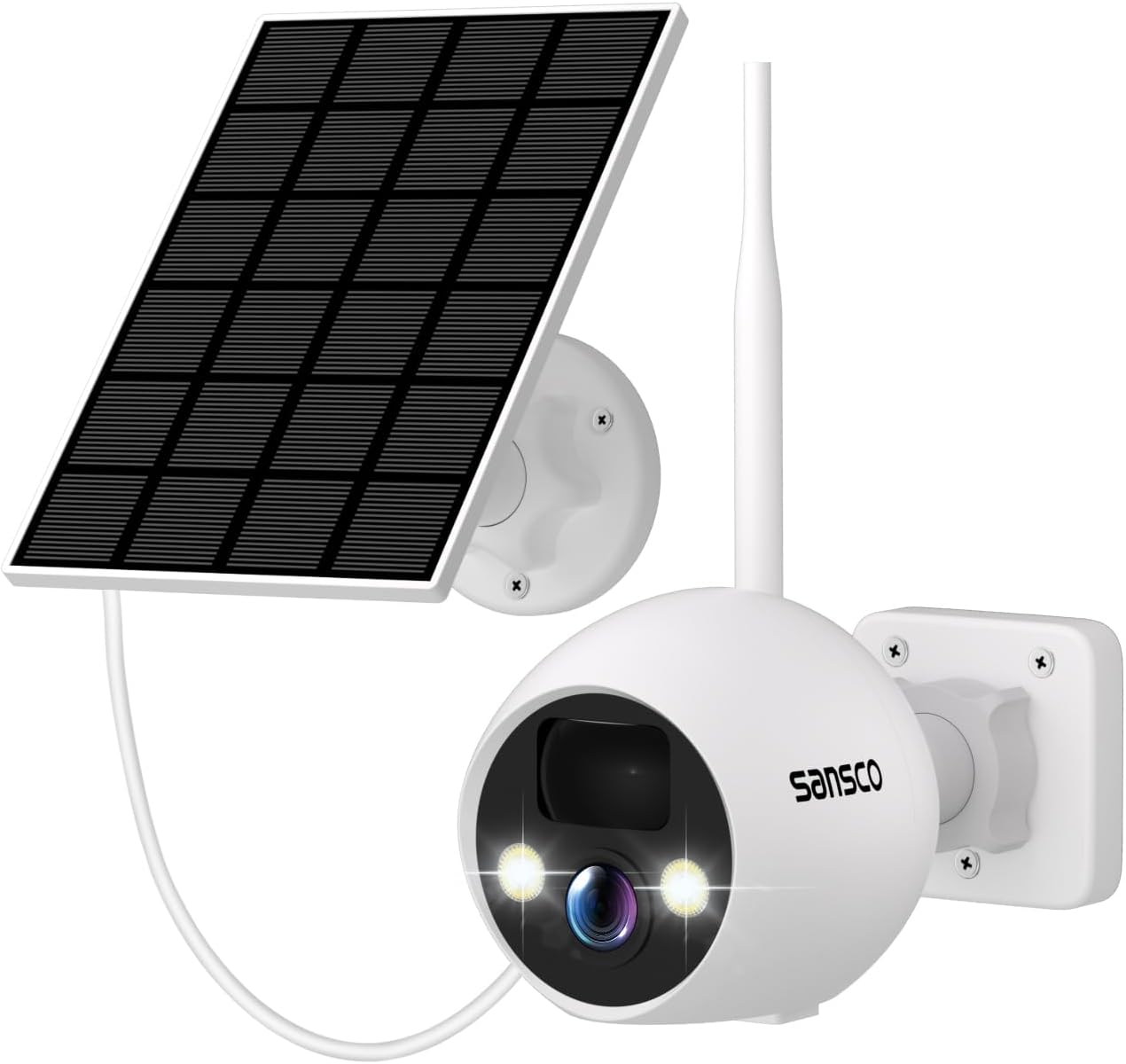
Image: SANSCO BK24 Security Camera with included solar panel.
Video: Unboxing and overview of the Sansco WiFi Battery Operated Camera System with Solar Panels. This video demonstrates the components included in the package and their initial presentation.
3. Product Overview

Image: Rear view of the SANSCO BK24 camera, highlighting the DC 5V port, Reset button, ON/OFF switch, and SD card slot, all protected by a waterproof cover.
The SANSCO BK24 camera features a robust design for outdoor use. Key components include:
- Lens: Captures 4MP video footage.
- LED Lights: Provide illumination for color night vision and active deterrence.
- PIR Sensor: Passive Infrared sensor for motion detection.
- Microphone: For audio input during two-way communication.
- Speaker: For audio output during two-way communication and siren.
- Antenna: For WiFi connectivity.
- DC 5V Port: USB-C port for charging the internal battery.
- SD Card Slot: Supports local storage of recordings (SD card not included).
- Reset Button: For factory reset.
- ON/OFF Switch: To power the camera on or off.
4. Setup
4.1 Physical Installation
The SANSCO BK24 camera and solar panel are designed for easy outdoor installation. Choose a location that provides optimal sunlight exposure for the solar panel and a clear view for the camera.
- Mounting Location: Select a sturdy surface (e.g., wall, wooden post) for both the camera and the solar panel. Ensure the solar panel is positioned to receive maximum direct sunlight throughout the day.
- Drill Pilot Holes: Use the provided positioning sticker (if available) or mark the screw holes for the mounting brackets. Drill pilot holes as needed.
- Install Brackets: Securely attach the camera mounting bracket and the solar panel mounting bracket using the provided screws and wall anchors.
- Attach Solar Panel: Connect the solar panel to its bracket and adjust its angle for optimal sun exposure.
- Attach Camera: Secure the camera to its mounting bracket.
- Connect Solar Panel to Camera: Plug the solar panel's cable into the DC 5V port on the camera. Ensure the waterproof plug is securely closed after connection.

Image: SANSCO camera and solar panel mounted on an outdoor wall, demonstrating the wire-free setup.

Image: SANSCO camera and solar panel illustrating continuous power supply for 365 days through solar charging.
4.2 App Installation and Configuration
The SANSCO BK24 camera operates via a mobile application. Follow these steps to set up the app and connect your camera:
- Download App: Search for the recommended app (e.g., Eseecloud) on your smartphone's app store (iOS or Android) and install it.
- Register Account: Open the app and register a new user account using your email address.
- Power On Camera: Ensure the camera is powered on using the ON/OFF switch.
- Add Device: In the app, select 'Add Device' or scan the QR code located on the back of the camera.
- Connect to WiFi: Follow the in-app instructions to connect the camera to your 2.4GHz WiFi network. (Note: 5GHz WiFi is not supported).
- Name Device: Assign a name to your camera (e.g., 'Front Door', 'Backyard').
Once connected, you can access live view, recordings, and adjust settings through the app.
5. Operating Instructions
5.1 Live View and Playback
Access real-time footage and review past recordings directly from the mobile app.
- Live View: Open the app and select your camera to view the live feed.
- Playback: Navigate to the 'Playback' section in the app to access recorded footage stored on the SD card or cloud storage (if subscribed).

Image: Demonstrates easy remote access to the camera's live feed and recordings from various devices like smartphones, tablets, and PCs.
5.2 Two-Way Audio
Communicate with visitors or deter intruders using the built-in microphone and speaker.
- Activate Two-Way Audio: In the live view interface of the app, tap the microphone icon to speak through the camera's speaker. Tap the speaker icon to hear audio from the camera's microphone.

Image: Illustrates real-time two-way communication feature, allowing interaction with individuals near the camera.
5.3 Motion Detection and Alerts
The camera uses a PIR sensor for accurate motion detection and sends instant alerts to your smartphone.
- Enable Alerts: Ensure motion detection and push notifications are enabled in the app's settings.
- Review Events: Access the 'Events' or 'Alarm Message' section in the app to view recorded motion events.

Image: Shows the camera's ability to detect human motion at night, activating a spotlight and sending instant notifications to a smartphone.
5.4 Night Vision
The camera supports 2K color night vision for clear surveillance even in low-light conditions.
- Automatic Activation: Night vision typically activates automatically in low light.
- Color Night Vision: The integrated spotlights enable full-color video at night when motion is detected.

Image: SANSCO camera providing clear night vision with its integrated spotlight, enhancing visibility in dark environments.
5.5 Active Deterrence
Utilize the camera's active deterrence features to ward off unwanted visitors.
- Spotlight: Can be configured to activate upon motion detection.
- Siren: A loud siren can be manually triggered or set to activate automatically via the app.
6. Maintenance
6.1 Battery Charging
The camera features a built-in rechargeable battery that is continuously charged by the solar panel during daylight hours. In periods of low sunlight, the battery will power the camera.
- Solar Charging: Ensure the solar panel is clean and free from obstructions to maximize charging efficiency.
- USB-C Charging: If prolonged periods of low sunlight occur, or for initial charging, the camera can be charged directly via the USB-C port using the provided cable and a standard 5V USB power adapter (not included).
6.2 SD Card Management
For local storage, insert a microSD card (up to 128GB, not included) into the camera's SD card slot. Format the card via the app for optimal performance.
- Installation: Carefully open the waterproof cover at the bottom of the camera and insert the microSD card. Close the cover securely.
- Formatting: Access the camera settings in the app to format the SD card.
- Storage: The camera will automatically record motion-triggered events to the SD card. Older footage may be overwritten when the card is full.
6.3 Weatherproofing
The SANSCO BK24 camera has an IP66 weatherproof rating, making it suitable for various outdoor conditions.
- Regular Inspection: Periodically check the camera and solar panel for any signs of damage or wear.
- Cleanliness: Keep the camera lens and solar panel clean from dirt, dust, and debris to ensure clear images and efficient charging.

Image: SANSCO camera demonstrating its waterproof capabilities, suitable for outdoor installation in various weather conditions.
7. Troubleshooting
If you encounter issues with your SANSCO BK24 camera, refer to the following common solutions:
| Problem | Possible Solution |
|---|---|
| Camera not connecting to WiFi | Ensure your WiFi is 2.4GHz. Check WiFi signal strength at the camera's location. Reset the camera and try re-pairing. |
| Poor video quality | Check your internet connection speed. Ensure the camera lens is clean. Adjust camera position for better lighting. |
| Battery not charging | Ensure the solar panel is receiving direct sunlight and is clean. Check the connection cable between the solar panel and camera. Charge directly via USB-C if needed. |
| No motion alerts | Verify motion detection is enabled in the app. Check app notification settings on your phone. Ensure the camera's PIR sensor is not obstructed. |
| Two-way audio issues | Check microphone and speaker settings in the app. Ensure there are no obstructions blocking the microphone or speaker on the camera. |
For further assistance, please contact SANSCO customer support.
8. Specifications
- Brand: SANSCO
- Model: BK24
- Color: White
- Power Source: Battery Powered, Solar
- Video Capture Resolution: 1080p, 720p (Note: Product title states 4MP, specifications list 1080p, 720p. Refer to product packaging for exact resolution.)
- Connectivity Technology: Wireless (WiFi)
- Installation Type: Self-Adhesive, Screw-In
- Alert Type: Motion Only
- Control Method: App
- Battery Cell Composition: Lithium Ion
- Recommended Uses For Product: Outdoor Security
- Battery Life: 1 year (estimated, varies with usage and solar exposure)
- Item Weight: 1.43 pounds
- Product Dimensions: 7.87 x 6.69 x 5.12 inches
- Weatherproof Rating: IP66
9. Warranty and Support
SANSCO is committed to providing reliable products and customer satisfaction.
- Returns and Exchanges: Enjoy 30 days of hassle-free returns and exchanges.
- Continuous Support: SANSCO offers lifetime continuous support for its products.
- Technical Assistance: For any technical support or troubleshooting, it is recommended to contact SANSCO directly. You may find contact details in the Quick Guide or on the official SANSCO website.