
1. Product Overview
This instruction manual provides guidance for the installation and maintenance of McbeAn replacement side brushes and HEPA filters, designed for optimal performance with the Cleanmate S950 robot vacuum cleaner. Regular replacement of these components is crucial for maintaining your robot vacuum's cleaning efficiency and air filtration capabilities.
2. Compatibility
This replacement kit is specifically designed to be compatible with the Cleanmate S950 Robot Vacuum Cleaner. Please ensure your robot vacuum model matches this specification before installation.
3. Package Contents
Depending on your purchased kit variant, the package may include:
- Side Brushes (e.g., 6 pieces)
- HEPA Filters (quantity varies by kit)

Figure 3.1: Example of a replacement kit containing both side brushes and HEPA filters. The exact contents may vary based on the specific kit purchased.
4. Installation Instructions
4.1. Replacing Side Brushes
The side brushes help sweep debris from edges and corners into the vacuum's cleaning path. They should be replaced periodically to maintain effective cleaning.
- Power Off: Ensure your Cleanmate S950 robot vacuum cleaner is powered off and unplugged from its charging base.
- Flip Vacuum: Carefully turn the robot vacuum upside down to access the underside.
- Locate Brushes: Identify the existing side brushes. They are typically located on the front sides of the vacuum.
- Remove Old Brushes: Depending on the design, the brushes might be held by a screw or simply snap into place. Use a screwdriver if necessary to remove the retaining screw, then gently pull the old brush upwards to detach it.
- Install New Brushes: Align the new side brush with the corresponding post on the vacuum. Push it down firmly until it clicks into place or secure it with the screw removed earlier. Ensure the brush is seated correctly and can rotate freely.
- Repeat: Repeat the process for all side brushes that require replacement.

Figure 4.1: Individual replacement side brushes. Note the three-arm design and central attachment point.
4.2. Replacing HEPA Filters
HEPA filters capture fine dust particles and allergens, improving air quality. They should be replaced regularly to maintain filtration efficiency and prevent reduced suction power.
- Power Off: Ensure your Cleanmate S950 robot vacuum cleaner is powered off.
- Access Dust Bin: Locate and remove the dust bin from your robot vacuum. Refer to your vacuum's main instruction manual if you are unsure how to remove the dust bin.
- Open Filter Compartment: Open the filter compartment on the dust bin. This usually involves lifting a latch or cover.
- Remove Old Filter: Carefully remove the old HEPA filter. Tap the dust bin gently over a trash can to dislodge any loose debris from the filter before removal.
- Install New Filter: Insert the new HEPA filter into the compartment, ensuring it is seated correctly and snugly. The pleated side typically faces upwards or towards the air intake.
- Close Compartment & Reinstall Bin: Close the filter compartment cover and reinsert the dust bin back into the robot vacuum until it clicks into place.
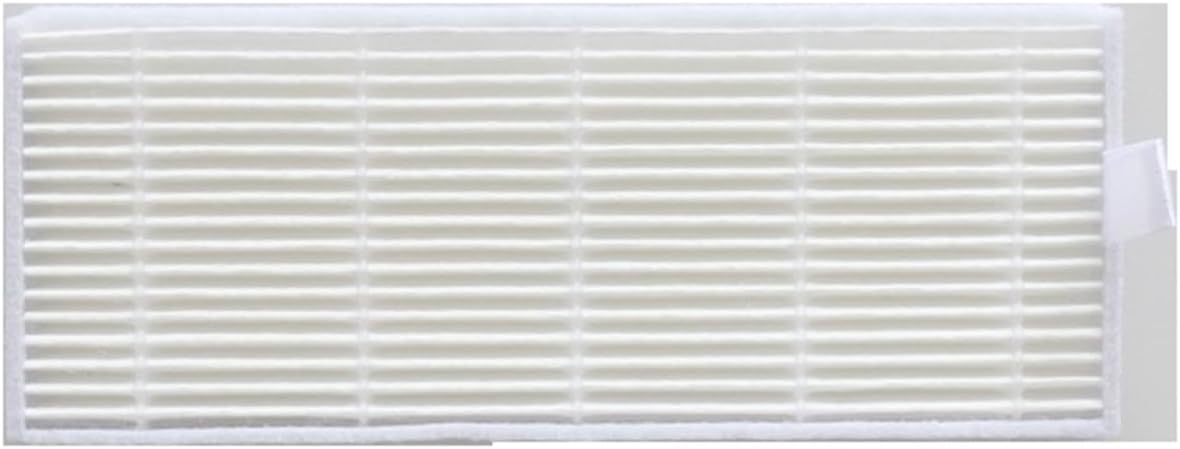
Figure 4.2: A new HEPA filter, ready for installation.

Figure 4.3: HEPA filter dimensions for reference.
5. Maintenance and Care
To ensure the longevity and optimal performance of your robot vacuum and its replacement parts:
- Side Brushes: Regularly check side brushes for tangled hair or debris. Clean them as needed. If bristles become bent or worn, replace the brush.
- HEPA Filters: Tap the HEPA filter gently over a trash can after each cleaning cycle to remove accumulated dust. Do not wash HEPA filters with water, as this can damage the filtration material. Replace filters every 1-3 months, or more frequently if you have pets or experience heavy usage.
- General: Always power off the vacuum before performing any maintenance.
6. Specifications
- Product Type: Replacement Side Brushes and HEPA Filters
- Compatibility: Cleanmate S950 Robot Vacuum Cleaner
- Brand: McbeAn
- Item Weight: Approximately 1.76 ounces (total package)
- HEPA Filter Dimensions: Approximately 130mm (Length) x 50mm (Width) x 9mm (Height)
- Reusability: Filters are generally not reusable after washing; brushes can be cleaned.
7. Troubleshooting
If you encounter issues after replacing parts, consider the following:
- Side Brush Not Spinning:
- Ensure the brush is correctly installed and the retaining screw (if applicable) is tightened.
- Check for any hair or debris tangled around the brush motor or shaft.
- Reduced Suction Power:
- Verify the HEPA filter is installed correctly and not clogged.
- Ensure the dust bin is empty and properly seated.
- Unusual Noises:
- Inspect all installed parts for proper seating and ensure no foreign objects are caught in the brushes or vacuum path.
8. Warranty and Support
For specific warranty information or further support regarding your McbeAn replacement parts, please refer to the product packaging or contact the retailer from whom the product was purchased. Keep your proof of purchase for warranty claims.