
1. Introduction
This manual provides detailed instructions for the safe and effective operation of your Ulanzi LT028 40W LED Video Light. Please read this manual thoroughly before use and retain it for future reference. The Ulanzi LT028 is a portable 40W COB LED video light designed for various photography and video recording applications, featuring a built-in battery and adjustable color temperature.

Image 1.1: The Ulanzi LT028 40W LED Video Light, showcasing its compact design and light output with an attached reflector. The image also displays examples of white and warm light output.
2. Safety Information
- Do not disassemble or modify the device. Unauthorized modifications may cause damage or injury.
- Keep the device away from water and other liquids. Do not operate with wet hands.
- Avoid direct eye exposure to the LED light.
- Do not block the ventilation openings during operation to prevent overheating.
- Use only the specified charging adapter.
- Store the device in a dry, cool place, away from direct sunlight and extreme temperatures.
3. Package Contents
Verify that all items are present in the package:
- Ulanzi LT028 40W LED Video Light
- Reflector
- Silicon Cover
- Power Adapter (DC)
- User Manual
4. Product Overview
Familiarize yourself with the components of the Ulanzi LT028 LED Video Light.

Image 4.1: The Ulanzi LT028 highlighting its compact and portable design, with dimensions of approximately 8.5cm x 8.5cm x 10.5cm.
- COB LED: Main light source.
- Reflector Mount: For attaching the included reflector or other Mini Bowens Mount accessories.
- Ventilation Grilles: For heat dissipation.
- Display Screen: Shows current settings (brightness, color temperature, battery level).
- Control Knobs: For adjusting brightness and color temperature, and selecting modes.
- Power Input (DC): For charging and continuous power supply.
- 1/4"-20 Thread: For mounting on tripods or light stands.

Image 4.2: A detailed view of the Ulanzi LT028's control panel, showing the display screen and the two control knobs for intuitive operation.
5. Setup
5.1 Charging the Battery
The LT028 features a built-in 3400mAh battery. Before first use, fully charge the device.
- Connect the provided DC power adapter to the power input port on the light.
- Plug the adapter into a power outlet.
- The display screen will indicate the charging status. A full charge typically takes approximately 3 hours.
- The light can be used while charging.

Image 5.1: A hand connecting the DC power adapter to the Ulanzi LT028 LED video light for charging or continuous power.
5.2 Attaching Accessories
The LT028 uses a Mini Bowens Mount for accessories.
- To attach the reflector: Align the reflector's tabs with the slots on the light's mount, insert, and twist clockwise until it locks.
- To remove: Twist counter-clockwise and pull the reflector off.
- Note: The Mini Bowens Mount is not compatible with standard Bowens Mount accessories.
6. Operating Instructions
6.1 Power On/Off
Press and hold the power button (usually integrated with one of the control knobs) to turn the light on or off.
6.2 Adjusting Brightness and Color Temperature
The LT028 offers adjustable brightness from 0-100% and color temperature from 2500K-6500K.

Image 6.1: Visual representation of the Ulanzi LT028's adjustable brightness (0-100%) and color temperature (2500K-6500K), demonstrating its versatility.
- Brightness Adjustment: Rotate the "DIM" control knob to increase or decrease the light intensity.
- Color Temperature Adjustment: Rotate the "CCT" control knob to change the color temperature from warm (2500K) to cool (6500K).
- The display screen will show the current brightness percentage and color temperature in Kelvin.
6.3 Special Lighting Effects
The LT028 includes 8 dynamic lighting effects for creative scenarios.
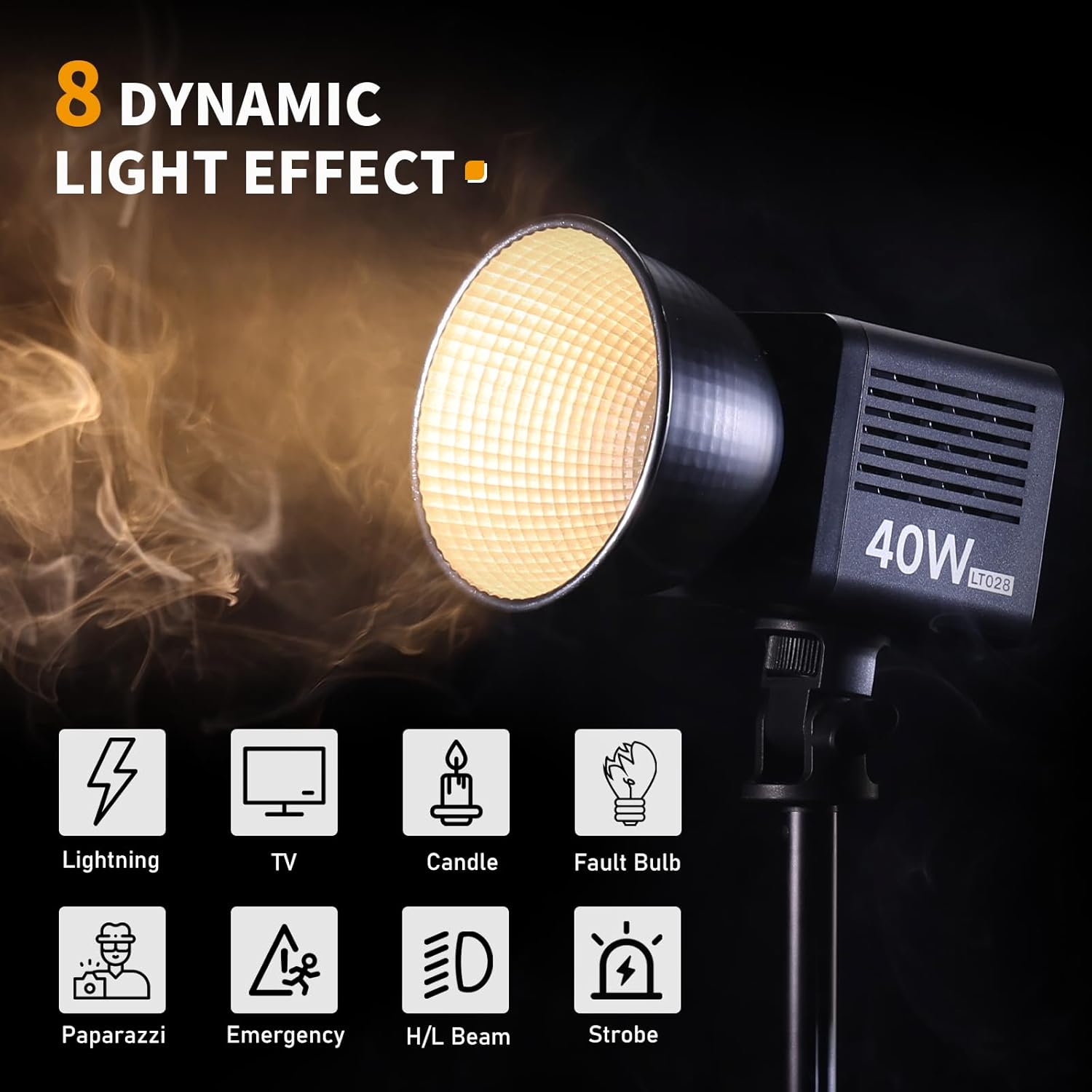
Image 6.2: The Ulanzi LT028 showcasing its 8 dynamic lighting effects, including Lightning, TV, Candle, Fault Bulb, Paparazzi, Emergency, H/L Beam, and Strobe.
- To access effects: Press the "CCT" knob to cycle through the available effects.
- To adjust effect parameters (e.g., speed, intensity): Use the "DIM" knob.
- The effects include: Lightning, TV, Candle, Fault Bulb, Paparazzi, Emergency, H/L Beam, and Strobe.
7. Maintenance
- Cleaning: Use a soft, dry cloth to clean the light. Do not use abrasive cleaners or solvents.
- Storage: When not in use for extended periods, store the light in its original packaging or a protective case in a cool, dry environment.
- Battery Care: To prolong battery life, avoid fully discharging the battery frequently. Charge the battery at least once every three months if not in regular use.
8. Troubleshooting
| Problem | Possible Cause | Solution |
|---|---|---|
| Light does not turn on. | Battery is depleted. Power button not pressed correctly. | Charge the battery. Press and hold the power button firmly. |
| Light output is weak. | Brightness setting is low. Battery is low. | Increase brightness using the DIM knob. Charge the battery. |
| Light overheats. | Ventilation blocked. Prolonged use at maximum power. | Ensure ventilation grilles are clear. Reduce brightness or allow to cool. |
| Controls are unresponsive. | Temporary software glitch. | Turn off the light, wait a few seconds, then turn it back on. |
9. Specifications

Image 9.1: Key specifications of the Ulanzi LT028, including its weight (0.46kg), maximum output (40W), and illuminance (13260 Lux at 0.5m).

Image 9.2: Details on the Ulanzi LT028's built-in battery, showing a 3400mAh capacity, approximately 75 minutes of continuous use at maximum power, and a 3-hour charging time.
| Feature | Detail |
|---|---|
| Model | LT028 |
| Power Output | 40W |
| Color Temperature | 2500K-6500K (Bi-Color) |
| Brightness Adjustment | 0-100% |
| CRI | ≥95 |
| TLCI | ≥96 |
| Illuminance | 13260 Lux (at 0.5m) |
| Battery Capacity | 3400mAh (Built-in) |
| Battery Runtime | Approx. 75 minutes (at max power), 5 hours (at min power) |
| Charging Time | Approx. 3 hours |
| Mount Type | Mini Bowens Mount |
| Weight | Approx. 0.46 kg (1.01 lbs) |
| Dimensions | Approx. 8.5 x 8.5 x 10.5 cm |
10. Warranty and Support
ULANZI products are covered by a limited warranty from the date of purchase. For specific warranty terms, conditions, and duration, please refer to the warranty card included with your product or visit the official ULANZI website. For technical support, troubleshooting assistance, or service inquiries, please contact ULANZI customer service through their official channels.
Official ULANZI Website: www.ulanzi.com