1. Introduction
This manual provides detailed instructions for the Hilitand PE4302 Digital Step Attenuator Module. The PE4302 is a high-linearity, 6-bit digital step attenuator designed for precise signal attenuation in various electrical distribution and modulation applications. It offers attenuation ranging from 0.5 dB steps up to 31.5 dB.
Please read this manual thoroughly before operating the device to ensure correct usage and optimal performance.
2. Product Overview
The Hilitand PE4302 module is a compact electronic component featuring a metal shell for shielding, enhancing its performance and durability. It supports both parallel port and serial port control modes, along with a boot status selection function, providing flexibility in integration and control.

Figure 1: Hilitand PE4302 Digital Step Attenuator Module, showing input/output connectors and control pins.
3. Features
- High linearity 6-bit digital step attenuator.
- Attenuation range from 0.5 dB steps to 31.5 dB.
- Frequency range attenuated from DC-4000MHz (DC-4GHz).
- Maintains high attenuation accuracy across frequency and temperature variations.
- Equipped with a metal shell for effective shielding.
- Supports both parallel port and serial port control modes.
- Includes a boot status selection function.
4. Setup
The PE4302 module requires a +5V power supply connected to the J1 terminal. Input and output signals are connected via the SMA connectors.
4.1 Control Mode Configuration
The module supports both parallel and serial control. The default configuration often uses solder pads J4-J6 for parallel non-latching mode. To access the control switches, carefully remove the friction-fit shield lid.

Figure 2: Close-up view of the PE4302 module, highlighting the internal DIP switches for control.
4.1.1 Parallel Mode Setup
In parallel non-latching mode, the attenuation is actively controlled by the internal DIP switches. Each switch corresponds to a C-bit (C0.5, C1, C2, C4, C8, C16) representing an attenuation value. The switches are configured such that:
- ON position corresponds to a 0 (no attenuation from that bit).
- OFF position corresponds to a 1 (attenuation from that bit is active).
Ensure solder pads J4-J6 are configured for parallel non-latching mode if you intend to use the DIP switches for control.
4.1.2 Serial Mode Setup
For I2C serial mode, it is generally required to unsolder all pads except J4. Refer to the PE4302 datasheet for specific serial communication protocols and register settings. Note that vendor-specific serial port programming information may vary and might not be publicly available.
5. Operating Instructions
Once the module is powered and configured for the desired control mode, you can set the attenuation level.
5.1 Setting Attenuation in Parallel Mode
To achieve a specific attenuation value, adjust the internal DIP switches according to the following:
- Identify the desired attenuation value (e.g., 16.5 dB).
- Break down the value into its constituent C-bits (e.g., 16.5 dB = C16 + C0.5).
- For each C-bit that contributes to the desired attenuation, set its corresponding DIP switch to the OFF position.
- For all other C-bits that are not part of the desired attenuation, set their corresponding DIP switches to the ON position.
Example: To set 16.5 dB attenuation, slide the C0.5 and C16 switches to OFF, and all other switches (C1, C2, C4, C8) to ON.
The module's attenuation steps are designed to be accurate, with insertion loss typically around 1.5dB, +/-0.2 from 100MHz to 1GHz, as per PE4302 datasheet specifications.
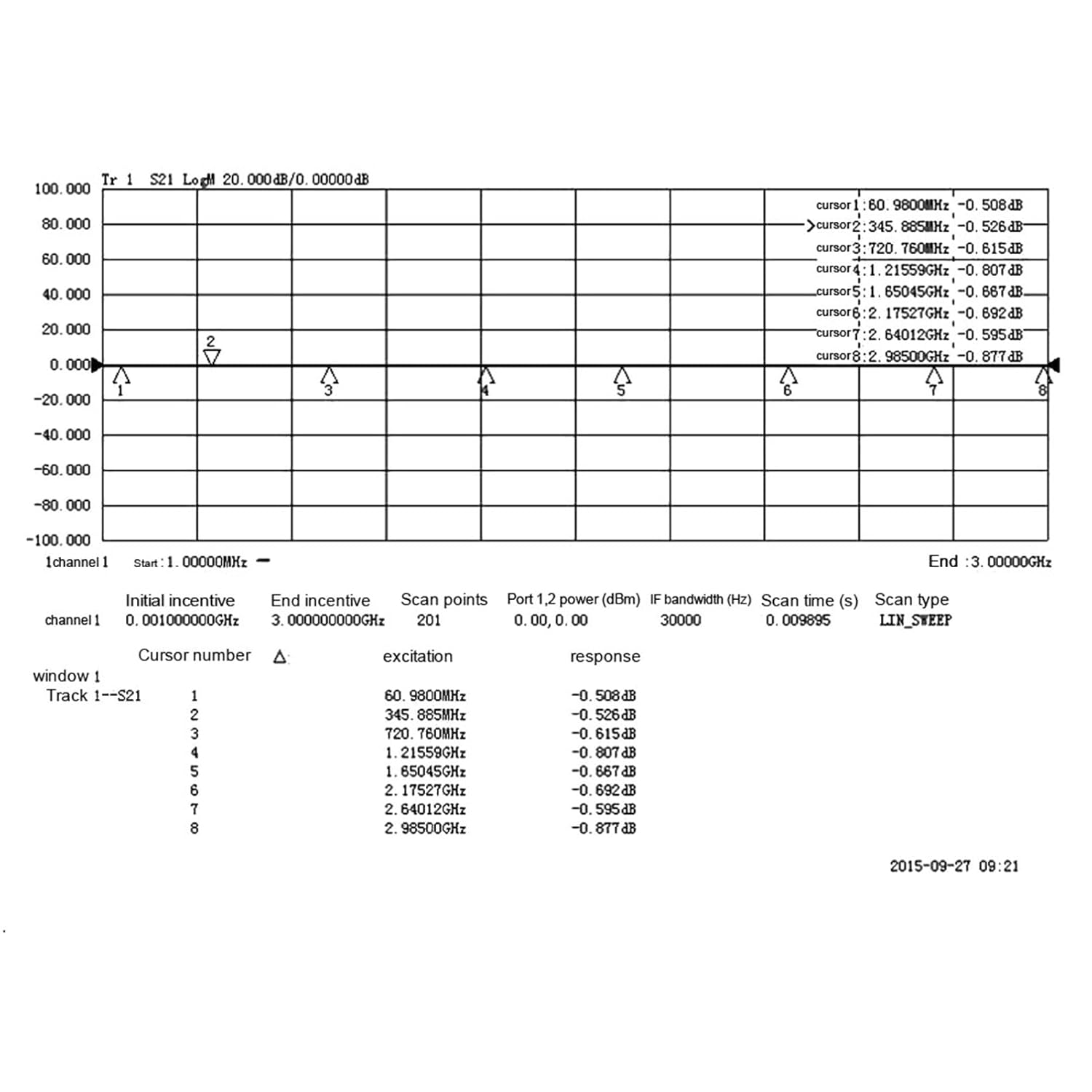
Figure 3: Example performance graph illustrating attenuation characteristics across a frequency range.
6. Maintenance
The Hilitand PE4302 module is designed for durability and requires minimal maintenance. Follow these guidelines to ensure its longevity:
- Keep the module clean and free from dust and debris. Use a soft, dry cloth for cleaning.
- Avoid exposing the module to extreme temperatures, humidity, or corrosive environments.
- Ensure proper ventilation if operating in an enclosed space.
- Handle with care to prevent physical damage to connectors or components.
- Do not attempt to modify the internal circuitry unless you are a qualified technician, as this may void any warranty and cause damage.
7. Troubleshooting
If you encounter issues with your PE4302 module, consider the following troubleshooting steps:
- No Attenuation/Incorrect Attenuation:
- Verify that the +5V power supply is correctly connected and providing stable voltage.
- If using parallel mode, ensure the internal DIP switches are set correctly according to the desired attenuation value (OFF for active bits, ON for inactive bits).
- Check the solder pad configuration (J4-J6) to confirm it matches your intended control mode (parallel or serial).
- Signal Loss/Poor Performance:
- Inspect SMA connectors and cables for proper connection and damage.
- Ensure the input signal frequency is within the module's specified operating range (DC-4GHz).
- Check for any external interference or grounding issues.
- Serial Port Communication Issues:
- Confirm that the module is correctly configured for serial mode (e.g., J4-J6 solder pads).
- Verify your serial communication protocol and register settings against the PE4302 datasheet.
- Note that specific programming information for the serial interface may require direct consultation with the vendor or manufacturer.
8. Specifications
| Specification | Value |
|---|---|
| Model Number | Hilitandsxvd58oumi (PE4302) |
| Attenuation Range | 0.5 dB to 31.5 dB |
| Attenuation Step Size | 0.5 dB |
| Frequency Range | DC-4GHz (DC-4000MHz) |
| Control Interface | Parallel Port, Serial Port (I2C compatible) |
| Power Supply | +5V |
| Dimensions (Package) | 4.96 x 3.86 x 0.39 inches |
| Weight (Package) | 0.81 ounces |
| Manufacturer | Hilitand |
9. Warranty and Support
For warranty information and technical support, please refer to the documentation provided with your purchase or contact Hilitand customer service directly. Keep your proof of purchase for any warranty claims.
Hilitand is committed to providing quality products and support. For further assistance, visit the official Hilitand store or contact their support channels.


