
Seasons SM09R1
Seasons SM09R1 Portable Air Conditioner User Manual
Model: SM09R1 | Brand: Seasons
Introduction
Thank you for choosing the Seasons SM09R1 Portable Air Conditioner. This manual provides important information for the proper operation, maintenance, and troubleshooting of your new appliance. Please read this manual thoroughly before using the air conditioner and keep it for future reference.

Figure 1: Front view of the Seasons SM09R1 Portable Air Conditioner, showing the air outlet and control panel.
Safety Information
To reduce the risk of fire, electrical shock, or injury when using your air conditioner, follow these basic precautions:
- Read all instructions before using the appliance.
- Connect to a properly rated, protected, and sized power supply circuit to avoid electrical overload.
- Do not operate the air conditioner with a damaged cord or plug.
- Do not block air openings. Ensure proper ventilation around the unit.
- Always unplug the unit before cleaning or servicing.
- Keep children and pets away from the unit during operation.
Package Contents
Verify that all items are present in the package:
- Seasons SM09R1 Portable Air Conditioner Unit
- Remote Control
- Window Venting Kit (includes exhaust hose, window slider kit, and adapters)
- User Manual (this document)
Setup and Installation
The Seasons SM09R1 is designed for quick and easy installation. Follow these steps for optimal performance:
- Positioning the Unit: Place the air conditioner on a flat, stable surface. Ensure there is at least 20 inches (50 cm) of space around the unit for proper airflow. The unit features 4 integrated wheels for easy movement.
- Window Venting Kit Installation:
- Extend the exhaust hose and attach it to the exhaust outlet on the back of the unit.
- Assemble the window slider kit according to your window type (vertical sliding or casement-style).
- Secure the window slider kit in the open window.
- Attach the other end of the exhaust hose to the adapter in the window slider kit, ensuring a tight seal to prevent hot air from re-entering the room.
- Power Connection: Plug the power cord into a grounded 115V, 60Hz electrical outlet.

Figure 2: The portable air conditioner with its exhaust hose properly installed in a window using the venting kit.
Operating Instructions
Your Seasons SM09R1 can be controlled via the electronic control panel on the unit or the included remote control.
Control Panel

Figure 3: Electronic control panel with digital display and touch buttons.
- POWER Button: Press to turn the unit ON or OFF.
- MODE Button: Cycle through operating modes: Cool, Fan, Dry.
- Cool Mode: Provides cooling. Adjust temperature using +/- buttons.
- Fan Mode: Circulates air without cooling. Adjust fan speed.
- Dry Mode: Dehumidifies the air.
- +/- Buttons: Adjust temperature settings in Cool mode or set timer duration.
- Digital Display: Shows current temperature or timer settings.
Remote Control
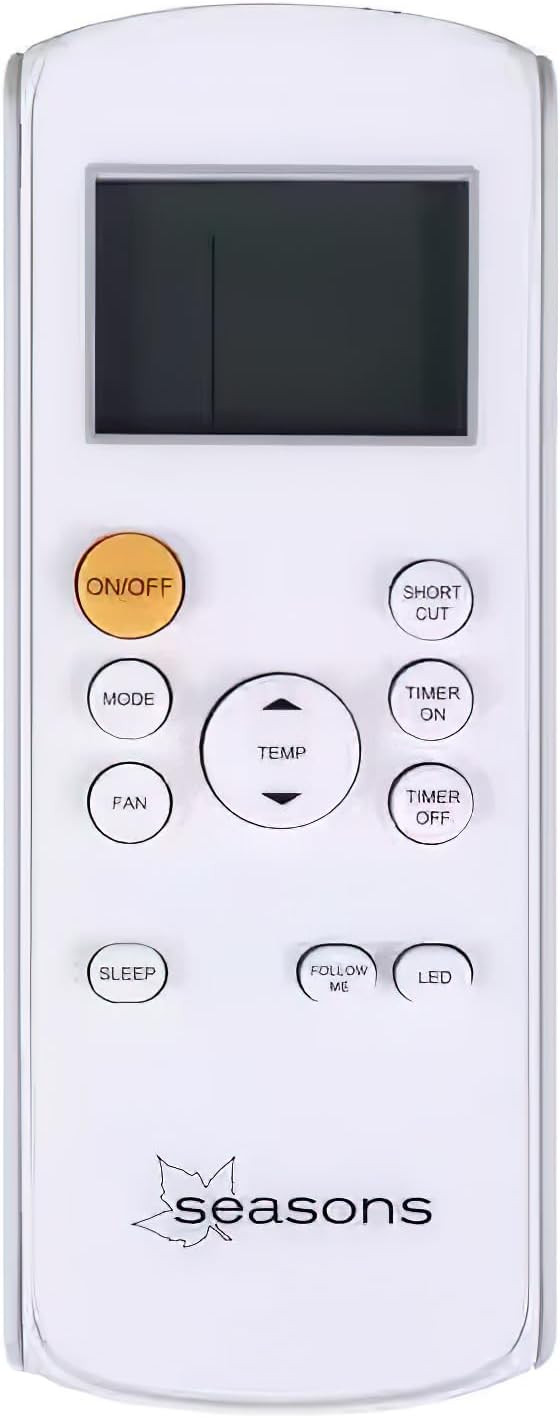
Figure 4: The remote control for the Seasons SM09R1 Portable Air Conditioner.
- ON/OFF: Turns the unit on or off.
- MODE: Selects operating mode (Cool, Fan, Dry).
- TEMP +/-: Adjusts desired temperature.
- FAN: Selects fan speed (2 speeds available).
- TIMER ON/OFF: Sets the 24-hour timer for automatic power on/off.
- SLEEP: Activates Sleep Mode for quiet, energy-efficient operation.
- FOLLOW ME: (If applicable) Activates a sensor in the remote to measure ambient temperature at its location.
- LED: Toggles the display light on the unit.
- SHORT CUT: (If applicable) Recalls preferred settings.
The unit features an automatic vent angle for better air distribution.
Maintenance
Regular maintenance ensures optimal performance and longevity of your air conditioner.
Air Filter Cleaning
The air filter should be cleaned every two weeks or more frequently depending on usage and air quality.
- Unplug the air conditioner from the power outlet.
- Locate the air filter panel (usually on the back or side of the unit).
- Remove the filter.
- Wash the filter with warm, soapy water. Rinse thoroughly.
- Allow the filter to air dry completely before reinserting it into the unit.
Bucket-less Evaporation System
This unit features a bucket-less evaporation system, which means most condensed water is automatically expelled with the exhaust air. Under conditions of very high humidity, some water may accumulate. If the unit stops operating and displays a "Full Tank" indicator (or similar), drain the water by locating the drain plug at the bottom rear of the unit and allowing water to flow into a suitable container.
Troubleshooting
Before contacting customer support, try these common troubleshooting steps:
| Problem | Possible Cause | Solution |
|---|---|---|
| Unit does not turn on. | No power; power cord unplugged; circuit breaker tripped. | Ensure unit is plugged in; check circuit breaker; try a different outlet. |
| Unit is not cooling effectively. | Air filter dirty; exhaust hose not properly installed; room too large; windows/doors open. | Clean air filter; ensure exhaust hose is sealed; close windows/doors; check room size (350-400 sq. ft.). |
| Water leakage. | Drain plug not secured; unit not level; high humidity causing excess condensation. | Ensure drain plug is tightly closed; place unit on a level surface; drain accumulated water if tank is full. |
| Remote control not working. | Batteries dead or incorrectly inserted; obstruction between remote and unit. | Replace batteries; ensure clear line of sight to the unit's receiver. |
Specifications
| Feature | Detail |
|---|---|
| Model | SM09R1 |
| Cooling Capacity | 9000 BTU (ASHRAE) |
| Recommended Room Size | 350 to 400 sq. ft. |
| Power Supply | 115 Volts, 60Hz |
| Amperage | 7.3 Amps |
| Wattage | 800 Watts |
| Noise Level | 55 dBA |
| Dimensions (HxWxD) | 24.96 x 12.95 x 12.52 inches |
| Item Weight | 47 pounds |
| Fan Speeds | 2 |
| Filter Type | Washable |
| Refrigerant | R 410A |
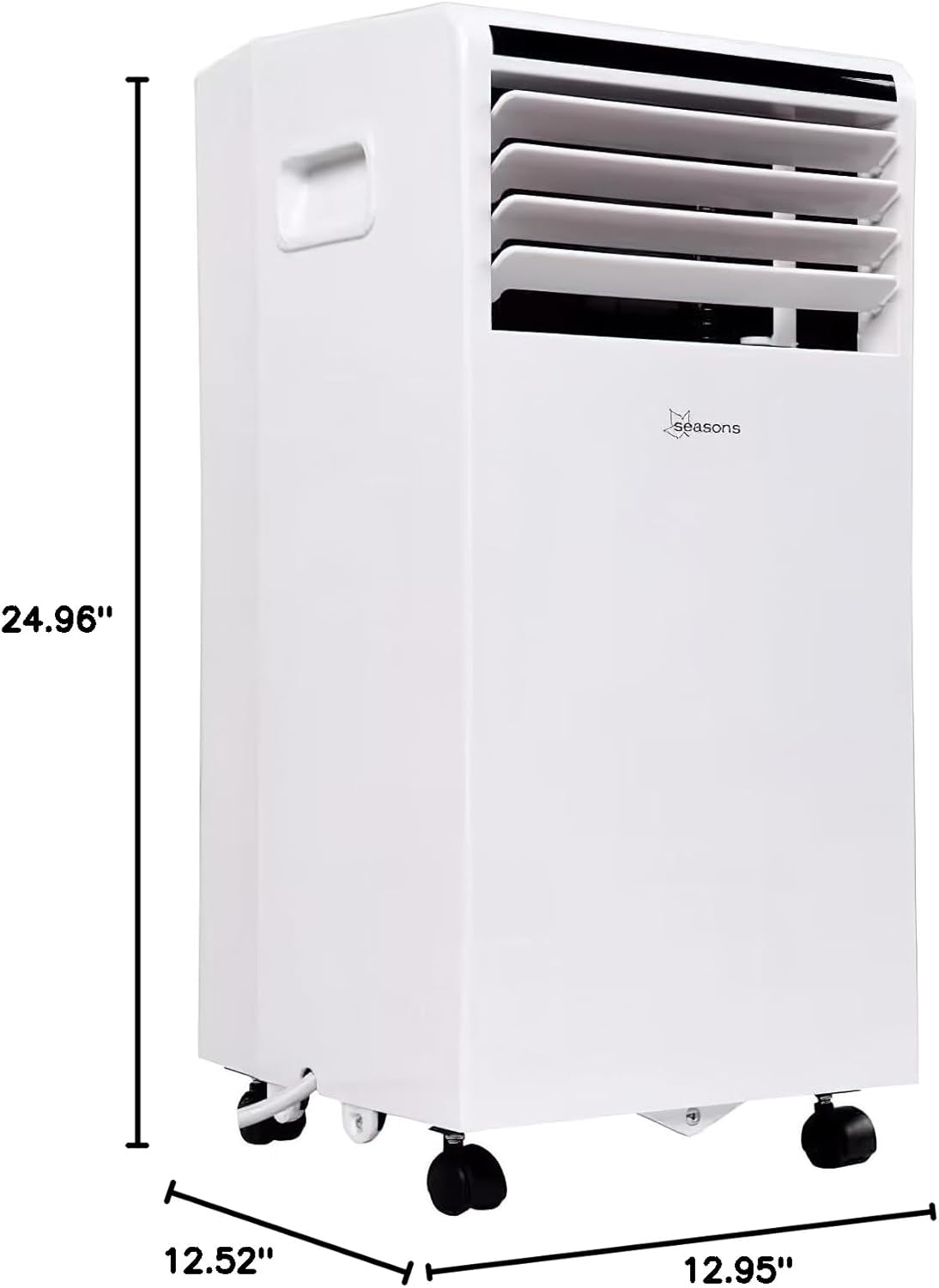
Figure 5: Dimensional drawing of the Seasons SM09R1 Portable Air Conditioner.
Warranty and Support
Your Seasons SM09R1 Portable Air Conditioner comes with a limited manufacturer's warranty. Please refer to the warranty card included in your package for specific terms and conditions.
For technical support, troubleshooting assistance, or to inquire about replacement parts, please contact Seasons customer service. Contact information can typically be found on the product packaging or the manufacturer's official website.
Ask a question about this manual
Ask about setup, troubleshooting, compatibility, parts, safety, or missing instructions. Manuals+ will review the question and use this page’s manual context to help answer it.