
1. Introduction
This manual provides essential information for the proper setup, operation, and maintenance of your new replacement remote control. This remote is designed to function as a direct replacement for various Sencor, TERRIS, and other compatible LED LCD HDTV models.
Compatibility: This remote control is compatible with the following TV models:
- Sencor: SLE1955M4, SLE22F55M4, SLE24F55M4, SLE40F55M4
- TERRIS: MSTV2407-Z001-01
- LEDTV1904
- TF-LED32S39T2S, TF-LED32S52T2S
While designed for broad compatibility, some advanced or specific functions present on your original remote may not be fully replicated. Refer to your TV's original manual for specific TV features.
2. Product Overview
The replacement remote control features a standard layout for easy navigation and control of your television. Familiarize yourself with the button layout as shown in the image below.
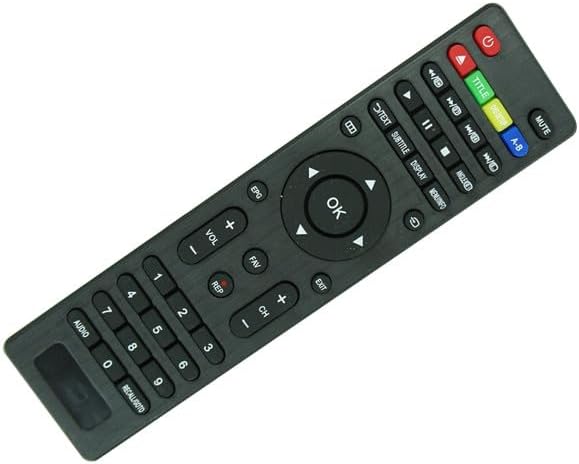
Figure 2.1: Front view of the remote control. This image displays the full button layout, including the power button (red), mute, volume up/down, channel up/down, number pad, navigation arrows with OK button, and various media playback and function buttons.
Key Button Functions:
- Power Button (Red): Turns the TV on or off.
- Number Pad (0-9): For direct channel input.
- Volume Up/Down (VOL +/-): Adjusts the sound volume.
- Channel Up/Down (CH +/-): Changes the TV channel.
- Mute: Silences the TV audio.
- Navigation Buttons (Up, Down, Left, Right, OK): Used to navigate menus and confirm selections.
- Input/Source: Selects different input sources (HDMI, AV, etc.).
- Menu: Accesses the TV's main menu.
- Exit: Exits the current menu or function.
- EPG (Electronic Program Guide): Displays program information.
- Text/Subtitle/Display: Accesses teletext, subtitle options, or display information.
- Media Controls (Play, Pause, Stop, Rewind, Fast Forward): For controlling media playback.
3. Setup
3.1. Installing Batteries
The remote control requires two (2) AAA batteries (not included). Follow these steps to install them correctly:
- Locate the battery compartment on the back of the remote control.
- Press down on the tab and slide the battery cover downwards to open it.
- Insert two AAA batteries, ensuring the positive (+) and negative (-) terminals align correctly with the markings inside the compartment.
- Slide the battery cover back into place until it clicks securely.

Figure 3.1: Battery compartment with cover removed. This image shows the open battery compartment on the back of the remote, indicating where two AAA batteries should be inserted, with clear markings for positive and negative terminals.
Important: Always use new batteries and replace both batteries at the same time. Do not mix old and new batteries or different types of batteries.
4. Operating Instructions
Once batteries are installed, the remote control is ready for use. Point the remote directly at the TV's infrared sensor.
4.1. Basic Functions
- Power On/Off: Press the Power button once.
- Changing Channels: Use the CH+ or CH- buttons, or enter the channel number directly using the number pad.
- Adjusting Volume: Use the VOL+ or VOL- buttons.
- Muting Sound: Press the Mute button. Press again to unmute.
4.2. Menu Navigation
To access and navigate your TV's menus:
- Press the Menu button to open the TV's main menu.
- Use the Up, Down, Left, Right arrow buttons to move through menu options.
- Press the OK button to select an option or confirm a setting.
- Press the Exit button to close the menu.
4.3. Input Source Selection
To switch between different video inputs (e.g., HDMI 1, AV, USB):
- Press the Input or Source button (if available).
- Use the Up/Down arrow buttons to highlight the desired input.
- Press OK to select.
5. Maintenance
5.1. Cleaning the Remote
To clean your remote control, gently wipe it with a soft, dry cloth. For stubborn dirt, slightly dampen the cloth with water. Do not use abrasive cleaners, alcohol, or solvents, as these can damage the remote's surface or internal components.
5.2. Battery Replacement
Replace batteries when the remote's response becomes sluggish or stops working. Always replace both batteries simultaneously with new AAA batteries. Remove batteries if the remote will not be used for an extended period to prevent leakage.
6. Troubleshooting
If you experience issues with your remote control, try the following troubleshooting steps:
- Remote not responding:
- Ensure there are fresh batteries installed correctly (check +/- orientation).
- Point the remote directly at the TV's infrared sensor.
- Remove any obstructions between the remote and the TV.
- Test the remote by pointing it at a digital camera (like a smartphone camera) and pressing a button. If you see a light flash from the remote's IR emitter on the camera screen, the remote is sending a signal.
- Some buttons not working:
- Verify that the button is intended for your TV model. Some replacement remotes may have buttons for features not present on your specific TV.
- Clean the remote, especially around the non-working buttons, to remove any dirt or debris.
- TV not responding to all commands:
- As a replacement remote, it may not replicate every single function of your original remote. Basic functions (power, volume, channel, input) should work.
- Ensure your TV's firmware is up to date, if applicable.
If issues persist after troubleshooting, consider contacting the seller or referring to your TV's original user manual for specific TV-related settings.
7. Specifications
- Product Type: Replacement Remote Control
- Connectivity Technology: Infrared (IR)
- Power Source: 2 x AAA Batteries (not included)
- Material: ABS Plastic
- Color: Black
- Compatibility: Sencor SLE1955M4, SLE22F55M4, SLE24F55M4, SLE40F55M4, TERRIS MSTV2407-Z001-01, LEDTV1904, TF-LED32S39T2S, TF-LED32S52T2S Led LCD HDTVs
8. Warranty and Support
This product is a replacement remote control. For specific warranty information, please refer to the terms and conditions provided by your retailer or the original seller at the time of purchase. As a generic replacement, direct manufacturer support may not be available from the original TV brand.
For any issues not covered in this manual, please contact the seller from whom you purchased this remote control for assistance.


