
1. Introduction
This manual provides detailed instructions for the installation, operation, and maintenance of your LETSCEE HMC1 Solar Powered Wireless Outdoor Security Camera. Please read this manual thoroughly before using the product to ensure proper function and safety.

Image: The LETSCEE HMC1 camera with its solar panel, demonstrating its outdoor application and remote viewing capability on a smartphone.
2. Package Contents
Verify that all items are present in your package:
- LETSCEE HMC1 Camera
- Solar Panel
- Mounting Bracket
- Mounting Bag (screws and anchors)
- User Manual (this document)
3. Setup and Installation
3.1 Powering the Camera
The LETSCEE HMC1 camera is solar-powered and wire-free. The included solar panel recharges the built-in battery. No power plug-in or LAN cable is required.

Image: Illustration of the camera and solar panel mounted, highlighting the wire-free installation and 2.4Ghz Wi-Fi connectivity.
3.2 App Installation and Camera Pairing
- Download the dedicated application to your smartphone.
- Register an account and log in.
- Turn on Bluetooth on your phone to connect to the camera for initial setup.
- Follow the in-app instructions to add your camera and connect it to your home's 2.4GHz Wi-Fi network.
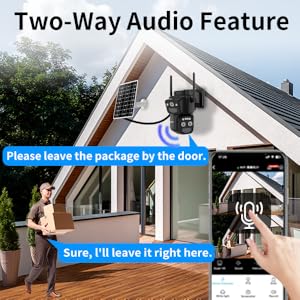
Image: A visual guide demonstrating the four steps for easy setup: downloading the app, enabling Bluetooth, achieving live view, and mounting the camera.
3.3 Mounting the Camera
Mount the camera and solar panel in a suitable outdoor location. Ensure the solar panel receives adequate direct sunlight for optimal charging. Use the provided mounting bracket and hardware.
4. Operating Instructions
4.1 Live View and PTZ Control
Access the live feed from your camera via the mobile application. The camera features 355° horizontal rotation (pan) and 90° vertical rotation (tilt), allowing you to adjust the viewing angle remotely through the app. It also offers 10x hybrid zoom to view distant details.

Image: An illustration demonstrating how to control the camera's pan (355°) and tilt (100°) functions using a smartphone application.

Image: A split image demonstrating the 10x hybrid zoom capability, showing a distant object clearly when zoomed in compared to the unzoomed view.
4.2 Motion Detection and Alerts
The camera provides instant alerts upon detecting motion. You can define specific activity zones within the app to reduce false alerts from areas like public streets. The camera can be configured to activate a siren and flashlight automatically or manually when motion is detected.

Image: A visual representation of setting a custom motion detection zone to minimize unwanted alerts.
4.3 Two-Way Audio
Utilize the built-in microphone and speaker for two-way communication through the app. This allows you to speak to visitors or deter intruders.
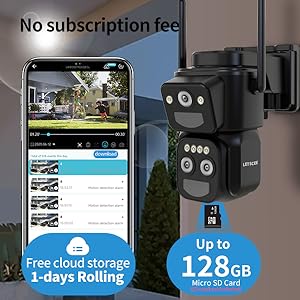
Image: A depiction of the two-way audio feature, enabling communication with individuals near the camera.
4.4 Night Vision
The camera provides 2K Full HD resolution and features colorful night vision, ensuring clear images even in low-light conditions.
4.5 Multi-User and Multi-Camera View
The application supports simultaneous live viewing of up to four cameras. You can add multiple cameras to the app and share access with family members, allowing multiple users to view the live feed concurrently.

Image: An illustration of the multi-user live view feature, showing multiple family members accessing the camera feed simultaneously.
4.6 Alexa Integration
The camera is compatible with Alexa. You can integrate it with your Alexa-enabled devices to view camera feeds using voice commands.

Image: A user interacting with an Alexa-enabled device to display the camera's live feed on a television screen.
4.7 Storage Options
The camera offers 3-day rolling free cloud storage for video playback. It also supports local storage via a Micro SD card (up to 128GB, not included).

Image: The camera's storage options, including free 3-day rolling cloud storage and support for up to 128GB Micro SD card.
5. Maintenance
5.1 Solar Panel Care
Periodically clean the surface of the solar panel to ensure maximum sunlight absorption and efficient battery charging. Remove any dust, dirt, or debris that may accumulate.
5.2 Weather Resistance
The LETSCEE HMC1 camera features an IP65 weather-proof design, making it suitable for outdoor use in various weather conditions. While designed to withstand elements, avoid direct high-pressure water jets.
Image: The camera and solar panel demonstrating their IP65 weather-proof design, capable of operating in various temperatures.
6. Troubleshooting
- Camera Not Connecting to Wi-Fi: Ensure your Wi-Fi network is 2.4GHz. Check Wi-Fi signal strength at the camera's location. Restart your router and the camera.
- Battery Not Charging: Verify the solar panel is clean and receiving direct sunlight for several hours daily. Check the connection between the solar panel and the camera.
- False Motion Alerts: Adjust the motion detection sensitivity in the app. Define specific activity zones to exclude areas prone to irrelevant motion (e.g., passing vehicles).
- No Live View: Check your internet connection. Ensure the camera is powered on and connected to Wi-Fi. Restart the app.
- Poor Image Quality: Ensure the camera lens is clean. Check your network speed.
7. Specifications
| Feature | Specification |
|---|---|
| Model | HMC1 |
| Indoor/Outdoor Usage | Outdoor |
| Power Source | Solar Powered |
| Connectivity Protocol | Wi-Fi (2.4GHz) |
| Video Capture Resolution | 2K |
| Pan/Tilt Range | 355° Horizontal, 90° Vertical |
| Zoom Type | 10x Hybrid Zoom |
| Field Of View | 90 Degrees |
| Night Vision | Night Color |
| International Protection Rating | IP65 |
| Storage | 3-day rolling cloud storage, Micro SD (up to 128GB) |
| Control Method | App |
| Compatible Devices | Smartphone (Android) |
| Item Dimensions (L x W x H) | 5.3 x 7.8 x 6.1 inches |
| Item Weight | 1.81 pounds (0.82 Kilograms) |
| Batteries | 3 Lithium Ion batteries (included) |
| Wattage | 3 watts |
8. Warranty and Support
For product support, troubleshooting assistance, or warranty inquiries, please refer to the contact information provided with your purchase or visit the official LETSCEE website. Keep your purchase receipt for warranty validation.