
HYPER GO H16BM, 14301
HYPER GO H16BM & 14301 Brushless RC Cars Instruction Manual
Models: H16BM (RC Truck), 14301 (Drift RC Car)
Your guide to setup, operation, and maintenance.
1. Introduction
Thank you for choosing the HYPER GO H16BM or 14301 Brushless RC Car. These high-performance remote control vehicles are designed for enthusiasts seeking speed, durability, and dynamic handling. The H16BM is a fast RC truck, while the 14301 is a 4x4 all-road street bash drift RC car with an independent gyro. Both models feature brushless power systems, robust construction, and advanced electronics for an exhilarating experience.
This manual provides essential information for the safe and effective operation, maintenance, and troubleshooting of your new RC car. Please read it thoroughly before first use.

Image 1.1: Overview of the HYPER GO H16BM RC Truck, 14301 Drift RC Car, and their respective remote controllers, along with rechargeable batteries.
2. Safety Precautions
Operating remote control vehicles requires attention to safety. Failure to follow these guidelines may result in injury or damage to the product or property.
- Always operate the RC car in open areas away from people, pets, and obstacles.
- Do not operate near public roads, water bodies, or in adverse weather conditions.
- Keep hands, hair, and loose clothing away from moving parts.
- Ensure batteries are fully charged and securely installed before operation.
- Never leave charging batteries unattended. Use only the provided charger or a compatible LiPo charger.
- If the vehicle becomes stuck or entangled, immediately turn off the power on both the vehicle and the transmitter.
- Adult supervision is recommended for younger operators.
3. Setup
3.1 Battery Charging and Installation
- Connect the provided charger to a power outlet.
- Connect the LiPo battery to the charger. Ensure correct polarity.
- Charge the battery until the charger indicates a full charge. Charging times may vary.
- Once charged, disconnect the battery from the charger.
- Open the battery compartment on the RC car.
- Insert the charged battery into the compartment and secure it. Ensure the battery is properly seated to prevent movement during operation.
3.2 Transmitter Setup
- Install 4x AA batteries (not included) into the transmitter, observing correct polarity.
- Turn on the transmitter. The indicator light should illuminate.
- Turn on the RC car. The car and transmitter should automatically bind. If not, refer to the binding instructions in the separate quick start guide.
3.3 Gyro Adjustment (Model 14301)
The 14301 model features an independent GYRO system to assist with dynamic handling and precise straight-line driving, especially during drifts. It helps correct the car's tail flick. It is recommended to adjust the gyro sensitivity to approximately 75% for optimal performance.

Image 3.1: The independent Gyro unit (left) and adjustable oil-filled shocks (right) on the HYPER GO 14301 RC Car, crucial for stability and handling.
4. Operating Instructions
4.1 Basic Controls
- Throttle Trigger: Pull to accelerate forward, push to brake/reverse.
- Steering Wheel: Turn left or right to steer the vehicle.
- Trim Adjustments: Use the trim dials on the transmitter to fine-tune steering and throttle for straight-line tracking.
4.2 Performance Capabilities
Both models are equipped with powerful brushless motors and ESCs, offering impressive speed.
- H16BM: With a 2S 7.4V 1050 mAh LiPo battery, it can reach speeds of 27+ mph (45 kph). When upgraded to a 3S LiPo battery (not included), furious speeds of 42+ mph (68 kph) are achievable under optimum conditions.
- 14301: With a 2S 7.4V 2000 mAh battery, it bursts out at 26+ mph (42 kph). The E45A ESC is perfectly matched for 3S battery power, allowing it to reach an amazing 34 mph high speed.

Image 4.1: The HYPER GO H16BM RC Truck in action, highlighting its speed capabilities with 2S and 3S LiPo batteries.
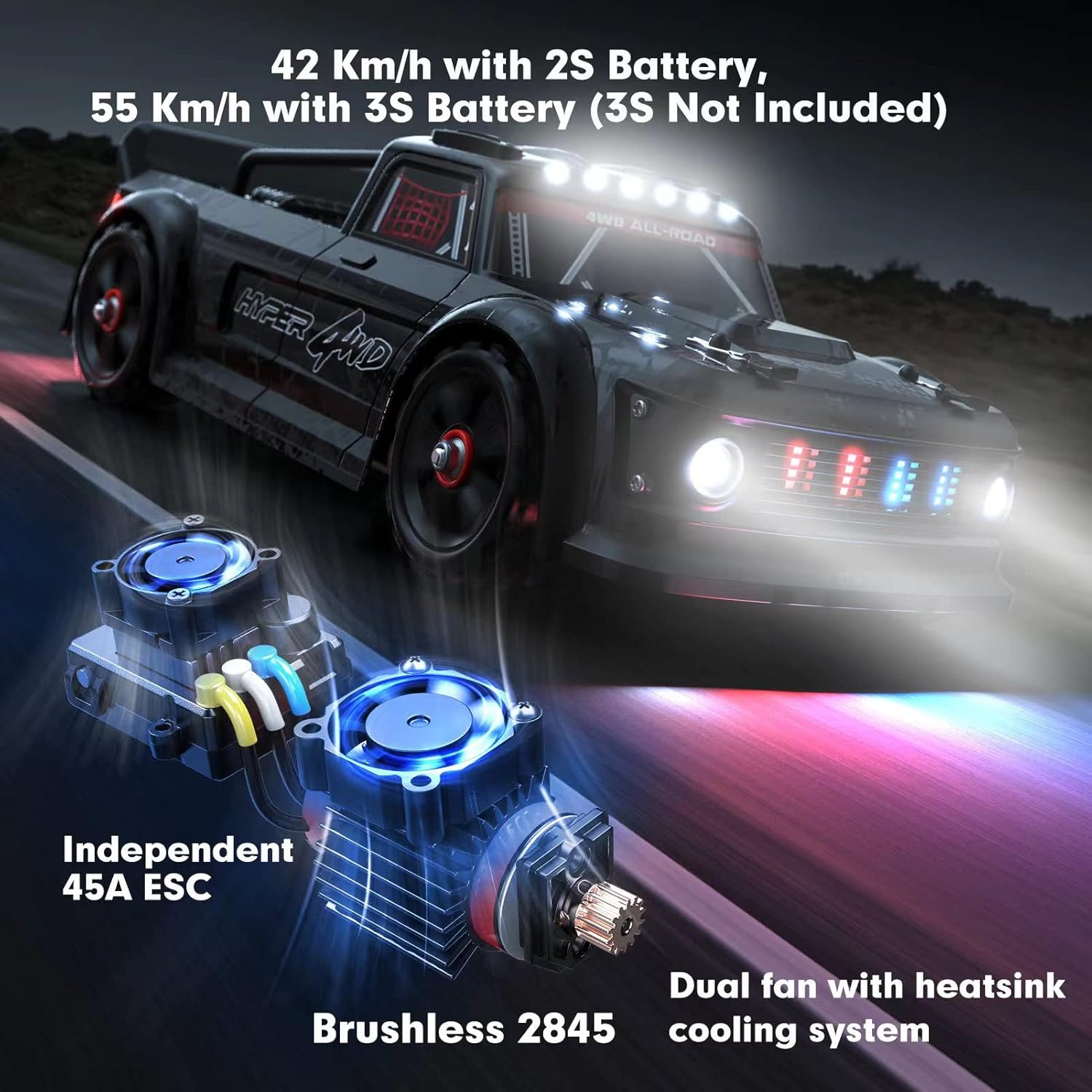
Image 4.2: The HYPER GO 14301 RC Car showcasing its speed potential with 2S and 3S batteries, along with its internal brushless motor and ESC.
4.3 Lighting System (Model 14301)
The 14301 model features simulated lights, including turn signals, brake lights, and police lights, which are linked with the vehicle's control. These lights add to the realism and fun of operation.

Image 4.3: Rear view of the HYPER GO 14301 RC Car demonstrating its functional brake lights, which are linked to the vehicle's control inputs.
5. Maintenance
Regular maintenance is crucial for extending the lifespan and performance of your RC car.
5.1 Cleaning
- After each use, especially in dusty or dirty conditions, clean the vehicle thoroughly.
- Use a soft brush or compressed air to remove dirt and debris from the chassis, suspension, and drivetrain.
- Wipe down the body with a damp cloth. Avoid using harsh chemicals.
5.2 Battery Care
- Always store LiPo batteries in a cool, dry place, away from direct sunlight and extreme temperatures.
- Do not overcharge or over-discharge batteries. Follow manufacturer guidelines for charging and discharging.
- If storing for extended periods, charge batteries to a storage voltage (typically 3.8V per cell).
5.3 Component Inspection
Periodically inspect the following components for wear or damage:
- Chassis and Suspension: Check for cracks, bends, or loose screws. The H16BM features a honeycomb chassis, and the 14301 has a 6061 aluminum alloy chassis with an 8MM central support bar. Both models include F/R zinc metal reinforced sheets for impact resistance.
- Drivetrain: Inspect metal gears, metal differentials, and 16 metal bearings for smooth operation. Ensure the 5.5MM diameter axle and M4 nuts are secure.
- Shocks: Check oil-filled shocks for leaks and proper damping. The package includes extra high rebound shock springs for replacement.
- Tires: Examine tires for wear and tear. The product includes extra drift tires, two more sets of on-road rubber tires, and rally tires for various terrains.
- Bumpers: Ensure the large front foam bumper is intact for maximum protection.
- Pull Rods: Verify adjustable pull rod linkages are secure and undamaged.

Image 5.1: Detailed view of the ultra-durable metal driving system, including pre-mounted soft sponge inserted tires, rechargeable LiPo battery, and adjustable pull rods.

Image 5.2: Illustration of the large front foam bumper integrated with the body for maximum protection, alongside the F/R zinc metal reinforced sheets.

Image 5.3: A display of extra accessories provided, including a protective shell to prevent entry of stones and weeds, 4 high rebound shock springs, 8 clips, drift tires, two more sets of on-road rubber tires, and rally tires.

Image 5.4: Additional components provided, including extra CVD (Constant Velocity Drive) shafts and an extra body shell, for maintenance and customization.
6. Troubleshooting
This section addresses common issues you might encounter with your HYPER GO RC car.
| Problem | Possible Cause | Solution |
|---|---|---|
| Vehicle does not respond to transmitter. | Low battery in vehicle or transmitter; Not bound; Power switch off. | Charge/replace batteries; Re-bind vehicle and transmitter; Ensure power switches are ON. |
| Reduced speed or short run time. | Battery not fully charged; Battery degradation; Motor/drivetrain friction. | Fully charge battery; Consider replacing old battery; Clean and lubricate drivetrain components. |
| Steering issues (e.g., not straight, unresponsive). | Steering trim incorrect; Damaged servo or linkages; Obstruction in steering mechanism. | Adjust steering trim; Inspect servo and linkages for damage; Clear any obstructions. |
| Unusual noises from vehicle. | Debris in gears; Damaged gears or bearings. | Inspect and clean gears; Replace damaged components. |
| Vehicle flips easily (Model 14301). | Gyro sensitivity too high; Driving on unsuitable terrain. | Adjust gyro sensitivity (recommended 75%); Operate on appropriate surfaces. |
If you encounter issues not listed here, or if solutions do not resolve the problem, please contact HYPER GO customer support.
7. Specifications
| Feature | H16BM (RC Truck) | 14301 (Drift RC Car) |
|---|---|---|
| Motor | 2845 4200KV Brushless | 2845 3900KV Brushless, 4-pole |
| ESC | Independent Smart 2S/3S 45A ESC | Independent 45A ESC |
| Battery (Included) | 2S 7.4V 1050 mAh 25C LiPo | 2S 7.4V 2000 mAh LiPo |
| Max Speed (2S Battery) | 27+ mph (45 kph) | 26+ mph (42 kph) |
| Max Speed (3S Battery) | 42+ mph (68 kph) | 34 mph |
| Chassis | Honeycomb chassis with F/R zinc metal reinforced sheet | 6061 Aluminum Alloy chassis with 8MM central support bar |
| Drivetrain | 4WD, Metal transmission, 16 metal bearings | 4WD, Metal transmission, 16 metal bearings, 5.5MM axle, M4 nuts |
| Shocks | Oil-filled shocks | Adjustable, Oil-Filled Shocks |
| Servo | 2.1kgf.cm torque force 3-wire servo | 2.1kgf.cm torque force 3-wire servo |
| Gyro | N/A | Independent GYRO |
| Lights | N/A | Simulated lights, turn signals, brake lights, police lights |
8. Warranty and Support
HYPER GO is committed to providing high-quality products. For specific warranty information, please refer to the documentation included with your purchase or visit the official HYPER GO store on Amazon.
Replacement parts for your HYPER GO RC car are available directly from the HYPER GO store on Amazon. This ensures you can easily maintain and repair your vehicle, extending its enjoyment.
For technical support, troubleshooting assistance beyond this manual, or inquiries about parts, please contact HYPER GO customer service through the Amazon platform or the official brand website.
Visit the HYPER GO Store: HYPER GO Official Store
Related documentsH16BM, 14301


Ask a question about this manual
Ask about setup, troubleshooting, compatibility, parts, safety, or missing instructions. Manuals+ will review the question and use this page’s manual context to help answer it.