
1. Introduction
Thank you for choosing the Zedamsan 100W 27000mAh Laptop Power Bank. This high-capacity portable charger is designed to provide reliable and fast power to your laptops, smartphones, tablets, and other USB-powered devices. With its advanced features and robust design, it ensures you stay charged wherever you go. Please read this manual carefully before using the product to ensure proper operation and to maximize its lifespan.
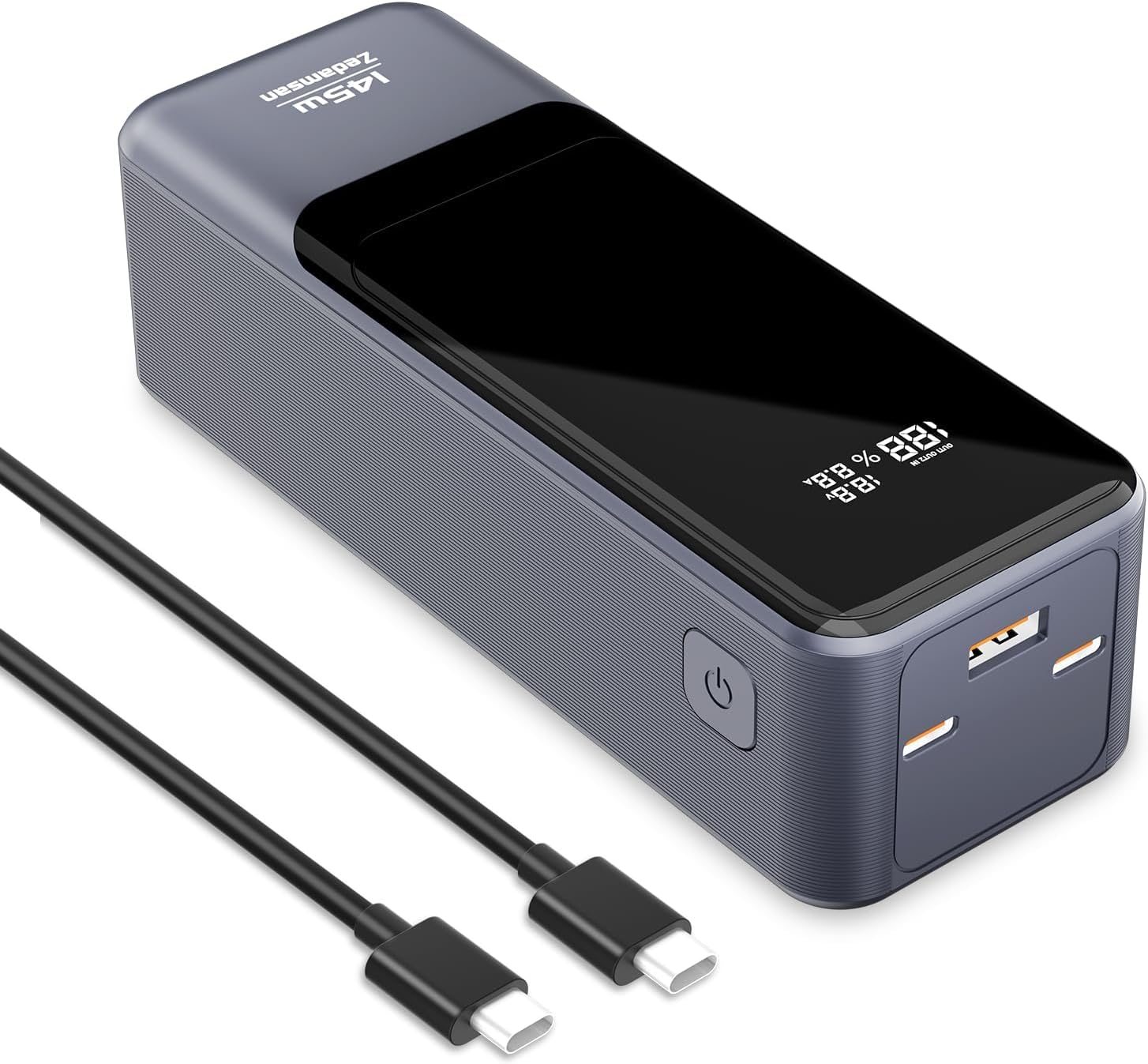
Image: The Zedamsan 100W 27000mAh Laptop Power Bank, showcasing its sleek design and included USB-C cables.
2. Product Overview
Key Features:
- High-Capacity 27000mAh Battery: Provides extended runtime for multiple device charges, airline-approved for travel.
- Extremely Fast Charging Speed: 145W total output, with up to 100W from a single USB-C port, enabling rapid charging for laptops and other devices.
- Simultaneous 3-Ports Charging: Equipped with two USB-C ports and one USB-A port for charging up to three devices concurrently.
- Smart Digital Display: Real-time monitoring of remaining battery life, input, and output power levels.
- Sleek and Portable Design: Compact form factor for easy portability.
- Safety Protection: Built-in safeguards against over-current, overcharging, overheating, and short-circuits.
Package Contents:
- Zedamsan 100W 27000mAh Power Bank x 1
- Type-C to Type-C Fast Charging Cable x 1
- User Manual x 1
- Travel Pouch x 1

Image: The complete package contents, including the power bank, USB-C cable, user manual, and travel pouch.
3. Specifications
| Feature | Specification |
|---|---|
| Model Number | 983SP-145W |
| Battery Capacity | 27000mAh / 97.2Wh |
| USB-C1/C2 Output | Up to 100W Max (each) |
| USB-A Output | Up to 45W Max |
| Total Output | 145W Max |
| Input (USB-C) | Up to 100W Max |
| Dimensions | 12.34 x 5.33 x 5.33 cm |
| Weight | 560 g |
| Color | Black & Silver |
4. Important Safety Instructions
- Do not expose the power bank to extreme temperatures (hot or cold), direct sunlight, or humid environments.
- Do not disassemble, modify, or repair the device yourself. Refer to qualified service personnel.
- Avoid dropping, hitting, or subjecting the power bank to strong impacts.
- Keep away from water, fire, and flammable materials.
- Use only certified charging cables and adapters.
- Do not use the power bank if it is damaged, swollen, or leaking.
- Keep out of reach of children.
- Dispose of the power bank responsibly according to local regulations.
5. Getting Started
Initial Charging of the Power Bank:
- For optimal performance, fully charge the power bank before first use.
- Connect the included Type-C to Type-C cable to one of the USB-C ports on the power bank.
- Connect the other end of the cable to a compatible USB-C wall charger (100W recommended for fastest charging).
- The digital display will show the charging status and current input power. A full charge from 0% to 100% typically takes approximately 1.2 hours with a 100W charger.

Image: The power bank being recharged, illustrating its 100W two-way fast charging capability.
6. Operation
Charging Your Devices:
- Connect your device's charging cable to the appropriate port (USB-C or USB-A) on the power bank.
- Connect the other end of the cable to your device.
- The power bank will automatically begin charging your device. The digital display will show the remaining battery percentage and the current output power.
- For optimal fast charging, use the USB-C ports for compatible laptops and high-power devices.

Image: The power bank simultaneously charging a laptop, smartphone, and earbuds, demonstrating its 3-port capability.
Understanding the Digital Display:
The smart digital display provides real-time information about the power bank's status:
- Battery Percentage: Shows the remaining charge level of the power bank.
- Input/Output Power: Displays the current voltage (V) and amperage (A) for both charging the power bank (input) and charging connected devices (output). This allows you to monitor the charging speed.

Image: The power bank's digital display showing 100W max output and the charging progress of various devices like laptops, tablets, and phones.
Universal Compatibility:
The Zedamsan power bank is compatible with a wide range of devices, including but not limited to:
- USB-C Port: MacBook Pro/Air, Dell XPS, ThinkPad, iPad Pro, iPhone 15 Pro, Nintendo Switch, Steam Deck, Rog Ally.
- USB-A Port: Samsung S23/S22/Note 20, AirPods Pro, Apple Watch, Galaxy Buds.
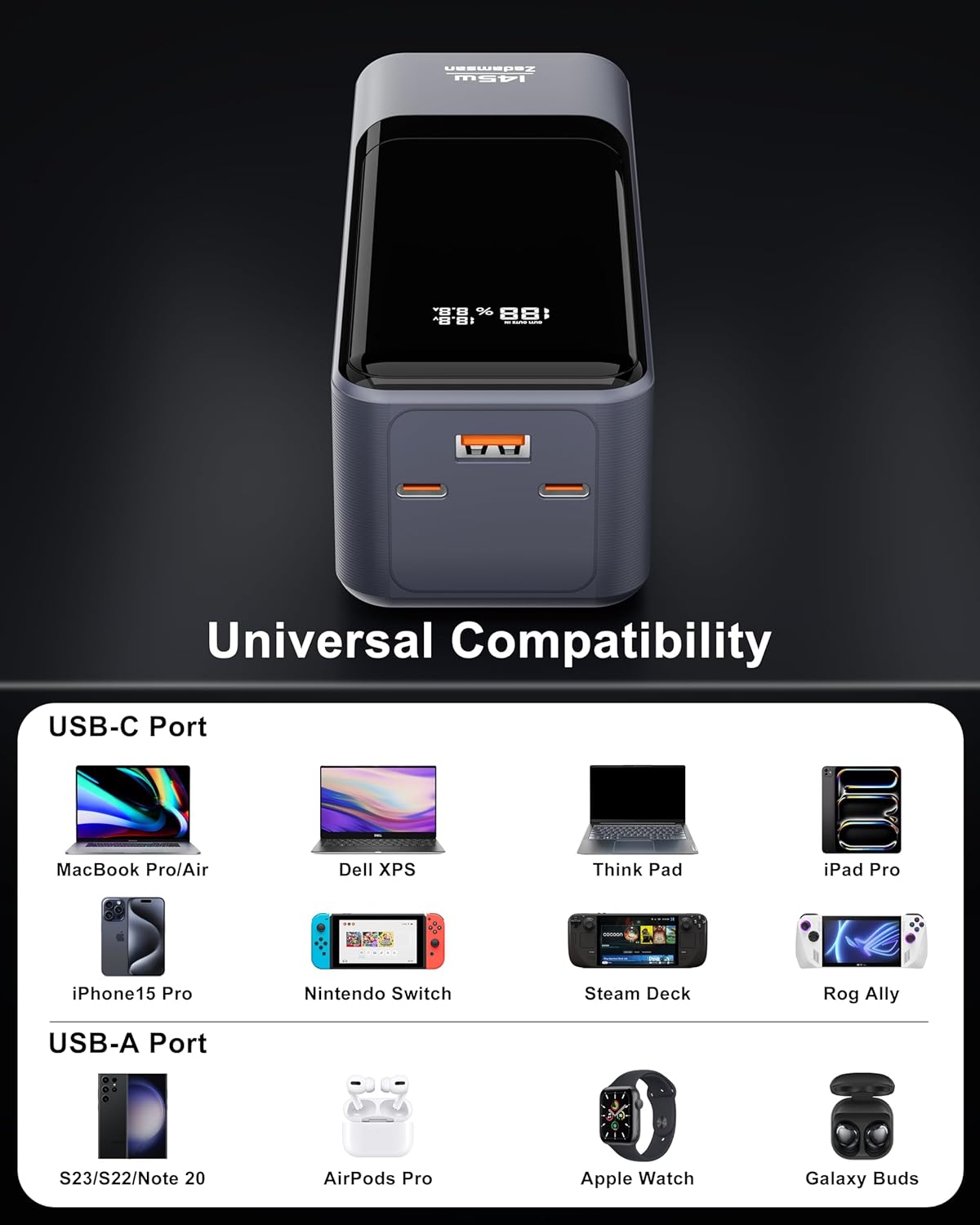
Image: A visual representation of the power bank's universal compatibility with various USB-C and USB-A devices.
7. Care and Maintenance
- Clean the power bank with a soft, dry cloth. Do not use abrasive cleaners or solvents.
- Store the power bank in a cool, dry place away from direct sunlight and extreme temperatures.
- If not used for extended periods, charge the power bank to approximately 50-70% every three months to maintain battery health.
- Avoid overcharging or completely draining the battery frequently, as this can reduce its lifespan.
8. Troubleshooting
- Power bank not charging: Ensure the charging cable and wall adapter are functioning correctly and are properly connected. Try a different cable or adapter.
- Device not charging from power bank: Check if the power bank has sufficient charge. Ensure the cable connecting the device is secure and undamaged. Try a different port or cable.
- Slow charging: Verify that your device and cable support fast charging. Ensure the power bank has enough charge. Some devices may limit charging speed if they are already partially charged or if they are in use.
- Digital display not working: Press the power button briefly to activate the display. If it remains off, the battery might be completely drained or there could be an internal issue.
- Power bank shuts off unexpectedly: This could indicate a low battery level or an overload protection activation. Recharge the power bank. If the issue persists, contact customer support.
9. Warranty and Customer Support
For warranty information, technical support, or any product-related inquiries, please refer to the manufacturer's official website or contact their customer service directly. Keep your purchase receipt as proof of purchase for warranty claims.


