1. Product Overview
The XUJAIOLQP Behind The Head Headphones are designed for comfort and high-quality audio performance. Featuring Bluetooth 5.0 technology, these lightweight and foldable headphones offer clear stereo sound with super bass, making them suitable for various activities, including sports. Their ergonomic design ensures a secure and comfortable fit, even during extended use.

Image: Front view of the XUJAIOLQP Behind The Head Headphones, showcasing the earcups and neckband design.

Image: Illustration showing the comfortable 'Stress Balance On ear' design of the headphones, contrasting with potential discomfort from in-ear or heavy over-ear types.

Image: A person wearing the XUJAIOLQP Behind The Head Headphones during an outdoor activity, demonstrating their secure and discreet fit.
Key Features:
- Bluetooth 5.0 Technology: Ensures faster transmission and stable signal connection, compatible with all Bluetooth-enabled devices within approximately 10 meters (33ft).
- High-Fidelity Stereo Sound: Delivers clear audio with dynamic bass performance and effective background noise filtering for an immersive listening experience.
- Ultra Comfort and Secure Fit: Lightweight design with a behind-the-head structure for maximum comfort and stability, ideal for active use and sensitive ears.
- Multi-functional Controls: Easy-to-use buttons for volume adjustment, track switching, call management, and mode selection.
- Long Battery Life: Provides up to 6 hours of music playback, 7 hours of talk time, and 1200 hours of standby time on a single charge.
- Portable Design: Foldable and ultra-lightweight, allowing for easy carrying and storage in a pocket or small pouch.
- Multiple Playback Modes: Supports Bluetooth connection, TF card music playback (up to 32GB), and FM radio.
2. What's in the Box
Upon opening the package, please ensure all the following items are present:
- XUJAIOLQP Behind The Head Headphones
- Charging Cable
- User Manual (this document)
3. Setup
3.1 Charging the Headphones
Before first use, it is recommended to fully charge the headphones. Use the provided charging cable to connect the headphones to a USB power source (e.g., computer USB port, USB wall adapter).
- Insert the small end of the charging cable into the charging port on the headphones.
- Connect the larger end of the charging cable to a USB power source.
- The indicator light will typically show red during charging and turn off or change color (e.g., blue) when fully charged.
- A full charge usually takes approximately 3 hours.
3.2 Bluetooth Pairing
To connect your headphones to a Bluetooth-enabled device (e.g., smartphone, tablet, computer), follow these steps:
- Ensure the headphones are turned off.
- Press and hold the multi-functional button (often the play/pause button) for approximately 3 seconds until the indicator light flashes red and blue alternately, indicating pairing mode.
- On your device, enable Bluetooth and search for available devices.
- Select "XUJAIOLQP" or a similar name from the list of found devices.
- Once connected, the indicator light on the headphones will typically flash blue slowly or turn off, and a voice prompt may confirm the connection.
- If prompted for a password, enter "0000".

Image: Illustration showing Bluetooth 5.0 compatibility with various devices such as phones, tablets, and computers.
4. Operating Instructions
4.1 Button Functions
The headphones feature intuitive controls for easy operation:

Image: Detailed diagram illustrating the control buttons on the headphone earcup and their corresponding functions.
| Button/Action | Function |
|---|---|
| Multi-functional Button (Play/Pause icon) |
|
| Previous Track Button (Left arrow icon) |
|
| Next Track Button (Right arrow icon) |
|
| Volume Up Button (+) | Increase volume |
| Volume Down Button (-) | Decrease volume |
4.2 Operating Modes
The headphones support three distinct operating modes: Bluetooth, TF Card, and FM Radio. You can switch between these modes by double-clicking the multi-functional button.
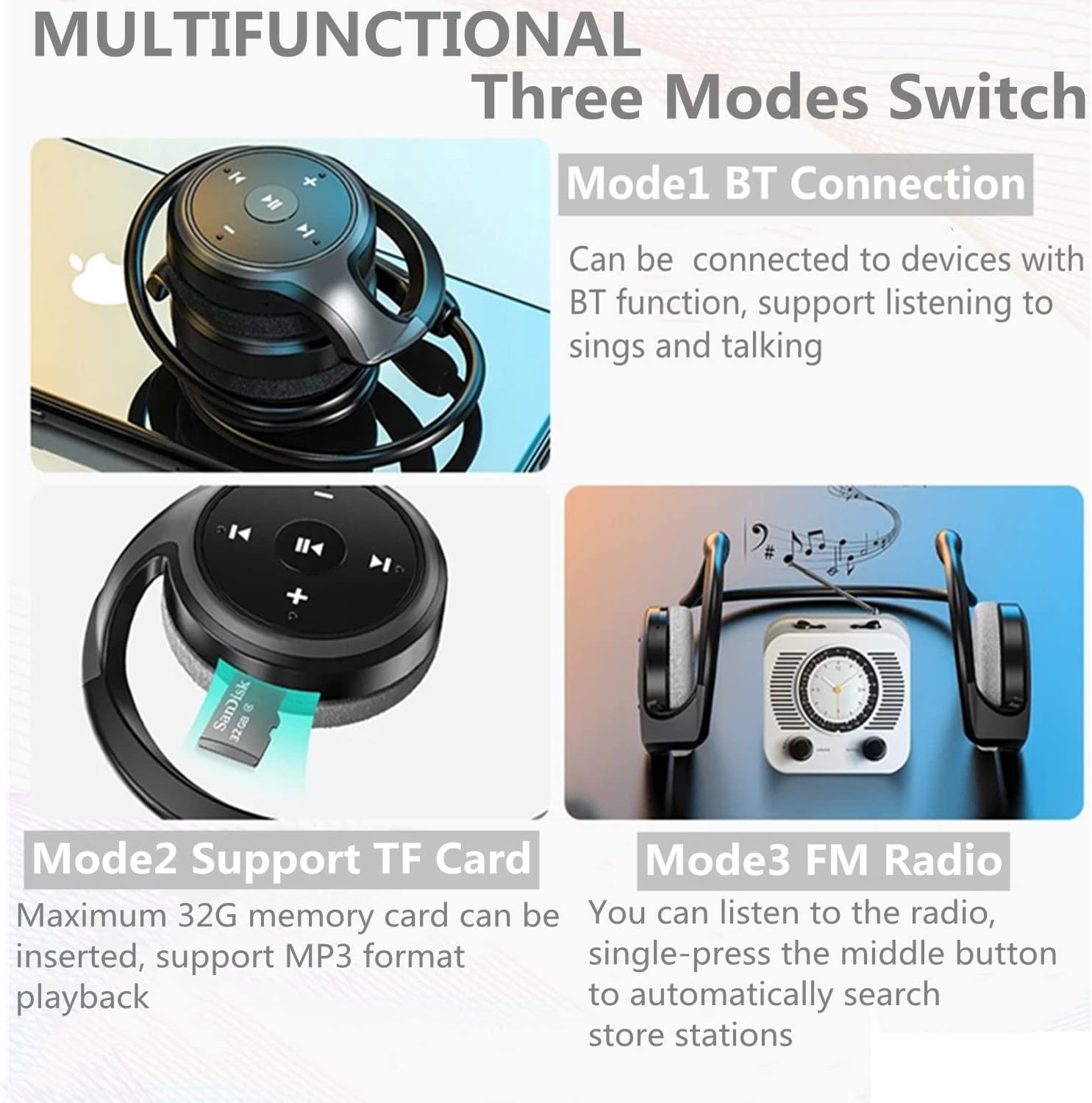
Image: Visual representation of the three available modes: Bluetooth connection, TF card support, and FM radio.
4.2.1 Bluetooth (BT) Mode
In BT mode, the headphones connect wirelessly to your Bluetooth-enabled device. This mode allows you to listen to audio from your device and manage calls.
- Ensure the headphones are paired with your device (refer to Section 3.2).
- Audio from your connected device will play through the headphones.
- Use the multi-functional button to play/pause music or answer/end calls.
- Use the previous/next track buttons to skip songs.
4.2.2 TF Card Mode
The headphones support music playback directly from a Micro SD (TF) card up to 32GB. This allows you to listen to music without needing a connected device.

Image: Close-up view of the headphone earcup showing the Micro SD card slot and indicating support for up to 32GB cards.
- Insert a TF card with MP3 format music files into the designated slot on the headphone earcup.
- Double-click the multi-functional button to switch to TF Card mode.
- The headphones will automatically begin playing music from the card.
- Use the previous/next track buttons for track navigation and long press for fast forward/rewind.
4.2.3 FM Radio Mode
You can listen to FM radio stations directly through the headphones.
- Double-click the multi-functional button to switch to FM Radio mode.
- Single press the multi-functional button to automatically search and store available FM stations.
- Use the previous/next track buttons to switch between stored stations.
- The frequency range for FM playback is 87.5-108Mhz.
5. Maintenance
5.1 Cleaning
- Wipe the headphones with a soft, dry, lint-free cloth.
- Do not use abrasive cleaners, alcohol, or chemical solvents, as these may damage the surface.
- Keep the charging port free of dust and debris.
5.2 Storage
- Store the headphones in a cool, dry place away from direct sunlight and extreme temperatures.
- When not in use for extended periods, charge the headphones at least once every three months to preserve battery life.
- The foldable design allows for compact storage; utilize this feature to protect the headphones during transport.
6. Troubleshooting
If you encounter issues with your headphones, please refer to the following common problems and solutions:
| Problem | Possible Solution |
|---|---|
| Headphones do not power on. |
|
| Cannot pair with a Bluetooth device. |
|
| No sound or low volume. |
|
| Sound is distorted or cuts out. |
|
| FM radio not working or poor reception. |
|
7. Specifications
Detailed technical specifications for the XUJAIOLQP Behind The Head Headphones:
| Feature | Detail |
|---|---|
| Model Number | A23 |
| Bluetooth Standard | V5.0 |
| Supported Modes | HSP, HFP, A2DP, AVRCP |
| Transmission Power | Class2 |
| Frequency Range | 2.4026GHz - 2.480GHz |
| Transmission Range | Up to 10 meters (33 feet) |
| Charging Time | ≦3 hours |
| Talk Time | ≧7 hours |
| Music Listening Time | ≧6 hours |
| Standby Time | ≧120 hours |
| FM Music Playback Support | 87.5-108Mhz |
| TF Card Support | Yes, up to 32GB (MP3 format) |
| Ear Placement | Open Ear |
| Form Factor | Over Ear, In Ear |
| Impedance | 80 Ohm |
| Noise Control | Passive Noise Cancellation |
| Dimensions | 16.7 x 10.9 x 3.9 cm |
| Weight | 32 g |
8. Warranty and Support
XUJAIOLQP products are manufactured with high standards of quality and durability. For specific warranty details, please refer to the warranty card included with your purchase or contact the retailer.
Customer Support:
If you have any questions, require technical assistance, or experience issues not covered in this manual, please contact XUJAIOLQP customer support through the platform where you purchased the product. Please have your model number (A23) and purchase details ready when contacting support.