
Introduction
Thank you for choosing the HBN Remote Control Outlet Kit. This kit provides a convenient way to control your household appliances wirelessly. Please read this manual carefully before use to ensure proper operation and safety.

Image: Overview of the HBN Remote Control Outlet Kit, showing the four plugs and the remote control.
Safety Instructions
- Do not exceed the maximum load of 16A / 3680W.
- For indoor use only in dry environments.
- Do not connect multiple remote control outlets in series.
- Ensure the plug is fully inserted into the wall socket.
- Keep out of reach of children.
- Do not disassemble or modify the device.
Package Contents
- 4 x HBN Remote Control Outlets (Model G89R)
- 1 x HBN Remote Control Transmitter
- 1 x CR2032 Battery (pre-installed in remote)
- 1 x User Manual
Product Features
- Wireless Control: Operate appliances from up to 30 meters away.
- Energy Saving: Easily cut power to devices to reduce standby consumption.
- Simple Pairing: Self-learning function for quick setup.
- Individual or Group Control: Control each outlet separately or multiple outlets with one button.
- High Power Capacity: Supports devices up to 16A / 3680W.
Product Components

Image: Detailed view of the remote control outlet and transmitter, highlighting the LED indicator, ON/OFF switch, self-learning button on the outlet, and the control buttons on the remote.
- Remote Control Outlet:
- LED Indicator: Illuminates when the outlet is powered ON.
- ON/OFF Switch & Self-Learning Button: Used for manual control and pairing.
- Power Socket: Type F – 2 pins (Germany and Spain).
- Remote Control Transmitter:
- ON/OFF Buttons (1-4): Control individual outlets.
- Master ON/OFF Button: Controls all paired outlets simultaneously.
- Battery Compartment: Houses the CR2032 battery.
Setup and Pairing
The HBN remote control outlets are pre-programmed for immediate use. If you need to re-pair or change the pairing, follow these steps:
- Plug in the Outlet: Insert the remote control outlet into a standard wall socket. The LED indicator on the outlet will flash slowly.
- Enter Learning Mode: Press and hold the small ON/OFF & Self-Learning button on the side of the remote control outlet for approximately 3 seconds until the LED indicator starts flashing rapidly.
- Pair with Remote: Within 10 seconds of the LED flashing rapidly, press the desired "ON" button (e.g., "1 ON") on the remote control. The LED on the outlet will stop flashing and remain lit, indicating successful pairing.
- Test Pairing: Press the corresponding "OFF" button (e.g., "1 OFF") on the remote. The LED on the outlet should turn off. Press "ON" again, and the LED should light up.
- Repeat for Other Outlets: Repeat steps 1-4 for each additional remote control outlet, assigning them to different buttons (2, 3, 4) on the remote, or to the same button if you wish to control them as a group.
To clear all pairings: Press and hold the ON/OFF & Self-Learning button on the outlet for about 8 seconds until the LED flashes rapidly, then stops. This will reset the outlet to its default state.

Image: Illustration demonstrating the 30-meter range and the ability to control outlets individually or multiple outlets simultaneously with the remote.
Operating Instructions
- Connecting an Appliance: Plug your appliance into the HBN remote control outlet.
- Turning ON/OFF (Individual): Press the corresponding "ON" or "OFF" button (1-4) on the remote control to power the specific outlet and connected appliance.
- Turning ON/OFF (All): Press the "Master ON" or "Master OFF" button on the remote control to power all paired outlets simultaneously.
- Manual Control: You can also manually turn the outlet ON or OFF by pressing the small ON/OFF & Self-Learning button on the side of the outlet.
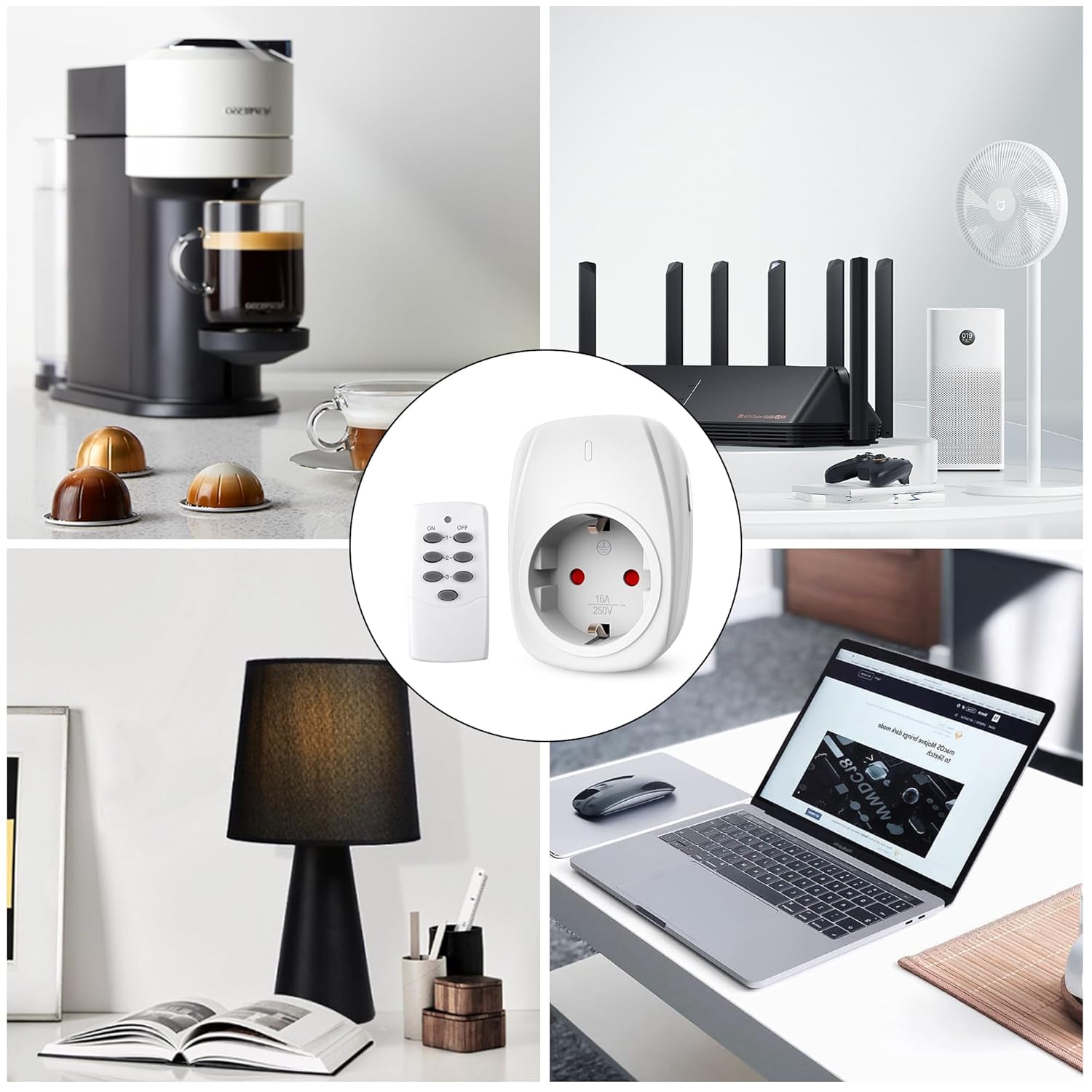
Image: Examples of common household appliances such as coffee makers, routers, fans, lamps, and laptops being controlled by the HBN remote control outlets.
Maintenance
- Cleaning: Disconnect the outlet from the power supply before cleaning. Wipe with a dry, soft cloth. Do not use liquid cleaners or sprays.
- Battery Replacement: If the remote control's range decreases or it stops responding, replace the CR2032 battery. Open the battery compartment on the back of the remote, replace the old battery with a new one, ensuring correct polarity (+/-).
- Storage: Store the outlets and remote in a cool, dry place when not in use for extended periods.
Troubleshooting
| Problem | Possible Cause | Solution |
|---|---|---|
| Outlet does not respond to remote. |
|
|
| Appliance connected to outlet does not turn on. |
|
|
| Remote control range is poor. |
|
|
Specifications
| Feature | Detail |
|---|---|
| Model Number | G89R |
| Input Voltage | 230V AC, 50Hz |
| Max Current | 16A |
| Max Power | 3680W |
| Wireless Frequency | 433.92 MHz |
| Remote Range | Up to 30 meters (open area) |
| Plug Type | Type F – 2 pins (Germany and Spain) |
| Remote Battery | 1 x CR2032 (included) |
| Dimensions (Outlet) | Approx. 5.7 cm (W) x 7.7 cm (H) (excluding pins) |
| Manufacturer | HBN |

Image: Dimensions of the HBN remote control outlet, highlighting its compact size and 16A maximum current capacity.

Image: Rear view of the HBN remote control outlet displaying its electrical ratings and model information.
Warranty and Support
For warranty information or technical support, please refer to the contact details provided with your purchase or visit the official HBN website. Keep your proof of purchase for warranty claims.
Environmental Protection
Do not dispose of electrical appliances as unsorted municipal waste. Use separate collection facilities. Contact your local government for information regarding the collection systems available. If electrical appliances are disposed of in landfills or dumps, hazardous substances can leak into the groundwater and get into the food chain, damaging your health and well-being.


