
RC-E5, RC-EX1A, SRK-35ZS-S, SRK25ZMA-S, SRK35ZMA-S, RLA502A700, RLA502A700K, SRK20ZSX-S, SRK25ZSX-S
AC Remote Control User Manual
For Mitsubishi Heavy Industries Multi Split Air Conditioners
Product Overview
This remote control is a replacement unit designed for various Mitsubishi Heavy Industries Multi Split Air Conditioner models. It provides essential functions for operating your air conditioning unit. Please note that this is a replacement remote and may not support all advanced features present on your original remote control, especially those related to heating and cooling modes if the original had specific functionalities not replicated by this IR replacement.
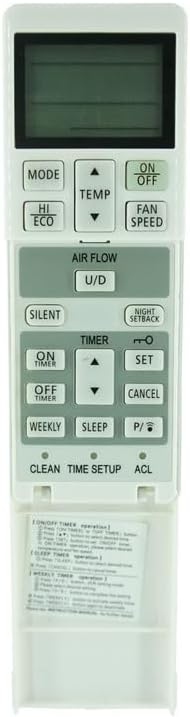
Figure 1: Front view of the AC remote control. This image displays the primary control interface, including the LCD screen, power button, mode selection, temperature adjustment, and fan speed controls.
Setup
1. Battery Installation
The remote control requires two (2) AAA batteries (not included). Follow these steps to install them:
- Locate the battery compartment on the back of the remote control.
- Slide the battery compartment cover downwards to open it.
- Insert two AAA batteries, ensuring the positive (+) and negative (-) terminals align correctly with the markings inside the compartment.
- Slide the battery compartment cover back into place until it clicks securely.
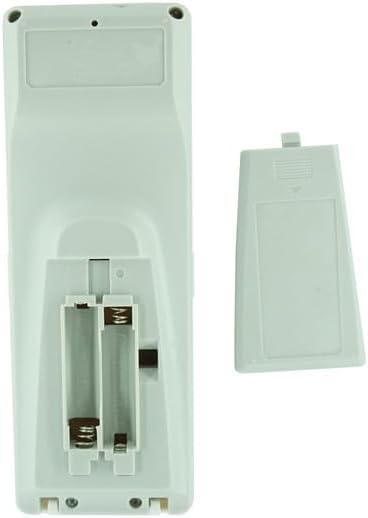
Figure 2: Battery compartment of the remote control. This image shows the open compartment where two AAA batteries are to be inserted.
2. Initial Use
Once batteries are installed, the remote control is ready for use. Point the remote directly at the infrared receiver on your Mitsubishi Heavy Industries air conditioning unit. No pairing or complex setup is typically required for this type of IR replacement remote.
Operating Instructions
This section outlines the basic functions of your replacement remote control.
- ON/OFF Button: Press the ON/OFF button to power the air conditioner on or off.
- MODE Button: Press the MODE button to cycle through available operating modes such as Cool, Dry, Fan, and Auto. The active mode will be displayed on the remote's screen.
- TEMP Buttons (▲/▼): Use the TEMP ▲ and TEMP ▼ buttons to adjust the desired temperature setting. The display shows the temperature in Celsius.
- FAN SPEED Button: Press the FAN SPEED button to adjust the fan speed settings (e.g., Low, Medium, High, Auto).
- HI ECO Button: This button may activate an energy-saving or high-efficiency mode, depending on your specific AC unit's capabilities. Refer to your air conditioner's original manual for details on this function.
Important Note: This remote is a replacement. While it supports core functions, some advanced features or specific heating/cooling modes found on your original remote may not be fully functional or available. Always ensure your air conditioner model is listed as compatible before relying on this remote for all functionalities.
Maintenance
- Battery Replacement: Replace batteries when the remote's display becomes dim or the remote becomes unresponsive. Always replace both batteries simultaneously with new AAA batteries.
- Cleaning: Wipe the remote control with a soft, dry cloth. Do not use liquid cleaners, sprays, or abrasive materials, as these can damage the remote's surface or internal components.
- Storage: If the remote will not be used for an extended period, remove the batteries to prevent leakage and potential damage. Store in a cool, dry place.
Troubleshooting
| Problem | Possible Cause | Solution |
|---|---|---|
| Remote not responding. | Dead or incorrectly installed batteries. | Replace batteries with new AAA batteries, ensuring correct polarity. |
| Remote not controlling AC unit. | No clear line of sight to AC unit's IR receiver. Obstruction. | Ensure direct line of sight between remote and AC unit. Remove any obstructions. |
| Remote functions are limited or incorrect. | Incompatibility with specific AC unit features. | This is a replacement remote; some advanced or specific functions (e.g., certain heating/cooling modes) may not be supported. Verify your AC model is listed as compatible. |
Specifications
- Brand: Generic
- Compatible Models: RC-E5, RC-EX1A, SRK-35ZS-S, SRK25ZMA-S, SRK35ZMA-S, RLA502A700, RLA502A700K, SRK20ZSX-S, SRK25ZSX-S (Mitsubishi Heavy Industries Multi Split Air Conditioners)
- Connectivity Technology: Infrared (IR)
- Controller Type: Button Control
- Power Source: 2 x AAA Batteries (not included)
- Special Features: Display in Celsius, Replacement for Air Conditioner
- Manufacturer: SZHKHXD
- Country of Origin: China
Warranty and Support
Information regarding specific warranty terms for this replacement remote control is not provided. For any issues or inquiries, please refer to the seller from whom you purchased the product. Ensure to check the product listing or contact the seller directly for support and warranty details.
Ask a question about this manual
Ask about setup, troubleshooting, compatibility, parts, safety, or missing instructions. Manuals+ will review the question and use this page’s manual context to help answer it.