
BW-WA3
BlitzWolf BW-WA3 100W Bluetooth Speaker User Manual
Model: BW-WA3
Introduction
Thank you for purchasing the BlitzWolf BW-WA3 100W Bluetooth Speaker. This manual provides detailed instructions for setup, operation, maintenance, and troubleshooting to ensure optimal performance and longevity of your device. Please read this manual thoroughly before using the product and retain it for future reference.

Figure 1: BlitzWolf BW-WA3 100W Bluetooth Speaker - Front View
This image shows the BlitzWolf BW-WA3 speaker from a slightly elevated front-right angle, highlighting its rectangular shape, dark gray metallic finish, and the illuminated circular light on the left end. The speaker grille is visible on the front, and control buttons are located on the top panel.
Package Contents
Please check the package contents upon unboxing. If any items are missing or damaged, contact customer support.
- BlitzWolf BW-WA3 Bluetooth Speaker
- USB-C Charging Cable
- User Manual
Key Features
- 100W Powerful Output: Enhanced with a strong 100W driver and DSP technology for stereo sound with rich bass, tight mids, and crystal clear highs.
- Quad Drivers + Dual Diaphragm: Delivers exceptional clarity and zero distortion with crystal clear highs and punchy, deep bass.
- 5000mAh Long Endurance Battery: Provides extended playback time and supports USB emergency charging for other devices.
- TWS Pairing: Wirelessly pair two speakers for double the volume or immersive stereo sound.
- RGB Light: Dynamic rainbow light show that pulses and shines to the beat of your music.
- Three EQ Modes: Switch between Standard, Light, and Heavy Bass modes to suit your musical preference.
- IPX5 Waterproof: Resistant to water splashes, making it suitable for outdoor use.

Figure 2: Internal Components and Sound Output
This image illustrates the internal quad drivers and dual diaphragms of the BlitzWolf BW-WA3 speaker, emphasizing its 100W power output and stunning bass capabilities. It also shows the three EQ modes: Standard, Light, and Heavy Bass.

Figure 3: RGB Light and Dual Metal Diaphragm
This image highlights the dual metal diaphragm and the dynamic RGB light feature of the BlitzWolf BW-WA3 speaker, showing how the lights pulse to the rhythm of the music. A smartphone displaying music playback is positioned in front of the speaker.
Setup Guide
1. Charging the Speaker
- Connect the provided USB-C charging cable to the speaker's charging port.
- Connect the other end of the cable to a USB power adapter (not included) or a computer's USB port.
- The charging indicator light will illuminate. A full charge typically takes approximately 5 hours.
- Once fully charged, the indicator light will change or turn off, depending on the model. Disconnect the charging cable.

Figure 4: Charging the Speaker and Battery Capacity
This image shows the BlitzWolf BW-WA3 speaker being charged via its USB-C port, with a smartphone connected to it, illustrating its 5000mAh capacity and emergency power bank function. Icons indicate call time (20h), music time (12h), and charging time (5h).
2. Powering On/Off
- To power on, press and hold the Power button for a few seconds until you hear an audible prompt and the indicator lights illuminate.
- To power off, press and hold the Power button again until the lights turn off and you hear an audible prompt.
Operating Instructions
1. Bluetooth Pairing
- Ensure the speaker is powered on and in Bluetooth pairing mode (indicated by a flashing blue light). If not, short press the Bluetooth button to enter pairing mode.
- On your device (smartphone, tablet, etc.), enable Bluetooth and search for available devices.
- Select "BW-WA3" from the list of devices.
- Once paired, the speaker will emit an audible confirmation, and the Bluetooth indicator light will become solid blue.
2. True Wireless Stereo (TWS) Pairing
TWS allows you to pair two BW-WA3 speakers together for an immersive stereo sound experience.
- Ensure both BW-WA3 speakers are powered on and not connected to any Bluetooth device.
- On one speaker (this will be the primary speaker), press and hold the TWS button (often indicated by a chain link icon) for 2-3 seconds.
- The primary speaker will search for the secondary speaker. Once connected, both speakers will emit an audible confirmation.
- Now, connect your device to the primary speaker via Bluetooth as described in the "Bluetooth Pairing" section. Audio will play through both speakers in stereo.
- To disconnect TWS, press and hold the TWS button on either speaker again.

Figure 5: True Wireless Stereo Sound Setup
This image visually represents the True Wireless Stereo (TWS) pairing feature, showing two BlitzWolf BW-WA3 speakers wirelessly connected to create an immersive stereo sound experience. Sound waves are depicted flowing between the speakers.
3. EQ Modes
The speaker features three equalizer modes to customize your audio experience:
- Standard: Balanced sound profile.
- Light: Enhanced clarity for vocals and treble.
- Heavy Bass: Amplified bass for a deeper, richer low-end.
To switch between EQ modes, short press the EQ button (often indicated by an EQ icon or "EQ" text) on the speaker's control panel.
4. RGB Light Control
The RGB light feature adds a visual element to your music. Refer to the speaker's control panel for the dedicated light button or combination press to cycle through light modes or turn them off.
5. Call Functions
- Answer/End Call: Short press the Play/Pause button.
- Reject Call: Press and hold the Play/Pause button.
- Redial Last Number: Double-press the Play/Pause button.
Maintenance
- Cleaning: Use a soft, dry cloth to wipe the speaker's surface. Do not use abrasive cleaners, alcohol, or chemical solvents.
- Storage: Store the speaker in a cool, dry place away from direct sunlight and extreme temperatures.
- Battery Care: To prolong battery life, fully charge the speaker before first use and at least once every three months if not used regularly. Avoid fully discharging the battery frequently.
- Water Resistance: While IPX5 waterproof, avoid submerging the speaker in water. Ensure the charging port cover is securely closed before exposure to water splashes.
Troubleshooting
| Problem | Possible Cause | Solution |
|---|---|---|
| Speaker does not power on. | Low battery. | Charge the speaker fully. |
| Cannot pair with Bluetooth device. | Speaker not in pairing mode; Bluetooth disabled on device; device too far. | Ensure speaker is in pairing mode. Enable Bluetooth on your device. Move device closer to speaker (within 10 meters). |
| No sound or low volume. | Volume too low on speaker or device; speaker not connected. | Increase volume on both speaker and connected device. Re-pair the speaker. |
| TWS pairing failed. | Speakers already connected to other devices; speakers too far apart. | Ensure both speakers are disconnected from other devices. Place speakers close to each other during TWS pairing. |
| Sound distortion. | Volume too high; audio source quality. | Reduce volume. Try a different audio source or file. |
Specifications
| Brand | BlitzWolf |
| Model | BW-WA3 |
| Output Power | 100W |
| Bluetooth Version | V5.0 |
| Battery Capacity | 5000mAh |
| Charging Time | Approx. 5 hours |
| Music Playtime | Up to 12 hours (at 50% volume) |
| Call Time | Up to 20 hours |
| Drivers Diameter | Treble Drivers: 45mm*2, Bass Drivers: 66mm*2 |
| Waterproof Rating | IPX5 |
| Dimensions | 240mm x 91mm x 82mm (9.45"D x 3.58"W x 3.23"H) |
| Net Weight | 1561g |
| Microphone | Yes |
| Control Method | Touch |
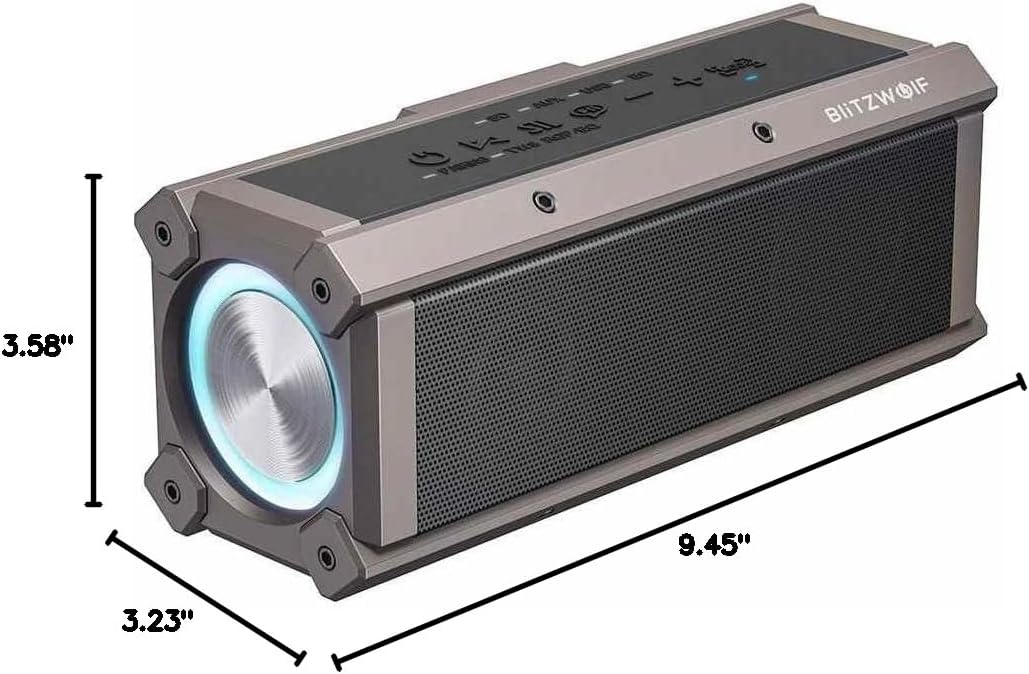
Figure 6: Product Dimensions
This image provides a visual representation of the BlitzWolf BW-WA3 speaker's dimensions, showing its length (9.45 inches), width (3.58 inches), and height (3.23 inches).
Warranty and Support
The BlitzWolf BW-WA3 speaker comes with a Limited Warranty. Please refer to the warranty card included in your package for specific terms and conditions.
For technical support, troubleshooting assistance, or warranty claims, please contact the retailer or manufacturer's customer service. Keep your purchase receipt as proof of purchase.
Related Documents - BW-WA3
 |
BIITZWOIF BW-WA3 PRO Bluetooth Speaker User Manual Comprehensive user manual for the BIITZWOIF BW-WA3 PRO Bluetooth speaker, detailing specifications, features, button operations, TWS pairing, EQ modes, and FCC compliance information. |
 |
BlitzWolf BW-WA3 User Manual - Portable Speaker User manual for the BlitzWolf BW-WA3 portable speaker, detailing specifications, instructions, and operational modes. Includes multilingual content in English, French, German, Italian, Spanish, and Japanese. |
 |
BlitzWolf BW-FLB5 True Wireless Stereo Earbuds User Manual Comprehensive user manual for the BlitzWolf BW-FLB5 true wireless stereo earbuds, covering setup, pairing, button controls, specifications, and important cautions. |
 |
BlitzWolf Selfie Stick User Manual and Product Guide Comprehensive guide to BlitzWolf selfie sticks, covering features, usage, and troubleshooting for models like BW-BS3, BW-BS8, and BW-BS5. Learn about Bluetooth connectivity, tripod functionality, and remote shutter operation. |
 |
BlitzWolf BW-BTS10 OWS Earbuds User Manual and Specifications Detailed specifications and features for the BlitzWolf BW-BTS10 OWS Bluetooth Earbuds, including bone conduction technology, IPX8 waterproofing, Bluetooth V5.4, and battery life. |
 |
BlitzWolf BW-IS20 User Manual and Quick Start Guide Comprehensive user manual and quick start guide for the BlitzWolf BW-IS20 smart device, covering product features, installation, setup, operation, and troubleshooting. |