
1. Introduction
This user manual provides comprehensive instructions for the Neosonic MX-RIC rechargeable Receiver-in-Canal (RIC) digital hearing aids. Please read this manual thoroughly before using your devices to ensure proper operation, maintenance, and to maximize your listening experience. Keep this manual for future reference.

Image 1.1: Neosonic MX-RIC hearing aids in their charging station.
2. Package Contents
Verify that all items listed below are present in your package:
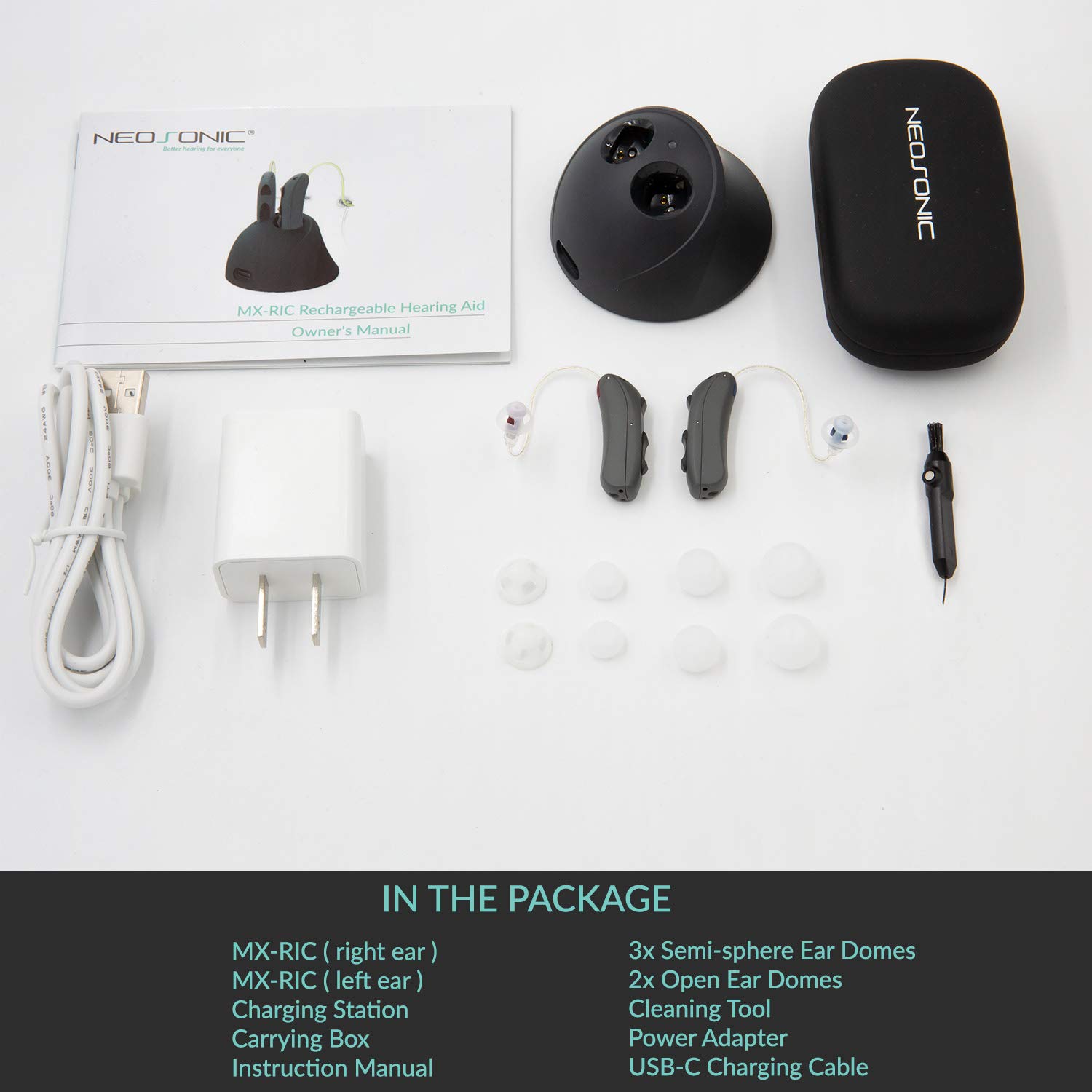
Image 2.1: All components included in the Neosonic MX-RIC product package.
- MX-RIC (right ear)
- MX-RIC (left ear)
- Charging Station
- Carrying Box
- Instruction Manual
- 3x Semi-sphere Ear Domes (various sizes)
- 2x Open Ear Domes (various sizes)
- Cleaning Tool
- Power Adapter
- USB-C Charging Cable
3. Product Overview and Components
The Neosonic MX-RIC hearing aids utilize a Receiver-in-Canal (RIC) design, where the speaker (receiver) is placed directly in the ear canal, connected by a thin wire to the main unit behind the ear. This design offers several advantages:
- Superior Sound Quality: The receiver's proximity to the eardrum provides clearer sound with less distortion.
- Reduced Feedback: Separation of microphone and speaker minimizes whistling.
- Comfort and Discretion: The small, lightweight unit behind the ear and thin wire make it less noticeable.
- Enhanced Airflow: More open ear canal design can improve comfort.

Image 3.1: Diagram of the MX-RIC hearing aid components and controls.
Key Features:
- Receiver-in-Canal (RIC) Style
- Quick EZcharge™ Magnetic Contact Charging
- Built-in 30mAh Steel Sealed Lition-Poly battery
- Dual Microphone Noise Reduction
- IP65 Water Resistant
- Patented Adaptive Feedback Cancelling™
4. Setup and First Use
4.1 Charging the Hearing Aids
Before initial use, fully charge your Neosonic MX-RIC hearing aids. The devices feature super quick charging technology.
- Connect the USB-C charging cable to the charging station and a power adapter.
- Place the hearing aids into their respective slots in the charging station. The magnetic contacts will secure them in place.
- Charging indicators on the hearing aids will illuminate (typically blue) to show they are charging.
- A full charge takes approximately 1.5 hours and provides up to 20 hours of continuous usage.

Image 4.1: Neosonic MX-RIC hearing aids in the charging station, illustrating quick charging capabilities.
4.2 Selecting and Attaching Ear Domes
Choose an ear dome size that provides a comfortable and secure fit in your ear canal. A proper fit is crucial for optimal sound quality and to prevent feedback.
- Experiment with the included semi-sphere and open ear domes to find the best fit.
- Gently push the selected ear dome onto the receiver (speaker) at the end of the thin wire until it is securely attached.
4.3 Inserting the Hearing Aids
- Hold the main unit behind your ear.
- Gently guide the ear dome into your ear canal until it sits comfortably and securely.
- Adjust the thin wire so it rests discreetly along the curve of your ear.
5. Operation
5.1 Power On/Off and Mode Selection
The main unit behind your ear features buttons for control:
- Power/Mode Button: Press and hold to power the device on or off. Short presses cycle through available sound programs/modes.
- Volume Up Button: Increases the listening volume.
- Volume Down Button: Decreases the listening volume.
5.2 Dual Microphone Noise Cancellation
The Neosonic MX-RIC is equipped with a dual microphone system, featuring both a front and a rear directional microphone. This advanced setup enhances sound clarity by:
- Better understanding your acoustic environment.
- Providing effective noise cancellation.
- Focusing on speech coming from the front, while reducing background noise from other directions.
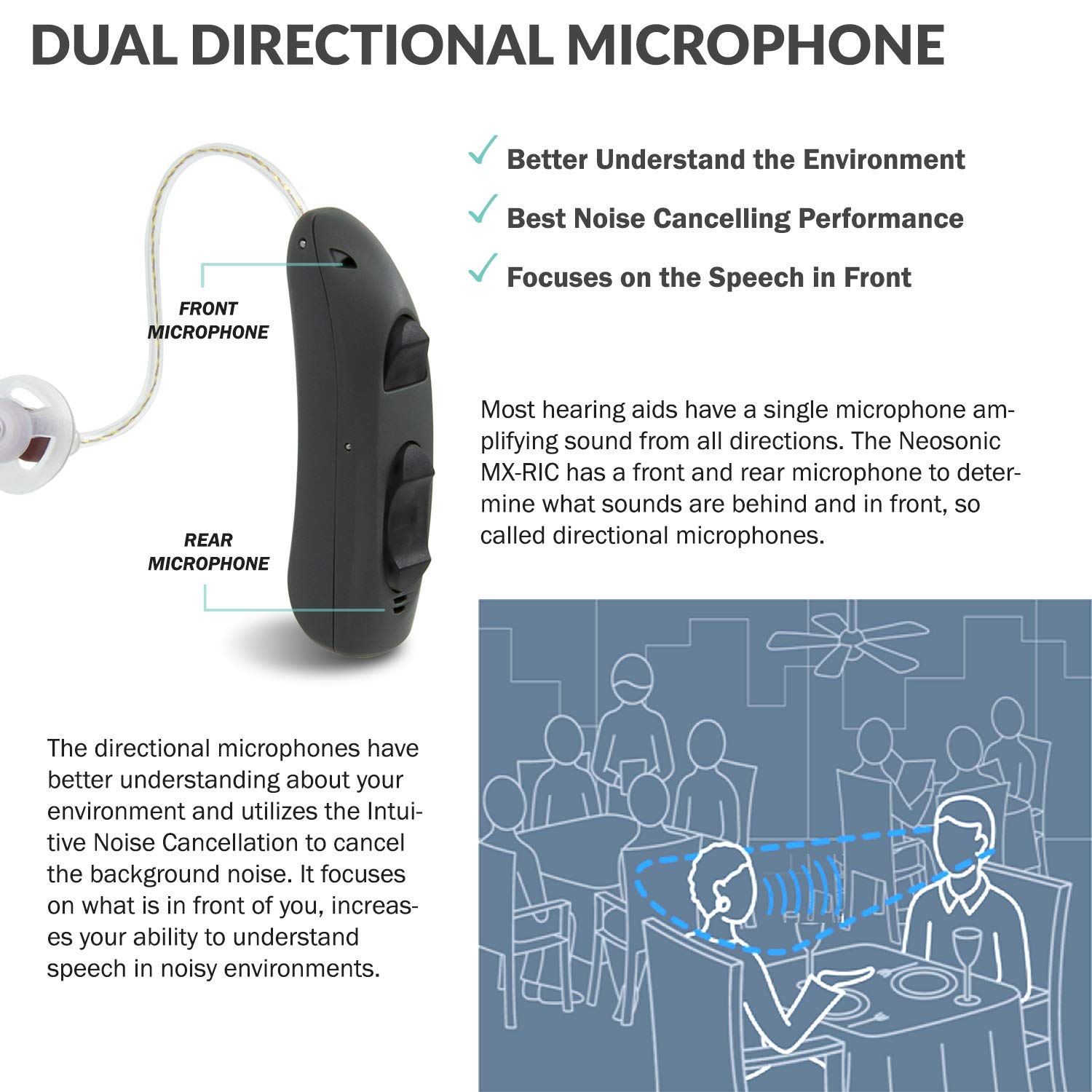
Image 5.1: Illustration of the dual directional microphone system and its function in noisy environments.
6. Maintenance and Care
6.1 Cleaning Your Hearing Aids
Regular cleaning helps maintain performance and extends the lifespan of your devices.
- Use the provided cleaning tool to gently remove any wax or debris from the ear domes and receiver.
- Wipe the main unit with a soft, dry cloth. Avoid using liquids or harsh chemicals.
- Ensure the charging contacts on both the hearing aids and the charging station are clean and dry.
6.2 Water Resistance (IP65 Rating)
The Neosonic MX-RIC hearing aids have an IP65 rating, indicating they are protected against dust ingress and low-pressure water jets from any direction. This means they are splash-resistant and can withstand:
- Rainy conditions.
- Sweating during physical activities.
Important: The IP65 rating does not mean the devices are waterproof. Do not submerge them in water or expose them to high-pressure water streams.

Image 6.1: Neosonic MX-RIC hearing aid demonstrating its IP65 water resistance.
7. Troubleshooting
If you experience issues with your Neosonic MX-RIC hearing aids, refer to the table below for common problems and solutions.
| Problem | Possible Cause | Solution |
|---|---|---|
| No sound or weak sound | Low battery; blocked ear dome/receiver; incorrect volume setting; device off. | Charge the device; clean the ear dome and receiver; increase volume; power on the device. |
| Whistling or feedback | Improper fit; ear dome too small; earwax buildup in ear canal; hand/object too close to device. | Ensure proper fit; try a larger ear dome; consult a healthcare professional for earwax removal; avoid covering the device. |
| Device not charging | Improper placement in charger; dirty charging contacts; faulty cable/adapter. | Ensure devices are correctly seated; clean charging contacts; try a different USB-C cable or power adapter. |
| Sound is distorted or unclear | Low battery; blocked ear dome/receiver; moisture inside device. | Charge the device; clean the ear dome and receiver; place devices in a drying kit if moisture is suspected. |
If the problem persists after attempting these solutions, please contact customer support.
8. Specifications
| Feature | Detail |
|---|---|
| Model Name | MX-RIC |
| Product Dimensions | 1.25 x 0.38 x 0.04 inches |
| Batteries | 2 Product Specific batteries required (included) |
| Charging Time | Approx. 1.5 hours for full charge |
| Usage Time | Up to 20 hours (per full charge) |
| Water Resistance | IP65 rated (splash resistant) |
| Material | Plastic |
| Style | Both Ear (Receiver-in-Canal) |
| Manufacturer | Neosonic |
9. Warranty and Support
Neosonic is committed to your satisfaction. The MX-RIC hearing aids come with the following:
- 45-Day Money-Back Guarantee: Allows you to return the product if you are not fully satisfied.
- 1-Year Manufacturer Warranty: Covers defects in materials and workmanship for one year from the date of purchase.
- Unlimited Customer Support: Available within the United States for any questions or assistance you may need.
For warranty claims or technical support, please refer to the contact information provided with your purchase or visit the official Neosonic website.