
1. Introduction
This manual provides essential information for the safe and effective operation of your TLBZK 350W 110V Soldering Station Hot Plate. Please read this manual thoroughly before use and retain it for future reference.
Key Features:
- High-quality aluminum alloy heating plate for high thermal efficiency, fast heating, and uniform temperature distribution.
- Temperature Range: 0-400℃.
- Fan-less design with louvers on both sides of the chassis for air convection and heat dissipation, extending component lifespan.
- Suitable for component heating, SMD rework, PCB removal and soldering, mobile tablet screen removal, and film scalding.
- Built-in CPU for intelligent temperature control.
- Designed with raised edges around the heating table to prevent accidental contact and scalding during operation.
2. Important Safety Instructions
Failure to follow these safety instructions may result in electric shock, fire, or serious injury. Always exercise caution when operating heating equipment.
- Placement: Ensure the hot plate is placed on a smooth, stable, and heat-resistant countertop or work platform.
- Heated Objects: Only place objects suitable for heating on the plate. High temperatures may damage certain materials or components.
- Cooling Down: Before moving or touching the machine, always turn off the power and allow the heated plate to cool completely to room temperature.
- Unattended Operation: This machine is a high-temperature electrical product. Always cut off the power when not in use to avoid danger and accidents. Do not leave the unit unattended while operating.
- Airflow: Do not allow direct airflow (e.g., from a fan) onto the heating plate, as this can affect the heater's performance and temperature stability.
- Electrical Safety: Ensure the power supply matches the unit's requirements (110V). Do not operate with damaged cords or plugs.
- Personal Protective Equipment: Always wear appropriate personal protective equipment, such as heat-resistant gloves and safety glasses, when operating the hot plate.
- Children and Pets: Keep the hot plate out of reach of children and pets.
3. Package Contents
Verify that all items are present upon unpacking:
- TLBZK 350W 110V Soldering Station Hot Plate (100x100mm)
- Power Cable
- Fuse (included in the power inlet)
- Instruction Manual (this document)
4. Product Overview
Familiarize yourself with the components of your hot plate:

Figure 1: TLBZK 350W 110V Soldering Station Hot Plate (100x100mm)
- Heating Plate: The top surface where items are placed for heating. Made of aluminum alloy for efficient heat transfer.
- Control Panel: Features an LED display and buttons for setting and monitoring temperature.
- Power Switch: Located at the rear of the unit to turn the device on or off.
- Ventilation Louvers: Located on the sides of the chassis to facilitate air convection and heat dissipation.
- Protective Edges: The design includes raised edges around the heating plate to enhance user safety.

Figure 2: Control Panel with LED Display

Figure 3: Ventilation Louvers for Heat Dissipation

Figure 4: Edge Design for Safety

Figure 5: Power Switch and Inlet
5. Setup
- Unpack: Carefully remove the hot plate and all accessories from the packaging.
- Placement: Place the unit on a stable, level, and heat-resistant surface, ensuring adequate clearance for ventilation.
- Power Connection: Ensure the power switch is in the OFF position. Connect the power cable to the unit's power inlet and then plug it into a grounded 110V AC power outlet.
6. Operating Instructions
Powering On/Off:
- To power on, flip the power switch located at the rear of the unit to the 'ON' position. The LED display will illuminate.
- To power off, flip the power switch to the 'OFF' position.
Setting Temperature:
- Press the 'SET' button on the control panel. The temperature display will start flashing.
- Use the 'UP' (▲) and 'DOWN' (▼) arrow buttons to adjust the desired temperature.
- Press the 'ENT' button to confirm and save the new temperature setting. The display will stop flashing, and the unit will begin heating to the set temperature.
General Usage:
Once the desired temperature is reached, carefully place the item to be heated onto the center of the heating plate. Monitor the process closely.
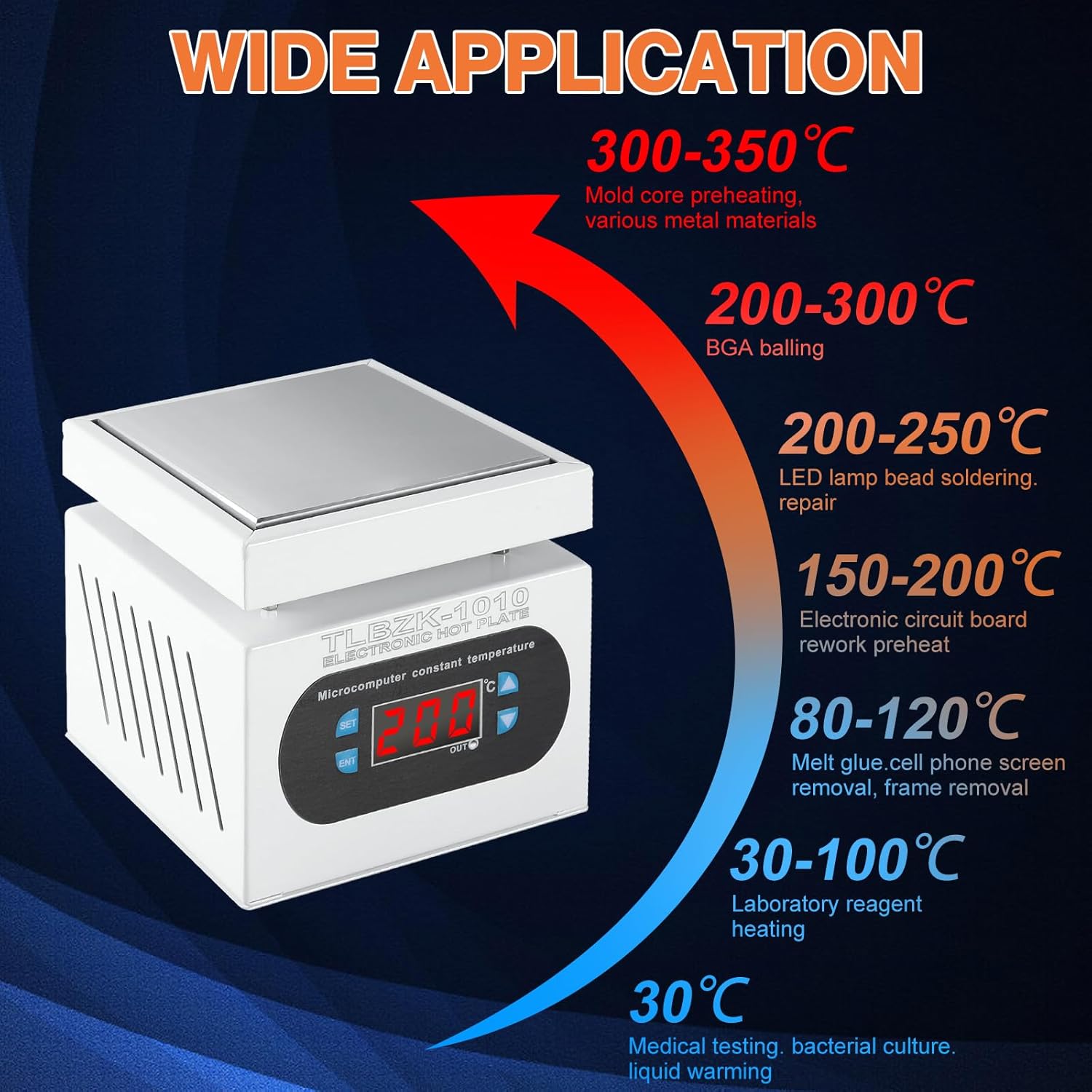
Figure 6: Recommended Temperature Ranges for Various Applications
Operational Demonstrations:
Video 1: Basic operation and temperature setting of a hot plate, similar to the TLBZK model.
Video 2: Lab hot plate in use for heating liquids and desoldering components.
Video 3: Preheating function of a hot plate for electronic components.
7. Maintenance
- Cleaning: After the unit has completely cooled down and is unplugged, wipe the heating plate and exterior with a soft, damp cloth. Do not use abrasive cleaners or solvents.
- Storage: Store the hot plate in a dry, dust-free environment when not in use.
- Inspection: Regularly inspect the power cable for any signs of damage. If damaged, discontinue use and replace it immediately.
8. Troubleshooting
| Problem | Possible Cause | Solution |
|---|---|---|
| Unit does not power on. | No power supply; power cable not connected; power switch off; blown fuse. | Check power outlet; ensure power cable is securely connected; turn power switch on; check and replace fuse if necessary. |
| Plate not heating or heating slowly. | Incorrect temperature setting; external airflow; internal component issue. | Verify temperature setting; ensure no direct airflow; if problem persists, contact support. |
| Temperature display is inaccurate. | Calibration required; sensor issue. | The unit has internal calibration parameters, but these are not user-friendly. For precise temperature applications, it is recommended to use an external thermometer or thermal camera to verify the actual surface temperature and adjust the set temperature accordingly. If the discrepancy is significant or persistent, contact support. |
9. Specifications
- Brand: TLBZK
- Model: 100X100mm
- Part Number: TLBZK-1010
- Power Source: AC
- Voltage: 110V (AC)
- Wattage: 350 watts
- Material: Metal (Aluminum alloy heating plate)
- Product Dimensions: 11.79 x 11.79 x 12.6 cm
- Item Weight: 1.25 kg
- Display Type: LED
- Temperature Range: 0-400℃
- Temperature Stability: Up to 400℃
- Included Components: Fuse
10. Warranty and Support
For warranty information, technical support, or service inquiries, please contact the seller or manufacturer directly through your purchase platform. Keep your purchase receipt or order number handy for faster assistance.


