1. Introduction
This manual provides detailed instructions for the installation, operation, and maintenance of your URAQT 19-Function Waterproof Bicycle Computer. Please read this manual thoroughly before use to ensure proper function and longevity of the device.
Safety Warnings
- Do not immerse the cyclometer directly in water, despite its IP54 waterproof rating. It is designed to withstand rain but not submersion.
- Ensure all components are securely installed before riding to prevent accidents.
- Always prioritize road safety. Do not operate the device in a way that distracts you from cycling.
2. Package Contents
Verify that all items are present in your package:
- Bicycle Computer Unit
- Sensor
- Magnet
- Mounting Bracket (Universal and Extension Bracket)
- Cable Ties
- User Manual

3. Product Overview
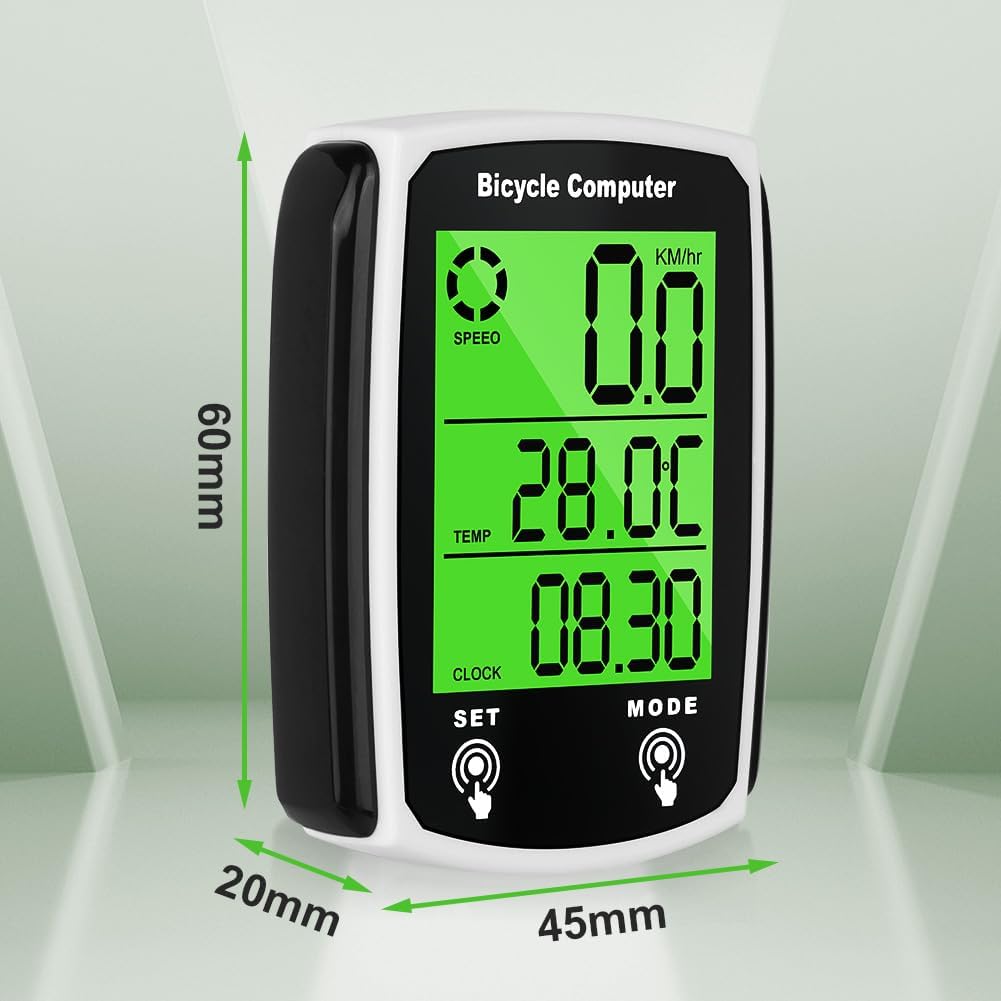
The URAQT Bicycle Computer is a versatile device designed to track various cycling metrics. It features a backlit LCD display and an automatic start/stop system for convenience.
Key Features:
- 19 Functions: Measures speed, distance, calories burned, ride time, and more.
- Backlit LCD Display: Glare-free screen for clear readability day and night.
- IP54 Waterproof: Designed to operate in rainy conditions.
- Automatic Start/Stop: Conserves battery by entering sleep mode after 5 minutes of inactivity and automatically resuming upon movement.
- Energy Saving: Enters power-saving mode after 300 seconds of inactivity.
- Data Storage: Retains battery data for 20 seconds during battery changes.
- Extension Support: Includes a universal and extension bracket for handlebar diameters from 22.2 to 31.8 cm.

4. Setup and Installation
Follow these steps to correctly install your bicycle computer:
- Mount the Computer Unit: Attach the universal or extension bracket to your handlebar. The extension bracket supports handlebar diameters from 22.2 to 31.8 cm. Secure the computer unit onto the bracket.
- Install the Sensor: Mount the sensor on the bicycle fork.
- Install the Magnet: Attach the magnet to a spoke on your front wheel.
- Positioning Requirements:
- The distance between the sensor and the main computer unit must be less than 50 cm for reliable signal reception. Closer proximity is recommended.
- The distance between the magnet and the sensor should be approximately 5 mm. A smaller gap ensures better accuracy.
- Ensure the magnet is oriented towards the rear of the sensor's battery compartment for optimal performance.


5. Operating Instructions
The bicycle computer features two main buttons for navigation and settings:
- "Mode" Button (Right): Used to cycle through different display modes or select desired settings.
- "Settings" Button (Left): Used to confirm selections or enter specific settings.
Basic Operation:
- Power On/Off: The device automatically turns on when movement is detected and enters sleep mode after 5 minutes of inactivity.
- Backlight Control: To activate the backlight, press the "Mode" and "Settings" buttons simultaneously. Repeat the action to deactivate it.
- Setting Tire Size: Refer to the detailed instructions in the full manual for precise tire circumference settings to ensure accurate speed and distance measurements.
- KM/M Selection: Customize your preferred unit of measurement (kilometers or miles) through the settings menu.
6. Functions Overview
The URAQT Bicycle Computer offers 19 functions to enhance your cycling experience:
- Current Speed (SPD)
- Average Speed (AVS)
- Maximum Speed (MAX)
- Trip Distance (DST)
- Odometer (ODO)
- Elapsed Time (TM)
- Calories Burned (CAL)
- Temperature (TEMP)
- Clock (CLK)
- Speed Comparison (+/-)
- Scan Mode (cycles through data)
- Maintenance Alert
- Sleep Clock Display
- Power Saving Mode
- Automatic Wake-up while Riding
- Backlight Function (user selectable)
- Change Battery Data Storage (20 seconds)
- Setting Type Circumference
- Setting Speed Scale (KM/H, M/H)

7. Maintenance
- Water Resistance: The device has an IP54 waterproof rating, meaning it is protected against dust and splashing water from any direction. It is suitable for use in light rain but should not be submerged or exposed to heavy downpours for extended periods.
- Cleaning: Wipe the unit with a soft, damp cloth. Do not use abrasive cleaners or solvents.
- Battery: The device is designed for long-lasting battery life, typically lasting at least 8 months. When changing the battery, the device stores data for 20 seconds, allowing for a seamless transition.


8. Troubleshooting
- Fluctuating Data: If the cyclometer displays fluctuating data, especially speed or distance, check the distance between the sensor and the main unit. Ensure it is less than 50 cm. Also, verify the magnet-to-sensor distance is approximately 5 mm and the magnet is correctly oriented.
- No Display/Power: Check the battery. Ensure it is correctly inserted and has sufficient charge.
- Backlight Not Working: Ensure you are pressing both "Mode" and "Settings" buttons simultaneously to activate/deactivate the backlight.
- Inaccurate Readings: Verify that the tire circumference setting is correct for your bicycle.
9. Specifications
| Feature | Detail |
|---|---|
| Brand | URAQT |
| Model Number | KS-BWHMSBI240314-FBA |
| Display Type | LCD |
| Connectivity Technology | Wired |
| Sensor Type | Speed Sensor |
| International Protection Rating | IP54 |
| Product Dimensions (L x W x H) | 13.7 x 9.1 x 2.3 cm |
| Item Weight | 83 Grams |
| Battery Life | Up to 8 months (typical); 5 minutes (power saving activation) |
| Battery Composition | Alkaline |
10. Warranty and Support
For warranty information and customer support, please refer to the documentation included with your purchase or contact the retailer. Keep your proof of purchase for any warranty claims.