
FITCAMX HD2-5213
Fitcamx 4K Dash Cam User Manual
Model: HD2-5213 | Brand: FITCAMX
1. Product Overview
The FITCAMX 4K Dash Cam is designed for seamless integration with Honda Accord and Accord Hybrid models from 2023 to 2025 (Gen11), including LX, EX, Sport-L, EX-L, and Touring trims. It offers an OEM-style fit, eliminating dangling wires and obstructed views, providing a factory-installed appearance.

The Fitcamx 4K Dash Cam seamlessly integrates into your vehicle's interior, controlled via a dedicated mobile application.
What's in the Box:
- 1x 4K Dash Cam
- 1x Power Cable
- 1x User Manual
- 1x 64GB Memory Card
- 1x Removal Pry Tool
 All components included in the Fitcamx 4K Dash Cam package.
2. Installation Guide
The Fitcamx dash cam is designed for a plug-and-play installation, requiring no complex wiring. Follow these steps for a secure and integrated setup:
 Visual guide for the installation process.
- Remove the front cover: Carefully detach the front cover of your vehicle's overhead console.
- Remove the back cover: Proceed to remove the back cover.
- Remove screws in glasses case: If your model has a glasses case, remove the screws securing it.
- Remove the room lamp: Gently remove the room lamp assembly.
- Connect to room lamp plug: Connect the dash cam's wiring harness to the room lamp's power plug.
- Wire the dash cam cable: Route the dash cam cable neatly towards the room lamp area.
- Fix the screws back: Securely re-fasten any screws removed in previous steps.
- Mount the dash cam: Position and mount the dash cam in its designated OEM location.
- Installation complete: Verify the dash cam is securely installed and powered on.
The OEM design ensures a clean look without obstructing the windshield or requiring extensive cable routing.
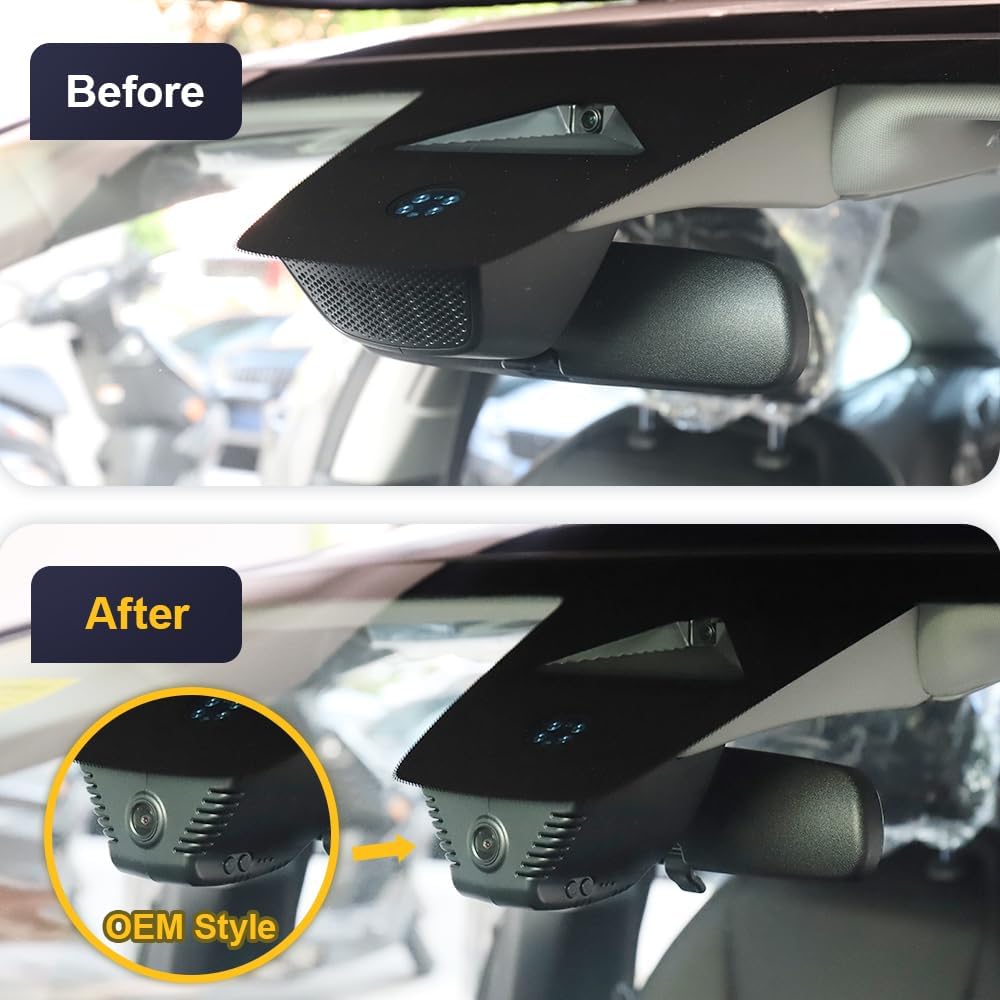 The OEM-style installation provides a clean, integrated look.
3. Operating Instructions
3.1. Wi-Fi Connection & App Usage
The Fitcamx Dash Cam features built-in Wi-Fi for easy connection to the FITCAMX mobile application. This allows you to view live footage, download recordings, and adjust camera settings directly from your smartphone.
Demonstration of connecting the dash cam to the FITCAMX app via Wi-Fi and navigating app features.
- Initial Power-On: Upon starting your car, the dash cam lights will illuminate, indicating correct operation.
- Connect to Wi-Fi: On your phone, go to Settings > Wi-Fi. Select the Wi-Fi network starting with "CAR", "LHD", or "CARDV". The default password is 12345678.
- Open FITCAMX App: Once connected to the dash cam's Wi-Fi, open the FITCAMX app. You will see a live view from the camera.
- Viewing Recordings: In the app, navigate to the "Camera File" section to browse and play back recorded videos.
- Downloading Files: You can download high-definition video recordings directly to your phone for easy access and sharing.
- Adjusting Settings: The app allows you to change various camera settings, including sound recording, video resolution, loop record options, exposure compensation, and time watermark.
Note: If you experience issues with live preview, try turning off cellular data or Bluetooth on your phone while connected to the dash cam's Wi-Fi.
 The FITCAMX app provides a convenient interface for managing your dash cam.
3.2. Loop Recording
The dash cam features loop recording, which automatically overwrites the oldest footage with new content when the memory card is full. This ensures continuous recording without manual intervention. The recording duration can be set via the FITCAMX app (1/3/5 minute options).
3.3. G-Sensor (Gravity Sensor)
The built-in G-Sensor detects sudden collisions or impacts. When a significant force is detected, the dash cam automatically saves the current footage to a protected folder, preventing it from being overwritten by loop recording. This ensures critical incident evidence is secured.
 Visual representation of Loop Recording and G-Sensor operation.
4. Key Features
- UHD 4K Video: Captures clear videos at 2160P/30fps, ensuring every detail is vividly recorded.
- HDR Technology: Enhances night vision by automatically adjusting exposure, allowing clear readability of license plates and road signs in low-light conditions.
- f/1.6 Large Aperture Lens: Contributes to superior low-light performance and overall video clarity.
- OEM Style: Designed to blend seamlessly with your vehicle's interior, appearing as a factory-installed component.
 Summary of the dash cam's main features.
5. Maintenance
5.1. Formatting the SD Card
Regularly formatting the SD card helps maintain optimal recording performance and prevents data corruption. You can format the SD card directly through the FITCAMX app settings.
Warning: Formatting will erase all contents on the SD card. Ensure you have backed up any important recordings before proceeding.
5.2. Operating Temperature
The Fitcamx dash cam is built with premium PC+ABS materials, allowing it to operate reliably in a wide temperature range from -20°C to 85°C (-4°F to 185°F).
6. Troubleshooting & FAQs
- Q: How to choose the correct model?
- A: Model compatibility depends on your vehicle's style, year, and original cover shape. It is recommended to confirm with FITCAMX for specific details regarding your vehicle.
- Q: Can I use CarPlay/Bluetooth when driving?
- A: Yes. Your phone cannot be connected to CarPlay and the dash cam's Wi-Fi simultaneously. However, the camera records automatically after the car starts, so you do not need to keep Wi-Fi connected to the camera constantly for recording.
- Q: Can I add a rear camera with a front cam already installed?
- A: No, because the PCB boards are different. If you wish to change video resolution or add a rear camera, you would need to replace the entire set.
- Q: Does the dash cam have parking mode?
- A: The standard package does NOT include parking mode functionality. An extra harness is required to enable parking mode. Search for ASIN: B09PQ9KDYX to order the fuse box cable for parking monitoring.
7. Specifications
| Attribute | Detail |
|---|---|
| Product Dimensions | 9 x 7 x 4 inches |
| Item Weight | 1.04 pounds |
| ASIN | B0CC59DKC3 |
| Item Model Number | HD2-5213 |
| Batteries | 1 Lithium Metal batteries required (included) |
| Connectivity Technologies | Powerline, Wireless |
| Special Features | FITCAMX APP, OEM Style |
| Color | Black |
| Manufacturer | Dongguan Daozhi Electronic Technology Co., Ltd |
| Date First Available | July 18, 2023 |
| Model Name | Fitcamx 4K Dash Cam |
| Orientation | Drivers Side |
| Vehicle Service Type | Honda Accord 2023-2025 |
| Video Capture Resolution | Front 2160P Only |
| Mounting Type | Ceiling |
8. Warranty and Support
FITCAMX offers prompt response and lifetime after-sales support for their products. For any questions or assistance, please contact FITCAMX customer service.
The product is made of premium PC+ABS materials, ensuring durability and reliable performance under various conditions.