
Introduction
Thank you for choosing the ZXU Ultra Soft Sherpa Heating Pad. This electric heating pad is designed to provide comfort and relief for various body areas, including the back, neck, shoulders, and abdomen. It features a soft sherpa fabric, multiple heat settings, and an automatic shut-off function for safe and convenient use. Please read this manual thoroughly before operating the device and retain it for future reference.
Important Safety Instructions
WARNING: To reduce the risk of burns, electric shock, fire, and injury, this product must be used in accordance with the following instructions.
- Always keep the heating pad at a comfortable temperature to prevent burns.
- Do not leave the heating pad unattended while in use.
- The auto shut-off function helps prevent overheating, but do not use the heating pad if it shows signs of damage.
- Keep the heating pad away from flammable materials to reduce fire risk.
- Unplug the heating pad when not in use.
- This product is not intended for use by children or individuals with impaired sensation, as they may be more susceptible to burns.
- Do not use while sleeping.
- Do not use on infants.
- Do not use on an invalid, sleeping, or unconscious person.
- Do not use on sensitive skin areas or in the presence of poor circulation.
- Never pull this pad by the supply cord.
- Do not use pins or other metallic means to fasten this pad in place.
- Do not sit on, or crush, the pad. Avoid sharp folds.
Product Features
- Ultra Soft Sherpa Fabric: Provides a comfortable and gentle touch.
- 12 Heat Settings: Adjustable temperature range from 101°F to 167°F (38°C to 75°C).
- 1-24 Hour Auto-Off Timers: Equipped with 8 timer settings (1, 2, 4, 6, 8, 10, 12, 24 hours) to conserve energy and prevent overheating.
- Moist Heat Option: Can be used for deeper heat penetration.
- Machine Washable: Detachable power cord allows for easy cleaning.
- 11ft Long Cord: Provides extended reach for convenient use.
- Large Digital Display Controller: Easy to customize settings even in low light.
Setup
- Unpack the heating pad and controller from its packaging.
- Ensure the heating pad and controller are free from any visible damage.
- Connect the power cord of the heating pad securely to the controller.
- Plug the power cord into a standard electrical outlet.
Operating Instructions
Follow these steps to operate your ZXU Heating Pad:
- Power On: Plug in the heating pad to an electrical outlet. The controller display will illuminate.
- Select Heat Setting: Press the "SET" button to switch between Timer and Heat settings. Use the "+" and "-" buttons to adjust the heat level from 1 to 12.
- Choose Auto Shut-Off Timer: Press the "SET" button again to switch to the timer setting. Use the "+" and "-" buttons to select your desired auto shut-off time (1, 2, 4, 6, 8, 10, 12, or 24 hours).
- Apply Pad: Place the heating pad on the desired area of your body. Ensure it is in a safe and comfortable position.
- Moist Heat Option: For moist heat, lightly mist the fabric surface of the heating pad with water using a spray bottle before turning it on. Do not soak the pad.
- Power Off: When finished, press the power button on the controller to turn off the pad, then unplug it from the electrical outlet.

Image: Woman using the ZXU heating pad on her lower back for relief.
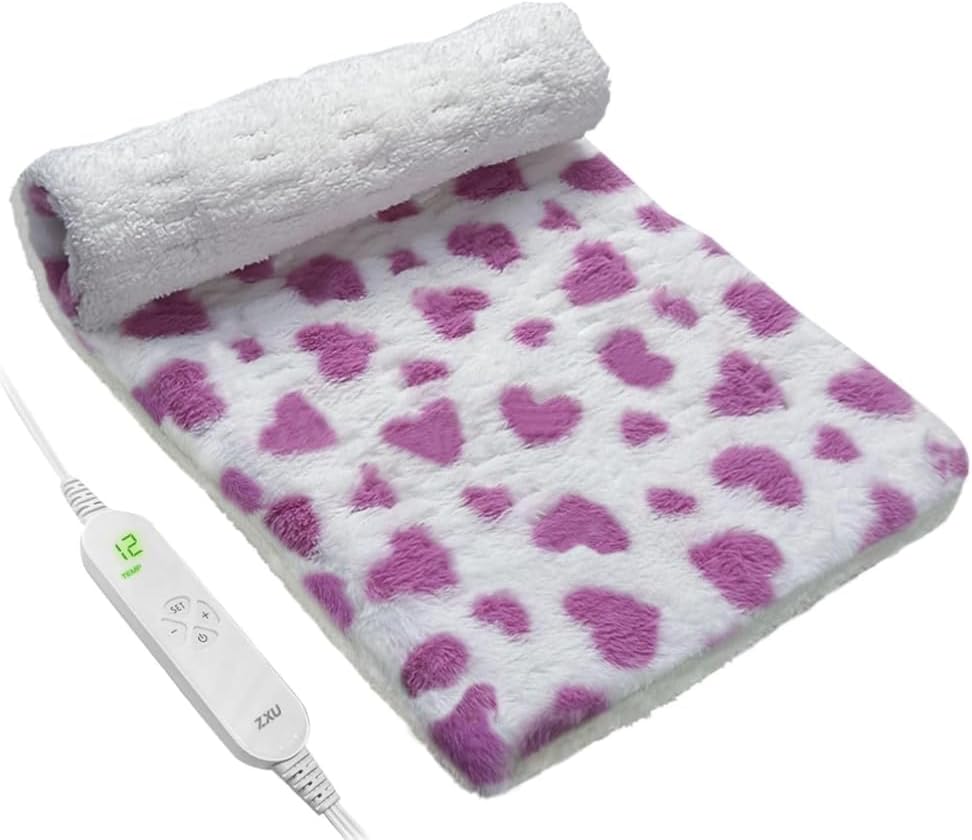
Image: The digital controller for the ZXU heating pad, showing heat and timer settings.

Image: Demonstrating the moist heat option by lightly spraying water onto the heating pad.
Video: A user demonstrating the features and comfort of the ZXU Sherpa Heating Pad, highlighting its softness and ease of use for pain and cramp relief.
Maintenance
Proper care ensures the longevity and hygiene of your heating pad.
- Cleaning: This heating pad is machine washable. Detach the power cord and controller from the heating pad before washing.
- Washing Instructions: Hand wash or machine wash on a gentle cycle with water under 30°C (86°F). Do not bleach, iron, or dry clean.
- Drying: Line dry or tumble dry on low heat. Ensure the heating pad is completely dry before reconnecting the controller and storing or using.
- Storage: Store the heating pad in a cool, dry place when not in use. Avoid folding it tightly or placing heavy objects on it.

Image: The ZXU heating pad being placed into a washing machine, demonstrating its machine washable feature.
Troubleshooting
If you encounter issues with your heating pad, please refer to the following common solutions:
- Pad not heating: Ensure the power cord is securely plugged into both the pad and the electrical outlet. Check if the outlet is functional.
- Controller display not working: Verify power connection. If the issue persists, the controller may be faulty.
- Pad feels too hot or not hot enough: Adjust the heat setting using the "+" and "-" buttons on the controller.
- Auto shut-off activates unexpectedly: This is a safety feature. Ensure the pad is not folded or bunched up, which can cause localized overheating.
If problems persist after attempting these solutions, please contact customer support.
Specifications
| Brand | ZXU |
| Model Name | Back Pain Relief |
| ASIN | B0CC52WJ5R |
| Material Type | Plush (Sherpa) |
| Number of Heat Settings | 12 (101°F-167°F) |
| Auto Shut-Off Timer | 1-24 Hours (8 settings) |
| Cord Length | 11 feet |
| Package Dimensions | 11.46 x 6.57 x 3.39 inches |
| Weight | 1.63 Pounds |
| Additional Features | Moist Heat Option, Machine Washable |
Warranty and Support
Your ZXU Heating Pad comes with a standard manufacturer's warranty. Please refer to the product packaging or contact the retailer for specific warranty details and duration.
For technical support, troubleshooting assistance, or warranty claims, please contact ZXU customer service through the retailer's platform or the contact information provided with your purchase.