
QTshine 5200mAh Portable Charger
QTshine 5200mAh Mini Portable Charger User Manual
Model: 5200mAh Portable Charger
Brand: QTshine
1. Introduction
This user manual provides detailed instructions for the safe and efficient operation of your QTshine 5200mAh Mini Portable Charger. Please read this manual thoroughly before using the product to ensure optimal performance and longevity. This portable charger is designed to provide on-the-go power for your compatible Apple devices.
2. Product Features
- Compact and Portable Design: Small and lightweight, designed for easy carrying in pockets or small bags.
- 5200mAh Capacity: Provides sufficient power for multiple charges of smaller devices or a significant boost for smartphones.
- 20W PD Fast Charging: Supports Power Delivery for rapid charging of compatible devices.
- Integrated Lightning Connector: Direct plug-in design eliminates the need for extra cables for iPhone charging.
- LCD Digital Display: Clearly shows the remaining battery percentage of the power bank.
- Pass-Through Charging: Allows you to charge your device while simultaneously recharging the power bank.
3. Package Contents
Please verify that all items are present in your package:
- 2 x QTshine 5200mAh Mini Portable Charger
- 1 x USB-A to USB-C Charging Cable
- 1 x User Manual (this document)
4. Setup
4.1 Initial Charge
Before first use, it is recommended to fully charge your QTshine Mini Portable Charger. Connect the provided USB-A to USB-C cable to the power bank's USB-C input port and plug the USB-A end into a compatible USB wall adapter (not included). The LCD display will show the charging progress, reaching 100% when fully charged.
4.2 Checking Battery Level
To check the remaining battery level, simply press the power button on the side of the power bank. The LCD digital display will illuminate, showing the current percentage.
5. Operating Instructions
5.1 Charging Your iPhone
- Ensure your portable charger has sufficient battery life (check LCD display).
- Align the integrated Lightning connector of the power bank with the charging port of your iPhone.
- Gently push the power bank onto your iPhone's charging port until it is securely connected.
- The LCD display on the power bank will light up, and your iPhone should indicate that it is charging.
- To stop charging, simply pull the power bank away from your iPhone.

This image illustrates various scenarios for using the portable charger, including charging on the go, cordless charging, and simultaneously charging while playing games. The compact design allows for convenient power access anywhere.

This infographic demonstrates the 5200mAh capacity of the portable charger, indicating approximately 5 charges for earphones, 1.57 charges for an iPhone 8, 0.92 charges for an iPhone 11, and 0.87 charges for an iPhone 14.

This image highlights the compatibility of the portable charger with various iPhone series, specifically iPhone 14, 13, 12/11, X, and 8/7/6 Series. It also explicitly states that the charger is not compatible with USB-C devices.
5.2 Recharging the Power Bank
To recharge your QTshine Mini Portable Charger:
- Connect the provided USB-A to USB-C charging cable to the USB-C input port on the side of the power bank.
- Plug the USB-A end of the cable into a 5V-2A wall charger or a computer's USB port.
- The LCD display will show the battery percentage increasing as it recharges. A full recharge typically takes approximately 3 hours with a 5V-2A charger.
- The power bank supports pass-through charging, meaning you can charge your iPhone while the power bank itself is being recharged.
Note: Wall charger is not included.

This image demonstrates the pass-through charging capability, where the power bank can charge a phone while being recharged itself. It also notes that a full charge takes about 3 hours with a 5V-2A charger and that pressing the power bank wakes it up.
6. Maintenance
- Keep the power bank away from water, fire, and high temperatures.
- Avoid dropping or subjecting the device to strong impacts.
- Do not attempt to disassemble or repair the power bank yourself.
- Clean the surface with a soft, dry cloth. Do not use harsh chemicals or abrasive materials.
- Store in a cool, dry place when not in use for extended periods.
7. Troubleshooting
| Problem | Possible Cause | Solution |
|---|---|---|
| Power bank not charging device. | Low battery on power bank; improper connection; incompatible device. | Recharge power bank; ensure secure connection; verify device compatibility (Lightning port only). |
| Power bank not recharging. | Faulty charging cable or adapter; loose connection. | Try a different USB-C cable or wall adapter; ensure cable is firmly inserted. |
| LCD display not working. | Device malfunction. | Contact customer support. |
8. Specifications
- Model: 5200mAh Portable Charger
- Battery Capacity: 5200mAh
- Output: 20W Power Delivery (PD)
- Input: 5V-2A (USB-C)
- Dimensions: 3.03 x 1.45 x 1.05 inches (approx.)
- Weight: Approximately 110g
- Compatibility: iPhone 6/7/8/X/11/12/13/14 Series (Lightning port devices)
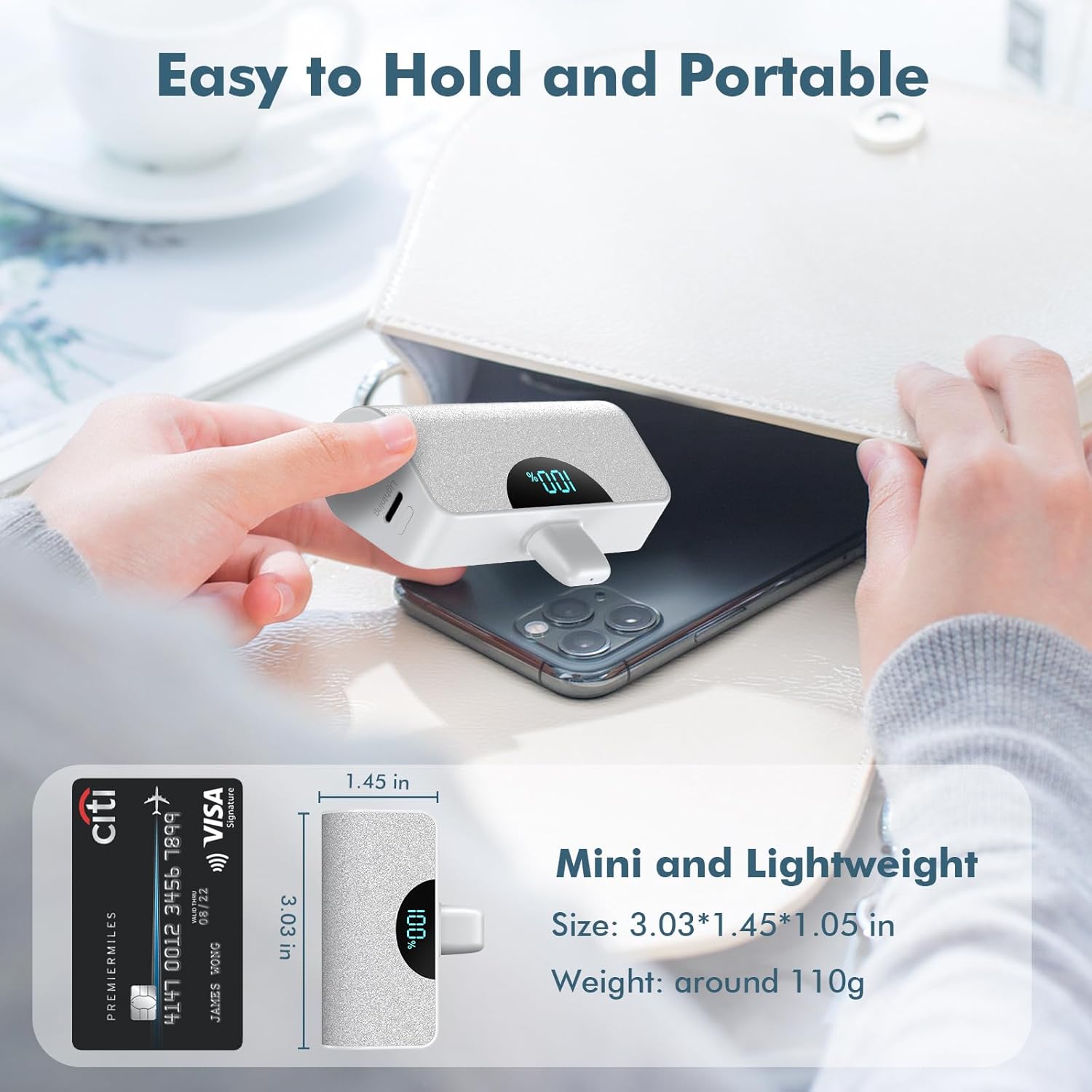
This image provides a visual representation of the charger's compact size, comparing it to a credit card, and details its dimensions (3.03 x 1.45 x 1.05 inches) and lightweight nature (around 110g).

This image displays both the black and white versions of the QTshine mini portable charger, each with its LCD screen indicating a full 100% charge.
9. Warranty & Support
QTshine products come with a standard manufacturer's warranty. For detailed warranty information, product support, or any inquiries, please contact our customer service team through the retailer where you purchased the product or visit the official QTshine website.
We are committed to providing high-quality products and excellent customer service.
Ask a question about this manual
Ask about setup, troubleshooting, compatibility, parts, safety, or missing instructions. Manuals+ will review the question and use this page’s manual context to help answer it.