
1. Product Overview
This manual provides instructions for the installation and maintenance of McbeAn replacement parts designed for the Shellbot SL60 Robot Vacuum Cleaner. These parts include the main brush, side brushes, HEPA filter, and mop pads, ensuring your robot vacuum continues to operate efficiently.

Image 1.1: Overview of McbeAn replacement parts and compatible Shellbot SL60 robot vacuum.
2. Package Contents
Please verify that all items listed below are included in your package. If any items are missing or damaged, please contact customer support.
- 1 x Main Roller Brush
- 4 x Side Brushes (2 pairs)
- 4 x Mop Pads
- 1 x HEPA Filter (Note: HEPA filter is mentioned in the product title but not explicitly shown in all images. Please verify upon receipt.)
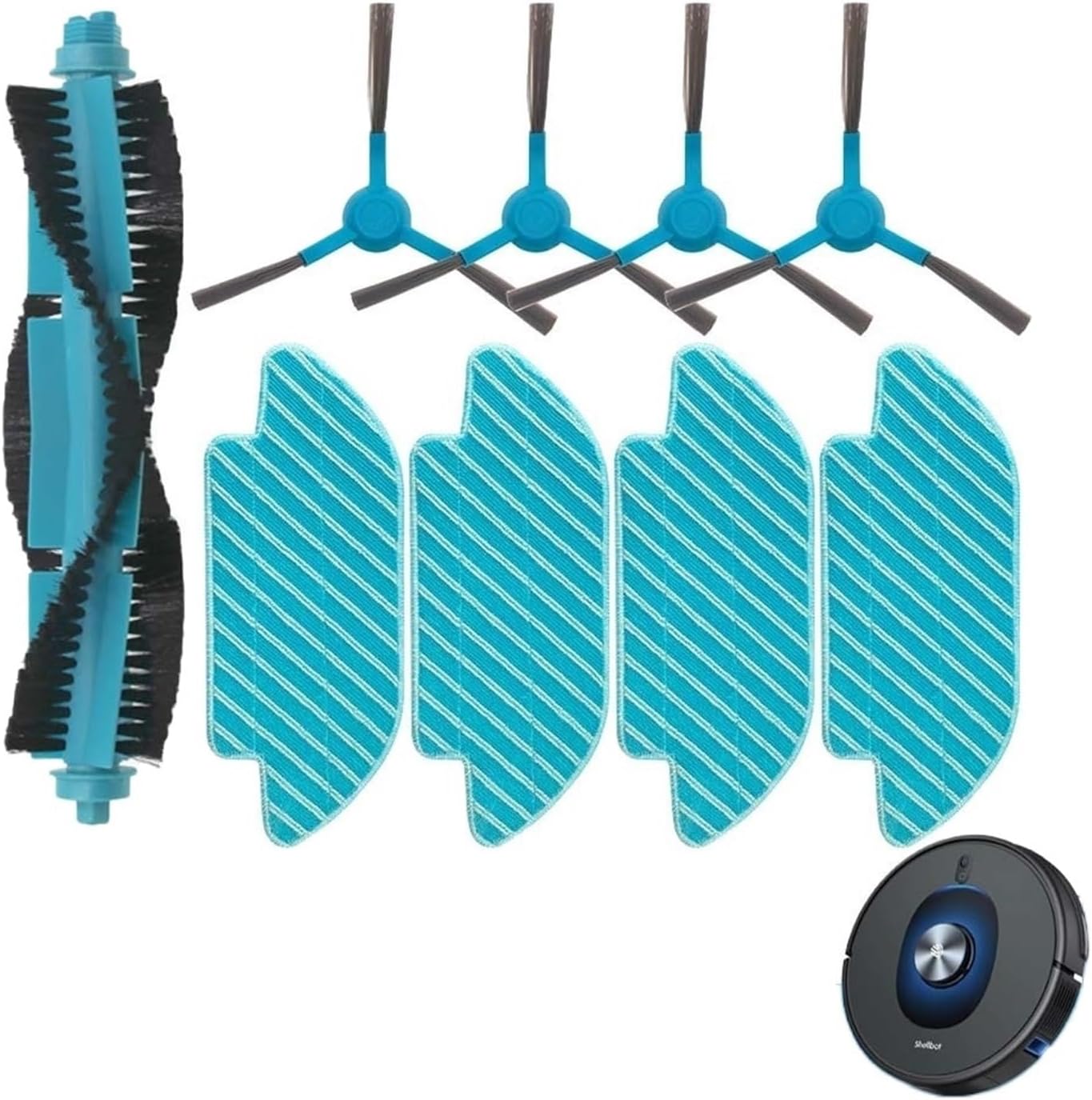
Image 2.1: Contents of the replacement parts package.
3. Setup and Installation
Before installing any replacement parts, ensure your Shellbot SL60 Robot Vacuum Cleaner is powered off and unplugged from its charging base.
3.1 Main Roller Brush Installation
- Turn the robot vacuum upside down.
- Locate the brush guard cover, usually secured by two tabs or screws. Open or remove it.
- Remove the old main roller brush.
- Insert the new main roller brush, ensuring the ends align with the slots in the vacuum.
- Close or reattach the brush guard cover.

Image 3.1: Main Roller Brush.
3.2 Side Brush Installation
- Turn the robot vacuum upside down.
- Locate the side brushes. They are typically held in place by a single screw.
- Unscrew and remove the old side brush.
- Place the new side brush into position and secure it with the screw. Ensure it is firmly attached.

Image 3.2: Side Brushes.
3.3 Mop Pad Installation
- Locate the mop pad attachment on the underside of your robot vacuum.
- Remove the used mop pad, typically by detaching it from Velcro or clips.
- Attach the new mop pad, ensuring it is securely fastened and covers the entire mopping area.

Image 3.3: Mop Pad.
3.4 HEPA Filter Installation
- Open the dustbin compartment of your robot vacuum.
- Remove the old HEPA filter from the dustbin.
- Insert the new HEPA filter into the designated slot within the dustbin, ensuring a snug fit.
- Close the dustbin compartment.
4. Operating Instructions (Post-Installation)
After installing the replacement parts, ensure they are correctly seated before operating your Shellbot SL60 Robot Vacuum Cleaner.
- Power On: Place the robot vacuum back on its charging base or press the power button to turn it on.
- Check Functionality: Observe the robot during its first cleaning cycle after part replacement. Ensure the main brush rotates freely, side brushes spin correctly, and the vacuum operates without unusual noises.
- Mop Pad Usage: If using the mop pad, ensure the water tank is filled (if applicable to your model) and the pad is damp for effective mopping.

Image 4.1: Shellbot SL60 Robot Vacuum Cleaner.
5. Maintenance
Regular maintenance of your replacement parts will extend their lifespan and ensure optimal cleaning performance of your Shellbot SL60 Robot Vacuum Cleaner.
- Main Roller Brush: Regularly check for tangled hair or debris. Use the cleaning tool (often included with the vacuum) to cut and remove hair. Replace every 6-12 months, or sooner if visibly worn.
- Side Brushes: Inspect for bent or damaged bristles. Clean off any accumulated hair or dust. Replace every 3-6 months, or if bristles are splayed or missing.
- Mop Pads: Wash mop pads after each use. They can typically be hand-washed or machine-washed. Replace every 1-3 months, or when they show signs of wear or reduced absorbency.
- HEPA Filter: Tap the filter gently over a trash can to remove dust. Do not wash HEPA filters with water unless explicitly stated by the vacuum manufacturer. Replace every 1-3 months, depending on usage and pet presence.
6. Troubleshooting
If you encounter issues after replacing parts, refer to the following common troubleshooting tips:
| Problem | Possible Cause | Solution |
|---|---|---|
| Main brush not spinning | Hair/debris tangled; brush not seated correctly. | Remove brush, clean thoroughly, re-install ensuring proper alignment. |
| Side brushes not spinning or bent | Hair/debris tangled; screw loose; bristles damaged. | Clean brushes, tighten screw, replace if bristles are permanently bent or missing. |
| Reduced suction power | Clogged HEPA filter; full dustbin. | Clean or replace HEPA filter; empty dustbin. |
| Mop pad not cleaning effectively | Pad is dry; pad is dirty; pad is worn out. | Dampen pad, wash pad, or replace pad. Ensure water tank is filled. |
7. Specifications
- Brand: McbeAn
- Compatibility: Shellbot SL60 Robot Vacuum Cleaner
- Material: HEPA (for filter), Plastic/Nylon (for brushes), Microfiber (for mop pads)
- Item Weight (package): 1.76 ounces
- Package Dimensions: 0.39 x 0.39 x 0.39 inches (Note: These dimensions appear to be placeholder values and may not reflect the actual product size.)
8. Warranty and Support
These replacement parts are designed for durability and performance. For specific warranty information or if you encounter any issues not covered in this manual, please contact the seller or manufacturer directly through your purchase platform.
For general support regarding your Shellbot SL60 Robot Vacuum Cleaner, please refer to the original vacuum cleaner's user manual or contact Shellbot customer service.