1. Introduction
This manual provides detailed instructions for the setup, operation, and maintenance of your new Generic Manta Smart TV Remote Control. Please read this manual thoroughly before using the remote to ensure proper functionality and to maximize your viewing experience.
2. Compatibility
This remote control is designed for use with Manta Smart TVs. For optimal compatibility, ensure that the physical appearance of this remote matches your original Manta Smart TV remote. Additionally, verify that the remote includes a 'Fav' button in the last row of buttons, as this indicates full compatibility with specific Manta Smart TV models.
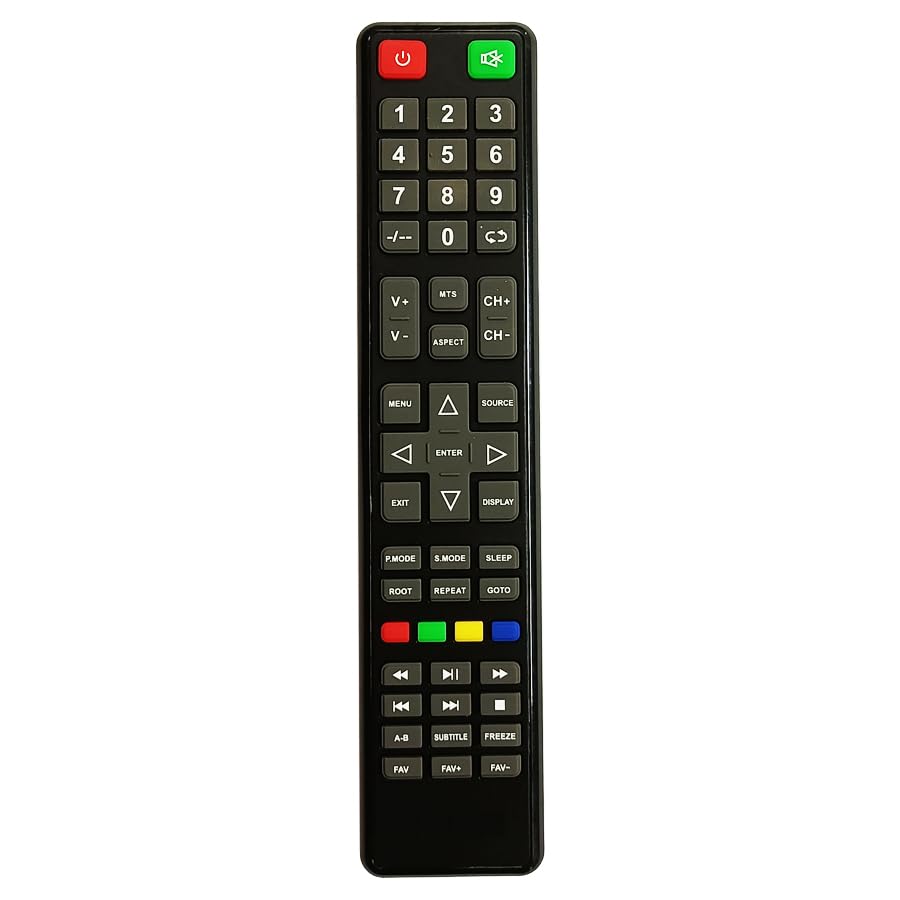
Figure 1: Manta Smart TV Remote Control. A black remote control with various buttons for TV operation, including a numeric keypad, navigation buttons, and dedicated smart TV function buttons.
3. Battery Installation
The remote control requires Lithium Ion batteries (not typically included). Follow these steps to install the batteries:
- Locate the battery compartment cover on the back of the remote control.
- Slide the cover downwards or press the latch to open the compartment.
- Insert the Lithium Ion batteries, ensuring the positive (+) and negative (-) terminals align correctly with the markings inside the compartment.
- Close the battery compartment cover by sliding it back into place until it clicks securely.
Note: Always replace all batteries at the same time. Do not mix old and new batteries, or different types of batteries.
4. Setup and First Use
This remote control uses infrared (IR) technology and typically does not require complex pairing. Once batteries are installed, it should be ready for use with compatible Manta Smart TVs.
- Ensure your Manta Smart TV is powered on or in standby mode.
- Point the remote control directly at the IR receiver on your Manta Smart TV.
- Press the Power button to turn on or off the TV. If the TV responds, the remote is successfully set up.
If the TV does not respond, refer to the Troubleshooting section.
5. Operating Instructions
Familiarize yourself with the main functions of the remote control:
- Power Button: Turns the TV on or off.
- Numeric Keypad (0-9): Used for direct channel input.
- Volume Up/Down: Adjusts the sound level.
- Channel Up/Down: Changes TV channels sequentially.
- Mute Button: Mutes or unmutes the TV sound.
- Navigation Buttons (Up, Down, Left, Right, OK): Used to navigate menus and select options on the screen.
- Back/Exit Button: Returns to the previous menu or exits the current menu.
- Smart TV/Home Button: Accesses the Smart TV interface or home screen.
- Fav Button: Accesses your favorite channels list (if supported by your TV model).
- Color Buttons (Red, Green, Yellow, Blue): Perform specific functions within menus or applications, as indicated on screen.
6. Troubleshooting
If you encounter issues with your remote control, refer to the following common problems and solutions:
| Problem | Solution |
|---|---|
| Remote is not responding to the TV. |
|
| Some buttons are not working. |
|
| Remote works intermittently. |
|
7. Maintenance
To ensure the longevity of your remote control:
- Keep the remote clean by wiping it with a soft, dry cloth.
- Avoid exposing the remote to extreme temperatures, direct sunlight, or moisture.
- Do not drop the remote or subject it to strong impacts.
- If the remote will not be used for an extended period, remove the batteries to prevent leakage.
8. Specifications
| Feature | Detail |
|---|---|
| Brand | Generic |
| Manufacturer | cheops |
| Country of Origin | China |
| Connectivity Technology | Infrared |
| Controller Type | Button Control |
| Battery Description | Lithium Ion |
| ASIN | B0CC31JXM4 |
9. Warranty and Support
For warranty information and customer support, please refer to the documentation provided with your purchase or contact the seller directly. Specific warranty terms and support channels may vary depending on your region and point of purchase.


