
1. Introduction
This manual provides instructions for the safe and effective use of your Karlak T600A Non-Contact Infrared Thermometer. This device is designed for measuring the surface temperature of inanimate objects. It offers a wide temperature range, high accuracy, and user-friendly features for various applications.
Important Note: This infrared thermometer is an industrial tool and is not intended for measuring human or animal body temperature. Readings for living beings will be inaccurate as it measures surface temperature only.

Image 1.1: The Karlak T600A thermometer demonstrating its wide temperature measurement range, from high heat sources to cold environments like a refrigerator.
2. Safety Information
- Do Not Point Laser at Eyes: The thermometer uses a laser for aiming. Avoid direct eye exposure to the laser beam.
- Not for Medical Use: This device is not a medical thermometer. Do not use it to measure body temperature of humans or animals.
- Avoid Direct Contact: The thermometer is non-contact. Do not touch hot surfaces with the device.
- Keep Away from Children: Store the device out of reach of children.
- Proper Battery Disposal: Dispose of used batteries according to local regulations.
- Operating Environment: Do not use the thermometer in environments with explosive gas, steam, or dust.
3. Product Features
- Non-Contact Measurement: Safely measure surface temperatures from a distance.
- Wide Temperature Range: Measures from -50°C to 600°C (-58°F to 1112°F).
- High Accuracy: 12:1 Distance-to-Spot ratio for precise targeting.
- Fast Response Time: Provides readings in approximately 0.5 seconds.
- Adjustable Emissivity: Customizable from 0.1 to 1.0 for improved accuracy on various surfaces.
- Backlit LCD Display: Large, clear display for easy reading in various lighting conditions.
- Unit Conversion: Easily switch between Celsius (°C) and Fahrenheit (°F).
- Data Hold Function: Freezes the last measurement on the display.
- Automatic Shutdown: Extends battery life by turning off after 12 seconds of inactivity.
- Temperature Calibration: Adjustable calibration range between -3°C and 3°C.
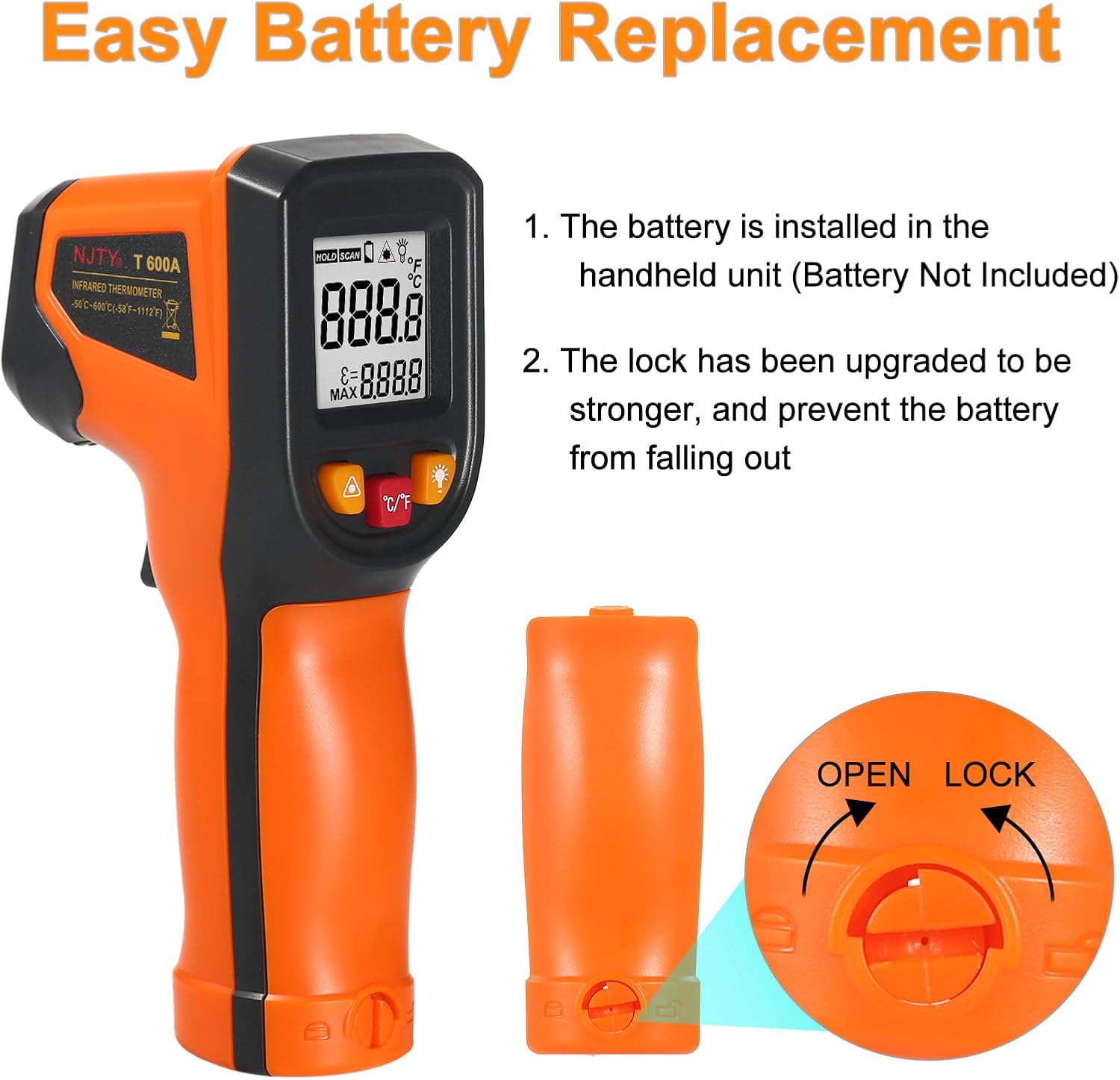
Image 3.1: The backlit LCD display of the T600A, showing temperature readings and various icons for functions like data hold and unit selection.

Image 3.2: Examples of the thermometer's wide range of applications, including measuring temperatures of frying pans, car engines, and air conditioning units.
4. Package Contents
The package includes the following items:
- 1 x Karlak T600A Infrared Thermometer
- 1 x User Manual (English)
Note: 2 x AAA 1.5V batteries are required and are not included in the package.
5. Product Diagram and Components

Image 5.1: Detailed diagram of the T600A, highlighting the LCD display, buttons, sensor, laser, and trigger.
- Data Hold Symbol: Indicates that the current reading is held.
- Temperature Measurement Readings: Displays the measured temperature.
- Positioning Laser Open Symbols: Indicates when the laser is active.
- Backlight Open Symbol: Indicates when the display backlight is active.
- Temperature Measurement Units: Shows °C or °F.
- Emissivity Adjustment Window: Displays the current emissivity setting.
- Positioning Laser Switch: Button to turn the laser on/off.
- Temperature Switch: Button to cycle through measurement modes or settings (often the °C/°F button).
- Backlight Switch: Button to turn the display backlight on/off.
- Sensor: Infrared sensor for temperature detection.
- Positioning Laser: Emits a laser dot for aiming.
- Trigger: Activates measurement when pressed.
6. Setup
6.1 Battery Installation
The Karlak T600A requires two (2) AAA 1.5V batteries (not included).
- Locate the battery compartment at the bottom of the handle.
- Twist the battery compartment cover counter-clockwise to unlock and open it.
- Insert two AAA batteries, ensuring correct polarity (+/-).
- Close the battery compartment cover and twist clockwise to lock it securely.

Image 6.1: Instructions for easy battery replacement, showing the battery compartment and locking mechanism.
7. Operating Instructions
7.1 Taking a Measurement
- Point the thermometer at the target object.
- Press and hold the trigger to activate the laser and begin scanning the surface temperature. The "SCAN" icon will appear on the display.
- Release the trigger to hold the measurement. The "HOLD" icon will appear, and the last reading will remain on the display.
- The device will automatically shut off after 12 seconds of inactivity to conserve battery.
7.2 Unit Conversion (°C/°F)
To switch between Celsius (°C) and Fahrenheit (°F), press the °C/°F button located below the display.
7.3 Backlight Control
Press the light bulb icon button to turn the display backlight on or off. This is useful for reading in low-light conditions.
7.4 Laser Aiming
Press the triangle icon button to turn the laser pointer on or off. The laser helps in accurately targeting the measurement area.
8. Emissivity Adjustment
Emissivity is a measure of an object's ability to emit infrared energy. Different materials have different emissivity values. For accurate temperature readings, it is important to adjust the thermometer's emissivity setting to match the target material. The T600A allows adjustment from 0.1 to 1.0.
To adjust emissivity:
- While the thermometer is on, press the °C/°F button repeatedly until the emissivity value flashes on the display.
- Use the laser button (triangle icon) to increase or decrease the emissivity value.
- Once the desired emissivity is set, release the button, and it will save automatically after a few seconds.
Refer to common emissivity tables for various materials to ensure accurate measurements.
9. Maintenance
9.1 Cleaning the Device
- Use a soft, damp cloth to clean the device casing. Do not use abrasive cleaners or solvents.
- For the lens, use a soft cloth or cotton swab with a small amount of isopropyl alcohol. Avoid scratching the lens.
- Ensure the device is dry before storage or next use.
9.2 Battery Replacement
When the low battery indicator appears on the display, replace the batteries as described in the "Battery Installation" section (6.1).
9.3 Storage
Store the thermometer in a cool, dry place, away from direct sunlight and extreme temperatures. Remove batteries if storing for extended periods to prevent leakage.
10. Troubleshooting
| Problem | Possible Cause | Solution |
|---|---|---|
| Device does not turn on. | Dead or incorrectly installed batteries. | Replace batteries, ensuring correct polarity. |
| Inaccurate readings. | Incorrect emissivity setting; distance too far; dirty lens; target outside temperature range. | Adjust emissivity; ensure proper distance (12:1 D:S ratio); clean lens; ensure target temperature is within -50°C to 600°C. |
| Display is dim or flickering. | Low battery. | Replace batteries. |
| Laser does not turn on. | Laser function is off. | Press the laser button (triangle icon) to activate. |
11. Specifications
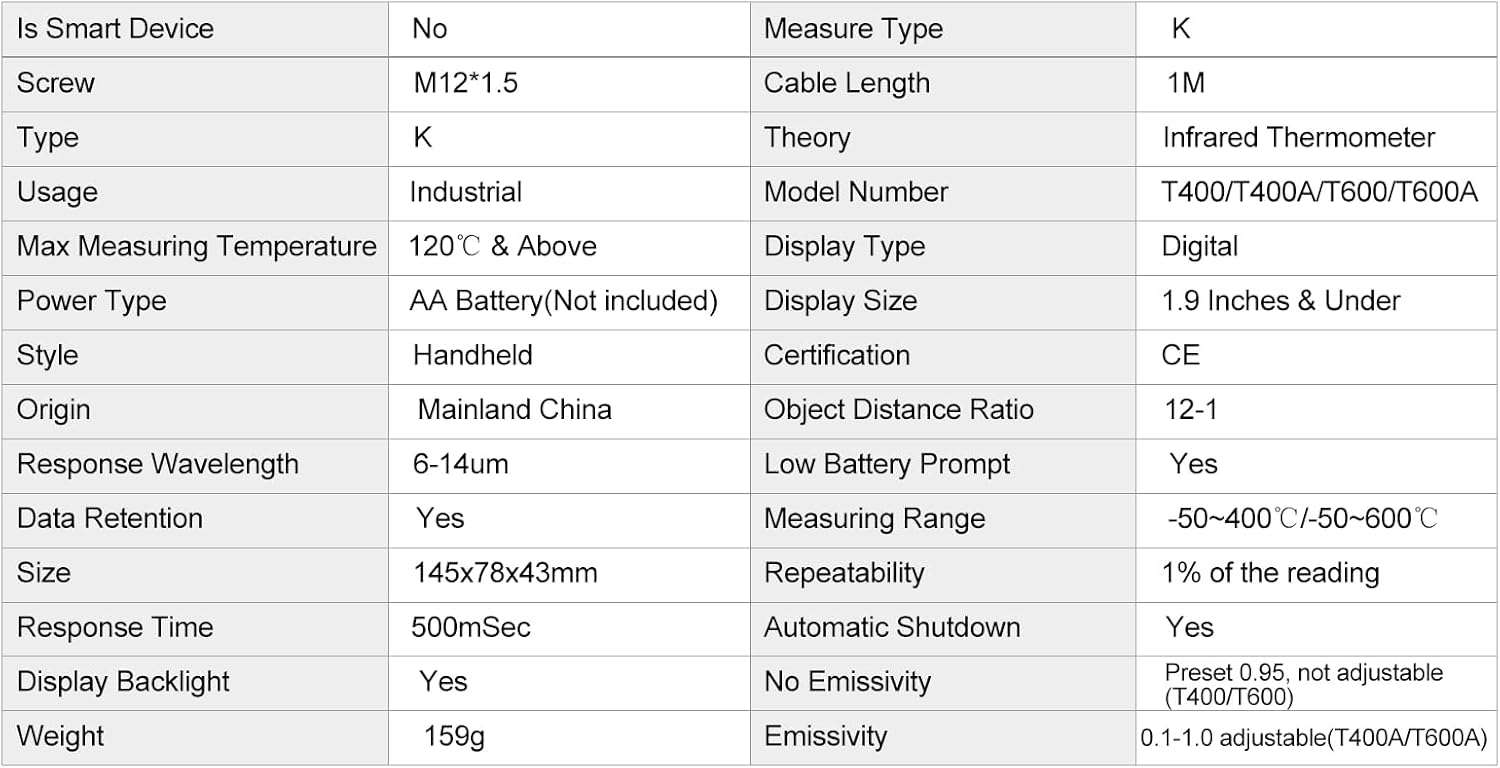
Image 11.1: Technical specifications table for the T600A model.
| Parameter | Value |
|---|---|
| Model | T600A |
| Temperature Range | -50°C ~ 600°C (-58°F ~ 1112°F) |
| Accuracy (≥0°C/32°F) | ±1.5°C (±2.7°F) or ±1.5% |
| Accuracy (<0°C/32°F) | ±3°C (±5.4°F) or ±3% |
| Spectral Response | 8-14um |
| Resolution | 0.1% of reading or 1°C |
| Response Time | 500 ms (95% response) |
| Distance to Spot Ratio (D:S) | 12:1 |
| Emissivity | 0.1-1.0 adjustable |
| Operating Temperature | 0°C ~ 50°C (32°F ~ 122°F) |
| Operating Humidity | 10-90% RH non-condensing |
| Storage Temperature | -20°C ~ 60°C (-4°F ~ 140°F) |
| Battery | 2 x AAA 1.5V (not included) |
| Item Size | 145 x 78 x 43 mm (5.71 x 3.07 x 1.69 in) |
| Item Weight | 107g (3.77 oz) |
| Automatic Shutdown | Yes (12 seconds) |
| Display Backlight | Yes |
| Data Retention | Yes |

Image 11.2: Physical dimensions of the T600A thermometer.
12. Warranty and Support
Specific warranty information is not provided in this manual. For warranty details, technical support, or service inquiries, please contact the seller or manufacturer directly through your purchase platform.
Please retain your purchase receipt as proof of purchase for any warranty claims.