
1. Introduction
This manual provides comprehensive instructions for the installation, operation, and maintenance of your HighZer0 Electronics 10dBi Dual Band Wi-Fi Antennas. These antennas are designed to enhance wireless signal strength and coverage for compatible devices operating on 2.4GHz and 5GHz-5.8GHz frequencies. Please read this manual thoroughly before use to ensure optimal performance and longevity of your product.
2. Product Overview
The HighZer0 Electronics 10dBi Dual Band Wi-Fi Antennas are high-gain, omni-directional antennas featuring an SMA Male connector. They are designed to improve the range and stability of your wireless connections across various devices.

Image 1: HighZer0 Electronics 10dBi Dual Band Wi-Fi Antennas (White/Red).
Key Features:
- 10dBi Omni-directional Gain: Provides enhanced signal strength and coverage.
- Dual Band Support: Operates on 2.4GHz (2.4 - 2.5 GHz) and 5GHz-5.8GHz (4.9 - 5.9 GHz) Wi-Fi bands.
- SMA Male Connector: Ensures compatibility with a wide range of devices.
- Wide Compatibility: Suitable for Wi-Fi routers, hotspots, adapters, modules, HDMI extenders, PCIe network adapters, Wi-Fi security cameras, gaming motherboards, DVR recorders, industrial routers, M2M terminals, FPV camera monitors, drone controllers, and video transmitters.

Image 2: Antenna dimensions and supported Wi-Fi bands (2.4-2.5 GHz, 4.9-5.9 GHz).
3. Setup
Proper installation of the antennas is crucial for optimal performance. Ensure your device is powered off before connecting the antennas.
3.1 Identifying Connector Types
It is essential to distinguish between SMA Male and RP-SMA Male connectors, as they are not interchangeable. These antennas feature an SMA Male connector.

Image 3: Comparison of SMA Male (with pin) and SMA Female (with hole) connectors.
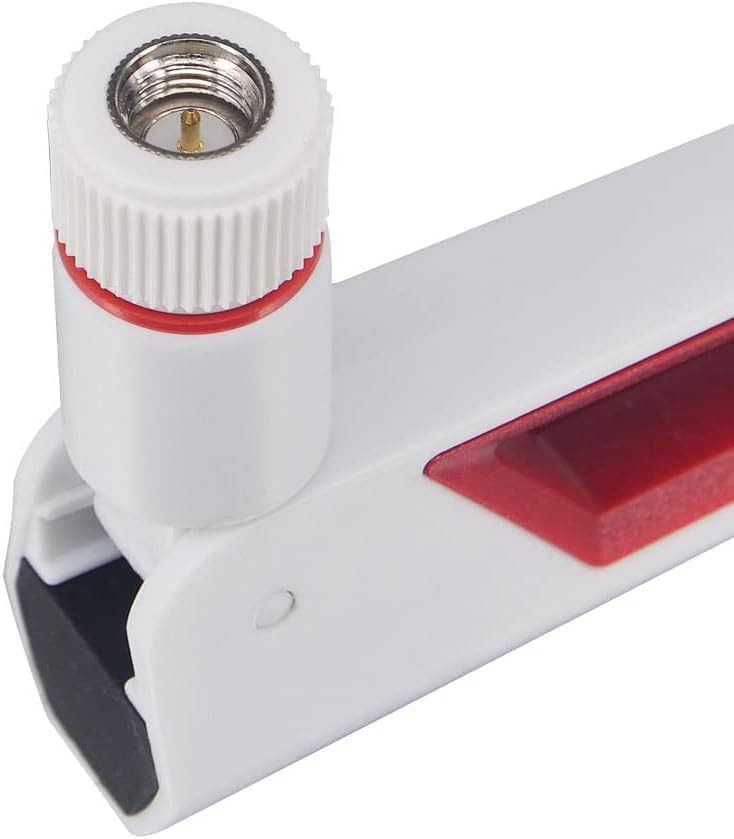
Image 4: Close-up of the SMA Male connector on the antenna.

Image 5: Comparison of SMA Male (pin in middle) and RP-SMA Male (no pin in middle) connectors.
3.2 Installation Steps:
- Verify Connector Type: Before attempting to connect, confirm that your device's antenna port is an SMA Female connector, which is compatible with the SMA Male connector on these antennas.
- Align and Screw: Carefully align the SMA Male connector of the antenna with the SMA Female port on your device. Gently screw the antenna onto the port in a clockwise direction until it is finger-tight. Avoid over-tightening, as this can damage the connector.
- Position Antennas: Once securely attached, adjust the angle of the antennas for optimal signal reception. For most omni-directional antennas, a vertical position is often recommended, but experimentation with different angles may yield better results depending on your environment.
- Power On Device: After installation, power on your device and verify the Wi-Fi connection.
Note: Some devices may have antenna ports that are closely spaced. The base of these antennas is approximately 1.9 inches wide. Ensure sufficient clearance for proper installation and adjustment.
4. Operating Instructions
Once installed, the antennas operate passively to enhance your device's Wi-Fi signal. No additional configuration is typically required for the antennas themselves.
- Optimal Placement: For best performance, position your Wi-Fi device (router, camera, etc.) in a central location, away from obstructions like thick walls, metal objects, and other electronic devices that may cause interference.
- Antenna Orientation: Experiment with different antenna orientations (e.g., vertical, angled) to find the best signal strength for your specific environment. Signal strength can be monitored through your device's software or operating system settings.
- Dual Band Utilization: The antennas support both 2.4GHz and 5GHz-5.8GHz bands. Your device will automatically select the appropriate band based on its configuration and network availability. The 2.4GHz band offers wider coverage, while the 5GHz-5.8GHz band provides faster speeds over shorter distances.
5. Maintenance
These antennas require minimal maintenance to ensure continued performance.
- Cleaning: Use a soft, dry cloth to wipe the antennas clean. Avoid using liquid cleaners or abrasive materials.
- Inspection: Periodically check the antenna connectors for any signs of damage or corrosion. Ensure they remain securely fastened to your device.
- Handling: Avoid bending or applying excessive force to the antennas, as this can damage the internal components.
6. Troubleshooting
If you encounter issues with your antennas, refer to the following troubleshooting guide:
| Issue | Possible Cause | Solution |
|---|---|---|
| No signal improvement or worse signal. | Incorrect connector type; antenna not securely attached; environmental interference; faulty antenna. | Verify your device uses an SMA Female connector. Ensure antennas are tightly screwed on. Reposition your device or antennas. Test with original antennas to confirm if the issue is with the new antennas. |
| Antennas do not fit the device port. | Incompatible connector type (e.g., device requires RP-SMA Male). | Confirm the required connector type for your device. These antennas are SMA Male. If your device requires RP-SMA Male, these antennas are not compatible. |
| Antennas are loose or fall off. | Not tightened sufficiently; damaged connector. | Gently tighten the antennas until finger-tight. Inspect connectors for damage. |
| Physical interference with other ports/antennas. | Antenna base is too wide for closely spaced ports. | If possible, use an extension cable or adapter to provide more clearance. Consider alternative antenna models if space is severely limited. |
7. Specifications
| Feature | Detail |
|---|---|
| Brand | HighZer0 Electronics |
| Model Number | ANT06Z+WR+SMA+M |
| ASIN | B0CBZJDZZ6 |
| Antenna Gain | 10dBi |
| Frequency Bands | 2.4 - 2.5 GHz / 4.9 - 5.9 GHz (Dual Band) |
| Connector Type | SMA Male |
| Impedance | 50 Ohm |
| Maximum Range | 500 Feet |
| Number of Items | 2 |
| Color | White/Red |
| Package Dimensions | 7.17 x 1.97 x 0.94 inches |
| Item Weight | 1.76 ounces |
| UPC | 655466791919 |
8. Warranty and Support
For warranty information or technical support regarding your HighZer0 Electronics 10dBi Dual Band Wi-Fi Antennas, please refer to the product packaging or contact HighZer0 Electronics directly through their official website or customer service channels. Keep your purchase receipt for warranty claims.