
1. Introduction
Welcome and thank you for choosing the AOHI Desk Charger 120W AOC-C006. This manual provides essential information for the safe and efficient use of your new charger. Please read it thoroughly before use and retain it for future reference.
Package Contents
- 1 x AOHI Desk Charger 120W AOC-C006
- 1 x User Manual

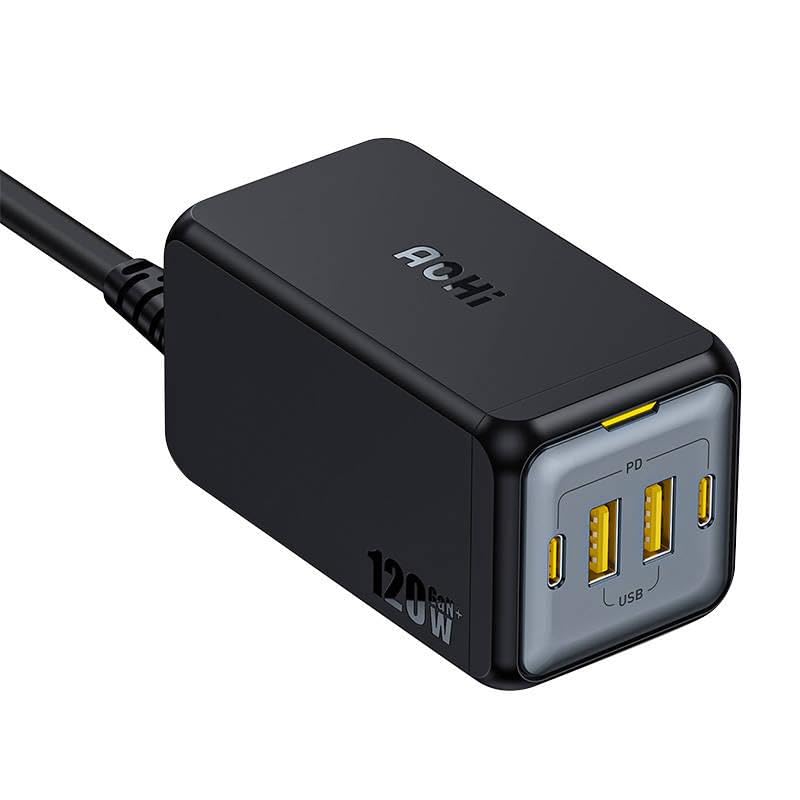
The AOHI Desk Charger 120W AOC-C006, a compact power adapter with multiple ports.
2. Safety Instructions
Important Safety Information
- Do not expose the device to water or excessive moisture.
- Do not disassemble or attempt to repair the device.
- Keep out of reach of children.
- Use only with compatible devices and cables.
- Avoid extreme temperatures.
- Unplug during lightning storms or when unused for long periods.
3. Setup
Connecting the Charger
- Connect the power cable to the charger's input port.
- Plug the power cable into a standard wall outlet (AC 100-240V, 50/60Hz).
- The charger is now ready for use.
The AOHI Desk Charger connected to a power outlet and charging a laptop via a USB-C cable.
4. Operating Instructions
Charging Your Devices
The AOHI Desk Charger 120W AOC-C006 features 2 USB-C ports and 2 USB-A ports, allowing you to charge multiple devices simultaneously.
USB-C Ports (Power Delivery)
These ports support Power Delivery (PD) for fast charging compatible devices such as laptops, tablets, and smartphones. Use a USB-C to USB-C cable for optimal performance.
USB-A Ports
These ports are suitable for charging a wide range of USB-A compatible devices, including smartphones, smartwatches, and other accessories.
- Connect your device's charging cable to the appropriate USB-C or USB-A port on the charger.
- Connect the other end of the cable to your device.
- The device should begin charging automatically.

The AOHI Desk Charger simultaneously charging a laptop and a smartphone, demonstrating its multi-device capability.

A close-up view of the AOHI Desk Charger's ports, showing two USB-C (PD) and two USB-A ports.
5. Maintenance
Cleaning and Storage
- Disconnect the charger from the power outlet before cleaning.
- Use a soft, dry cloth to wipe the surface of the charger. Do not use liquid cleaners or aerosols.
- Store the charger in a cool, dry place when not in use.
- Avoid dropping or subjecting the charger to strong impacts.
6. Troubleshooting
Common Issues and Solutions
| Problem | Possible Cause | Solution |
|---|---|---|
| Device not charging | Loose connection | Ensure cables are securely plugged into both the charger and the device. |
| Device not charging | Incompatible cable/device | Use a compatible charging cable and ensure your device supports the charger's output. |
| Slow charging | Cable quality | Use high-quality, certified charging cables, especially for fast charging. |
| Slow charging | Device power requirements | Some devices may require specific power profiles. Check your device's specifications. |
| Charger feels warm | Normal operation | It is normal for the charger to become warm during operation, especially under heavy load. If it becomes excessively hot, disconnect it immediately. |
If the issue persists, please contact AOHI customer support.
7. Specifications
Technical Details
- Model: AOC-C006
- Input: AC 100-240V, 50/60Hz
- Total Output Power: 120W
- USB-C Ports: 2 (Power Delivery compatible)
- USB-A Ports: 2
- Dimensions: 10 x 5 x 1.27 cm
- Weight: 1 kg
- Color: Black

An internal view of the AOHI Desk Charger, highlighting its GaN technology for efficient power delivery.
8. Warranty and Support
Warranty Information
This AOHI product is covered by a 2-year manufacturer's warranty from the date of purchase. This warranty covers defects in materials and workmanship under normal use.
Customer Support
For technical support, warranty claims, or any questions regarding your AOHI Desk Charger, please visit the official AOHI website or contact their customer service directly.
Website: www.aohi.com
