
1. Introduction
Thank you for choosing the CJGHJNFF kxpj001 W555-B T300 25W Oven Bulb. This high-quality, ceramic, high-temperature resistant bulb is designed for universal use in electric ovens and microwave ovens, providing reliable illumination. This manual provides essential information for safe installation, operation, and maintenance of your new bulb.
2. Important Safety Instructions
Please read and understand all safety instructions before installing or using the bulb. Failure to follow these instructions may result in electric shock, fire, or personal injury.
- ALWAYS disconnect power to the appliance (oven or microwave) at the circuit breaker or by unplugging it before attempting any installation or replacement.
- Allow the appliance and the old bulb to cool completely before handling. Hot surfaces can cause severe burns.
- Do not touch the new bulb with bare hands. Oils from your skin can create hot spots and reduce bulb life. Use a clean cloth or gloves.
- Ensure the replacement bulb's voltage and wattage match the appliance's requirements. This bulb is rated for 240V and 25W.
- If the bulb is broken or damaged, handle with extreme care to avoid cuts from glass fragments.
- Do not use this bulb in applications other than those specified (electric ovens, microwave ovens).
- Keep out of reach of children.
3. Product Overview
The CJGHJNFF kxpj001 W555-B T300 bulb is specifically designed for the demanding environment of cooking appliances. Its ceramic construction ensures high-temperature resistance, making it suitable for both ovens and microwaves.
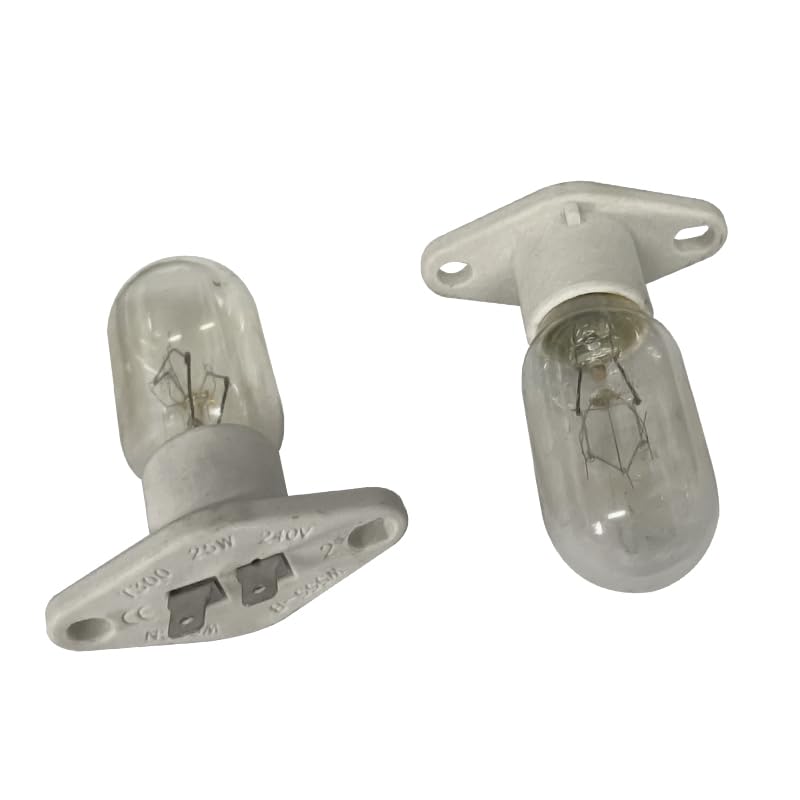
Figure 1: CJGHJNFF W555-B T300 25W Oven Bulb. This image shows the ceramic base and glass bulb, designed for high-temperature applications in ovens and microwaves.
4. Installation
Follow these steps carefully to replace your oven or microwave bulb.
4.1 Pre-Installation Checklist
- Ensure the appliance is completely cool.
- Confirm the power supply to the appliance is disconnected.
- Have a clean, dry cloth or gloves ready.
- Verify the new bulb (CJGHJNFF kxpj001) matches the required specifications (25W, 240V).
4.2 Installation Steps
- Disconnect Power: Locate the circuit breaker for your oven or microwave and turn it off, or unplug the appliance from the wall outlet. This is a critical safety step.
- Locate Bulb Cover: Inside your oven or microwave, locate the protective glass cover over the bulb. This cover may be screwed in, clipped, or twisted off. Refer to your appliance's specific manual if you have difficulty locating or removing it.
- Remove Old Bulb: Carefully unscrew the old bulb counter-clockwise. If the bulb is stuck, apply gentle, firm pressure. If it's broken, use pliers to remove the base, ensuring no glass fragments remain.
- Install New Bulb: Using a clean cloth or gloves, screw the new CJGHJNFF kxpj001 bulb clockwise into the socket until it is snug. Do not overtighten.
- Replace Bulb Cover: Reattach the protective glass cover securely.
- Restore Power: Reconnect power to the appliance by turning on the circuit breaker or plugging it back in.
- Test: Turn on the oven or microwave light to ensure the new bulb is functioning correctly.
5. Operating Instructions
Once installed, the CJGHJNFF kxpj001 bulb operates automatically with your appliance's light function. Simply turn on your oven or microwave light as you normally would, and the bulb will illuminate.
- The bulb is designed for continuous use within the appliance's operating temperature range.
- Avoid frequently turning the light on and off, as this can reduce bulb lifespan.
6. Maintenance
Minimal maintenance is required for the CJGHJNFF kxpj001 bulb.
- Cleaning: If the bulb or its cover becomes dirty, ensure the appliance is cool and power is disconnected. Wipe the glass cover with a soft, damp cloth. Do not use abrasive cleaners. Avoid direct contact with the bulb itself if possible, or wipe gently with a dry cloth if necessary.
- Inspection: Periodically check the bulb and its socket for any signs of damage or loose connections. If any issues are observed, disconnect power and address them.
- Replacement: Replace the bulb when it burns out. Refer to the installation instructions for replacement.
7. Troubleshooting
If your new bulb does not light up after installation, consider the following:
- No Power: Ensure the appliance is properly plugged in and the circuit breaker is on.
- Loose Connection: Disconnect power, allow the bulb to cool, and then gently tighten the bulb in its socket.
- Incorrect Bulb: Verify that the bulb installed is the correct voltage (240V) and wattage (25W) for your appliance.
- Defective Bulb: Although rare, a new bulb can sometimes be defective. If all other troubleshooting steps fail, try replacing it with another new bulb.
- Appliance Issue: If multiple bulbs fail to work, there might be an issue with the appliance's wiring or socket. Consult a qualified technician.
8. Specifications
| Attribute | Value |
|---|---|
| Model Number | kxpj001 (W555-B T300) |
| Brand | CJGHJNFF |
| Type | Ceramic High-Temperature Resistant Bulb |
| Wattage | 25W |
| Voltage | 240V |
| Compatibility | Universal for Electric Ovens and Microwave Ovens |
| ASIN | B0CBYTVFVR |
| Manufacturer Part Number | kxpj001 |
9. Warranty Information
This product is covered by a standard manufacturer's warranty against defects in materials and workmanship. Please retain your proof of purchase for warranty claims. For specific warranty terms and conditions, please refer to the documentation provided at the time of purchase or contact customer support.
10. Customer Support
If you have any questions, require assistance, or encounter issues not covered in this manual, please contact CJGHJNFF customer support through your retailer or the official brand website. Please have your product model number (kxpj001) and purchase details ready when contacting support.