
1. Introduction
This manual provides detailed instructions for the installation, operation, and maintenance of the Ruida RDC6445G CO2 Laser DSP Controller System. The RDC6445G is designed for controlling CO2 laser cutting and engraving machines, offering advanced features for precise material processing. Please read this manual thoroughly before using the controller to ensure safe and efficient operation.
Note: The Ruida RDC6445S and RDC6445G models have been unified into the RDC6445G, which includes support for Double-Head Linkage Functionality.
2. Product Overview
The Ruida RDC6445G is a high-performance digital signal processing (DSP) controller specifically engineered for CO2 laser applications. It features a 5-inch TFT color screen for intuitive control and supports standalone operation with 128MB of onboard memory.
Key Features:
- Standalone operation with 128MB memory.
- Supports USB, Ethernet communication, and U disk for data transfer.
- Compatible with RDWorksV8, AutoCAD, and AI plug-in software.
- 4-axis motion control and 2-channel laser control.
- Panel-based modification of manufacturer and user parameters.
- Functions include manual point/continuous switch, automatic focus, and docking point setting.
- Y-axis and U-axis synchronous feeding.
- Supports fixed single and double-head cutting, double-head shift processing, and over-breadth cutting.
- Multi-language support for global usability.
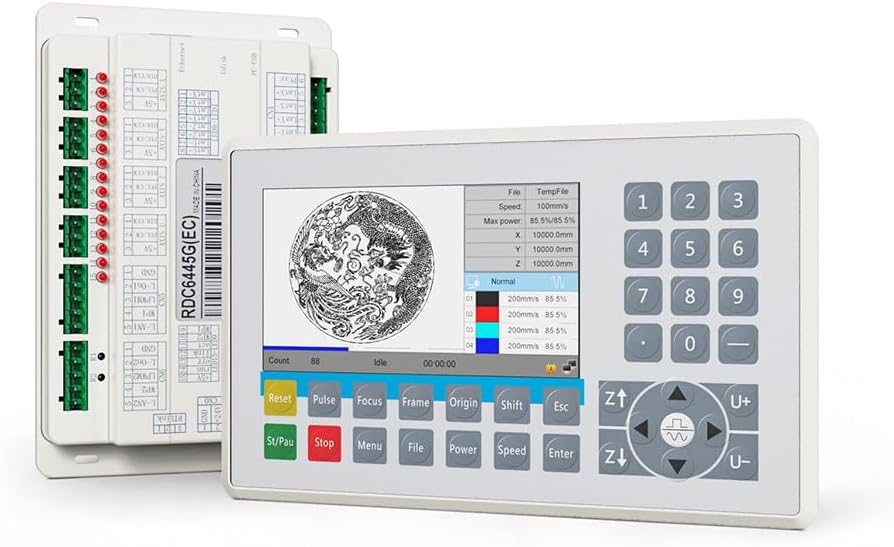
Figure 2.1: The Ruida RDC6445G CO2 Laser DSP Controller System, showing the control panel and mainboard.

Figure 2.2: The RDC6445G controller highlighting its standalone operation, 5-inch TFT screen, and high-performance motion control capabilities.
Supported Languages:
The RDC6445G controller supports a wide range of languages, enhancing user accessibility. These include Simplified Chinese, Traditional Chinese, English, Japanese, German, Russian, Spanish, Portuguese, Korean, French, Italian, and Turkish, among others.

Figure 2.3: The RDC6445G control panel interface showing various language selection options.
Software Compatibility:
The controller is designed to work seamlessly with RDWorks V8 software. It supports importing, displaying, and editing various file formats such as PLT, DXF, AI, and DST. Additionally, it facilitates image file import and processing.

Figure 2.4: Screenshot of the RDWorks V8 software interface, demonstrating its design and processing capabilities.
3. Setup and Installation
Proper installation and wiring are crucial for the safe and correct operation of the RDC6445G controller. Refer to the wiring diagram below for connection details.
Wiring Diagram:
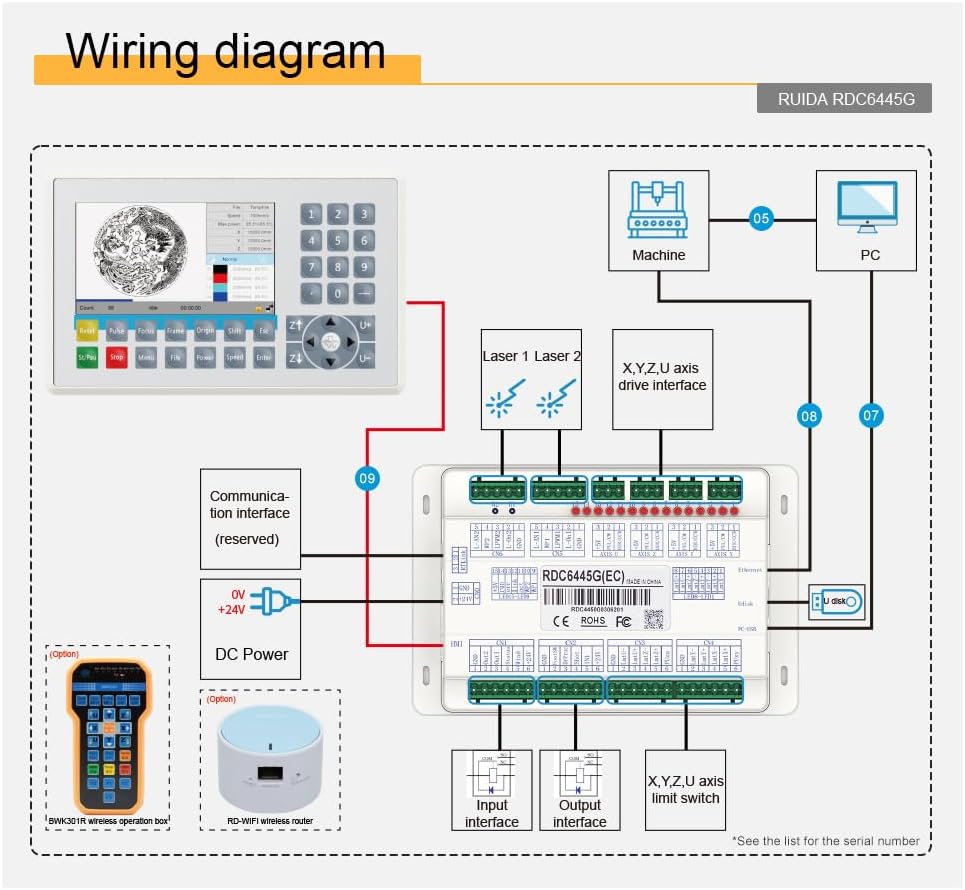
Figure 3.1: Comprehensive wiring diagram for the Ruida RDC6445G controller, illustrating connections to the machine, PC, laser sources, axis drives, limit switches, and power supply.
Connection Points:
- DC Power: Connect 6V and +24V power supplies to the designated terminals.
- Laser 1 & Laser 2: Connect to your CO2 laser power supplies.
- X, Y, Z, U Axis Drive Interface: Connect to the stepper or servo motor drivers for motion control.
- X, Y, Z, U Axis Limit Switch: Connect all necessary limit switches for safe operation and homing.
- Communication Interface: Utilize USB or Ethernet for PC connection. A U disk port is available for offline file transfer.
- Input/Output Interface: Connect external control signals and output devices as required by your machine setup.
- Optional Accessories: The system supports an optional BWK-30 IR wireless operation box and an RD-WiFi wireless router for enhanced control flexibility.
Package Contents:
Ensure all components are present before beginning installation:

Figure 3.2: Contents of the RDC6445G package, including the control panel, mainboard, adapters, screws, and various cables.
- Control Panel
- Mainboard (RDC6445G(EC))
- Adapters & Screws
- USB Cable
- Network Cable
- USB Adapter Cable (Type 1)
- USB Adapter Cable (Type 2)
- Network Cable (Alternative)
- Five-core Cable
4. Operating Instructions
This section outlines the basic operational procedures for the Ruida RDC6445G controller.
Power On/Off:
- To power on, ensure all connections are secure and then apply power to the controller.
- To power off, follow the machine's shutdown procedure, then disconnect power from the controller.
Control Panel Functions:
The control panel provides direct access to various machine functions:
- Reset: Resets the controller or current job.
- Pulse: Initiates a short laser pulse for alignment or testing.
- Focus: Activates the auto-focus function if available.
- Frame: Outlines the job area on the material without firing the laser.
- Origin: Sets the current position as the job origin.
- Shift: Used in combination with other keys for secondary functions.
- Esc: Exits current menu or cancels an operation.
- St/Pau (Start/Pause): Starts or pauses the current laser job.
- Stop: Halts the current laser job.
- Menu: Accesses the main menu for settings and options.
- File: Manages job files stored on the controller or U disk.
- Power: Adjusts laser power settings.
- Speed: Adjusts processing speed.
- Enter: Confirms selections or inputs.
- Z+/Z-, U+/U-: Controls the Z-axis (up/down) and U-axis (auxiliary axis) movement.
- Directional Arrows: Controls X and Y axis movement.
Job Loading and Execution:
- Transfer job files to the controller via USB, Ethernet, or U disk.
- Select the desired file using the 'File' button on the control panel.
- Set parameters such as power, speed, and focus as needed.
- Use the 'Frame' function to verify the job area.
- Press 'St/Pau' to begin the laser operation.
5. Maintenance
Regular maintenance ensures the longevity and optimal performance of your RDC6445G controller.
- Cleaning: Keep the control panel and mainboard free from dust and debris. Use a soft, dry cloth for cleaning. Avoid liquid cleaners that could damage electronic components.
- Environment: Operate the controller in a clean, dry environment with stable temperature and humidity. Avoid extreme temperatures and direct sunlight.
- Connections: Periodically check all wiring connections to ensure they are secure and free from corrosion. Loose connections can lead to erratic behavior or damage.
- Software Updates: Check the official Ruida website for any available firmware or software updates to ensure your controller is running the latest version.
6. Troubleshooting
This section provides general guidance for common issues. For complex problems, contact technical support.
- Controller Not Powering On: Verify power supply connections and ensure the power source is active. Check for any blown fuses in the power circuit.
- No Communication with PC: Ensure USB or Ethernet cables are securely connected. Check network settings if using Ethernet. Reinstall or update controller drivers if necessary.
- Machine Not Responding: Check all motor drive connections and limit switch wiring. Ensure the emergency stop button is not engaged. Verify that the correct job file is loaded and parameters are set.
- Laser Not Firing: Confirm laser power supply is active and connected. Check laser tube status and cooling system. Verify laser power settings in the job file and on the controller.
- Erratic Movement: Inspect motor wiring for loose connections. Check for mechanical obstructions in the machine's movement path.
If issues persist after attempting these steps, refer to the detailed troubleshooting guide provided by the manufacturer or contact technical support.
7. Specifications
Detailed technical specifications for the Ruida RDC6445G controller:
| Feature | Specification |
|---|---|
| Model Number | RDC6445G (Internal Item Number: SEC-054) |
| Product Dimensions | 5 x 3 x 1 inches (Controller Mainboard) |
| Onboard Memory | 128MB |
| Motion Control Axes | 4 Axes |
| Laser Control Channels | 2 Channels |
| Communication Interfaces | USB, Ethernet, U Disk |
| Software Compatibility | RDWorksV8, AutoCAD, AI plug-in |
| Display | 5-inch TFT Color Screen |
| Date First Available | July 15, 2023 |

Figure 7.1: Dimensional drawing of the Ruida RDC6445G mainboard, showing measurements of 180.0mm by 116.6mm.
Application Areas:
The RDC6445G controller is suitable for CO2 laser systems focused on non-metal cutting and engraving. Common applications include:
- Leather processing
- Fabric cutting
- Sign making
- 3C (Computer, Communication, Consumer Electronics) product manufacturing

Figure 7.2: Visual examples of materials and products processed using CO2 laser systems, including fabric, signs, and 3C components.
8. Warranty and Support
Warranty Information:
Specific warranty terms and conditions for the Ruida RDC6445G controller are typically provided by the seller or manufacturer at the time of purchase. Please retain your proof of purchase and consult the documentation included with your product for detailed warranty coverage.
Technical Support:
For technical assistance, troubleshooting, or inquiries regarding your Ruida RDC6445G controller, please contact the vendor from whom you purchased the product. You may also visit the official Ruida website for additional resources, FAQs, and contact information for their support services.


