
1. Introduction
The Vastarry H401 Nixie Tube Clock is a versatile desktop digital clock featuring an IPS color screen that simulates the classic Nixie tube aesthetic. It offers extensive customization options, including various display modes, DIY image uploads, and integration with weather information. This manual provides detailed instructions to help you get the most out of your device.

The Vastarry H401 Nixie Tube Clock, showcasing its digital display.
2. Package Contents
Please ensure all items are present in the package:
- IPS Glow Tube Clock (Main Unit)
- Reinforced Woven Data Cable (USB)
- Soft Deer Skin Velvet Mirror Wiping Cloth
- Product Manual

All components included in the Vastarry H401 package.
3. Setup Guide
3.1 Initial Power-On
The Vastarry H401 comes ready to use without assembly. Simply connect the provided USB data cable to the clock and a compatible 5V USB power source (e.g., computer USB port, USB wall adapter). The clock will power on automatically.
3.2 App Installation and Connection
To unlock the full customization features, download and connect to the official IPS Tube app. Ensure your phone is connected to a 2.4GHz Wi-Fi network for initial setup, as 5GHz networks are not supported for device configuration. Also, enable Bluetooth and Location services on your phone.
Video demonstrating the software and device connection process for the Vastarry H401.

The application interface for connecting and controlling the clock.

Step-by-step app setup instructions for the IPS Tube clock.
4. Operating the Clock
4.1 Display Customization
The clock offers a wide range of display options. You can change the numerical fonts, upload your own images, and select from 16 million colors for personalized customization. Use the app to browse and apply different display themes.
Video showcasing the physical unboxing and various display modes of the clock.
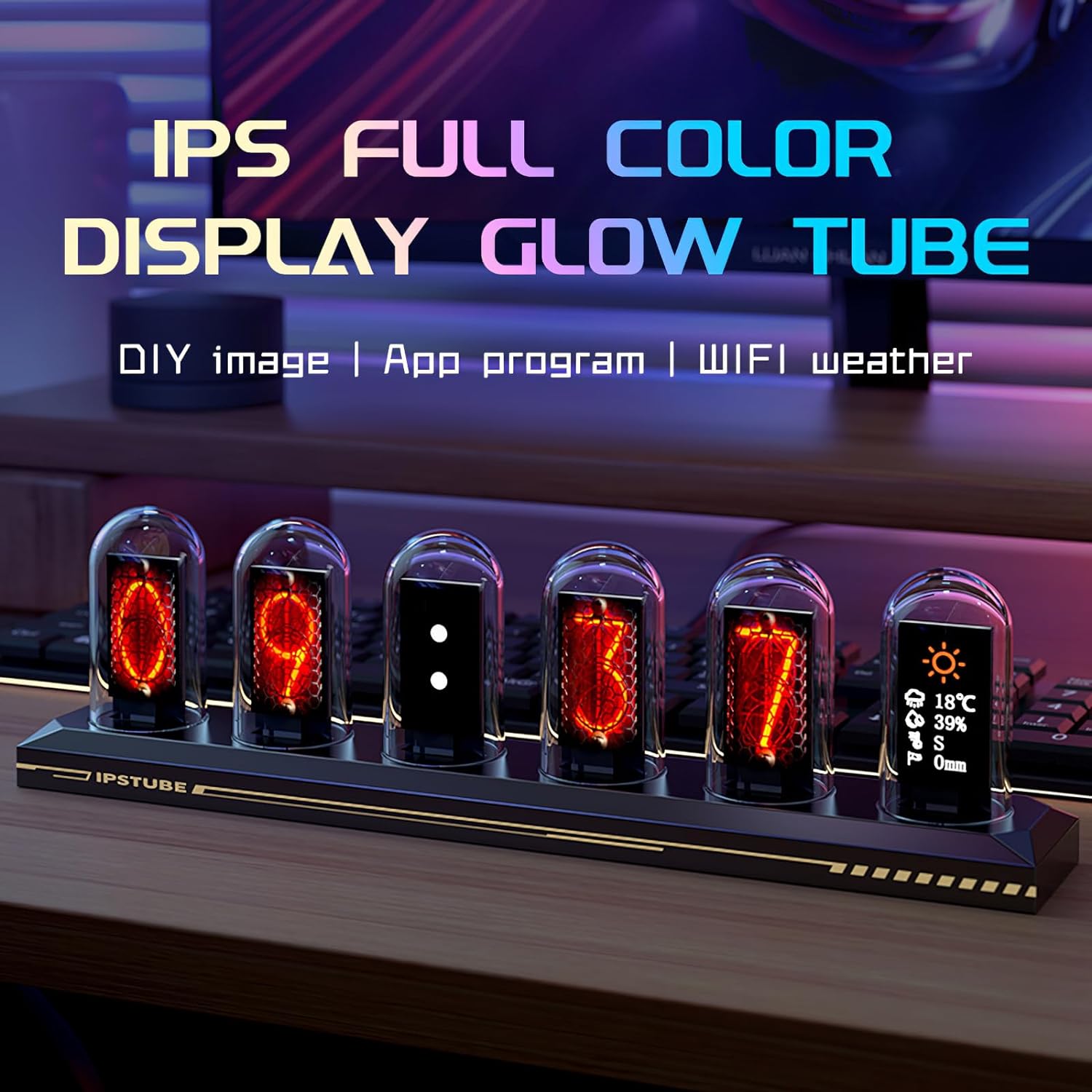
The IPS full-color display allows for vibrant and customizable glow tube effects.

Utilize the multimedia electronic album function to display personal photos.
4.2 Time and Weather Modes
The clock supports both 12-hour and 24-hour time formats. Through the app, you can also set up a weather display mode to quickly access daily weather information directly on the clock's screen.

Configure weather display settings via the app.
5. Key Features
- Diverse Display and Personalized Customization: Equipped with an RGB full-color simulated neon tube, offering a variety of cool display modes and supporting DIY image uploads. Provides a palette of 16 million colors for personalized customization, and supports both 12-hour and 24-hour time formats.
- Powerful Function Combination: In addition to the clock function, the product also features a multimedia electronic album and weather mode. Users can upload photos to create an electronic album and quickly access daily weather information.
- High-Quality Visual Experience: With a 1.14-inch IPS display and a high-definition resolution of 135x240, the product delivers an exceptional visual experience with clear and lifelike displays.
- Convenient User Experience: No assembly required, the product is delivered as a finished product. Made with a one-piece formed aluminum alloy material, it boasts a power-off memory function that retains the settings after shutdown.
- Robust and Durable Design: Constructed with high-quality materials, including a dustproof and aesthetically pleasing glass tube and a durable aluminum alloy base. Showcases exquisite design and meticulous attention to detail.
6. Maintenance
To ensure the longevity and optimal appearance of your Vastarry H401 Nixie Tube Clock, follow these maintenance guidelines:
- Cleaning: Use the provided soft deer skin velvet mirror wiping cloth to gently clean the glass tubes and the aluminum alloy base. Avoid abrasive cleaners or harsh chemicals that could damage the surfaces.
- Placement: Place the clock on a stable, flat surface away from direct sunlight, excessive heat, or moisture.
- Power: Always use a 5V USB power source. Disconnect power during extended periods of non-use or before cleaning.

The clock's robust construction features a glass tube and aluminum alloy base.
7. Troubleshooting
If you encounter issues with your Vastarry H401 Nixie Tube Clock, please refer to the following common solutions:
- Clock Not Powering On: Ensure the USB cable is securely connected to both the clock and a working 5V USB power source. Try a different USB port or power adapter.
- App Connection Issues:
- Verify your phone is connected to a 2.4GHz Wi-Fi network. The device does not support 5GHz Wi-Fi for initial setup.
- Ensure Bluetooth and Location services are enabled on your phone.
- Restart the app and the clock.
- Keep your phone close to the clock during the connection process.
- Incorrect Time Display: Use the app's time synchronization feature to sync with network time or your mobile phone's time.
- Display Not Changing/Customizing: Ensure the clock is properly connected to the app via Wi-Fi (2.4GHz) to download and transmit custom display modes and images.
- Weather Information Not Displaying: Check your app settings to ensure the weather mode is enabled and your location is correctly configured. A stable Wi-Fi connection is required for weather updates.
8. Specifications
| Feature | Detail |
|---|---|
| Brand | Vastarry |
| Model Number | H400 |
| Display Type | Digital (IPS Color Screen) |
| Screen Size | 1.14 inches |
| Resolution | 135x240 |
| Power Source | DC Powered (5V USB) |
| Material | Aluminum Alloy Base, Glass Tubes |
| Product Dimensions | 7.8"W x 3.97"H |
| Item Weight | 15.8 ounces |
| Connectivity | Wi-Fi (2.4GHz), Bluetooth |
| Features | Customizable Display, Electronic Album, Weather Mode, Power-off Memory |
9. Warranty and Support
For product support, please refer to the official user guide available at https://manuals.plus/m/dd6f5e97531e9ef142d9b837dc5e65a7dc63eaa10cd1c7b4020cd7d763b12614. Information regarding specific warranty terms and conditions may be provided with your purchase documentation or through the seller. Additional protection plans are available for purchase separately.
