
1. Introduction
This manual provides instructions for the BTMETER GC-01 Nuclear Radiation Detector. This device is designed for detecting, measuring, and monitoring radiation levels, including alpha, beta, gamma, and X-ray radiation. It is equipped with a Geiger-Müller tube for sensitive and precise measurements.
2. Product Overview
2.1. Key Features
- Equipped with an energy compensation GM tube for sensitive and accurate detection.
- Measures Dose Equivalent Rates from 0.0-10000µSv/h and Cumulative Dose Equivalent up to 500.0mSv.
- Detects Beta, Gamma, and X-rays.
- Adjustable alarm settings for cumulative and current dose equivalent rates with sound, vibration, and flash light alerts.
- Displays real-time, average, and maximum CPM readings.
- Five selectable dosage units: µSv/h, µGy/h, mR/h, CPS, CPM.
- Powered by a 1100mAh USB Type-C rechargeable lithium battery, providing up to 10 hours of operation.
- Adjustable screen brightness for varied lighting conditions.
2.2. Components

Image 2.2.1: Front view of the BTMETER GC-01 Nuclear Radiation Detector, showing the display, control buttons, and included USB-C charging cable. The device is yellow and black with a clear digital screen.
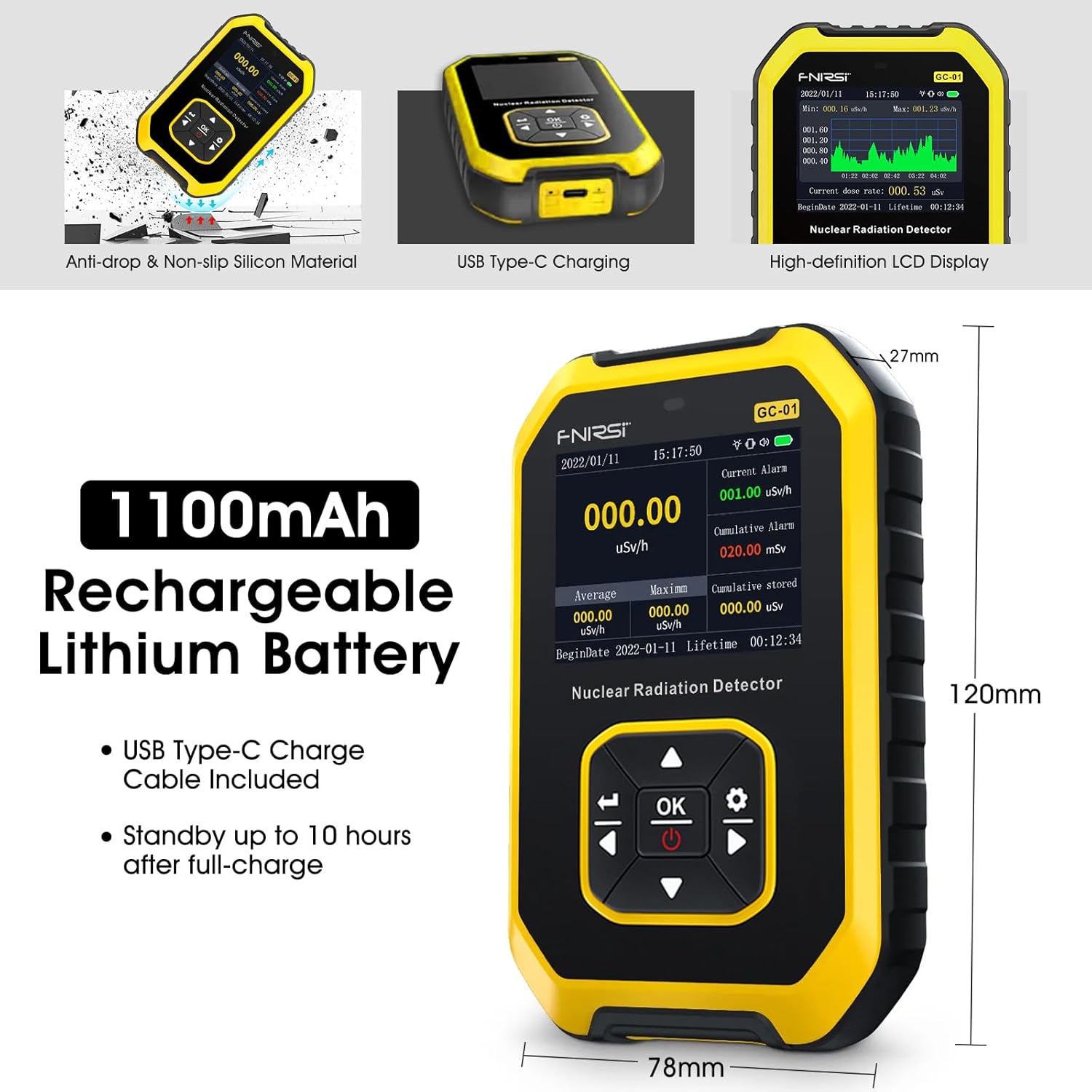
Image 2.2.2: Diagram illustrating the dimensions (120mm x 78mm x 27mm) and highlighting the 1100mAh rechargeable lithium battery and USB Type-C charging port. The image also shows the anti-drop and non-slip silicon material of the device casing.
2.3. What's in the Box
- BTMETER GC-01 Nuclear Radiation Detector
- USB Type-C Charging Cable
- User Manual (this document)
3. Setup
3.1. Initial Charging
Before first use, fully charge the device. Connect the supplied USB Type-C cable to the detector's charging port and to a standard USB power adapter (not included). The battery indicator on the display will show charging status. A full charge provides approximately 10 hours of continuous operation.
3.2. Powering On/Off
- To power on: Press and hold the OK/Power button until the display illuminates.
- To power off: Press and hold the OK/Power button until the display turns off.
4. Operating Instructions
4.1. Understanding the Display

Image 4.1.1: The main display of the GC-01, showing real-time radiation levels, current alarm settings, cumulative alarm, and various measurement units. Icons for X, Y, β-RAY detection are visible.
The display provides real-time radiation readings, along with average and maximum values. It also shows the cumulative dose equivalent and current alarm settings.
4.2. Unit Selection
The device supports five dosage units. To change the unit:
- Navigate to the 'Set Unit' option in the menu using the navigation buttons.
- Press OK to select.
- Choose from µSv/h, µGy/h, mR/h, CPS, or CPM.
- Press OK to confirm your selection.

Image 4.2.1: The device display showing the menu for selecting measurement units (µSv/h, µGy/h, mR/h, CPS, CPM) and demonstrating the dimmable brightness feature.
4.3. Alarm Settings
The GC-01 features adjustable alarm thresholds for both current and cumulative dose equivalent rates. When a threshold is exceeded, the device can alert via sound, vibration, or flashing light.
- Access the 'Set Alarm' option in the menu.
- Adjust the desired threshold for current dose and cumulative dose using the navigation buttons.
- Select the preferred alarm method(s): sound, vibration, or light.
- Press OK to save settings.

Image 4.3.1: The device display showing the menu for adjustable alarm settings, including current alarm and cumulative alarm thresholds. Icons for sound, vibration, and LED flash light alarm modes are displayed.
4.4. Clearing Cumulative Dose
To reset the cumulative dose equivalent value, navigate to the appropriate option in the settings menu and confirm the action.
4.5. Brightness Adjustment
The screen brightness can be adjusted to improve visibility in various lighting conditions. Access the 'Set Disp' (Display Settings) option in the menu to modify brightness levels.
5. Maintenance
5.1. Cleaning
Wipe the device with a soft, dry cloth. Do not use abrasive cleaners or solvents, as these can damage the casing or display.
5.2. Battery Care
To prolong battery life, avoid fully discharging the device frequently. If storing for an extended period, charge the battery to approximately 50% and recharge every few months.
5.3. Storage
Store the detector in a cool, dry place away from direct sunlight and extreme temperatures. Keep it away from strong magnetic fields and corrosive substances.
6. Troubleshooting
6.1. Device Does Not Turn On
- Ensure the battery is charged. Connect the device to a power source using the USB-C cable and allow it to charge for at least 30 minutes before attempting to power on again.
- Verify that the power button is pressed and held correctly.
6.2. Readings Appear Slow or Unresponsive
- The device updates readings every second. In environments with very low radiation levels, changes may not be immediately apparent.
- Ensure the device is not obstructed or placed in an area that could interfere with its sensor.
6.3. Inaccurate Readings
- Ensure the device is used within its specified operating temperature and humidity ranges.
- Avoid exposing the device to strong electromagnetic interference.
- If persistent issues occur, contact customer support.
7. Specifications

Image 7.1.1: Detailed specifications of the GC-01, including detector type, detection rays, dose equivalent rate, cumulative dose equivalent, energy range, sensitivity, and dosage units.
| Detector | Energy Compensation GM Tube |
| Types of Detection Rays | γ rays, x rays, β rays |
| Dose Equivalent Rate | 0.0-10000µSv/h (10mSv/h) |
| Cumulative Dose Equivalent | 0.00µSv-500.0mSv |
| Energy Range | 48keV-1.5Mev ≤±30% (for 137Csγ) |
| Sensitivity | 80CPM/µSv (For Co-60) |
| Dosage Units | µSv/h, µGy/h, mR/h, CPS, CPM |
| Alarm Method | Light, Vibration, Sound |
| Battery | 1100mAh USB Type-C Rechargeable Lithium Battery |
| Battery Life | Up to 10 hours (after full charge) |
| Dimensions | 120 x 78 x 27mm |
| Weight | 250g |
8. Warranty and Support
8.1. Warranty Information
The BTMETER GC-01 Nuclear Radiation Detector comes with a 365-day quality warranty from the date of purchase. This warranty covers manufacturing defects and ensures the product functions as described under normal use.
8.2. Technical Support
Lifetime technical support is provided for this product. For assistance with setup, operation, troubleshooting, or any other inquiries, please contact BTMETER customer service. Refer to the product packaging or the official BTMETER website for contact details.