
FUNPICK FTSK10-3
FUNPICK FTSK10-3 Karaoke Machine PA System User Manual
Model: FTSK10-3
1. Introduction
Thank you for choosing the FUNPICK FTSK10-3 Karaoke Machine PA System. This portable and versatile audio system is designed to deliver high-quality sound for various occasions, from home entertainment to outdoor gatherings. Featuring a powerful 3-way speaker system, wireless microphones, and multiple connectivity options, the FTSK10-3 provides an immersive audio experience. Please read this manual carefully to ensure proper use and maintenance of your device.
2. Product Overview
2.1. Package Contents
Upon unpacking, please ensure all the following components are present:
- FUNPICK FTSK10-3 PA Speaker
- 2 x Wireless Microphones
- Power Supply / AC Adapter
- USB Cable
- 3.5mm Jack Cable
- User Manual

Figure 2.1: FUNPICK FTSK10-3 PA System and all included accessories.
2.2. Key Features
- Powerful 3-Way PA System: Equipped with a 10-inch subwoofer, 4-inch midrange, and 3-inch tweeter for full-range stereo sound, covering up to 75 m² (approx. 807 sq ft).
- TWS & Bluetooth Connectivity: Seamless audio streaming via Bluetooth and the ability to connect two FUNPICK PA speakers for an impressive stereo experience (TWS function).
- Multifunction Design: Features an LED display, electric guitar input, adjustable sound effects, and independent control for microphone mid-bass and high-bass.
- USB Pro Playback: Supports USB drives up to 512GB and plays various audio formats including WAVE, MP3, WMA, APE, and FLAC.
- Wireless Crystal Microphones: Two included microphones with advanced circular dynamic balancing technology and an integrated U digital chip for purer, smoother sound with noise and interference blocking.
- Portable Design: Convenient carrying handle and universal attachable wheels for easy transport.
3. Setup
3.1. Unpacking and Placement
Carefully remove the PA system and all accessories from the packaging. Place the speaker on a stable, flat surface. For optimal sound, position the speaker in a central location within the desired listening area.
3.2. Charging the Battery
The FUNPICK FTSK10-3 features a built-in rechargeable Lithium battery. Before first use, fully charge the battery using the provided AC adapter. Connect the adapter to the speaker's charging port and plug it into a standard power outlet. The LED indicator will show charging status.
3.3. Microphone Setup
The two wireless microphones are pre-paired with the speaker. Ensure the microphones have fresh batteries (if not pre-installed) and power them on. They should automatically connect to the PA system.
3.4. Initial Connections
The FTSK10-3 offers multiple connection options:
- Bluetooth: Power on the speaker and activate Bluetooth on your device (smartphone, tablet, etc.). Search for "FUNPICK FTSK10-3" in your device's Bluetooth settings and pair.
- USB: Insert a USB drive into the designated USB Pro port on the control panel. The system will automatically detect and begin playing compatible audio files.
- 3.5mm Audio Cable: Connect external audio sources (e.g., laptop, MP3 player) using the provided 3.5mm jack cable to the Audio IN port.
- RCA Audio Cable: Connect devices like TVs or projectors using RCA cables to the Audio IN ports.
- Guitar Input: Plug your electric guitar into the dedicated guitar input jack.

Figure 3.1: Various connectivity options for the FUNPICK FTSK10-3.
4. Operating Instructions
4.1. Power On/Off
Locate the power switch on the control panel. Flip it to the 'ON' position to power on the system. The LED display will illuminate. To power off, flip the switch to the 'OFF' position.
4.2. Mode Selection
Press the 'MODE' button on the control panel to cycle through available input modes: Bluetooth, USB, FM Radio, and AUX (3.5mm/RCA input).
4.3. Volume and Sound Adjustment
Use the main 'VOLUME' knob to adjust the overall sound output. Individual knobs are available for fine-tuning:
- TREBLE: Adjusts high-frequency sounds.
- BASS: Adjusts low-frequency sounds.
- ECHO: Adds an echo effect to microphone vocals.
- DELAY: Adjusts the delay time for the echo effect.
- MIC.VOL: Adjusts the volume of the wireless microphones.
- GT.VOL: Adjusts the volume of the guitar input.
4.4. USB Playback
Once a USB drive is inserted, the system will automatically switch to USB mode. Use the 'PREV', 'PLAY/PAUSE', and 'NEXT' buttons to control playback. The system supports WAVE, MP3, WMA, APE, and FLAC formats.
4.5. FM Radio Operation
In FM mode, press and hold the 'PLAY/PAUSE' button to auto-scan and save available radio stations. Use the 'PREV' and 'NEXT' buttons to navigate between saved stations.
4.6. TWS (True Wireless Stereo) Function
To connect two FUNPICK FTSK10-3 speakers for a stereo experience:
- Ensure both speakers are powered on and in Bluetooth mode, but not connected to any device.
- On one speaker (this will be the primary speaker), press and hold the 'TWS' button until you hear a confirmation tone.
- The two speakers will automatically pair with each other. Once paired, the primary speaker's Bluetooth indicator will flash, and the secondary speaker's indicator will be solid.
- Now, connect your Bluetooth device to the primary speaker. Audio will play in stereo through both speakers.
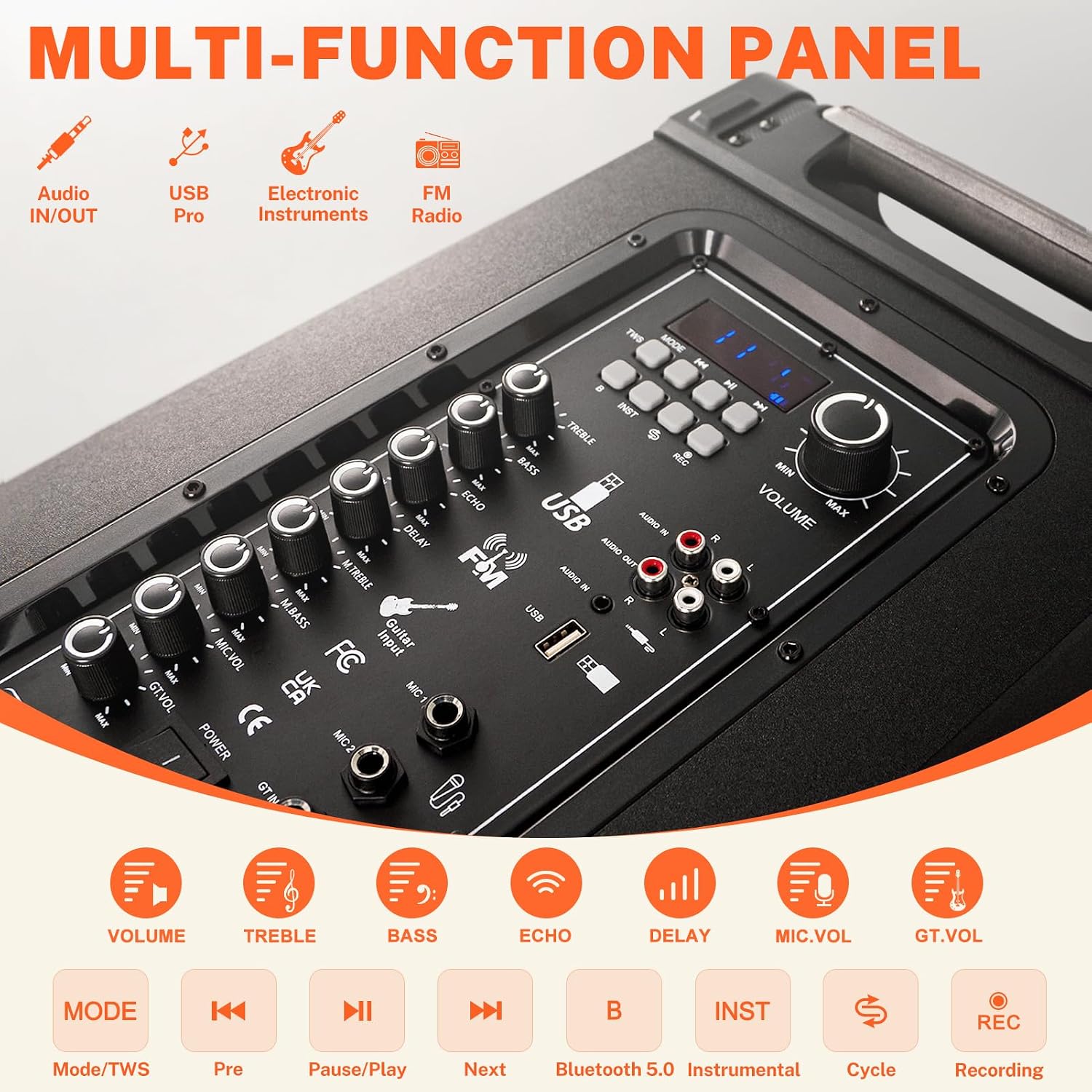
Figure 4.1: Detailed view of the multi-function control panel.

Figure 4.2: TWS (True Wireless Stereo) connection setup and product dimensions.
5. Maintenance
5.1. Cleaning
Wipe the exterior of the speaker with a soft, dry cloth. Do not use abrasive cleaners, waxes, or solvents as they may damage the finish. Keep the speaker grilles free of dust and debris.
5.2. Storage
When not in use for extended periods, store the PA system in a cool, dry place away from direct sunlight and extreme temperatures. It is recommended to store it in its original packaging to protect it from dust and physical damage.
5.3. Battery Care
To prolong battery life, avoid fully discharging the battery frequently. If storing for a long time, charge the battery to about 50% every 3-6 months.
6. Troubleshooting
If you encounter any issues with your FUNPICK FTSK10-3, please refer to the following common problems and solutions:
| Problem | Possible Cause | Solution |
|---|---|---|
| No power | Battery is depleted; Power switch is off. | Charge the battery; Ensure the power switch is in the 'ON' position. |
| No sound output | Volume is too low; Incorrect input mode selected; Audio cable not connected properly. | Increase the main volume; Select the correct input mode (Bluetooth, USB, AUX); Check audio cable connections. |
| Bluetooth not connecting | Speaker is not in Bluetooth pairing mode; Device is too far; Interference. | Ensure speaker is in Bluetooth mode and discoverable; Move device closer to speaker; Avoid strong interference sources. |
| Microphone not working | Microphone battery is low; Microphone is off; MIC.VOL is too low. | Replace microphone batteries; Power on the microphone; Increase MIC.VOL. |
| TWS pairing failed | One or both speakers are already connected to a Bluetooth device; TWS button not held long enough. | Disconnect any Bluetooth devices from both speakers; Ensure both speakers are in Bluetooth mode; Press and hold the TWS button on one speaker until confirmation tone. |
If the problem persists after trying these solutions, please contact FUNPICK customer support.
7. Specifications
Detailed technical specifications for the FUNPICK FTSK10-3 PA System:
| Feature | Specification |
|---|---|
| Brand | FUNPICK |
| Model Name | FTSK10-3 |
| Color | Black |
| Speaker Configuration | 3-Way (10" Subwoofer, 4" Midrange, 3" Tweeter) |
| Connectivity Technology | Bluetooth, USB, 3.5mm AUX, RCA, FM Radio |
| Total USB Ports | 1 (USB Pro) |
| Power Source | Battery Powered (Rechargeable Lithium Battery) |
| Recommended Uses | Home, Outdoor Events, Gatherings |
| Manufacturer | FUNPICK |
| Date First Available | July 14, 2023 |

Figure 7.1: Internal components of the 3-way speaker system.

Figure 7.2: The durable wooden box construction for enhanced sound quality.
8. Warranty and Support
The FUNPICK FTSK10-3 PA System comes with a one-year warranty from the date of purchase, ensuring a risk-free experience. This warranty covers manufacturing defects and malfunctions under normal use.
For any questions, technical support, or warranty claims, please do not hesitate to contact our customer service team. Please have your purchase receipt and product model number (FTSK10-3) ready when contacting support.
Contact information can typically be found on the retailer's website or the product packaging.
Ask a question about this manual
Ask about setup, troubleshooting, compatibility, parts, safety, or missing instructions. Manuals+ will review the question and use this page’s manual context to help answer it.