
MOLUOLA LIGHTING S40-Black
MOLUOLA LED Wall Lamp User Manual
Model: S40-Black
1. Product Overview
The MOLUOLA LED Wall Lamp is a versatile and modern lighting solution designed for various indoor settings, particularly suitable for bedside or headboard use. It features a rotatable reading spotlight, a soft backlight, and integrated USB-A and USB-C charging ports for convenience.

Image 1.1: MOLUOLA LED Wall Lamp with integrated USB-A and USB-C charging ports, shown charging a smartphone and smartwatch.
2. Safety Information
- Ensure power is disconnected before installation or maintenance.
- This product is designed for indoor use only. Do not expose to moisture or extreme temperatures.
- Do not attempt to modify the lamp or its components. Unauthorized modifications may void the warranty and pose safety risks.
- Keep out of reach of children.
- If the external flexible cable or cord of this luminaire is damaged, it shall be exclusively replaced by the manufacturer or his service agent or a similar qualified person in order to avoid a hazard.
3. What's in the Box
Carefully unpack the contents and ensure all items are present and undamaged:
- MOLUOLA LED Wall Lamp Fixture (1 unit)
- 180CM Plug-in Cord (pre-attached or included)
- Mounting Accessories (screws, wall anchors)
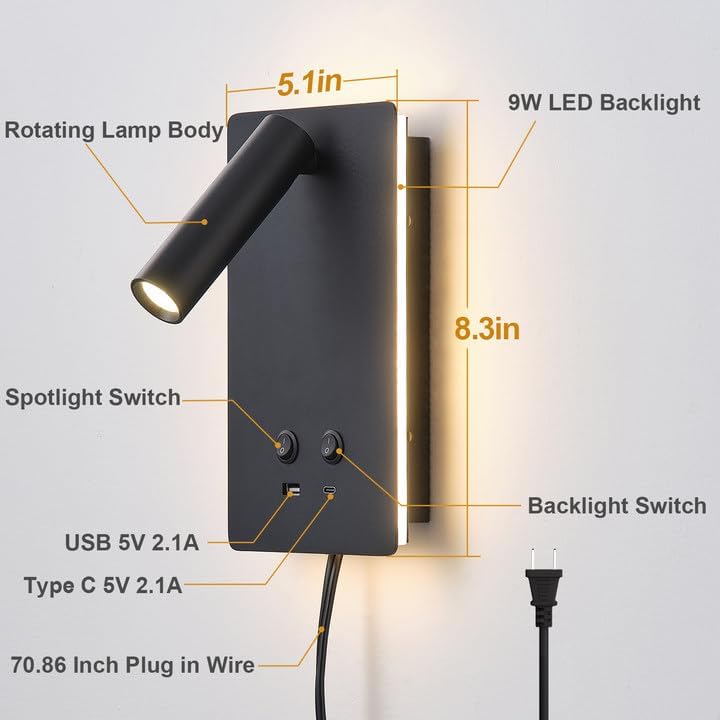
Image 3.1: Diagram showing the lamp's dimensions and key components, including the rotating lamp body, 9W LED backlight, spotlight switch, backlight switch, USB 5V 2.1A port, Type C 5V 2.1A port, and 70.86 inch plug-in wire.
4. Setup and Installation
The MOLUOLA LED Wall Lamp offers two installation options: Plug-in or Hardwired.
4.1 Plug-in Installation (Recommended for ease of use)
- Choose Location: Select a suitable wall location near an electrical outlet.
- Mark Drilling Points: Use the mounting plate as a template to mark the drilling points on the wall.
- Drill Holes: Drill holes at the marked points and insert wall anchors if necessary.
- Secure Mounting Plate: Attach the mounting plate to the wall using the provided screws.
- Mount Lamp: Align the lamp fixture with the mounting plate and secure it.
- Plug In: Plug the 180cm cord into a standard electrical outlet.

Image 4.1: Visual representation of the two installation methods: Plug-in (left) and Hardwired (right).
4.2 Hardwired Installation (Requires professional assistance if unfamiliar)
For hardwired installation, the plug-in cord can be removed. This method requires connecting the lamp directly to your home's electrical wiring, typically to a standard J-BOX. It is highly recommended to consult a qualified electrician for this type of installation to ensure safety and compliance with local electrical codes.
- Disconnect Power: Turn off power at the circuit breaker before beginning.
- Prepare Wiring: Carefully cut and strip the plug-in cord if it's not already detached. Connect the lamp's wires to the corresponding household wires (live, neutral, ground) according to local electrical codes.
- Mounting: Follow steps 2-4 from the Plug-in Installation section to secure the mounting plate and lamp fixture to the wall, ensuring all wires are properly tucked into the J-BOX.
- Restore Power: Once installation is complete and secure, restore power at the circuit breaker.
5. Operating Instructions
The MOLUOLA LED Wall Lamp features independent controls for its two lighting functions and integrated charging ports.
5.1 Lighting Controls
The lamp has two distinct light sources, each controlled by its own switch:
- Reading Spotlight (3W): This is the adjustable, focused light. Use the dedicated switch to turn it on/off. The spotlight can be rotated 350 degrees horizontally and adjusted 90 degrees vertically to direct light precisely where needed, ideal for reading without disturbing others.
- Night Light/Backlight (9W): This provides a softer, ambient glow from behind the main panel. Use its dedicated switch to turn it on/off.
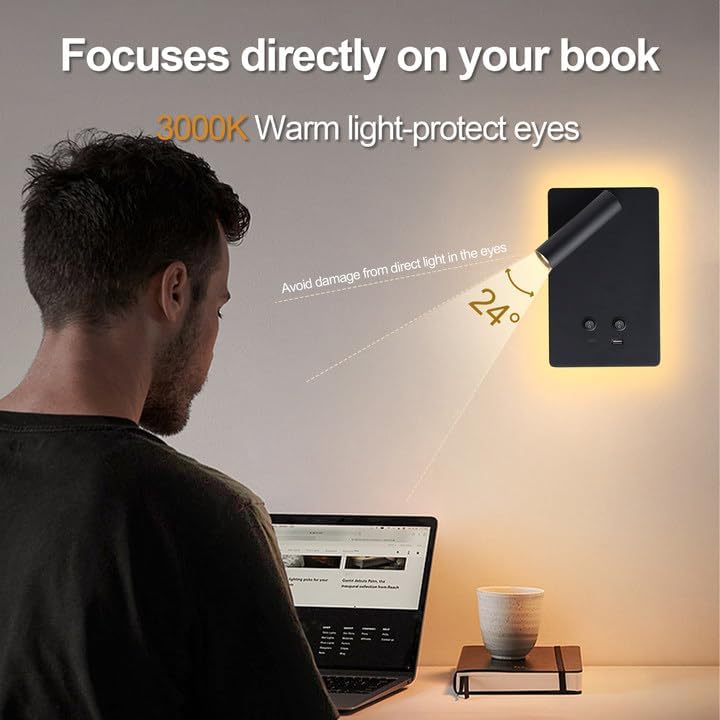
Image 5.1: Demonstrates the adjustable nature of the reading light, showing 90-degree vertical tilt and 350-degree horizontal rotation.

Image 5.2: The reading light provides a focused 24-degree beam of 3000K warm light, designed to protect eyes and illuminate only the reading area.
5.2 USB Charging Ports
The lamp is equipped with two charging ports (5V/2.1A): one USB-A and one USB-C. These ports function independently of the light switches, allowing you to charge devices even when the lights are off.
- Connect your compatible device's charging cable to the appropriate USB-A or USB-C port on the lamp.
- Ensure your device begins charging.
Video 5.1: Demonstration of the MOLUOLA LED Wall Lamp's features, including independent light controls, adjustable reading light, and functional USB charging ports.
6. Maintenance
- Cleaning: Disconnect power before cleaning. Wipe the lamp with a soft, dry cloth. Do not use abrasive cleaners or solvents.
- Bulb Replacement: The LED light sources are integrated and not user-replaceable. The lamp is designed for long-term use with an average life of 100,000,000 hours.
- Inspection: Periodically check the power cord and connections for any signs of damage. If damage is found, discontinue use and contact customer support.
7. Troubleshooting
| Problem | Possible Cause | Solution |
|---|---|---|
| Lamp does not turn on. | No power supply; switch is off; loose connection. | Ensure the lamp is properly plugged into a live outlet or hardwired correctly. Check that both the spotlight and backlight switches are in the ON position. Verify all connections are secure. |
| USB ports not charging. | Device not compatible; cable faulty; lamp not receiving power. | Ensure your device is compatible with 5V/2.1A charging. Try a different USB cable. Confirm the lamp is receiving power (even if lights are off, power is needed for USB). |
| Light flickers or dims unexpectedly. | Unstable power supply; internal component issue. | Try plugging the lamp into a different outlet. If hardwired, consult an electrician to check the circuit. If the problem persists, contact customer support. |
8. Specifications
| Feature | Detail |
|---|---|
| Brand | MOLUOLA LIGHTING |
| Model Name | Bedside Wall Mounted Reading Light (S40-Black) |
| Color | Black |
| Material | Aluminum, Metal |
| Product Dimensions | L8.3*W5.1*D1.2 inch (Fixture), 25.5"L x 17.5"W x 13.5"H (Packaged) |
| Item Weight | 2.88 pounds |
| Power Source | AC (Plug-in or Hardwired) |
| Voltage | 120 Volts |
| Wattage | Total 12 Watts (9W Backlight + 3W Spotlight) |
| Brightness | 1000 Lumen |
| Color Temperature | 3000 Kelvin (Warm White) |
| Color Rendering Index (CRI) | 90.00 |
| Average Life | 100,000,000 Hours |
| USB Output | 5V/2.1A (USB-A and USB-C) |
| Special Features | USB and TYPE-C Charging Ports, Hardwired / Plug in (No assembly required), 350 Degree Rotating Head, Spotlight and Night Light Lighting Methods, On off switches independently controlled |
| Indoor/Outdoor Usage | Indoor only |
| Certification | ETL |
9. Warranty and Support
MOLUOLA LIGHTING provides a limited warranty for this product. For specific warranty details, please refer to the documentation included with your purchase or contact MOLUOLA LIGHTING customer service.
If you encounter any issues or have questions regarding your MOLUOLA LED Wall Lamp, please contact our customer support team:
- Service Call: +86 177 2838 1023
- Email: moluolalighting@outlook.com
Our team is available 24 hours online for your service.
Ask a question about this manual
Ask about setup, troubleshooting, compatibility, parts, safety, or missing instructions. Manuals+ will review the question and use this page’s manual context to help answer it.